📄 仓库 README
在 GitHub 查看 ↗

Your coding agents stop re-debugging what you already fixed.
Claude Code, Codex, Cursor and 40 more agents already save every session to disk. deja indexes all of it, months back, and hands the part that matters to whichever agent is working now.
English | 简体中文 | 繁體中文 | 日本語 | 한국어 | Español | Português | Français | Deutsch | Русский | Türkçe | हिन्दी

Nobody searched anything — the agent called deja itself. Two real runs against a synthetic corpus: nobody's history is published.
curl -fsSL https://raw.githubusercontent.com/vshulcz/deja-vu/main/install.sh | sh
deja install --auto
macOS and Linux; ten seconds to install, about ten to index · Windows, Homebrew, npm and the rest
| Recall 97.2% R@5 on LongMemEval-S MemPalace publishes 96.6%, agentmemory 95.2% |
Tokens half the tokens of agentmemory on a task this machine had already solved |
Index time 13.6 s to index 19,195 sessions the next of seven tools takes 72 s |
I maintain deja-vu, so every driver, the corpus and the scoring rule are in this repository · the head-to-head, and how to re-run a row you doubt · every run




Docs · Benchmarks · How it compares · Building it into your tool
Found it useful? Star deja-vu on GitHub.
deja-vu (vshulcz/deja-vu) is a local memory tool for coding agents: it indexes the session transcripts Claude Code, Codex, Cursor and 40 other agents already wrote to disk and hands relevant history back over MCP and hooks. No LLM, one Go binary.
Search it yourself
deja with no arguments in a terminal opens a search over every agent's history. It starts
on the sessions behind your uncommitted change, then the recent ones in this project, and
the list narrows as you type.
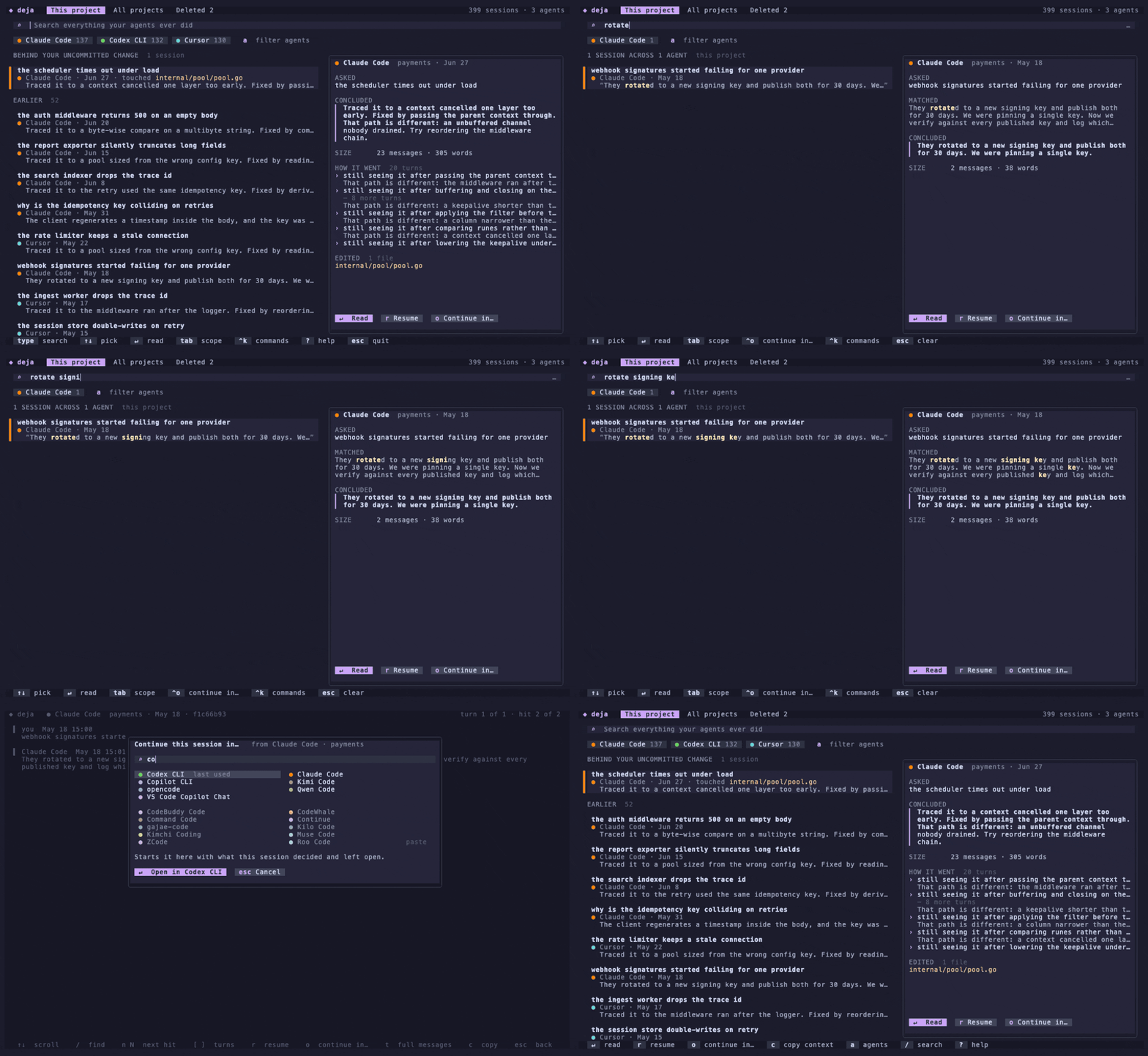
↑↓picks a session,↵opens it at the match,nandNstep through the matches,escgoes back. Inside a session,/finds a word and][jump between the turns you asked.- The box takes filters: an agent with a colon (
codex:),today,yesterday,week,month, andin:<project>. ^slists the results newest first under day headings, and back to best match first.deja search --sort datedoes the same from a script.rresumes the session in the agent that wrote it.ocontinues it in any other agent, which starts with what the session asked, decided and left open.tabswitches between this project, all projects and Deleted, the sessions their agent deleted that deja still holds;Rputs one back.Derases a session from its agent and from deja, after asking (deja delete <id>from a script).?lists every key,^khas the rest (copy the session id or project path, forget a session),qquits from the list;escsteps back and quits from an empty search box.
With DEJA_TUI=0 it prints the text summary instead, which is also deja brief. Piped, it
prints what is indexed and which command to run next.
Highlights
- Starts full. Months of history from before you installed it are searchable on day one:
deja "connection pool exhausted"over gigabytes. - One memory, every agent. A fix found in Codex comes back in Claude Code, Cursor or opencode; all forty-three agents read the same index.
- Nobody has to ask. Recall arrives at session start, before a file is edited or a command runs, and after a command fails.
- Survives compaction. Over 43 measured compactions the summary kept 77% of the decisions and 0.2% of the commands; deja hands back the rest (how).
- Indexes the work, not just the talk. The files each turn opened, the commands with their exit status, the exact spans an edit replaced.
- Knows what held.
deja promote <id> --state rejectedmarks a reverted decision, and every later hit says it was tried and why it was dropped;--state acceptedtakes the mark back. - Says when the ground moved. A hit reports 4 files this session touched have changed since, and stays quiet when it cannot tell.
- Local and private. No model and no server; embeddings only if you turn on semantic recall. Keys and tokens are stripped as the index is built (privacy).
- Moves with you.
deja sync ssh laptopbetween machines, no cloud in between;deja handoff --to codexto continue in another agent. - One Go binary. macOS, Linux and Windows, through Homebrew, Scoop, winget, npm or
go install.
Your own work, wrapped
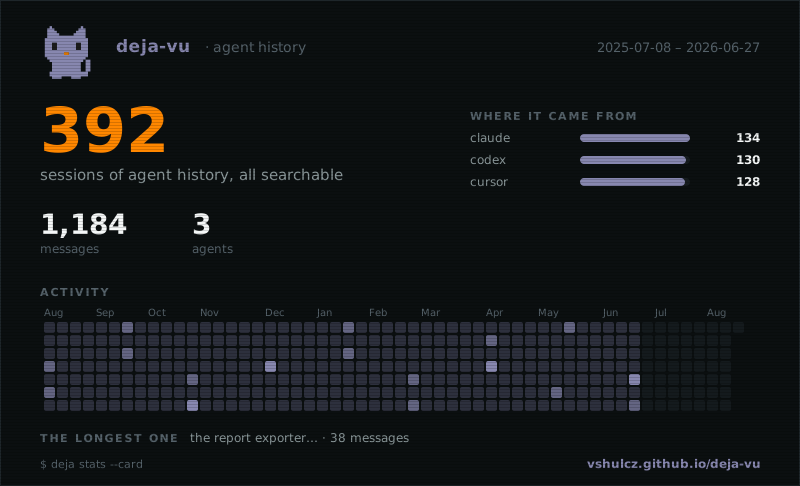
deja stats --card draws it in the terminal; give it a filename and it writes an
SVG for a profile README. To post it anywhere else, turn it into a
PNG — that page converts it in your own
browser.
The full feature reference lives in the docs.
Install
The two commands at the top are the whole install on macOS and Linux:
curl -fsSL https://raw.githubusercontent.com/vshulcz/deja-vu/main/install.sh | sh
deja install --auto
The script puts the binary in ~/.local/bin. If that directory is not on your PATH yet, the second command is not found in the same shell: run the next: line the script prints, which has the full path, or open a new shell once the PATH line is added.
Ten seconds to install, about ten to index, and it is useful. The second command wires MCP recall into every agent it finds, turns on session-start recall where the agent supports it, and builds the first index so the next session does not pay for it.
Start a new agent session and ask it something you worked on months ago:
have we dealt with jwt refresh rotation before? check your memory
It does not have to be asked, either — with auto-recall the agent already knows what you
solved in that project when the session opens. To look for yourself, run deja.
Other ways to install, and what to do if you want less than all of it
`brew install deja-vu`, `go install github.com/vshulcz/deja-vu/cmd/deja@latest`, or `npx @vshulcz/deja-vu "query"` to try it without installing anything. Desktop apps that take MCP servers as bundles can open the `.mcpb` from the [latest release](https://github.com/vshulcz/deja-vu/releases/latest); it carries the binary. Claude Code, Qwen and OpenClaw can take the same plugin bundle from their own marketplaces instead (Codex has a bundle of its own, in the table under [Harnesses with a package of their own](#harnesses-with-a-package-of-their-own), and Cursor has one in [`cursor-plugin/`](https://github.com/vshulcz/deja-vu/blob/HEAD/cursor-plugin/)). Copilot CLI installs it too but takes only the skill, so use `deja install copilot-auto` there:claude plugin marketplace add vshulcz/deja-vu && claude plugin install deja-vu@deja-vu
scoop install deja-vu
winget install vshulcz.deja-vu
📈 近 7 天 Star 趋势
🏆 排名变化趋势
📋 历史上榜记录
| 日期 | 榜单 | 排名 | 周期新增 | 总 STAR |
|---|