📄 仓库 README
在 GitHub 查看 ↗WARPSCOUT
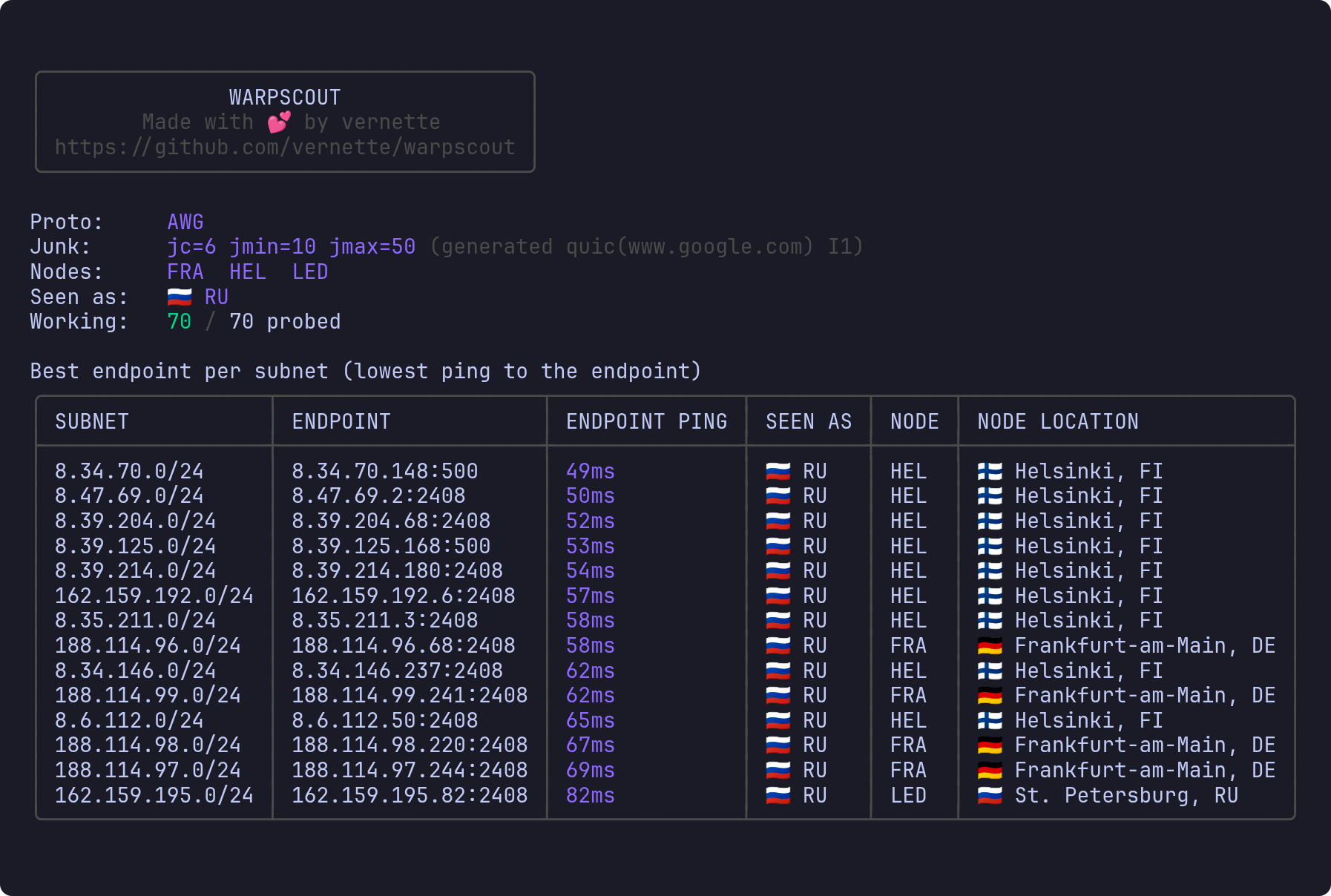
Find Cloudflare WARP endpoints that work from your network, and see where they exit.


Documentation: 🇬🇧 English · 🇷🇺 Русский
Contents
- What it is
- Installation
- Quick start
- Reading the table
- If nothing works
- Commands
- Useful flags
- Going further
- Credits
- Support the author
What it is
Cloudflare WARP has thousands of endpoint addresses, and the one you connect to decides which Cloudflare edge node (colo) your tunnel lands on. That matters: since April 2026 traffic through the Moscow node DME is filtered by DPI, and some sites simply do not open through it even though WARP itself connects fine. The same config pointed at an endpoint on a foreign node works without that problem.
The official WARP client gives you no way to pick the node. WARPSCOUT walks the endpoint addresses, shows the node and exit region for each one, and writes a ready-to-import config for the best of them.
- A single file, nothing to install
- No admin rights and no TUN device
- Windows, Linux, macOS, Android and Docker
- A live table while scanning, plus a report file on disk
Installation
Windows
- Open the releases page and download
warpscout_..._windows_amd64.zip. - Unpack it anywhere, for example into
C:\warpscout. - Open that folder, hold Shift and right-click empty space → Open PowerShell window here (on Windows 11 - Open in Terminal).
- Check that it runs:
.\warpscout.exe version
Every command below goes into that same window.
[!NOTE] If Windows complains about the downloaded file, right-click
warpscout.exe→ Properties → tick Unblock at the bottom
Android
The easiest way is the ready-made app openwarpkit/warpscout-android by OpenWarpKit. Grab the APK for your architecture from its releases page.
In Termux the one-line install below works as it does on Linux.
Linux, macOS, OpenWrt, Termux
curl -fsSL https://raw.githubusercontent.com/vernette/warpscout/master/install.sh | sh
If there is no curl (OpenWrt routers, for one):
wget -qO- https://raw.githubusercontent.com/vernette/warpscout/master/install.sh | sh
The script picks the right archive for your system and puts warpscout into ~/.local/bin, on OpenWrt into /usr/bin, in Termux into $PREFIX/bin. Run it again to update.
[!NOTE] macOS only. The first run is blocked because the file came from the internet. Clear the flag once:
xattr -d com.apple.quarantine warpscout
Other ways
Arch Linux (AUR, packaged by Nebulosa, not maintained by this repository):
paru -S warpscout      # build from source
paru -S warpscout-bin  # prebuilt release binary
Docker - see running in Docker.
From source, Go 1.25 or newer:
go install github.com/vernette/warpscout@latest
Installer options go after sh -s --, and INSTALL_DIR picks another directory:
INSTALL_DIR=/usr/local/bin sh -c "$(curl -fsSL https://raw.githubusercontent.com/vernette/warpscout/master/install.sh)"

curl -fsSL https://raw.githubusercontent.com/vernette/warpscout/master/install.sh | sh -s -- --version v0.8.1
curl -fsSL https://raw.githubusercontent.com/vernette/warpscout/master/install.sh | sh -s -- --uninstall
If you want a specific archive by hand, here is what to take:
| Your OS | File |
|---|---|
| Windows | windows_amd64.zip |
| Mac on Apple silicon | darwin_arm64.tar.gz |
| Mac on Intel | darwin_amd64.tar.gz |
| Linux, regular PC or server | linux_amd64.tar.gz |
| Linux on ARM (Raspberry Pi, some VPS) | linux_arm64.tar.gz |
| OpenWrt router, x86_64 | linux_amd64.tar.gz |
| OpenWrt router, ARM64 | linux_arm64.tar.gz |
| Android, in Termux | android_arm64.tar.gz |
Quick start
The examples are written for Windows. On Linux, macOS and Termux type warpscout instead of .\warpscout.exe.
Step 1. Create a WARP account
.\warpscout.exe register
This writes warpscout-account.json next to the binary. You do it once - without that file scanning will not start. Details in the WARP account.
Step 2. Scan the endpoints
.\warpscout.exe scan -p awg -P
-p awgis AmneziaWG, obfuscated WireGuard. On filtering networks plain WireGuard (-p wg) usually gets through nowhere at all, so start withawgright away.-Padditionally measures latency and packet loss inside the tunnel. The scan takes longer, but endpoints that connect and then pass nothing are weeded out.
A scan takes a couple of minutes. The result is a table sorted so that the best endpoint is on top.
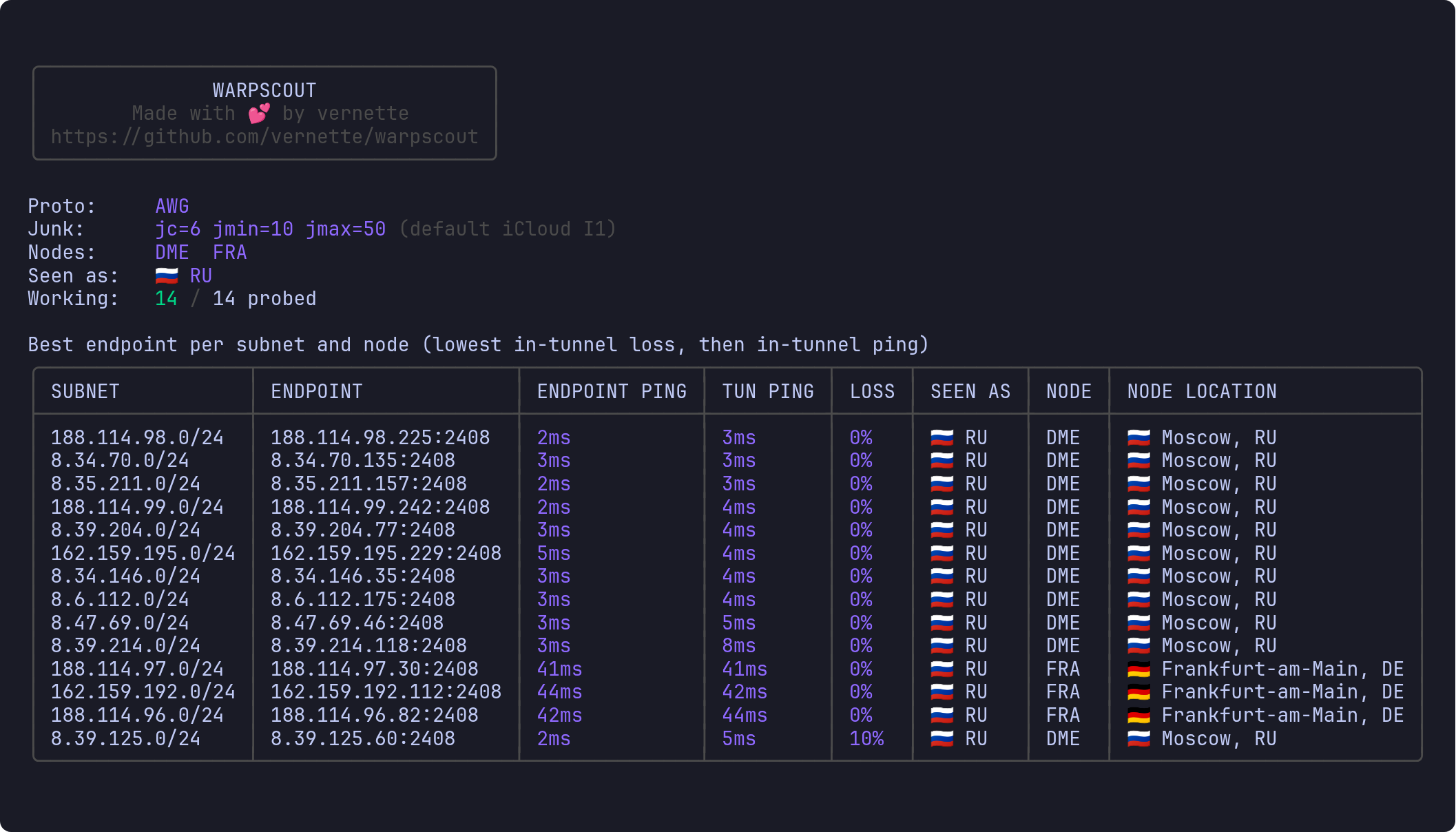
Step 3. Pick an endpoint
Look at the NODE column. Any row will do where the node is not DME, loss (LOSS) is 0%, and the ping is on the lower side.
To skip picking by hand, let the tool do it. -exclude-node DME drops the Moscow node and -best prints the single best address:
.\warpscout.exe scan -p awg -P -exclude-node DME -best
# 188.114.98.58:2408
Or the other way round - keep only the countries or nodes you want:
.\warpscout.exe scan -p awg -P -country DE,NL -best
.\warpscout.exe scan -p awg -P -node HEL,ARN -best
Step 4. Get a config
-conf writes a ready config for the best endpoint straight away:
.\warpscout.exe scan -p awg -P -exclude-node DME -conf warp.conf
Import warp.conf into the AmneziaWG client (Windows, Android, Linux, macOS) like any other config. If you scanned with -p wg, you get a plain WireGuard config.
Other formats (mihomo, usque), DNS, MTU and routing are covered in configs and filters.
Reading the table
| Column | What it means |
|---|---|
SEEN AS |
The country websites will think you are in if you route traffic through this endpoint |
NODE |
The Cloudflare edge node the tunnel landed on, as an airport code (FRA, ARN, DME) |
NODE LOCATION |
Where that node sits, city and country |
ENDPOINT PING |
A plain ping to the endpoint address. It only tells you how far the address is |
TUN PING |
Latency inside the tunnel, to 1.1.1.1. Appears with -P |
LOSS |
Packet loss inside the tunnel. Appears with -P |
SPEED |
Download speed inside the tunnel. Appears with -speed |
SEEN AS and NODE LOCATION are different things: a tunnel can go through Frankfurt and still exit as Russia. SEEN AS answers "which country will websites see", NODE answers "through which node, and which filtering, does the traffic go".
One subnet can hand out several different nodes, so rows with similar addresses but different nodes are perfectly normal.
Besides the on-screen table the tool writes a report file, warpscout-report-<timestamp>.txt, with every endpoint it found. -no-report turns it off.
If nothing works
Go down the list, running the scan again at each step.
-
A
-p wgscan finds nothing, or every endpoint ends up in thetorn downlist. That is expected on a filtering network. Use-p awg. -
-p awgfinds nothing either. Change the fake first packet the connection opens with:
powershell
   .\warpscout.exe scan -p awg -P -gen-i1 quic
Instead of quic you can try dns, sip, stun, random. This is usually what helps.
- No
-gen-i1profile helped. Let the tool search for working obfuscation parameters. It rescans until it finds a working set, then prints a ready-to-run command:
powershell
   .\warpscout.exe find-junk -gen-i1 random
More in getting past blocking.
- AmneziaWG does not get through at all. Try MASQUE, Cloudflare's second transport - over TCP it looks like ordinary HTTPS:
powershell
   .\warpscout.exe find-sni -p masque-h2
   .\warpscout.exe scan -p masque-h2 -masque-sni www.apple.com
More in MASQUE.
What torn down means
Some endpoints land in a separate torn down list instead of the working ones. Those connected and passed data at first, and were then cut mid-stream - that is what DPI does to a tunnel it does not like. In everyday use it looks like a VPN that connects, works for a few seconds and hangs for good.
Only -P can see this. Without it the same endpoints look perfectly fine:
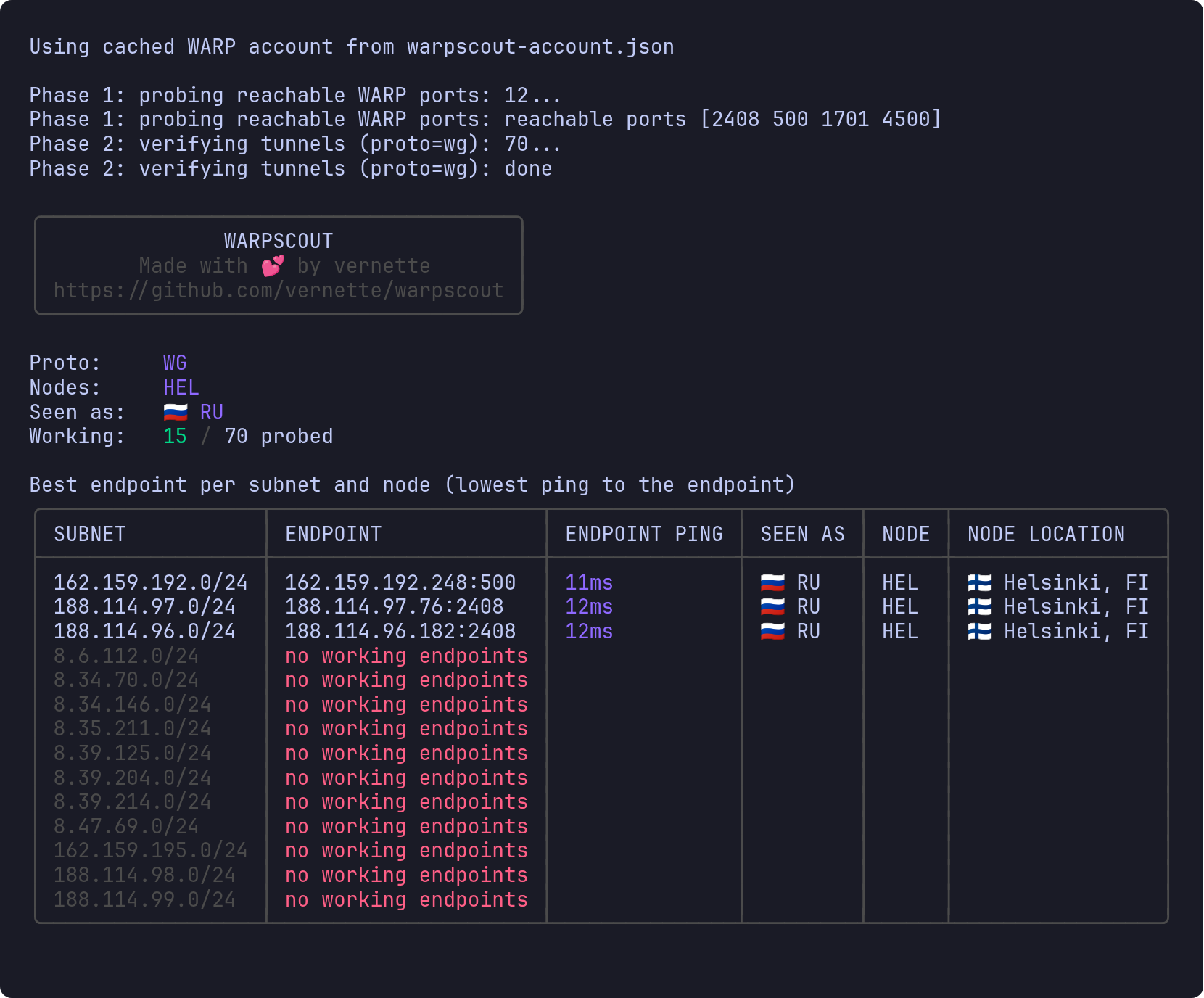
With -P it turns out every one of them gets cut:
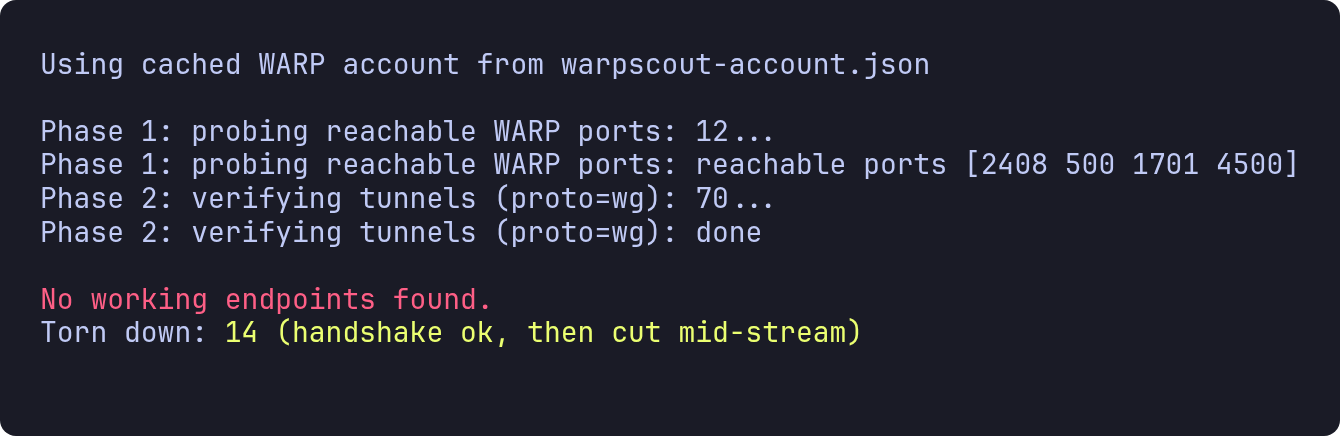
Torn-down endpoints are never picked by -best or -conf. They are shown so you can see how much of the pool your network kills - which is the signal to change -gen-i1.
Commands
| Command | What it does |
|---|---|
register |
Create a WARP account and save it. Start here |
scan |
Scan the endpoints and show the working ones |
find-junk |
Search for AmneziaWG parameters that get past the filter |
find-sni |
Search for a MASQUE SNI that gets past the filter |
socks |
Serve one endpoint as a local SOCKS5 proxy, to test it |
version |
Print the installed version |
Useful flags
| Flag | What it does |
|---|---|
-p, -proto |
Protocol: wg, awg, masque, masque-h2 (default wg) |
-P, -tun-ping |
Measure latency and loss inside the tunnel, and weed out torn-down endpoints |
-best |
Print one best ip:port instead of the tables |
-conf FILE |
Write a ready config for the best endpoint (-conf - prints it instead) |
-node, -country |
Keep only these nodes or countries, comma-separated |
-exclude-node, -exclude-country |
Drop them instead. Stacks with the two above |
-n, -sample N |
Addresses to try per subnet (default 5) |
-f, -full |
Try every address of every subnet. Slow but thorough |
-speed |
Add the SPEED column - a download test. Noticeably slower |
-6, -ipv6 |
Scan IPv6 endpoints instead of IPv4 |
-o FILE, -no-report |
Where to write the report file, or skip it entirely |
-emoji |
Show country flags next to regions |
-t, -timeout N |
Per-request timeout in seconds (default 2) |
-jt N |
How many tunnels to bring up at once (default 10) |
The full flag list of any command is warpscout <command> -h, for example .\warpscout.exe scan -h.
Going further
- How it works - the scan phases, region versus node, checking a VPS region
- The WARP account - what
registerdoes, what the account file holds, registering from a blocked network - Getting past blocking - AmneziaWG obfuscation,
-gen-i1, junk packets,find-junk - MASQUE -
-p masqueand-p masque-h2, picking an SNI, usque configs - Configs and filters -
-confformats, DNS and MTU,-target, the speed phase, the report format - SOCKS5 proxy - check one endpoint with third-party services
- WARP-in-WARP - scanning from inside another WARP tunnel
- Docker - running in a container
- Troubleshooting -
ENDPOINT PINGshows?, the tool gets killed on a router, macOS refuses to run it
Credits
- Cloudflare - for WARP itself, obviously
- puzige/CloudflareWarpSpeedTest - the alternate port sweep and the in-tunnel RTT/loss measurement
- ampetelin/warp-endpoint-checker - the list of WARP IPv4 subnets
- TheyCallMeSecond/WARP-Endpoint-IP - the list of WARP IPv6 subnets
- SagePtr/mini_quic_generator - the QUIC Initial packet builder, ported for the
quicI1 profile - Diniboy1123/usque - the WARP MASQUE client implementation
-p masqueis built on - nellimonix/base-relay - the reverse proxy the registration fallback runs on
- amnezia-vpn/amneziawg-go - the userspace AmneziaWG implementation
- charmbracelet/bubbletea - the framework the live dashboard is built on
Support the author


📈 近 7 天 Star 趋势
🏆 排名变化趋势
📋 历史上榜记录
| 日期 | 榜单 | 排名 | 周期新增 | 总 STAR |
|---|