把 Evernote、Obsidian 当作对标对象的知识库与笔记工作区,文档称其为 AI-native。保留了经典三栏布局:左侧目录树、中间笔记列表、右侧编辑器,同时提供表格、思维导图、图表、海报等富文本块,并附带网页剪藏工具与 MCP 接口。数据存放在开放格式中,不锁死在某家服务里,还提供从其他笔记应用迁移的入口。部署方式有两种:跑在 Cloudflare Workers 上,或用 Docker 自托管,两种都无需付费。界面与文档覆盖简中、繁中、英、西、德、法、日、波兰、俄语。代码以 AGPL-3.0 发布,自行改造后对外提供服务需同样开源。适合在意数据归属、又想要多端即时同步的自建用户。
📄 仓库 README
在 GitHub 查看 ↗
 EdgeEver
AI-native note-taking app & Evernote/Obsidian alternative. Instant all-platform sync, rich notes (tables, mind maps, diagrams, posters), web clipper & MCP. 100% free on Cloudflare or Docker.







简体中文 | 繁體中文 | English | Español | Deutsch | Français | 日本語 | Polski | Русский
 Telegram Group |
🌐 Live Demo |
🗺️ Roadmap |
📱 Clients & Extension |
Feature Matrix & Capabilities |
📥 Note Migration
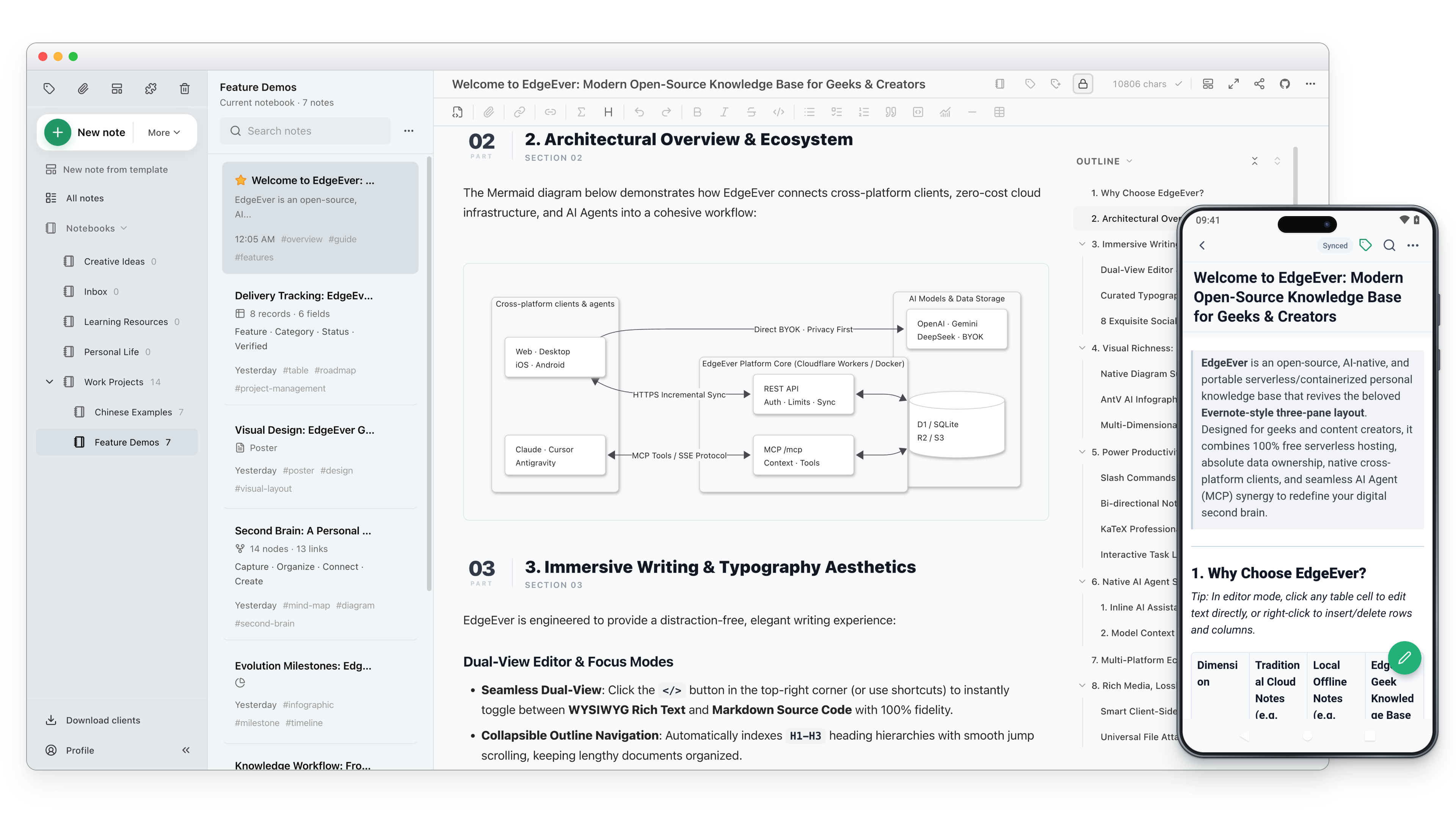
EdgeEver is a modern, open-source notes and knowledge base workspace. It preserves the classic, high-efficiency three-pane productivity workflow (Tree View · Note List · Editor) while offering an open data architecture and seamless AI Agent integration for complete ownership and smart productivity.
💡 Serverless & 100% Free Forever EdgeEver can run within Cloudflare's free quotas with no server purchase or VPS maintenance. Users who prefer a VPS, NAS, or home server can deploy the same application with Docker.
⭐ If EdgeEver is useful to you, consider giving it a Star. Your support helps more people discover the project.
Why EdgeEver
Many users of note-taking apps and personal knowledge bases simply want a reliable, open, and fast personal knowledge base. However, existing mainstream solutions all present tradeoffs:
- Evernote: Offers the smoothest, most seamless multi-device cloud sync experience. Yet as it evolved into a full-featured commercial suite, ads and add-ons multiplied while system overhead climbed. Meanwhile, free-tier quotas tightened, premium AI subscriptions grew expensive, and it remains difficult to integrate into modern self-hosted and private AI workflows.
- Obsidian: Open Markdown files, closed-source core. Official Sync requires an ongoing subscription tiered by storage and vault count, while third-party sync (iCloud, WebDAV, Git, etc.) is tedious and conflict-prone; constrained by local-directory file sync and mobile background limits, it struggles to match the seamless, invisible sync of cloud-native note apps (and lacks a full web workspace). Relying on local file scanning causes noticeable cold-start and search lag once notes reach the thousands or plugins pile up; storing attachments alongside notes bloats vaults, slows mobile sync, and leaves orphaned files behind. Combined with an IDE-like UI and plugin-tinkering learning curve, it feels overly heavy for users used to out-of-the-box, capture-anywhere cloud note apps.
- Joplin: A veteran open-source three-pane note app, yet its UI design and editing experience feel stuck more than a decade in the past, lacking modern polish and fluidity. Fast official sync (Joplin Cloud) requires a paid subscription; free sync via WebDAV or cloud drives relies on file-by-file polling that becomes sluggish on mobile as notes and attachments grow, while self-hosting Joplin Server requires maintaining your own server with no zero-cost serverless option. It also lacks a full browser-based web workspace and native AI Agent capabilities (MCP/ACP).
- Memos & Stream Notes: Clean and simple, but their social-timeline layouts differ fundamentally from the structured productivity of a classic three-pane workflow.
- SiYuan & Block-based PKMs: Powerful with self-hosting support, but their UI and interaction feel closer to heavy Obsidian-style PKMs than the intuitive three-pane experience of traditional commercial cloud note apps, and their granular "block-level" architecture also imposes noticeable cognitive overhead for quick daily capture and continuous prose writing. Furthermore, they lack a true zero-cost serverless deployment tier, and multi-device sync relies on paid official subscriptions or paying extra to unlock S3/WebDAV sync features with your own storage.
EdgeEver fills this gap: The entire stack is open source, delivering truly seamless, low-latency, instant multi-device cloud sync with full self-hosting freedom. It keeps the three-pane layout you know, stays silky-smooth and lightweight even with 10,000+ notes, and ships native AI agents with zero-cost deployment.
Online Demo
The public demo resets every day at 3:00 AM (China Standard Time) and restores sample notes. Do not store private content there.
All-Platform Clients & Browser Extension
Client Downloads


The iOS app requires an Apple ID from outside mainland China.
Browser Web Clipper Extension


- Extract clean Markdown from web articles or clip selected text and images directly to your self-hosted instance.
- Deep structured clipping for 20+ platforms: social (X, Xiaohongshu, WeChat, Jike, Douban, Threads, Bluesky), dev & reading communities (Zhihu, Reddit, GitHub, V2EX, Hacker News, Medium, Substack), and media/podcasts (Bilibili, YouTube, Xiaoyuzhou).
Feature Matrix & Capabilities
An all-in-one workspace connecting inspiration capture, deep creation, and knowledge compounding (👉 Explore 20 step-by-step showcases with screenshots):
| Module | Core Features | Advanced Features |
|---|---|---|
| Writing & Editing | • Classic 3-pane layout with resizable panel width • Seamless toggle between rich-text WYSIWYG & raw Markdown • Syntax highlighting, math formulas, task lists & Focus Mode • Second-level auto-save, instant multi-device sync & revision history |
• Native Poster Notes: Canvas-based structured visual card layouts, double-click to edit • **We |
📈 近 7 天 Star 趋势
🏆 排名变化趋势
📋 历史上榜记录
| 日期 | 榜单 | 排名 | 周期新增 | 总 STAR |
|---|