📄 仓库 README
在 GitHub 查看 ↗[!IMPORTANT] A personal update from the maintainer
First, thank you to everyone who uses, tests, contributes to, and supports TargetBridge. Unexpected health issues have recently prevented me from continuing work on new features. Thank you for your patience and understanding while I focus on my health.
If TargetBridge has been useful to you, please consider supporting the project through GitHub Sponsors, with a one-time or monthly contribution. Your support helps sustain maintenance and future updates so more people can benefit. Contributions are entirely optional; testing, feedback, and code contributions are just as appreciated.
TargetBridge
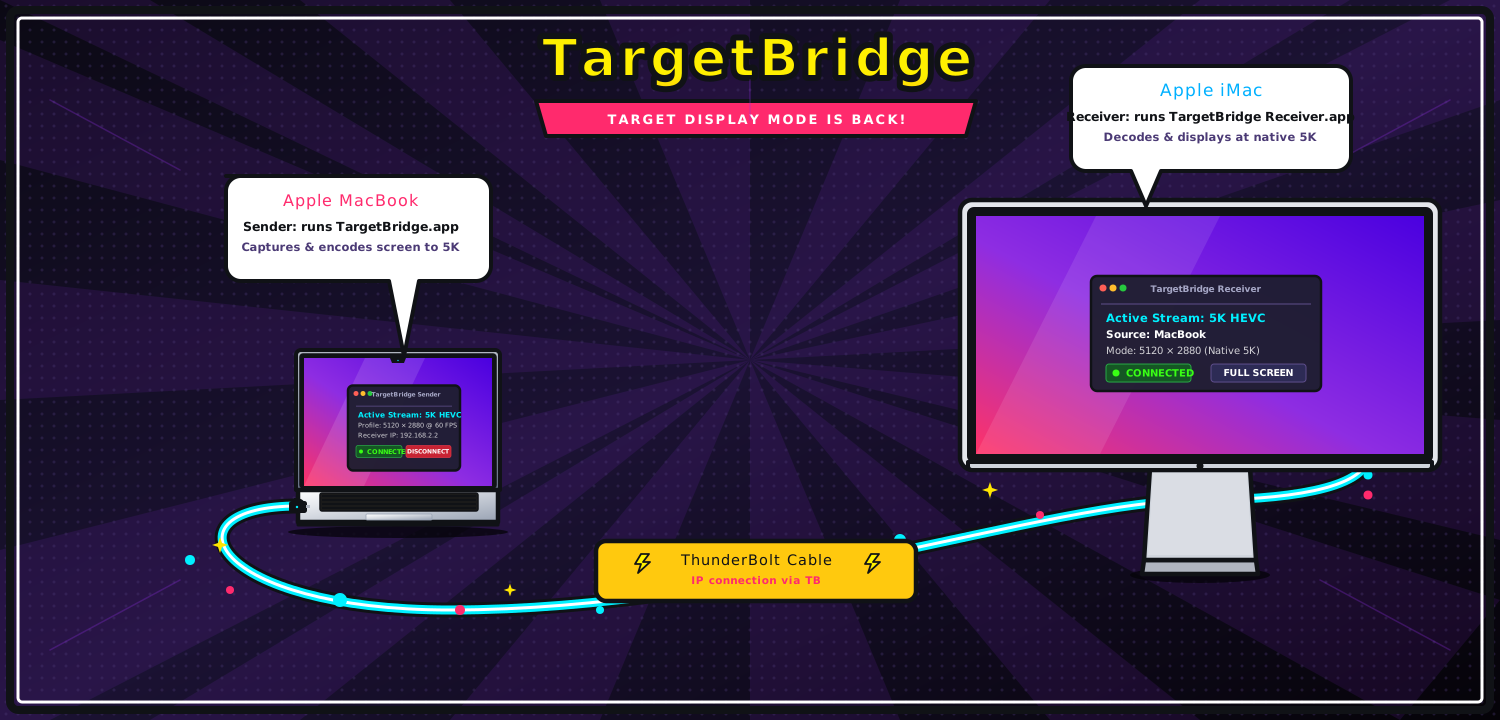
Apple dropped Target Display Mode in late 2014 with the 5K iMac — and it never came back.
TargetBridge brings it back via software, streaming your screen at up to 5K over a direct Thunderbolt connection, e.g. to an iMac.
It's free and open source software, no subscription and no dongle required.
If it is useful to you, spread the news and give us a ⭐ on GitHub.
Support and Thanks
TargetBridge is free and open source. Sponsorship is never required, but monthly and one-time contributions make it possible to reserve time for macOS compatibility, bug fixes, hardware testing, and future useful tools for Mac.
Thank you to everyone supporting TargetBridge through GitHub Sponsors. Your contributions help keep the project moving forward.

Contributors
Thank you to everyone who tests TargetBridge on real hardware, reports issues, and improves the project. A special thank-you for this release goes to:
- @aalpgiray for receiver brightness, volume, Night Shift, and True Tone controls.
- @preggocl for the physical Receiver display profile and the software decode fallback.
- @Betafer for input-queue safety, cursor work, idle audio/display handling, watchdog protection, monitor shielding, and build improvements.
TargetBridge 3.6.0
TargetBridge 3.6.0 improves everyday connection setup and makes the display pipeline more adaptable without changing the stable default workflows:
- remembers a discovered Receiver by its stable identity instead of losing the selection when its Thunderbolt or network IP changes
- migrates saved display profiles, codec choices, and extended-desktop placement when upgrading from the previous Receiver identities
- offers per-Receiver H.264, HEVC, or automatic hardware codec selection with a safe fallback when a selected codec is unavailable
- adds
Full HDandFull HD 601:1 stream profiles for non-Retina 1080p receivers - uses direct virtual-display capture in a genuinely headless mirror session, while keeping system-audio relay active
- adds a built-in permission assistant for Screen Recording, Accessibility, and Input Monitoring
The release also retains the 3.5 maintenance work:
- preserve keyboard and mouse release events when the Receiver input queue is under pressure
- preserve native macOS cursor shapes by default, including the screenshot crosshair; the custom overlay is reserved for the explicit large-cursor option
- advertise the Receiver's actual panel geometry instead of always reporting a fixed 5K profile
- preserve native 5K panel dimensions when macOS uses a scaled HiDPI desktop
- fall back safely to software video decode when VideoToolbox cannot decode a stream on older hardware
- allow display sleep while the Receiver is waiting, including before the first session
- open audio output only when audio arrives and release it when the session ends
- handle watchdog clock underflow without incorrectly dropping the connection
- keep local notification banners behind the active monitor surface across display/fullscreen transitions
- package SDL runtimes safely and support explicit build/version overrides
See the full 3.6.0 release notes, the 3.5.2 release notes, and the testing guide, including the new monitor-shield lifecycle test.
It also keeps the established multi-Mac workspace features:
- mirror mode and extended desktop mode
- multiple receivers from one sender
- experimental
Network Linktransport in addition to Thunderbolt Bridge - streamed system audio
- shared JSON localization for Sender and Receiver
- official manifest-based addons
Input Dockstationwith master/slave keyboard and mouse control- text clipboard sync tied to the active input master
- remote brightness control from the sender
- automatic receiver discovery and extended-layout restore
- remote connection automation via URL scheme, CLI wrapper, launch args, and SSH recipes
- remembers the selected virtual-display resolution for each receiver
- configurable Receiver Master shortcuts, including protected macOS shortcuts such as Space switching
- mock sender, parser tests, and a loopback smoke test for Receiver resilience without a second Mac
- improved direct
Duplicate Desktopstartup, with a short wait for the virtual display to become available - permission cards refresh when TargetBridge returns from macOS Privacy & Security settings
- Receiver stays on its waiting screen until a real session starts, avoiding a distracting fullscreen flash
- experimental
5K 60profile for recent Apple Silicon; use5K 48for the most stable work sessions
Feature Guides
- Overview hub: docs/Features.md
- Mirror mode and Extended Desktop: docs/Features.md#display-modes
- Guided configuration check: docs/Features.md#guided-configuration-check
- Stream profiles and per-Receiver codecs: docs/Features.md#stream-profiles-and-codecs
- Permission assistant: docs/Features.md#permission-assistant
- Multi-receiver layouts: docs/Features.md#multi-receiver-workflows
- Network Link (experimental): docs/Features.md#network-link-experimental
- Audio Relay: docs/Features.md#audio-relay
- Input Dockstation, clipboard sync, master/slave roles, and Receiver Master shortcuts: docs/Features.md#input-dockstation
- Receiver device controls (brightness, volume, Night Shift, True Tone): docs/Features.md#receiver-device-controls
- Remote connection & automation (URL scheme, launch args, SSH, login/wake): docs/Automation.md
- Measured connection-path selection (Thunderbolt, USB/USB4, Ethernet, Wi-Fi): docs/Automation.md#1-targetbridge-cli
- Shared translations (English, Italian, German, French, and Chinese): docs/Features.md#shared-translations
- Thunderbolt networking extras (SSH/SFTP, file sharing, Internet Sharing): docs/Features.md#thunderbolt-networking-extras
Core Features
- Sender can stream either a mirrored desktop or an extended virtual display. See Display Modes.
- One sender can drive multiple receiver Macs over separate cables. See Multi-Receiver Workflows.
- Stream profiles range from
2560 x 1440to5120 x 2880with H.264/HEVC selection based on capability.5K 60is an experimental profile for recent Apple Silicon;5K 48remains recommended for reliable daily work. See Display Modes. - Receiver discovery is automatic over Bonjour. Extended-display arrangement is remembered per receiver when possible. See Display Modes.
- Thunderbolt Bridge remains the primary low-latency path, with
Network Linkavailable as an experimental addon-gated transport. See Network Link. - The Sender menu can control a connected receiver's brightness, volume, Night Shift, and True Tone when supported. See Receiver Device Controls.
Official Addons
TargetBridge now has a conservative manifest-based addon system. Official manifests ship with the app, and user manifests can be imported from the settings UI.
Network Link: local Ethernet/Wi-Fi transport path for the same display pipeline. See docs/Addons.md#official-addons and Network Link.Audio Relay: streamed system audio from sender to receiver. See docs/audio.md and docs/Addons.md#official-addons.Input Dockstation: keyboard/mouse relay, master/slave roles, slave switching, and text clipboard sync. See docs/Addons.md#input-dockstation and Input Dockstation.
Requirements
- Sender: Apple Silicon Mac (M1 or later) or Intel Mac, macOS 14 Sonoma or later. Apple Silicon remains the primary tested path; Intel Sender builds are available for broader testing.
- Pre-built Receiver: macOS 14 Sonoma or later on Intel; macOS 15 Sequoia or later on Apple Silicon.
- The Receiver source targets macOS 11, but builds for older systems require compatible libraries. Older-system packaging remains tracked in #167.
- Thunderbolt cable
- See also docs/Hardware.md for hardware details, tested cables, adapters, and Thunderbolt networking ideas.
Download
→ Download latest release (pre-built apps, no Xcode needed)
TargetBridge-arm64.app.zip— Sender (for Apple Silicon Macs)TargetBridge-x86_64.app.zip— Sender (for Intel Macs)TargetBridge-Receiver-arm64.app.zip— Apple Silicon Receiver (use machine as monitor for sender)TargetBridge-Receiver-x86_64.app.zip— Intel Receiver (use machine as monitor for sender)
Unzip and double-click. On first launch, grant Screen Recording permission to the sender.
If you build from source, app outputs go into build/ folder.
"App is damaged" warning? macOS quarantines unsigned apps downloaded from the browser. Run this in Terminal, then try again:
bash
xattr -cr ~/Downloads/TargetBridge-arm64.app
xattr -cr ~/Downloads/TargetBridge-Receiver-arm64.app
xattr -cr ~/Downloads/TargetBridge-Receiver-x86_64.app
Permissions
- Sender usually needs
Screen Recording. Input Dockstationmay also requireAccessibilityandInput Monitoring, depending on the active role.- Receiver may require
AccessibilityorInput Monitoringwhen it participates in input relay. - In practice,
Input Dockstationis a two-sided feature: one Mac captures input, the other injects it, so permissions may be needed on both Sender and Receiver. - On the Sender, use the
Permissionstoolbar button to review live status and request the native macOS prompts. macOS still requires confirmation from the person using the Mac; TargetBridge cannot grant or overwrite these permissions automatically. Official updates keep a stable app identity so future releases can retain consent already granted to the app installed inApplications. See Signing and permission continuity. - See docs/Addons.md#input-dockstation for the permission matrix.
Quick start
- Italian: docs/QuickStart-IT.md
- English: docs/QuickStart-EN.md
- 中文: docs/QuickStart-ZH.md
- Translation guide: docs/Translations.md
Detailed Documentation
- Feature overview: docs/Features.md
- Remote connection & automation: docs/Automation.md
- Addon manifests and capability model: docs/Addons.md
- Audio transport internals: docs/audio.md
- Hardware, cables, adapters, and Thunderbolt Bridge networking: docs/Hardware.md
- Translation workflow: docs/Translations.md
- Testing without hardware (unit tests, mock sender, loopback smoke): docs/Testing.md
- Binary verification: docs/verify-binaries.md
Licensing and brand
TargetBridge source code is available under the MIT License. Please preserve the required copyright and license notices when redistributing copies or substantial portions of the software.
Project branding and commercial use are handled separately from the source code license. For now, the canonical source-code license is:
Screenshots
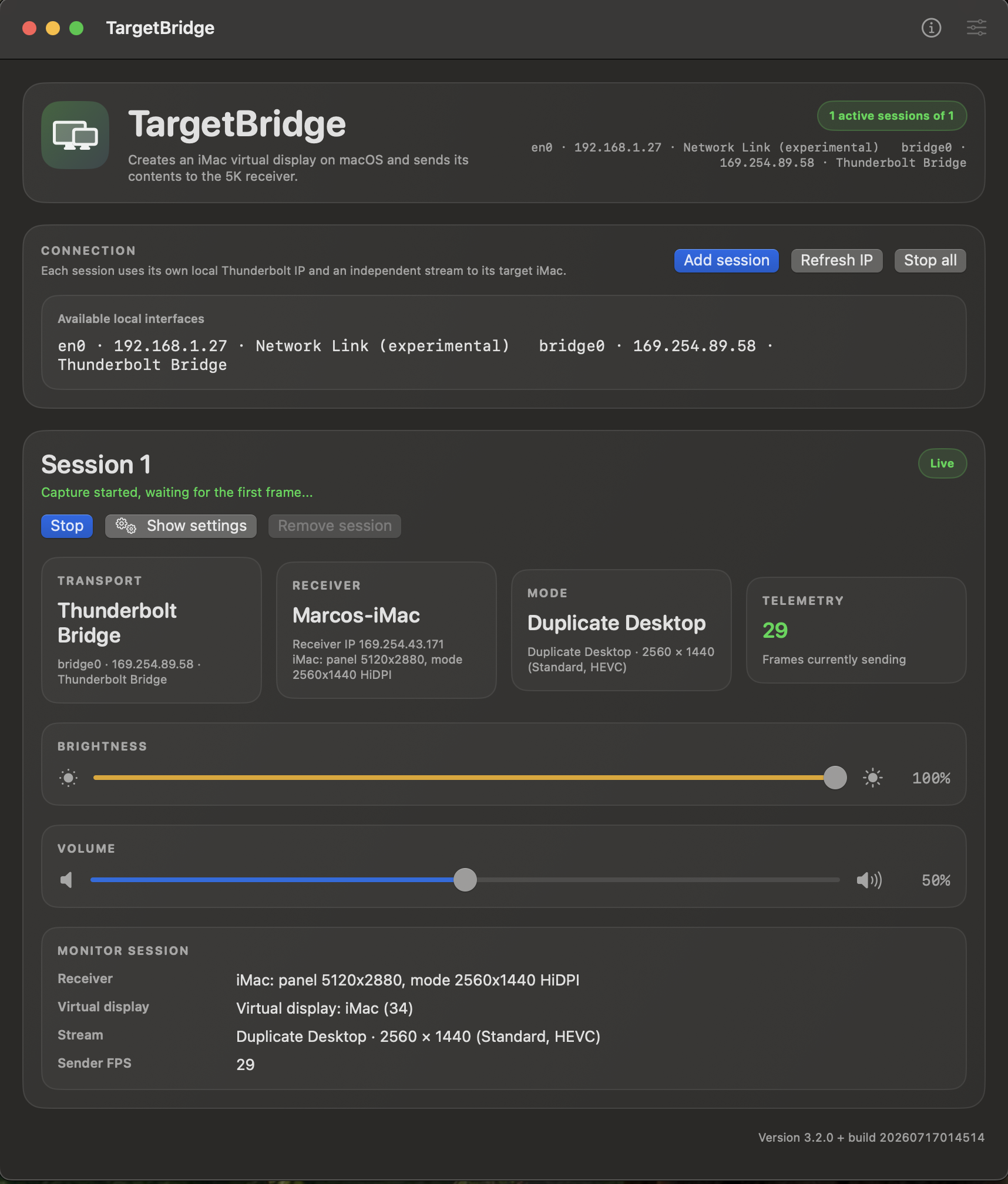
Sender (Apple Silicon Mac) — session dashboard:
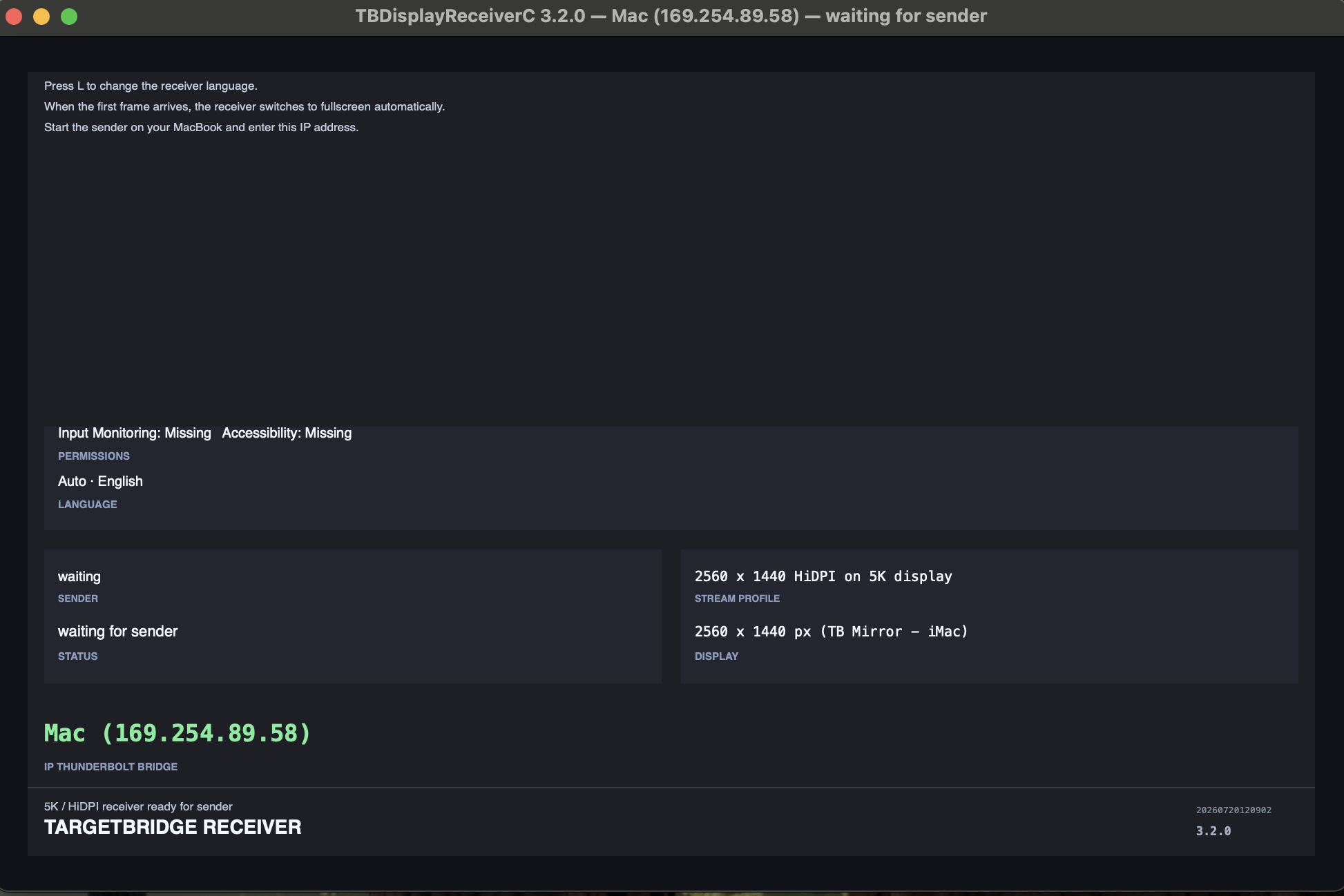
Receiver — ready for a sender stream:
macOS Displays — extended desktop target:
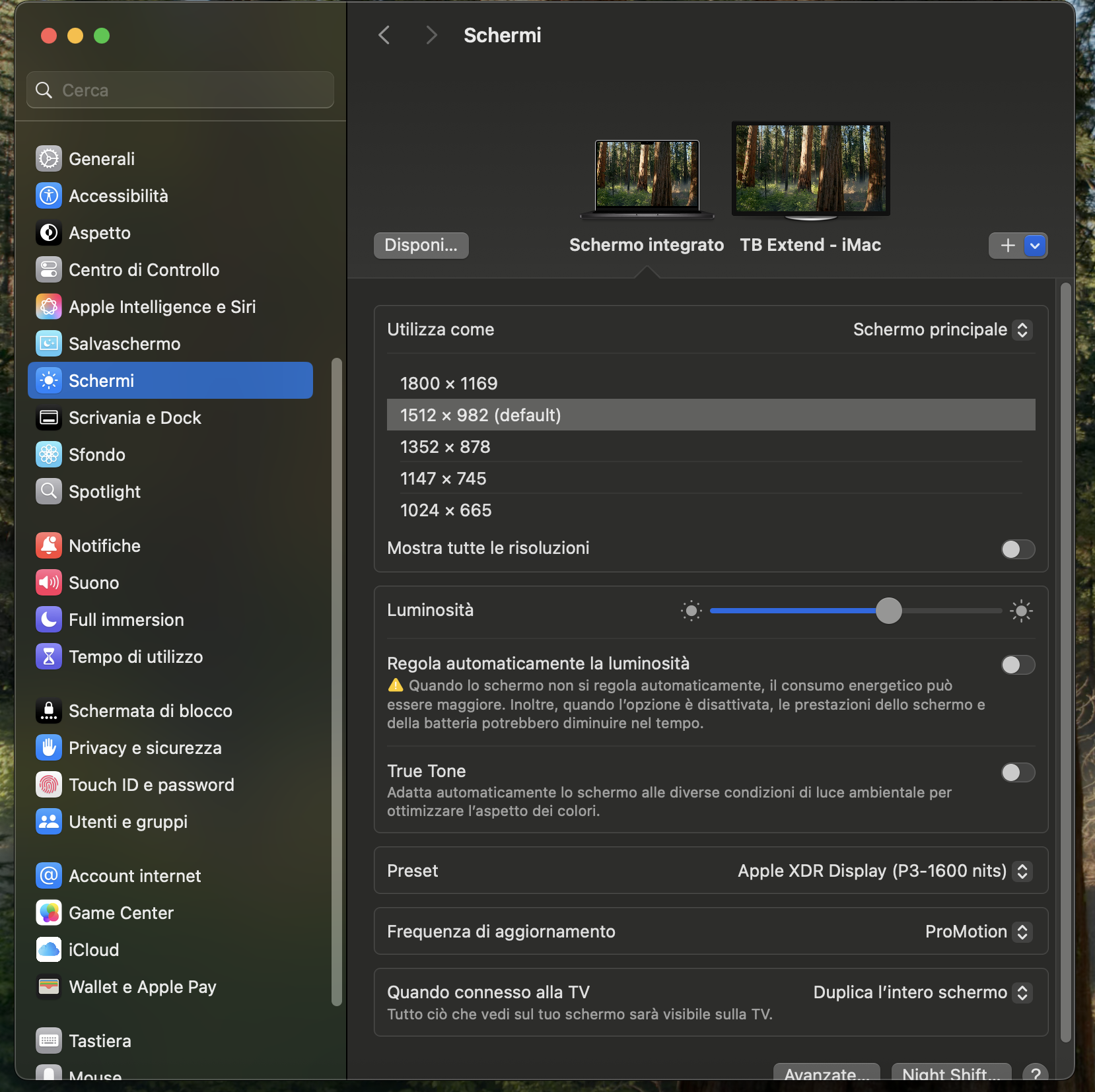
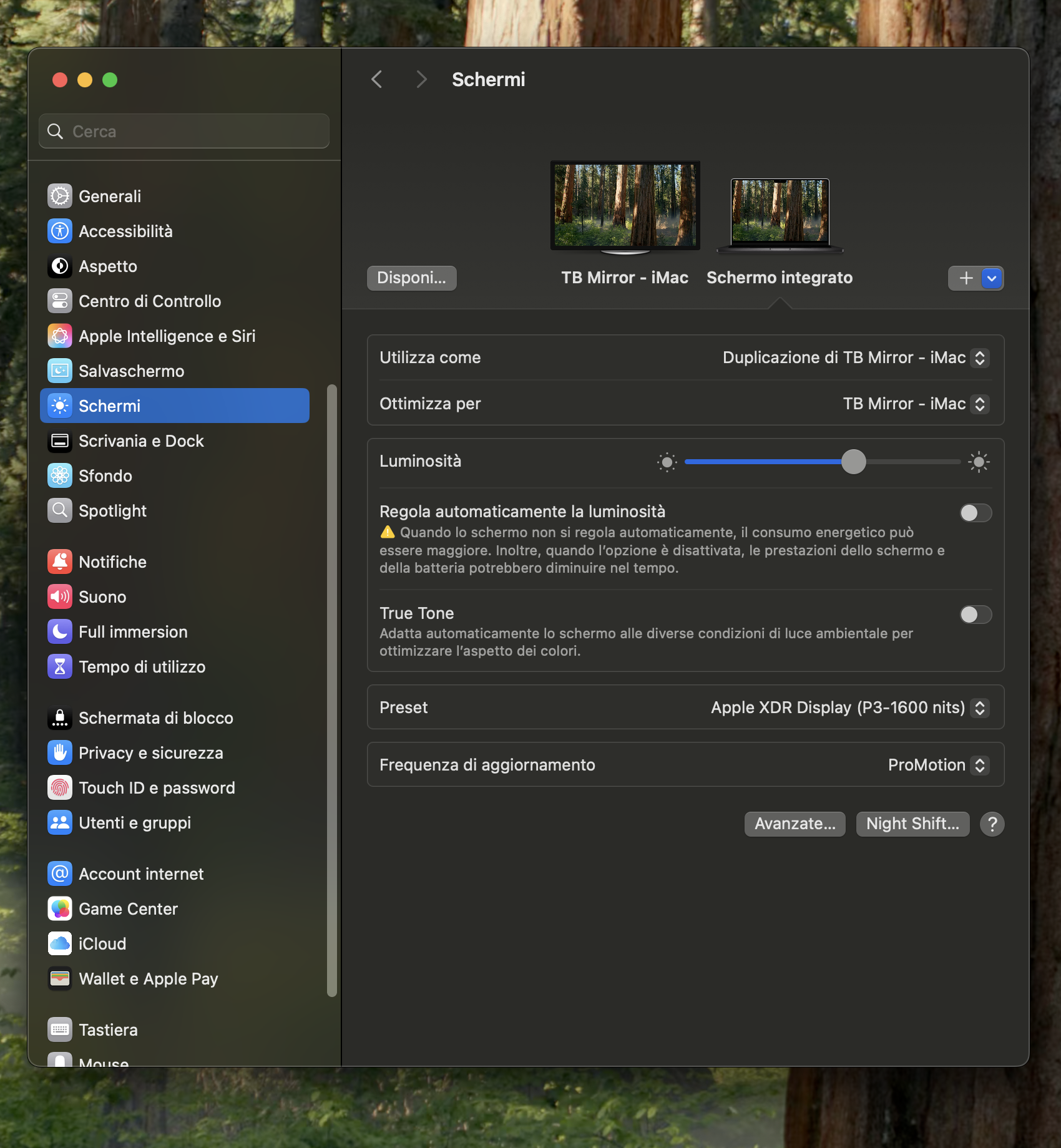
macOS Displays — mirrored desktop target:
📈 近 7 天 Star 趋势
🏆 排名变化趋势
📋 历史上榜记录
| 日期 | 榜单 | 排名 | 周期新增 | 总 STAR |
|---|