📄 仓库 README
在 GitHub 查看 ↗SourceGit - Opensource Git GUI client.




Screenshots
- Dark Theme
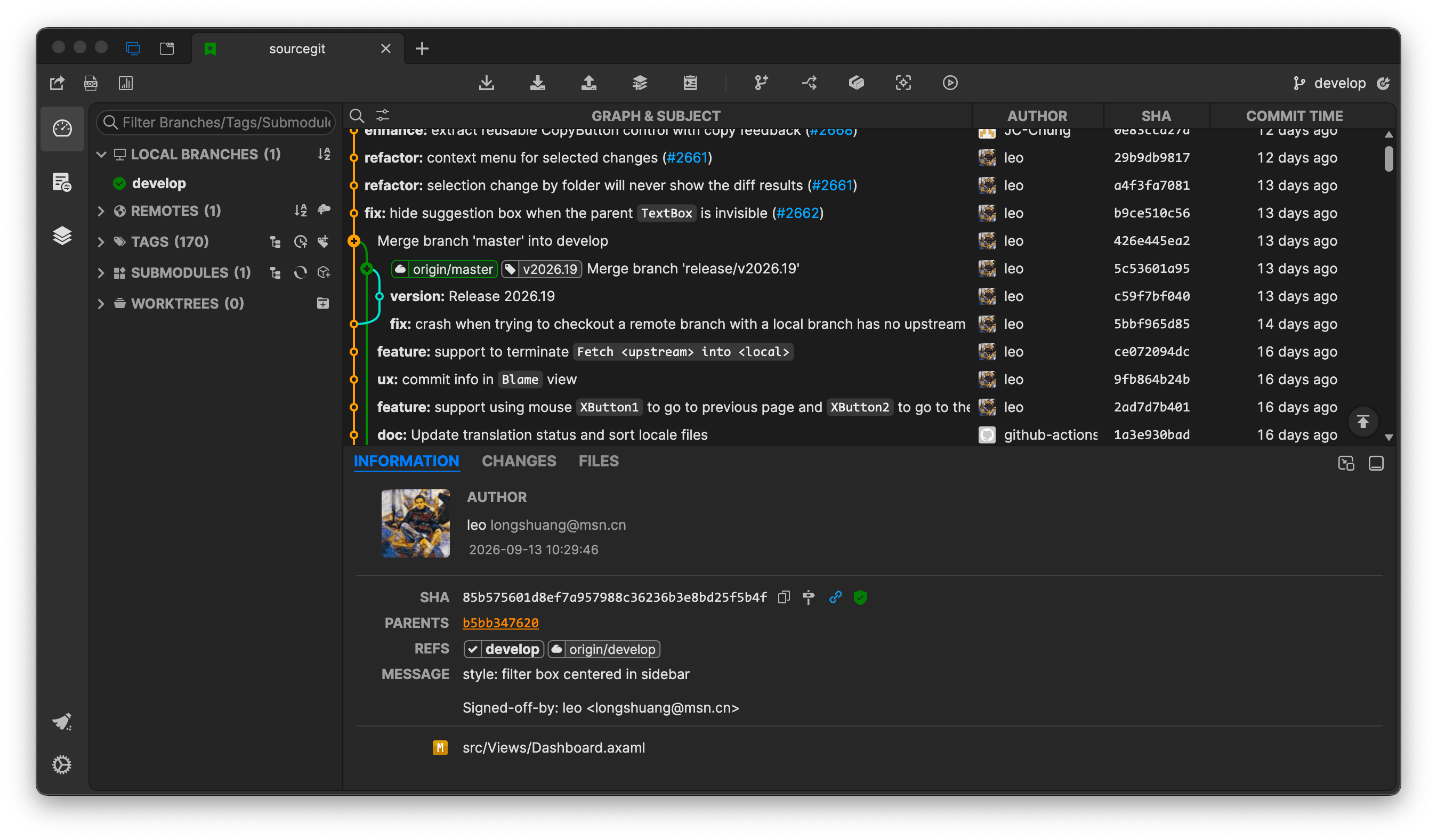
- Light Theme
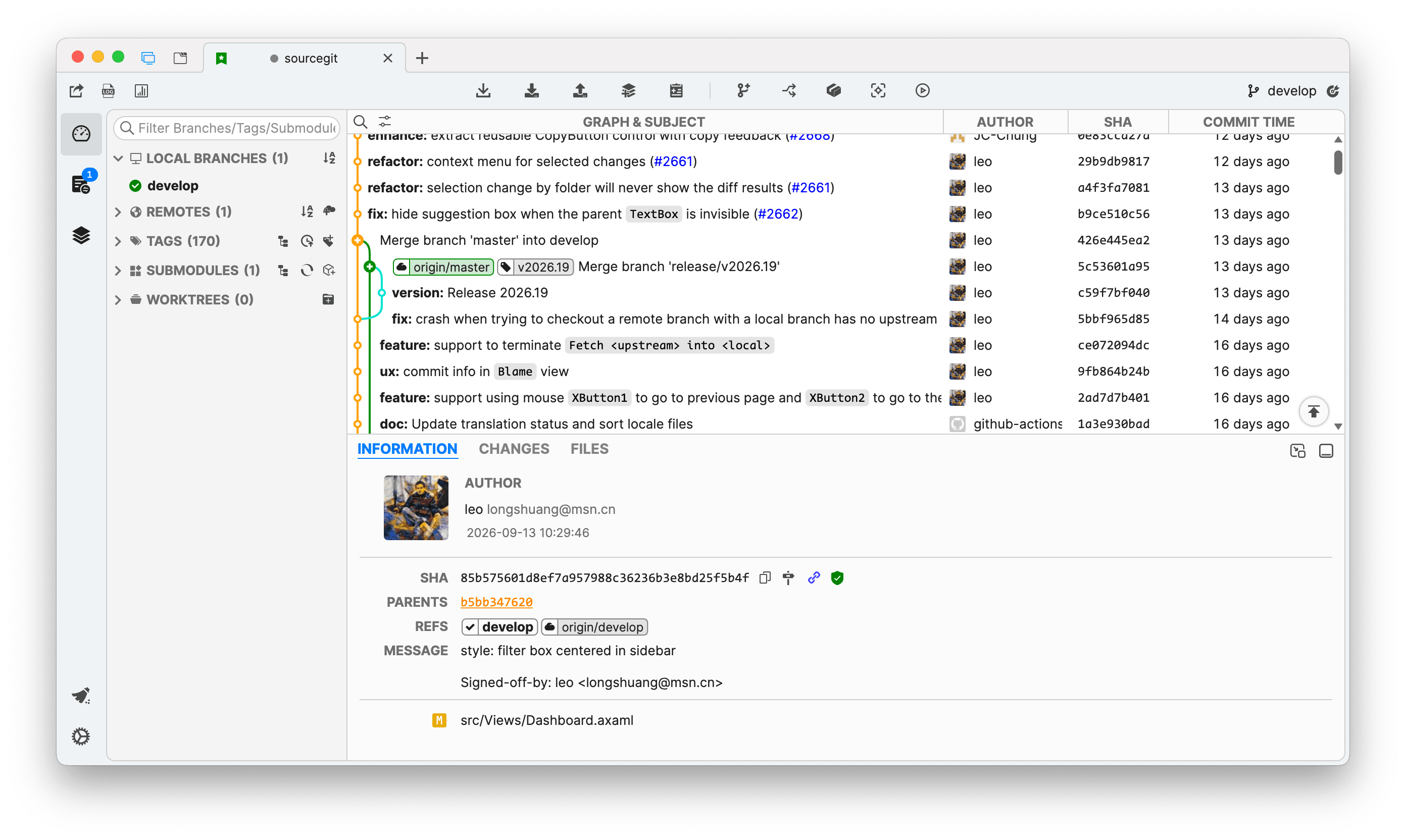
- Custom
You can find custom themes from sourcegit-theme. And welcome to share your own themes.
Highlights
- Supports Windows/macOS/Linux
- Opensource/Free
- Fast
- Deutsch/English/Español/Bahasa Indonesia/Français/Italiano/Português/Русский/Українська/简体中文/繁體中文/日本語/தமிழ் (Tamil)/한국어
- Built-in light/dark themes
- Customize theme
- Visual commit graph
- Supports SSH access with each remote
- GIT commands with GUI
- Clone/Fetch/Pull/Push...
- Merge/Rebase/Reset/Revert/Cherry-pick...
- Amend/Reword/Squash
- Interactive rebase
- Branches
- Remotes
- Tags
- Stashes
- Submodules
- Worktrees
- Archive
- Diff
- Save as patch/apply
- File histories
- Blame
- Revision Diffs
- Branch Diff
- Image Diff - Side-By-Side/Swipe/Blend
- Git command logs
- Search commits
- GitFlow
- Git LFS
- Bisect
- Issue Link
- Workspace
- Custom Action
- Create PR on GitHub/Gitlab/Gitea/Gitee/Bitbucket...
- Using AI to generate commit message
- Built-in conventional commit message helper.
[!WARNING] Linux only tested on Debian 12 on both X11 & Wayland.
How to Use
To use this tool, you need to install Git(>=2.25.1) first.
You can download the latest stable from Releases or download workflow artifacts from GitHub Actions to try this app based on latest commits.
This software creates a folder, which is platform-dependent, to store user settings, downloaded avatars and crash logs.
| OS | PATH |
|---|---|
| Windows | %APPDATA%\SourceGit |
| Linux | ${XDG_CONFIG_HOME}/SourceGit (preference.json) ${XDG_CACHE_HOME}/SourceGit (avatars & logs) |
| macOS | ~/Library/Application Support/SourceGit |
[!TIP] * You can open this data storage directory from the main menu
Open Data Storage Directory. * You can create adatafolder next to theSourceGitexecutable to force this app to store data (user settings, downloaded avatars and crash logs) into it (Portable-Mode). Only works with Windows packages and Linux AppImages.
For Windows users:
- MSYS Git is NOT supported. Please use official Git for Windows instead.
- You can install the latest stable by
scoopwith follow commands:shell scoop bucket add extras scoop install sourcegit - Pre-built binaries can be found in Releases
[!NOTE]
git-flowis no longer shipped with Git for Windows since2.51.1. You can use it by following these steps: * Download git-flow-next * Unzip & Rename thegit-flow-nexttogit-flow* Copy to$GIT_INSTALL_DIR/cmdor just add its path to youPATHdirectly
For macOS users:
- Thanks @ybeapps for making
SourceGitavailable onHomebrew:shell brew install --cask sourcegit -
If you want to install
SourceGit.appfrom GitHub Release manually, you need run following command to make sure it works:shell sudo xattr -cr /Applications/SourceGit.app[!NOTE] macOS packages in the
Releasepage of this project are all unsigned. If you are worried about potential security issues with the above command, you can download the signed package from the distribution repository provided by @ybeapps (there is no need to execute the above command while installingSourceGit). -
Make sure git-credential-manager is installed on your mac.
- You can run
echo $PATH > ~/Library/Application\ Support/SourceGit/PATHto generate a custom PATH env file to introducePATHenv to SourceGit.
For Linux users:
- Thanks @aikawayataro for providing
rpmanddebrepositories, hosted on Codeberg.
deb how to:
shell
  sudo mkdir -p /etc/apt/keyrings
  curl https://codeberg.org/api/packages/yataro/debian/repository.key | sudo tee /etc/apt/keyrings/sourcegit.asc
  echo "deb [signed-by=/etc/apt/keyrings/sourcegit.asc, arch=amd64,arm64] https://codeberg.org/api/packages/yataro/debian generic main" | sudo tee /etc/apt/sources.list.d/sourcegit.list
  sudo apt update
  sudo apt install sourcegit
rpm how to:
```shell
curl https://codeberg.org/api/packages/yataro/rpm.repo | sed -e 's/gpgcheck=1/gpgcheck=0/' > sourcegit.repo
# Fedora 41 and newer sudo dnf config-manager addrepo --from-repofile=./sourcegit.repo # Fedora 40 and earlier sudo dnf config-manager --add-repo ./sourcegit.repo
sudo dnf install sourcegit ```
If your distribution isn't using dnf, please refer to the documentation of your distribution on how to add an rpm repository.
AOSC OS: In addition to AMD64 and ARM64, support for LoongArch and RISC-V has been added.shell sudo oma install sourcegit
[!NOTE] RISC-V support is untested.
AppImagefiles can be found on AppImage hub,xdg-open(xdg-utils) must be installed to support open native file manager.- Make sure git-credential-manager or git-credential-libsecret is installed on your Linux.
- Maybe you need to set environment variable
AVALONIA_SCREEN_SCALE_FACTORS. See https://github.com/AvaloniaUI/Avalonia/wiki/Configuring-X11-per-monitor-DPI. - If you can NOT type accented characters, such as
ê,ó, try to set the environment variableAVALONIA_IM_MODULEtonone.
Commandline arguments
Users can also launcher SourceGit from commandline. Usage:
<SOURCEGIT_EXEC> <DIR>                       // Open repository in existing `SourceGit` instance or a new one
<SOURCEGIT_EXEC> --history <FILE_OR_DIR>     // Launch `SourceGit` to see the history of a file or dir
<SOURCEGIT_EXEC> --blame <FILE_PATH>         // Launch `SourceGit` to blame a file (HEAD version only)
OpenAI
This software supports using OpenAI or other AI service that has an OpenAI compatible HTTP API to generate commit message. You need configurate the service in Preference window.
For OpenAI:
Servermust behttps://api.openai.com/v1
For OrcaRouter:
Servershould behttps://api.orcarouter.ai/v1API Keyshould be an OrcaRouter API key (prefixed withsk-orca-)- A good starting
Modelisorcarouter/auto, which routes each request to the best available model
For Cheaper Inference:
Servershould behttps://api.cheaperinference.com/v1API Keyshould be a Cheaper Inference API key (prefixed withci_live_)- A good starting
Modelisgpt-5.4-mini
For Opper:
Servershould behttps://api.opper.ai/v3/compatAPI Keyshould be an Opper API key, created at https://platform.opper.ai- A good starting
Modelisgpt-5.4-mini
For API Route:
Servershould behttps://global.api-route.com/v1API Keyshould be your API Route API keyModelcan begpt-6.1-solif it is available to your key; otherwise select an available chat model from the fetched catalog- See the API documentation for authentication and model discovery
For other AI service:
- The
Servershould fill in a URL equivalent to OpenAI'shttps://api.openai.com/v1. For example, when usingOllama, it should behttp://localhost:11434/v1instead ofhttp://localhost:11434/api/generate - The
API Keyis optional that depends on the service
External Tools
This app supports open repository in external tools listed in the table below.
| Tool | Windows | macOS | Linux |
|---|---|---|---|
| Visual Studio Code | YES | YES | YES |
| Visual Studio Code - Insiders | YES | YES | YES |
| VSCodium | YES | YES | YES |
| Cursor | YES | YES | YES |
| Sublime Text | YES | YES | YES |
| Zed | YES | YES | YES |
| Visual Studio | YES | NO | NO |
[!NOTE] This app will try to find those tools based on some pre-defined or expected locations automatically. If you are using one portable version of these tools, it will not be detected by this app.
To solve this problem you can add a file namedexternal_editors.jsonin app data storage directory (config dir for Linux) and provide the path directly.
User can also exclude some editors by usingexternal_editors.json.
The format of external_editors.json:
{
    "tools": {
        "Visual Studio Code": "D:\\VSCode\\Code.exe"
    },
    "excludes": [
        "Visual Studio Community 2019"
    ]
}
[!NOTE] This app also supports a lot of
JetBrainsIDEs, installingJetBrains Toolboxwill help this app to find them.
Conventional Commit Helper
You can define your own conventional commit types (per-repository) by following steps:
- Create a json file with your own conventional commit type definitions. For example:
[
  {
    "Name": "New Feature",
    "Type": "Feature",
    "Description": "Adding a new feature",
    "PrefillShortDesc": "this is a test"
  },
  {
    "Name": "Bug Fixes",
    "Type": "Fix",
    "Description": "Fixing a bug"
  }
]
- Configure the
Conventional Commit Typesin repository configuration window.
Contributing
Everyone is welcome to submit a PR. Please make sure your PR is based on the latest develop branch and the target branch of PR is develop.
This project has a submodule in depends/AvaloniaEdit which is a custom fork of Official AvaloniaEdit.
Please make sure it is initialized - enable --recurse-submodules option while cloning or run git submodule update --init after cloned.
In short, here are the commands to get started once .NET tools are installed:
dotnet nuget add source https://api.nuget.org/v3/index.json -n nuget.org
dotnet restore
dotnet build
dotnet run --project src/SourceGit.csproj
Thanks to all the people who contribute.
Translation Status
You can find the current translation status in TRANSLATION.md
Translate Utility Script
A script that assists with translations by reading the target language, comparing it with the base language, and going through missing keys one by one, so the translator can provide the translations interactively without needing to check each key manually.
Usage
Check for a given language (e.g., pt_BR) and optionally check for missing translations:
python translate_helper.py pt_BR [--check]
pt_BRis the target language code (change as needed), it should correspond to a file namedpt_BR.axamlin thesrc/Resources/Locales/directory, so you can replace it with any other language code you want to translate, e.g.,de_DE,es_ES, etc.--checkis an optional flag used to only check for missing keys without prompting for translations, useful for getting a list of missing translations.
The script will read the base language file (en_US.axaml) and the target language file (e.g., pt_BR.axaml), identify missing keys, and prompt you to provide translations for those keys. If the --check flag is used, it will only list the missing keys without prompting for translations.
Third-Party Components
For detailed license information, see THIRD-PARTY-LICENSES.md.
📈 近 7 天 Star 趋势
🏆 排名变化趋势
📋 历史上榜记录
| 日期 | 榜单 | 排名 | 周期新增 | 总 STAR |
|---|