📄 仓库 README
在 GitHub 查看 ↗PaperTodo · A Sheet of Paper
Let a few quiet, useful, unobtrusive sheets of paper live on your desktop.
A lightweight, openly co-created Windows desktop sticky-note app.

PaperTodo remains free to download on GitHub. If you'd like to support its continued development, you're welcome to purchase it on the Microsoft Store. Thank you!




Language: English | 简体中文
Official Website
User Manual · Changelog
Preview
| Papers |
|---|
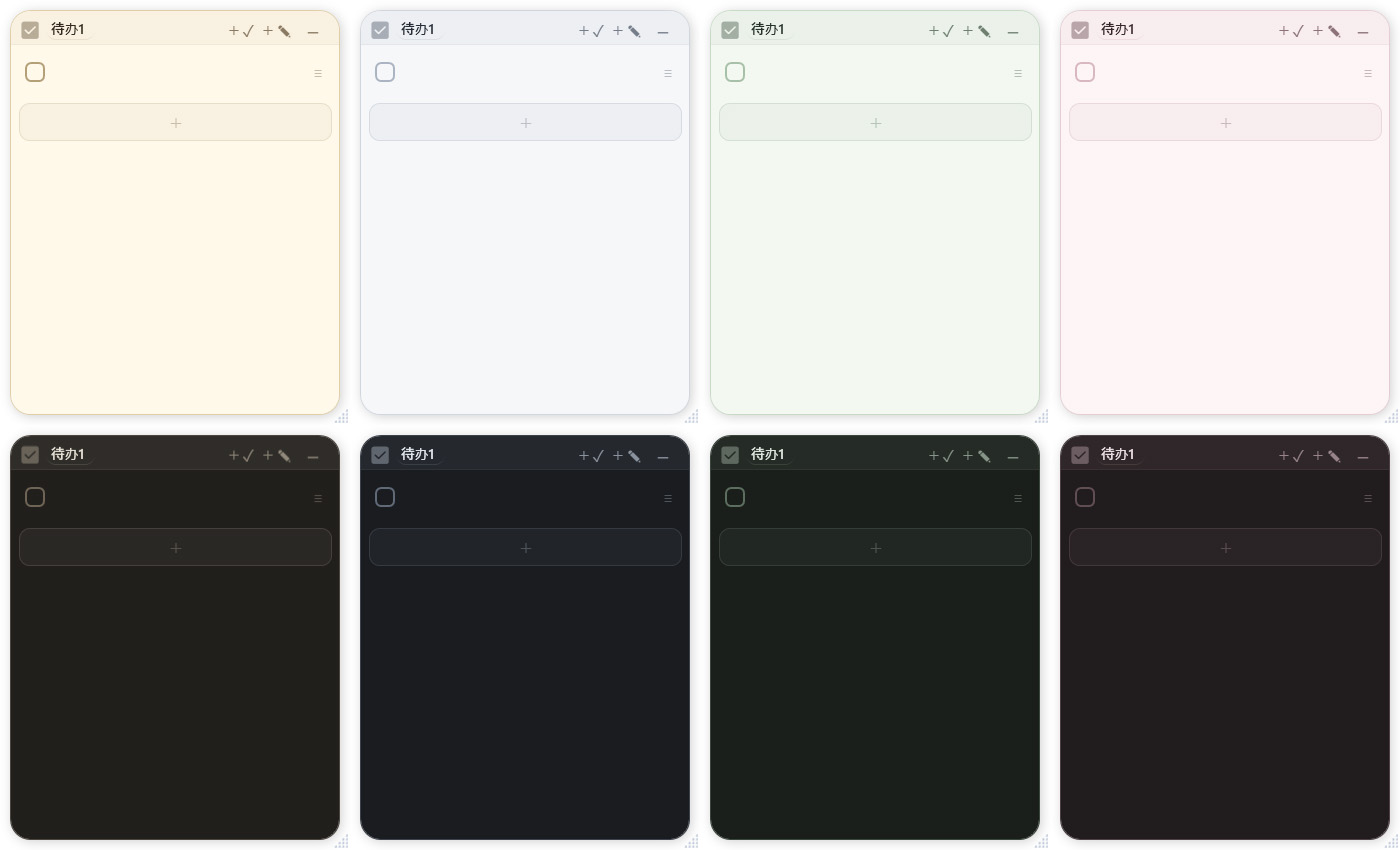 |
| Markdown View |
|---|
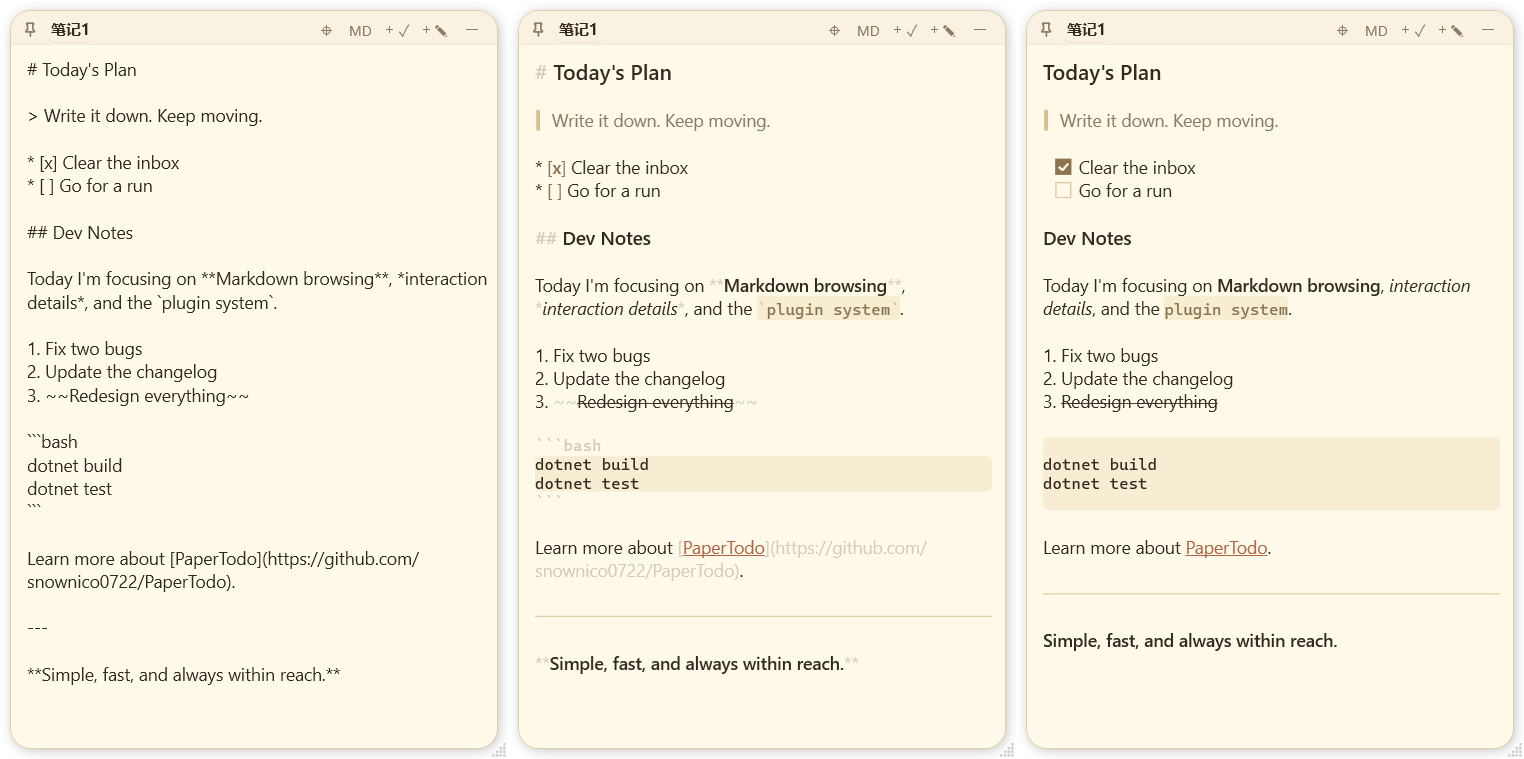 |
| Edge Browsing |
|---|
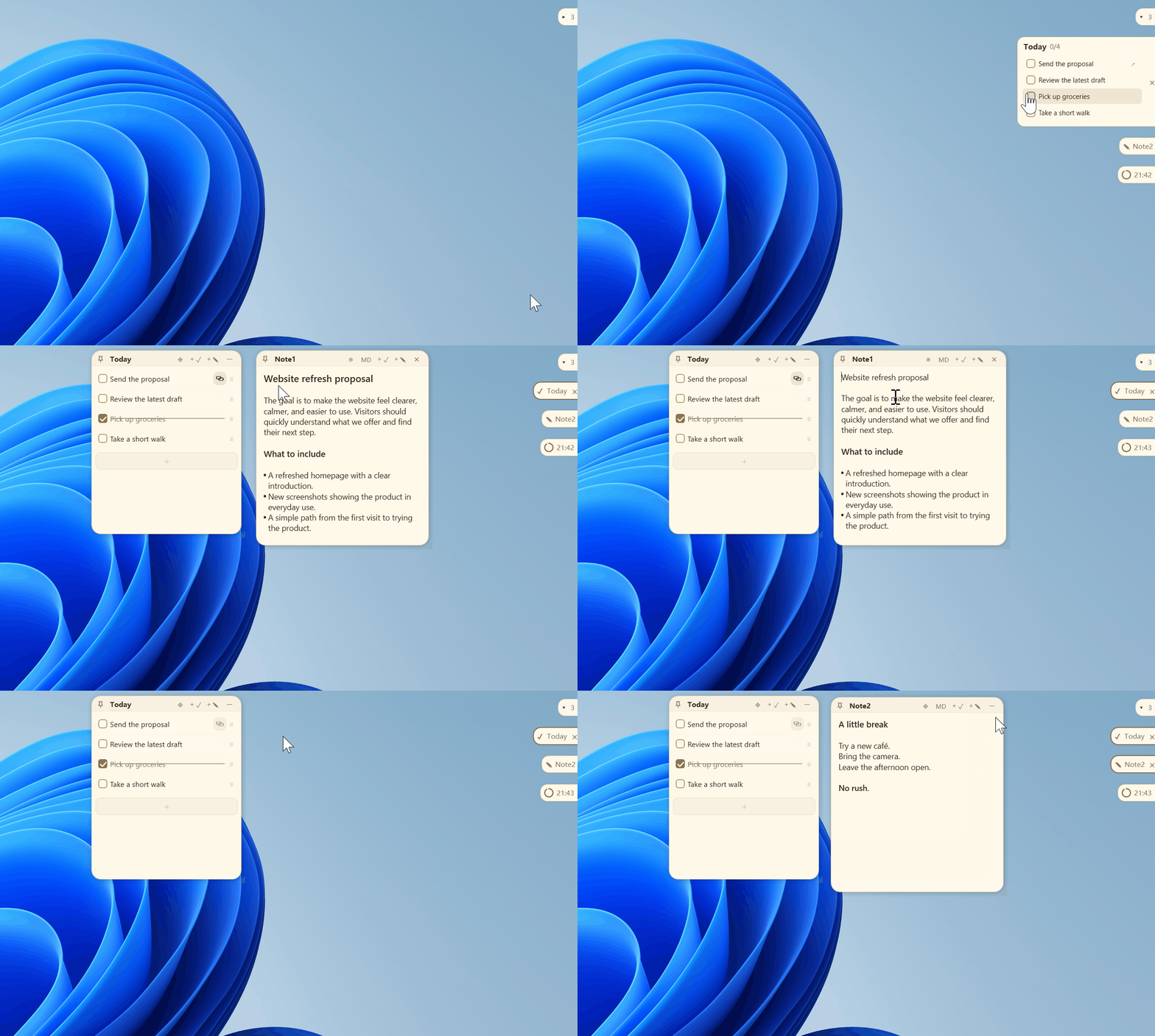 |
| Capsule Mode | Advanced Capsules |
|---|---|
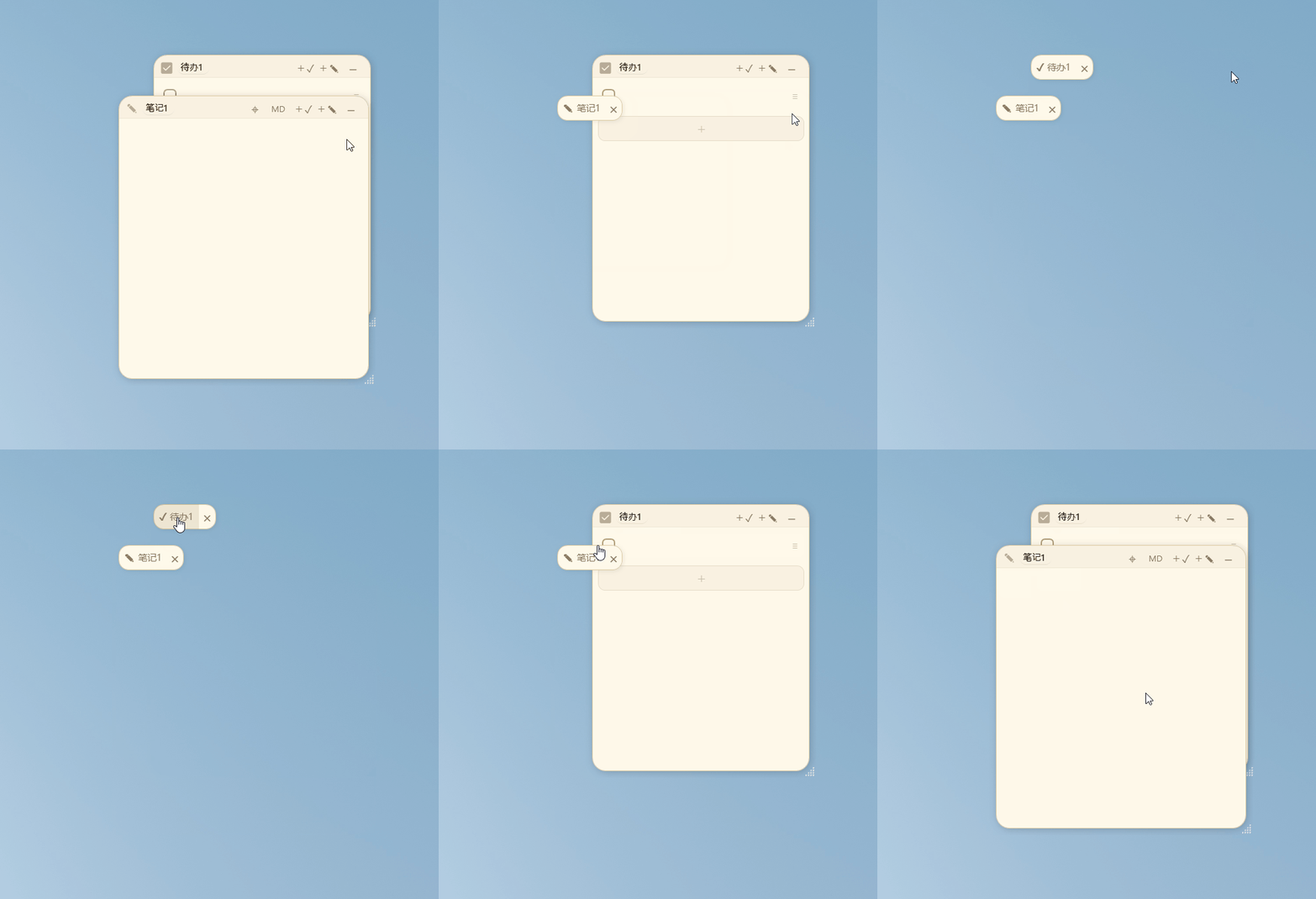 |
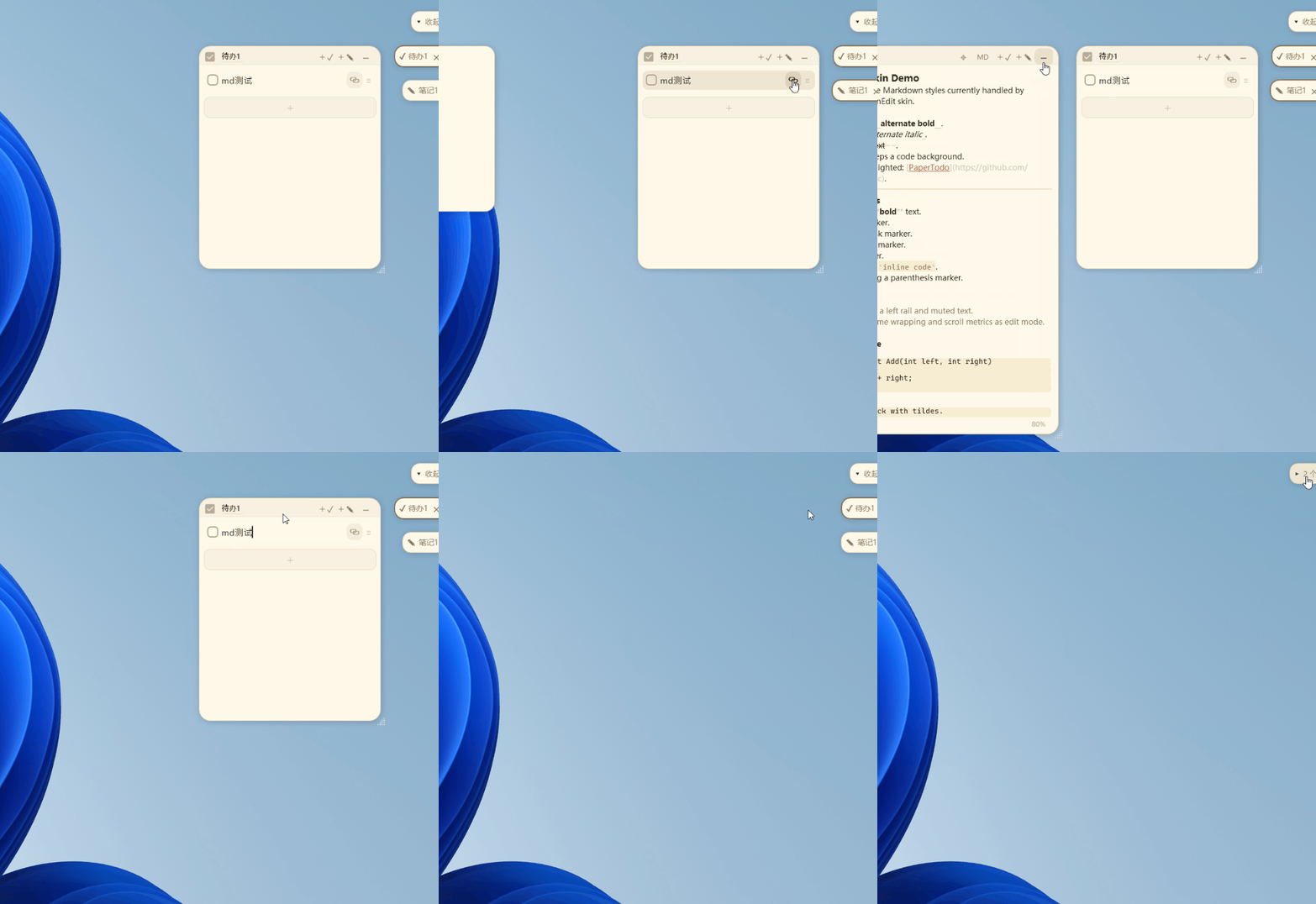 |
| Papers can collapse into compact capsules to reduce desktop clutter. | Collapsed capsules automatically dock to screen edges and slide out on hover. |
Philosophy
- Paper first — Every paper is an independent window that lives directly on the desktop, with no layered management console to open first.
- Ready immediately — Write when you want, check things off when done; everything saves automatically and the interaction path stays short.
- No unnecessary management — PaperTodo deliberately avoids complex project-management models, reducing the mental overhead of everyday capture.
- Native & lightweight — Built natively with WPF, without a Web wrapper, for fast startup and low resource use.
- Restrained interaction — The UI stays clean and low-distraction: quiet when idle, immediately available when needed.
No unnecessary interaction layers. No unnecessary visual focus.
Core Features
1. Two Basic Paper Types
- Todo Paper: A clean, efficient checklist with drag-and-drop ordering, continuous swipe multi-selection, and smart splitting of multi-line paste; completed items can be cleared automatically or moved to the bottom.
- Note Paper: Lightweight Markdown and visual notes with three levels of real-time rendering, natural editing/reading flow, and support for pasting or dropping local images.
2. Edge Capsules & Live Preview Cards
- Collapse & Dock: Click the top-right button or press
Ctrl+Wto collapse a paper into a compact capsule that automatically docks to a screen edge and frees up desktop space. - Hover Preview Cards (Preview): Hover an edge capsule to smoothly open a lightweight interactive preview card and inspect content without opening the full paper window:
- Todo Preview: Scroll, check, or uncheck visible tasks directly in the hover card; click the card background to open the full paper.
- Note Preview: Instantly renders Markdown body layout and image placeholders.
- Intent Prediction & Seamless Handoff: Built-in pointer-intent prediction keeps transitions smooth while moving across adjacent capsules and retracts automatically when the pointer leaves.
- Multi-Monitor Flow & Master Capsule: Drag capsules across displays and edges; the master capsule at the top can collapse the whole queue and can be dragged to adjust the queue's starting height.
3. New Plugin System (Preview)
- Desktop Micro-App Expansion: Papers are not limited to notes—you can switch them into clocks, focus Pomodoro timers, review pools, and other rich plugins: a next-generation take on Windows desktop widgets.
- Deep Capsule & Top-Bar Integration: Plugins can collapse into dedicated capsules, provide edge-hover cards and custom top-bar actions, while keeping their data stored independently.
- Drop-in Use: Place a plugin folder in
plugins/and PaperTodo can recognize it directly. To build your own plugin, see the Plugin Development Manual.
4. Ultra-Smooth Native Experience & High-Refresh Tuning
- Full high-refresh optimization: Paper folding/unfolding, edge drawer motion, card handoff, and cross-monitor dragging are deeply tuned for frame pacing, with full support for 120Hz/144Hz/165Hz+ displays for a smooth, stutter-free feel.
- Pure native responsiveness: Built with .NET 10 and native WPF without Web-wrapper overhead, aiming for millisecond-level interaction, very low memory/CPU use, and unobtrusive always-on operation.
- Incremental rendering for long notes: Note input uses localized incremental parsing so long text-and-image notes remain responsive and IME input stays smooth.
- Smooth multi-monitor and mixed-DPI flow: Deeply adapted for multi-display setups with different scaling factors, keeping cross-screen dragging and edge docking precise without flicker or distortion.
5. Universal Todo Linking & Script Capsules
- Quick Launch & Universal Linking: Drag the link icon from another paper's top bar, or drop a file/folder from File Explorer onto a todo item, then click it to jump straight to the target.
- Script Capsules (PowerShell): Put
!por!poweron the first line of a note to turn it into a script runner; when collapsed it becomes a lightning capsule that executes the script when clicked.
6. Advanced Labs Features (Preview)
- Local MCP Interface: Start PaperTodo with
--mcpto expose a standard MCP service, allowing authorized external AI assistants such as Claude or Cursor to securely read, write, and manage todos and notes. - Third-Party Window Tethering: Drag to attach a paper to any third-party app window so it follows that window smoothly as it moves, minimizes, and restores.
- Scheduled Reminders: Todo items support custom countdown reminders with tray notifications and alert sounds when due.
- Idle Behavior & Desktop Integration: Papers can auto-collapse into capsules on focus loss and compact their title bar while idle; global shortcuts can send papers behind other windows and enable mouse click-through for deeper desktop integration.
7. Customization & Data Ownership
- Appearance Customization: Follow system/light/dark themes, choose from Warm Paper, Ink, Forest, and Rosy palettes, use a custom font by placing
papertodo.ttf, and switch between multiple UI languages. - Local Control: Data and images stay in the application directory (
data.jsonandnote-assets.lmdb), with automatic snapshot backups before writes and full offline operation.
Common Operations & Shortcuts
| Action | Shortcut / Trigger | Description |
|---|---|---|
| Collapse / Hide Paper | Ctrl + W or middle-click the top bar | Collapses into a capsule when enabled; otherwise hides the paper |
| Cancel / Retract | Esc | Cancels multi-selection/drag; collapses the current paper when no other interaction is active |
| Undo / Redo | Ctrl + Z / Ctrl + Y | Available in both Todo and Note, with up to 100 history steps |
| Note Formatting | Ctrl + B / I / K | Bold, italic, insert link |
| Note Font Zoom | Ctrl + Scroll Wheel | Zoom note text; click the percentage at bottom-right to reset |
| Retrieve All Papers | Double-click tray icon | Highlights and pulls all papers back into view, useful after monitor disconnects or window drift |
Download & Run
PaperTodo is a portable single-file application and requires no installation. Download the version you need from Releases:
PaperTodo-...-self-contained.exe(Recommended): Includes the .NET runtime and can be launched directly after download.PaperTodo-...-no-runtime.exe: Smaller download for systems that already have .NET 10 Desktop Runtime (x64) installed.
Tip: Keep the executable in a dedicated writable directory such as
D:\Apps\PaperTodo\. Avoid read-only locations or temporary extraction folders. PlacePaperTodo.icoin the application directory to use it as a custom tray icon.
On first launch, papers appear on the desktop and the PaperTodo tray icon remains available. If papers are covered or moved off-screen, double-click the tray icon to show and retrieve all papers.
Documentation & Advanced Guides
- 📖 Full User Manual: Includes a three-minute getting-started guide, advanced Todo/Note usage, multi-monitor capsule management, the full settings reference, script rules, device-migration guidance, and FAQ.
- 🧩 Plugin Development Manual: Learn the PaperTodo paper-body plugin extension model, protocol details, and example index.
- 📋 Changelog: Review release changes and fixes.
Build & Dependencies
Local builds require Windows and the .NET 10 SDK:
git clone --recurse-submodules https://github.com/snownico0722/PaperTodo.git
cd PaperTodo
dotnet build -c Release
If you cloned without submodules, initialize them first:
git submodule update --init --recursive
dotnet build -c Release
Feedback & Community
- Bugs & suggestions: GitHub Issues
Thanks to the linux.do community for the support.
简体中文(点击展开完整 README)
PaperTodo · 一张纸
让桌面上有几张安静、可用、不打扰人的纸。
一个轻量、自由共创的 Windows 桌面便签。
PaperTodo 仍可在 GitHub 免费下载。如果你愿意支持项目持续开发,欢迎前往微软商店自愿购买。非常感谢!
语言:简体中文 | English
官方网站
用户手册 · 更新日志
QQ 交流群:551612664——奇奇怪怪的魔法研究基地
|
| Markdown 浏览 |
| :---: |
| |
| 边缘浏览 |
| :---: |
| |
| 胶囊模式 | 高级胶囊 |
| :---: | :---: |
|  |  |
| 纸片可折叠为小胶囊,减少桌面占用。 | 折叠胶囊自动贴到屏幕边缘,悬浮时滑出。 |
---
## 设计理念
- **纸片优先** — 每张纸都是独立窗口,直接常驻桌面,无需打开层级复杂的管理后台。
- **即时使用** — 想记就写,勾选即完;所有内容自动保存,操作路径极短。
- **无需管理** — 不刻意承载复杂的项目管理逻辑,降低日常记录的心智负担。
- **原生轻量** — 基于 WPF 原生开发,拒绝 Web 套壳,启动快速且资源占用低。
- **交互克制** — 界面干净低干扰,该安静时安静,需要时随时呼出。
> 拒绝长出非必要的交互层级和视觉焦点负担。
---
## 核心特性
### 1. 两种基础纸片
- **待办纸(Todo)**:清爽高效的任务清单。支持拖拽排序、连续滑动多选、多行粘贴智能拆分;已完成项支持自动清除或置底。
- **笔记纸(Note)**:轻量 Markdown 与图文备忘。支持常用 Markdown 语法与三档实时渲染,编辑与浏览自然融合;支持粘贴或拖入本地图片。
### 2. 边缘胶囊与实时预览卡片
- **折叠贴边**:点击右上角或按 `Ctrl+W` 将纸片折叠为小胶囊,自动靠在屏幕边缘,彻底释放桌面空间。
- **悬停预览卡片(Preview)**:鼠标悬停在边缘胶囊上,即可平滑展开轻量、可交互的预览卡片,无需打开完整大窗口即可即时速览:
- **待办预览**:直接在悬停卡片上滚动查看、勾选完成或撤销,点击卡片背景呼出完整纸片;
- **笔记预览**:即时渲染 Markdown 正文排版与图片占位;
- **意图预测与顺滑接续**:内置鼠标移动意图预测,在相邻胶囊间连续滑动时平滑过渡切换,离开后自动收回。
- **多屏流动与主胶囊**:支持多显示器拖拽换边;顶部主胶囊可一键收拢整列入口,拖动可调节队列起始高度。
### 3. 全新插件系统(Preview)
- **桌面微应用扩展**:便签不仅能记笔记,还可一键切换为时钟、专注番茄钟、复盘池等丰富插件,下一代的windows桌面小组件。
- **深度融入胶囊与顶栏**:插件同样支持折叠为专属胶囊、边缘悬停卡片与专属顶栏按钮,且数据独立安全保存。
- **即放即用**:将插件文件夹放入 `plugins/` 目录即可直接识别。如需自行开发插件,可查阅 [插件开发手册](https://github.com/snownico0722/PaperTodo/blob/HEAD/plugin-samples/README.zh.md)。
### 4. 极致流畅与全链路高刷调优
- **全面适配高刷新率**:无论是纸片折叠展开、边缘抽屉滑出、卡片顺滑接续还是跨屏拖拽,全链路动效均经过深度帧率调优,完美适配 120Hz/144Hz/165Hz+ 高刷屏,细腻丝滑、完全不掉帧。
- **纯原生极速响应**:基于 .NET 10 与 WPF 原生构建,拒绝任何 Web 套壳的性能开销,毫秒级即点即开,内存与 CPU 占用极低,常驻后台毫无负担。
- **长笔记增量渲染**:笔记输入采用智能局部增量解析,面对长篇图文依然流畅跟手,彻底杜绝输入法卡顿。
- **多屏与混合 DPI 顺畅流转**:深度适配多显示器与不同缩放比例环境,跨屏拖拽与边缘停靠计算精确,不闪烁、不形变。
### 5. 待办万物互联与脚本胶囊
- **快速启动与万物关联**:从另一张纸片顶栏拖出关联图标,或直接从文件管理器拖入文件/文件夹至待办项,点击即可一键直达。
- **脚本胶囊(PowerShell)**:笔记首行写入 `!p` 或 `!power`,便签即可化身脚本运行器;折叠后显示闪电胶囊,点击直接执行脚本命令。
### 6. 实验室深度能力(Preview)
- **本地 MCP 接口**:支持通过 `--mcp` 模式启动标准 MCP 服务,允许外部 AI 助手(如 Claude、Cursor 等)按授权安全读写与管理待办和笔录。
- **第三方窗口绑定**:可拖拽绑定至任意第三方软件窗口,随目标窗口一同平滑移动、最小化与还原。
- **定时提醒**:待办支持设置自定义倒计时提醒(到期托盘通知与提示音)。
- **静置与桌面融入**:支持失焦自动收起为胶囊、静置收拢标题栏;支持快捷键一键置底并开启鼠标穿透,彻底融入桌面壁纸。
### 7. 个性化与数据安全
- **外观定制**:跟随系统/浅色/深色主题,内置暖纸、墨、林、霞四套配色;支持自定义字体(放置 `papertodo.ttf` 即可生效)与多语言界面。
- **本地自主可控**:数据与图片完整存放在程序所在目录(`data.json` 与 `note-assets.lmdb`),写盘前自动快照备份,完全离线运行。
---
## 常用操作与快捷键速查
| 操作 | 快捷键 / 触发方式 | 说明 |
| :--- | :--- | :--- |
| **折叠 / 隐藏纸片** | Ctrl + W 或顶栏中键 | 启用胶囊时折叠为胶囊,未启用时隐藏 |
| **取消交互 / 收起** | Esc | 取消多选/拖拽;无状态时折叠当前纸片 |
| **撤销 / 重做** | Ctrl + Z / Ctrl + Y | 待办与笔记通用(支持深达 100 步记录) |
| **笔记文本格式** | Ctrl + B / I / K | 对应加粗、斜体、插入链接 |
| **笔记字号缩放** | Ctrl + 滚轮 | 缩放正文字号(右下角点击百分比一键复位) |
| **找回全部纸片** | 双击托盘图标 | 显亮并拉回全部纸片(多屏断开或窗口漂移时瞬间召回) |
---
## 下载与运行
PaperTodo 为绿色单文件程序,无需安装。请在 [Releases 页面](https://github.com/snownico0722/PaperTodo/releases/latest) 下载对应版本:
- **`PaperTodo-...-self-contained.exe`(推荐)**:已内嵌 .NET 运行时,下载后双击即可直接运行。
- **`PaperTodo-...-no-runtime.exe`**:体积更小,适用于电脑已安装 .NET 10 Desktop Runtime (x64) 的环境。
> **提示**:建议将程序存放在有写入权限的专用目录(如 `D:\Apps\PaperTodo\`),请勿存放在只读目录或临时解压目录中。程序目录下放置 `PaperTodo.ico` 可作为自定义托盘图标。
首次运行后,纸片会出现在桌面上,托盘区会常驻 PaperTodo 图标。若纸片被遮挡或移出屏幕,**双击托盘图标**即可显示并拉回所有纸片。
---
## 详细文档与进阶
- 📖 **[完整用户手册](https://github.com/snownico0722/PaperTodo/blob/HEAD/doc/USER_GUIDE.md)**:包含新手 3 分钟入门指南、待办/笔记深度用法、多屏胶囊调度、全量设置项大字典、脚本编写规则、换机数据迁移教程及常见问题解答(FAQ)。
- 🧩 **[插件开发手册](https://github.com/snownico0722/PaperTodo/blob/HEAD/plugin-samples/README.zh.md)**:了解 PaperTodo 正文插件扩展机制、协议说明与示例索引。
- 📋 **[版本更新日志](https://github.com/snownico0722/PaperTodo/blob/HEAD/CHANGELOG.zh.md)**:查阅更新与修复记录。
---
## 构建与依赖
本地编译需 Windows 环境并安装 .NET 10 SDK:
git clone --recurse-submodules https://github.com/snownico0722/PaperTodo.git
cd PaperTodo
dotnet build -c Release
git submodule update --init --recursive
dotnet build -c Release
📈 近 7 天 Star 趋势
🏆 排名变化趋势
📋 历史上榜记录
| 日期 | 榜单 | 排名 | 周期新增 | 总 STAR |
|---|