📄 仓库 README
在 GitHub 查看 ↗Radar
The missing open-source Kubernetes UI, with a built-in MCP server for your AI agent.
Single binary. No account required. Free forever.
🌐 radarhq.io · Docs · Benchmarks · Releases
Radar shows you what's broken in a Kubernetes cluster, why, and what changed: issues, topology, a timeline of events and resource changes, Helm, GitOps, traffic, audit, and upgrade impact. Your AI agent reads the same cluster data and relationships through Radar's MCP server, and Radar can run an AI investigation for you with the agent CLI you already use. It runs on your laptop as a kubectl plugin or desktop app, or in-cluster with Helm.








Table of contents
- [Why Radar?](#why-radar) · [Debugging in the UI](#debugging-in-the-ui) - [AI agents: MCP server and AI investigations](#ai-agents-mcp-server-and-ai-investigations) — Connect your agent · AI investigations · Benchmarks - [Installation](#installation) - [Usage](#usage) - [Views](#views) — Issues · Topology · Resources · Image Filesystem · Timeline · Helm · Compare · TLS · GitOps · Traffic · Metrics · Capacity · Cost · Audit · Network path · Upgrade impact · RBAC · Auth - [Supported Resources](#supported-resources) - [Keyboard Shortcuts](#keyboard-shortcuts) - [Security](#security) - [Development](#development) · [Contributing](#contributing)
Install and run in 30 seconds:
curl -fsSL https://get.radarhq.io | sh && kubectl radar
Or brew install kubectl-radar. Windows, Krew, desktop app and Helm ↓
Then, with Radar running, connect your AI agent (read-only):
claude mcp add --transport http radar http://localhost:9280/mcp-readonly
Codex, Cursor, GitHub Copilot, other clients, and the desktop app ↓
Why Radar?
- Nothing to install in your cluster — a single binary on your laptop that talks to the Kubernetes API with your kubeconfig. No agents, no CRDs, no dependencies
- Fast on big clusters — tested on tens of thousands of pods; watches the cluster through informers and pushes live updates to the browser over SSE
- Private by design — your cluster data stays on your machine. No account, no agents, no cloud sync. Usage reporting is off unless you opt in, and then sends only anonymous usage counts and coarse cluster facts: Kubernetes version, platform, node-count range, known integrations (what Radar sends). An AI agent you connect sends what it reads to its own model provider
- Airgapped-friendly — runs as a single binary against the Kubernetes API and works in locked-down environments with outbound egress blocked
- Works everywhere — GKE, EKS, AKS, minikube, kind, k3s, or any conformant cluster
- One model of the cluster, for you and your agent — the UI, the MCP server, and AI investigations read the same live data: relationships, health, events, and changes
- Ready for teams — deploy in-cluster with Helm for shared access, with SSO (OIDC or an auth proxy) and per-user Kubernetes RBAC in the open-source build
"Have Radar deployed at work. As far as Kubernetes dashboards go, this is one of the best." — u/TheRealNetroxen
Debugging in the UI
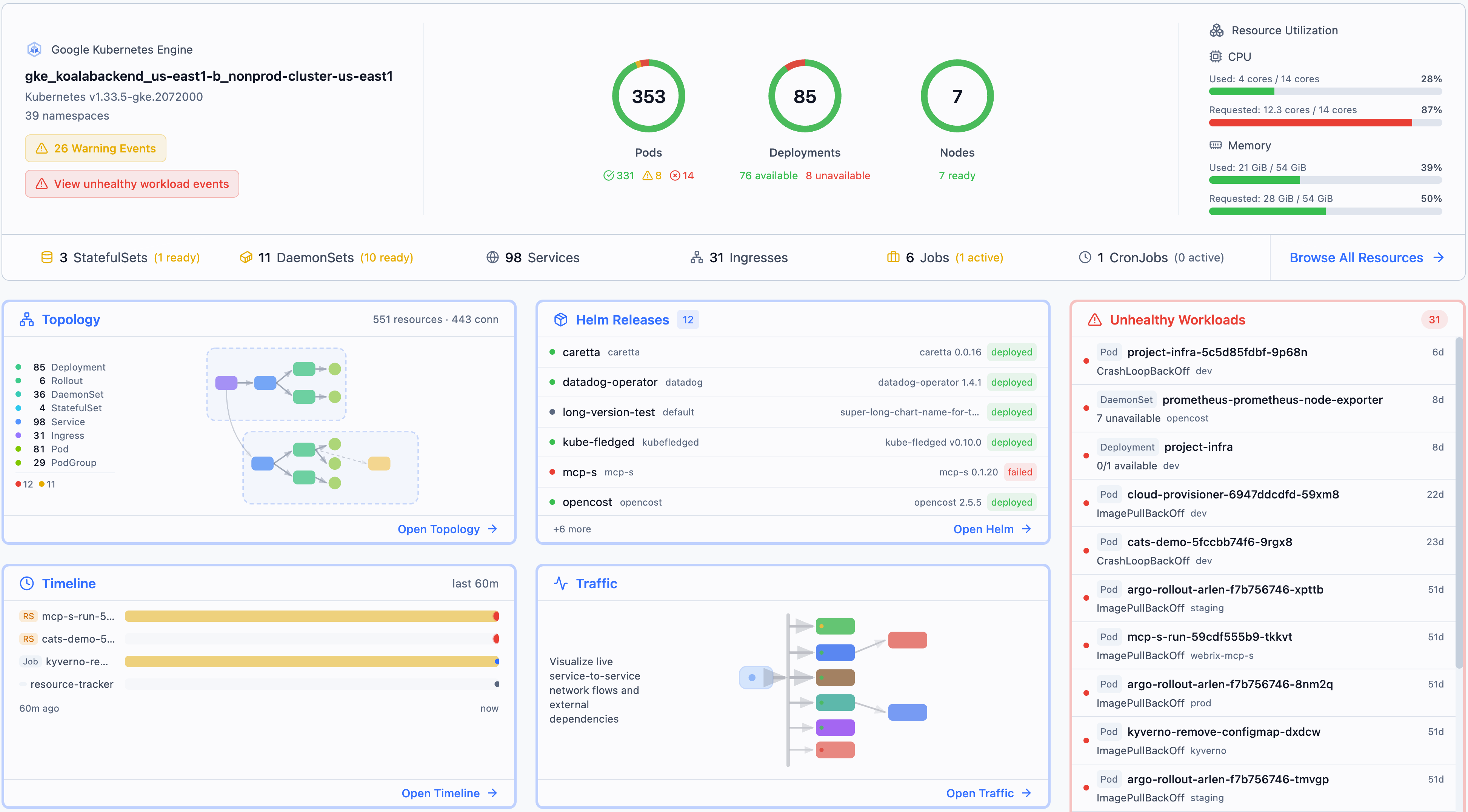
Start from Issues, a ranked queue of what's broken right now. Open a failing resource to see it in context: its owners, Pods, Services, and config on the Topology, what changed and when on the Timeline (with diffs), and its events, logs, and YAML in the detail drawer. Helm, GitOps, and Traffic cover how it got deployed and who talks to it. When you want help, Investigate hands the same evidence to your agent (AI investigations). Radar records resource changes while it watches the cluster; history is in memory by default, and --timeline-storage=sqlite or postgres keeps it across restarts.

Issues for the incident the agent diagnoses below: a crash loop on checkout and a Service with no endpoints
AI agents: MCP server and AI investigations
Pointed at raw kubectl, an agent spends its context window on YAML and its time on round trips. Radar's built-in Model Context Protocol (MCP) server gives it what Radar already knows instead: how resources connect, what is unhealthy, deduplicated events, recent changes with diffs, and filtered logs. In our benchmarks, the same agent and model reached a diagnosis about 3× faster through Radar than through kubectl (details).
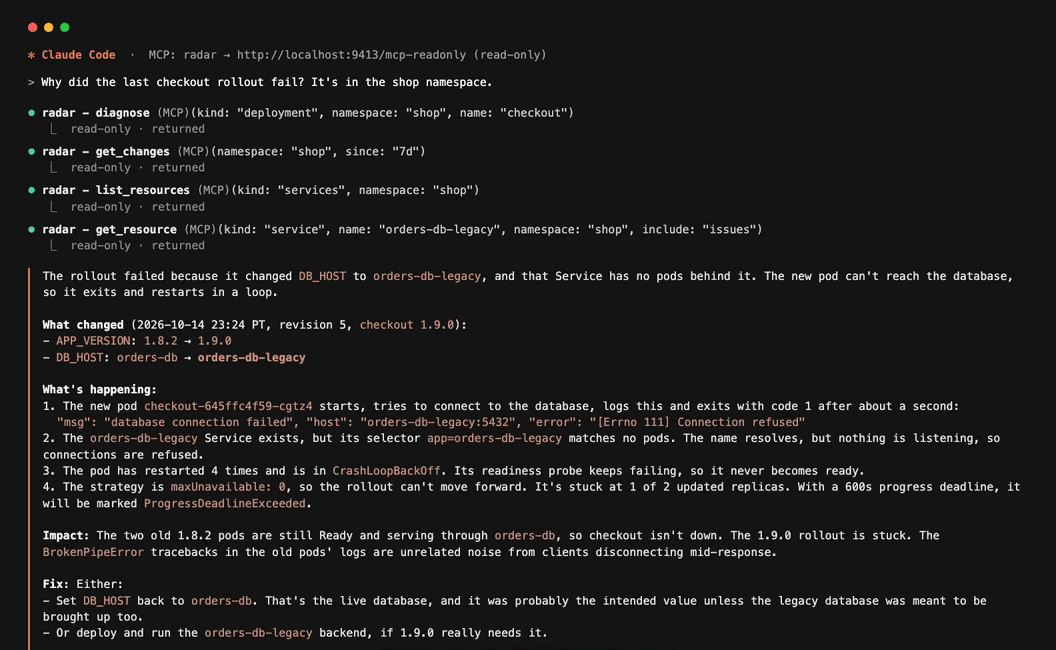
Claude Code on Radar's read-only endpoint, finding why a rollout failed (replay of a real session)
Connect your agent
MCP is on by default and served on the same port as the UI: 9280 unless you set --port. The desktop app picks its own port: copy the URL from Radar's MCP dialog and change the final /mcp to /mcp-readonly. Start with the read-only endpoint:
# Claude Code
claude mcp add --transport http radar http://localhost:9280/mcp-readonly

# Codex
codex mcp add radar --url http://localhost:9280/mcp-readonly
Setup for Cursor, VS Code (GitHub Copilot), Copilot CLI, OpenCode, Google Antigravity, Kiro, JetBrains, Cline, Devin, Claude Desktop, Zed, Gemini CLI, and any other MCP client is in the MCP guide. Its examples use /mcp; use /mcp-readonly instead to keep Radar's tools read-only. Your agent's other tools follow its own configuration.
- Context, not raw YAML — topology, health assessments, events, changes, and logs, minified so they don't burn the context window. The tools cover resources and topology, issues, events and changes, logs, Helm, audit, upgrade readiness, RBAC, cost, and Prometheus
- You pick the endpoint —
/mcp-readonlyhas no write tools. The full/mcpendpoint, also on by default, adds write tools (restart, scale, apply, rollback, GitOps sync, node drain) marked destructive so clients can ask before running them. On/mcp,diagnosecan also run an in-cluster reachability probe that creates short-lived pods. Calls use Radar's Kubernetes access: your kubeconfig locally, or each user's own RBAC when authentication is on.--mcp-read-onlyturns/mcpoff (and with it, applying a fix from an AI investigation);--no-mcpturns MCP and AI investigations off. Neither blocks ordinary UI writes - Secret values are withheld — Secret reads never include
.dataor.stringData. Environment variables, Helm values, and logs are scrubbed for known secret patterns, which can't catch everything, and the opt-inexec_podtool returns raw command output. See MCP security
AI investigations
Radar can also run the investigation for you, with the agent CLI you already have — Claude Code, Codex, Cursor, or OpenCode — on your machine and signed in with your own account. Radar needs no API key of its own. Start one from a resource's Investigate action, from an issue, by describing what you're seeing on the AI investigations page (where to start, since when, and optionally the resource it's about), or from a terminal against a running Radar:
radar diagnose deploy/checkout -n shop
radar diagnose deploy/checkout -n shop --json > conclusion.json
Every investigation ends on the same Findings page, with the evidence behind each claim. Radar's investigation tools can only read the cluster, and Radar applies a fix only when you approve it, from an investigation of the resource it changes. What else the agent can do depends on how Radar runs it. Radar safeguards (Claude Code and Codex) shuts off the agent's other MCP servers and its ability to write. Your agent setup (the only option for Cursor and OpenCode) runs the agent with its normal configuration, tools, and MCP servers, which Radar cannot constrain and which may be able to change your cluster. Cursor and OpenCo
📈 近 7 天 Star 趋势
🏆 排名变化趋势
📋 历史上榜记录
| 日期 | 榜单 | 排名 | 周期新增 | 总 STAR |
|---|