📄 仓库 README
在 GitHub 查看 ↗

From thought to insight, with agents












English | 中文 | 日本語 | Türkçe | Português
Table of Contents
- 💡 Introduction
- 🔮 Features
- 🏗️ Architecture and Ecosystem
- 🗺️ Roadmap
- 🚀 Download Setup
- App Market
- Installation Package
- Package Manager
- Docker Hosting
- Kubernetes Hosting
- Unraid Hosting
- TrueNAS Hosting
- Test Channels
- ⌨️ Command-line Interface
- 🏘️ Community
- 🛠️ Development Guide
- ❓ FAQ
- How does SiYuan store data?
- Does it support data synchronization through a third-party sync disk?
- Is SiYuan open source?
- How to upgrade to a new version?
- What if some blocks (such as paragraph blocks in list items) cannot find the block icon?
- What should I do if the data repo key is lost?
- Do I need to pay for it?
- 🙏 Acknowledgement
- Contributors
💡 Introduction
SiYuan is a privacy-first personal knowledge management system, supporting fine-grained block-level reference and Markdown WYSIWYG.
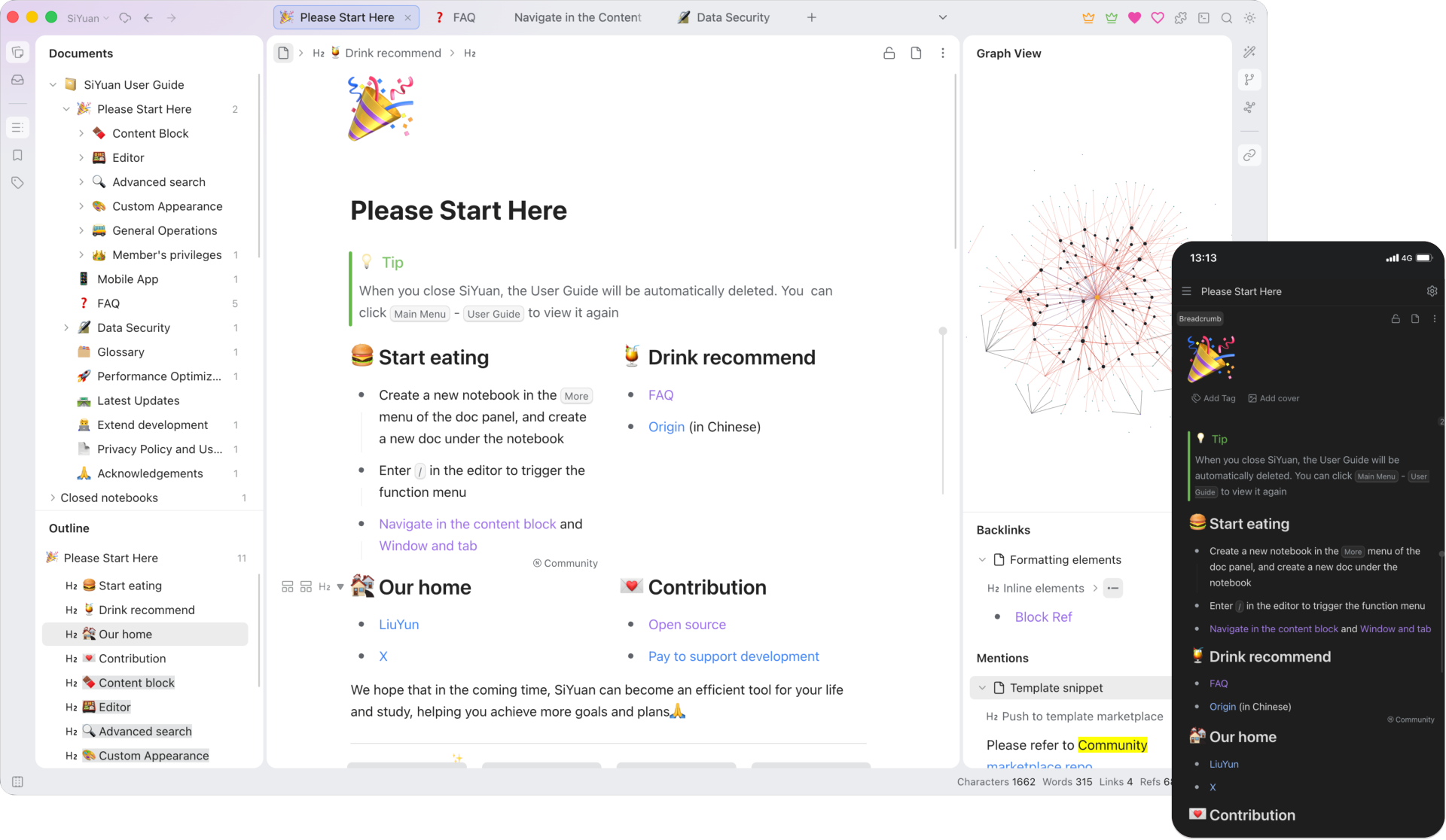
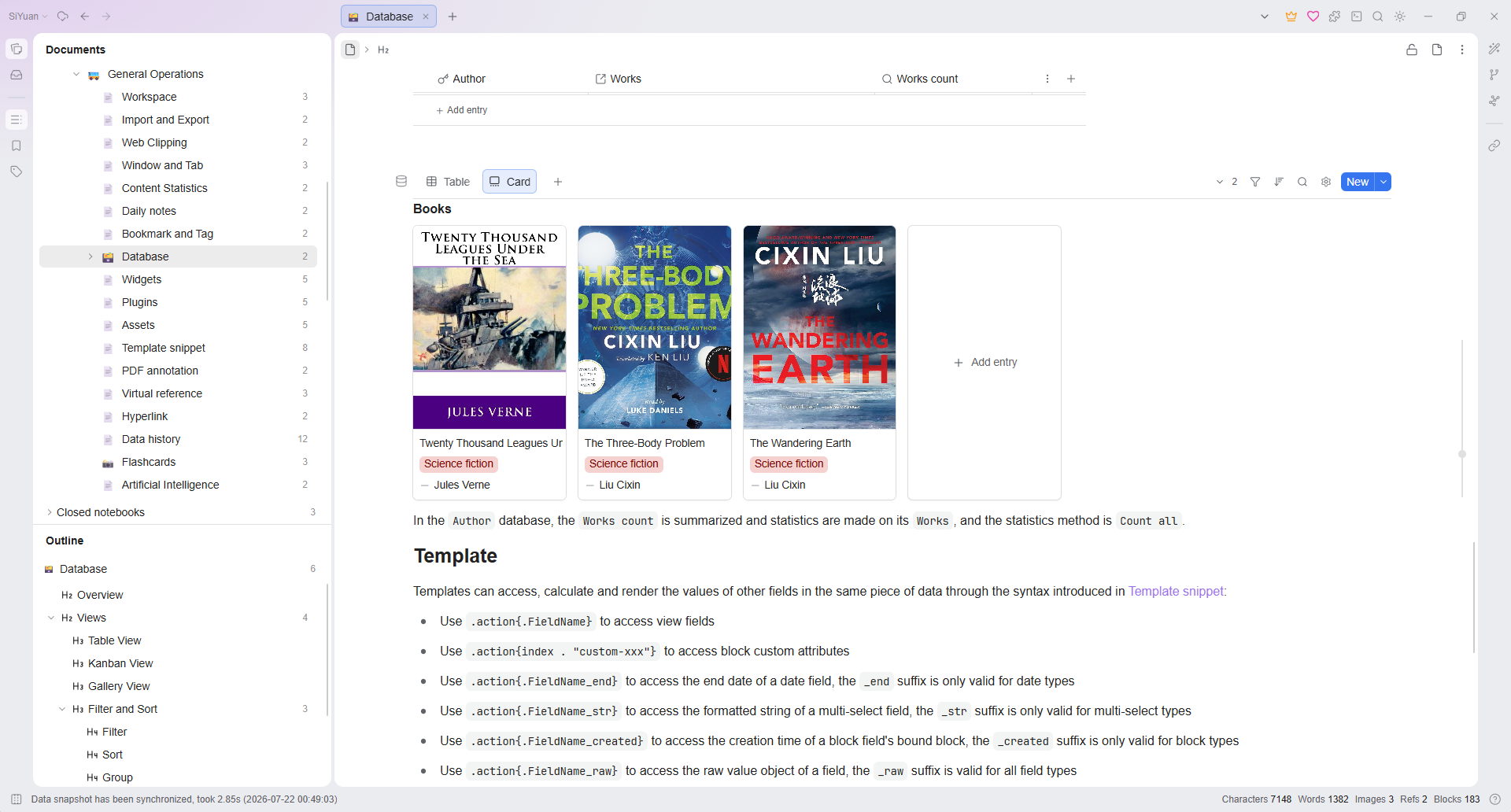
To learn more, read the online user guide or join the SiYuan English Discussion Forum.
🔮 Features
Most features are free, even for commercial use.
- Content block
- Block-level reference and two-way links
- Custom attributes
- SQL query embed
- Protocol
siyuan:// - Editor
- Block-style
- Markdown WYSIWYG
- List outline
- Block zoom-in
- Million-word large document editing
- Mathematical formulas, charts, flowcharts, Gantt charts, timing charts, staves, etc.
- Web clipping
- PDF Annotation link
- Export
- Block ref and embed
- Standard Markdown with assets
- PDF, Word and HTML
- Copy to WeChat MP, Zhihu and Yuque
- Database
- Table view
- Flashcard spaced repetition
- AI writing and Q/A chat via OpenAI API
- Tesseract OCR
- Multi-tab, drag and drop to split screen
- Template snippet
- JavaScript/CSS snippet
- Android/iOS/HarmonyOS App
- Docker deployment
- API
- Community marketplace
Some features are only available to paid members, for more details please refer to Pricing.
🏗️ Architecture and Ecosystem
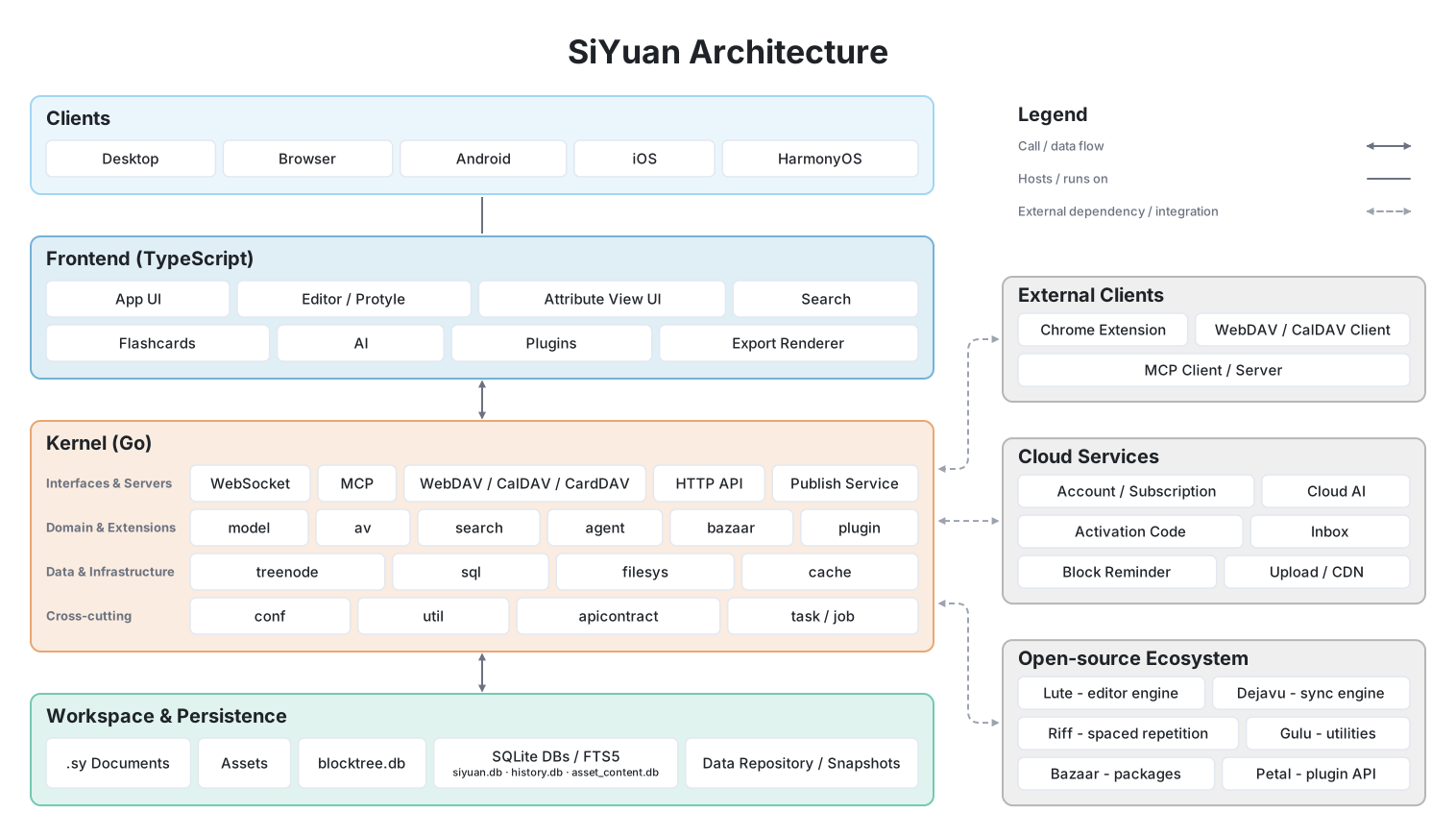
| Project | Description | Forks | Stars |
|---|---|---|---|
| lute | Editor engine |  |
 |
| chrome | Chrome/Edge extension |  |
 |
| bazaar | Community marketplace |  |
 |
| dejavu | Data repo |  |
 |
| petal | Plugin API |  |
 |
| android | Android App |  |
 |
| ios | iOS App |  |
 |
| harmony | HarmonyOS App |  |
 |
| riff | Spaced repetition |  |
 |
🗺️ Roadmap
🚀 Download Setup
It is recommended to give priority to installing through the application market on desktop and mobile, so that you can upgrade the version with one click in the future.
App Market
Mobile:
Desktop:
Installation Package
Package Manager
siyuan

siyuan-note

Docker Hosting
Docker Deployment
#### Overview The easiest way to serve SiYuan on a server is to deploy it through Docker. - Image name `b3log/siyuan` - [Image URL](https://hub.docker.com/r/b3log/siyuan) #### File structure The overall program is located under `/opt/siyuan/`, which is basically the structure under the resources folder of the Electron installation package: - appearance: icon, theme, languages - guide: user guide document - stage: interface and static resources - kernel: kernel program #### Entrypoint The entry point is set when building the Docker image: `ENTRYPOINT ["/opt/siyuan/entrypoint.sh"]`. This script allows changing the `PUID` and `PGID` of the user that will run inside the container. This is especially relevant to solve permission issues when mounting directories from the host. The `PUID` (User ID) and `PGID` (Group ID) can be passed as environment variables, making it easier to ensure correct permissions when accessing host-mounted directories. Use the following parameters when running the container with `docker run b3log/siyuan`: > **Note:** Since v3.7.0, the `serve` subcommand must be passed explicitly (e.g. `docker run b3log/siyuan serve --workspace=...`). Run `docker run --rm b3log/siyuan serve --help` to see all serving options. - `--workspace`: Specifies the workspace folder path, mounted to the container via `-v` on the host - `--accessAuthCode`: Specifies the lock screen password More parameters can be found using `--help`. Here’s an example of a startup command with the new environment variables: First set `AuthCode` to your own strong password (use `export AuthCode='your-strong-password'` in Bash; Compose can also read a `.env` file in the same directory). The example stops with an error if the value is unset or empty.docker run -d \
-v workspace_dir_host:workspace_dir_container \
-p 6806:6806 \
-e PUID=1001 -e PGID=1002 \
b3log/siyuan \
serve \
--workspace=workspace_dir_container \
--accessAuthCode="${AuthCode:?Set AuthCode}"
docker run -d \
  -v /siyuan/workspace:/siyuan/workspace \
  -p 6806:6806 \
  -e PUID=1001 -e PGID=1002 \
  b3log/siyuan \
  serve \
  --workspace=/siyuan/workspace/ \
  --accessAuthCode="${AuthCode:?Set AuthCode}"
version: "3.9"
services:
  main:
    image: b3log/siyuan
    command: ['serve', '--workspace=/siyuan/workspace/', '--accessAuthCode=${AuthCode:?Set AuthCode}']
    ports:
      - 6806:6806
    volumes:
      - /siyuan/workspace:/siyuan/workspace
    restart: unless-stopped
    environment:
      - TZ=${YOUR_TIME_ZONE}    # A list of time zone identifiers can be found at https://en.wikipedia.org/wiki/List_of_tz_database_time_zones
      - PUID=${YOUR_USER_PUID}  # Customize user ID
      - PGID=${YOUR_USER_PGID}  # Customize group ID
chown -R 1001:1002 /siyuan/workspace
Kubernetes Hosting
Kubernetes Deployment
The [HelmForge SiYuan chart](https://github.com/helmforgedev/charts/tree/main/charts/siyuan) is community-maintained by HelmForge, uses the official `b3log/siyuan` image, and is not an official SiYuan chart. Please report chart issues to [HelmForge](https://github.com/helmforgedev/charts/issues). Prepare Helm, kubectl, and a Kubernetes cluster with a default StorageClass that can provision a 10Gi ReadWriteOnce volume, then run the following commands:helm repo add helmforge https://repo.helmforge.dev
helm repo update
helm install siyuan helmforge/siyuan --namespace siyuan --create-namespace --wait
kubectl -n siyuan get secret siyuan-siyuan-auth -o go-template='{{index .data "access-code" | base64decode}}{{"\n"}}'
kubectl -n siyuan port-forward service/siyuan-siyuan 6806:6806
Unraid Hosting
Unraid Deployment
Note: First run `chown -R 1000:1000 /mnt/user/appdata/siyuan` in the terminal Template reference:Web UI: 6806
Container Port: 6806
Container Path: /siyuan/workspace
Host path: /mnt/user/appdata/siyuan
PUID: 1000
PGID: 1000
Publish parameters: serve --accessAuthCode=******(Lock screen password)
TrueNAS Hosting
TrueNAS Deployment
Note: First, run the commands below in the TrueNAS Shell. Please update `Pool_1/Apps_Data/siyuan` to match your dataset path.zfs create Pool_1/Apps_Data/siyuan
chown -R 1001:1002 /mnt/Pool_1/Apps_Data/siyuan
chmod 755 /mnt/Pool_1/Apps_Data/siyuan
services:
  siyuan:
    image: b3log/siyuan
    container_name: siyuan
    command: ['serve', '--workspace=/siyuan/workspace/']
    ports:
      - 6806:6806
    volumes:
      - /mnt/Pool_1/Apps_Data/siyuan:/siyuan/workspace  # Adjust to your dataset path
    restart: unless-stopped
    environment:
      - SIYUAN_ACCESS_AUTH_CODE=
      - TZ=America/New_York  # Replace with your timezone if needed
      - PUID=1001
      - PGID=1002
Test Channels
Select Beta or Alpha in Settings - About - Update channel to receive prereleases. Beta includes stable, RC, and Beta releases; Alpha includes all releases. Test channels require access to GitHub.
⌨️ Command-line Interface
The built-in CLI provides direct access to workspace data — no running server required.
The CLI does not support operations on encrypted notebooks. Unlock and access them through the dedicated in-app workflow.
Quick Start
# List all notebooks
siyuan notebook list -w ~/SiYuan

# Full-text search with JSON output
siyuan search "keyword" -w ~/SiYuan -f json

# Search inside asset files (PDF/Word/Excel/txt etc.)
siyuan search "phrase" --asset -w ~/SiYuan
siyuan search "phrase" --asset --ext pdf --ext docx -w ~/SiYuan

# Export a document as Markdown
siyuan export md --id <block-id> -w ~/SiYuan
Available Commands
| Category | Commands |
|---|---|
| Notebooks & Documents | notebook, document, dailynote — CRUD and daily notes |
| Content | block, attr, outline — block read/write, attributes, outline |
| Metadata | tag, bookmark, template — tags, bookmarks, template snippets |
| Queries | search, sql — full-text, semantic, asset-content, and SQL queries |
| References | ref — backlinks and mentions |
| Import/Export | export, import, inbox — Markdown, HTML, preview, Word, .sy.zip, Data, cloud inbox |
| Data Management | repo, history, sync — snapshots, versions, cloud sync |
| Utilities | asset, file — resources and file system |
| Database | database — attribute view management |
| Server | serve — start the kernel HTTP server |
| Workspace & System | workspace, system — list, inspect, system info |
Run siyuan --help for the full command tree. Use -f json (default is -f table) for script-friendly output. Most mutating commands also support --dry-run to preview changes without applying them.
Installation
The CLI binary is <install-dir>/resources/kernel/SiYuan-Kernel, invoked via the siyuan command.
- Windows: the installer automatically adds the kernel directory to
PATH, sosiyuanworks out of the box. The Microsoft Store edition (3.8.7+) registers thesiyuan.exeapp execution alias on Windows 10 1607 (build 14393) or later. After installing or updating, open a new terminal and runsiyuan --help```powershell siyuan --help
# Check which command is being used
Get-Command siyuan -All
where.exe siyuan
``
If the command is unavailable, check that the SiYuan app execution alias is enabled in Windows and%LOCALAPPDATA%\Microsoft\WindowsAppsis inPATH. The commands above show command resolution; multiple SiYuan editions orPATH` order may select another executable
If you created the old siyuan.cmd shim, first verify the Store alias directly with & "$env:LOCALAPPDATA\Microsoft\WindowsApps\siyuan.exe" --help, then optionally remove the shim: Remove-Item "$env:LOCALAPPDATA\Microsoft\WindowsApps\siyuan.cmd"
- macOS: create a symlink after installing:
bash
  ln -s /Applications/SiYuan.app/Contents/Resources/kernel/SiYuan-Kernel /usr/local/bin/siyuan
- Linux: create a symlink after installing:
bash
  ln -s <install-dir>/resources/kernel/SiYuan-Kernel /usr/local/bin/siyuan
🏘️ Community
🛠️ Development Guide
See Development Guide.
❓ FAQ
How does SiYuan store data?
The data is saved in the workspace data folder:
assetsis used to save all inserted assetsemojisis used to save emoji imagessnippetsis used to save code snippetsstorageis used to save query conditions, layouts and flashcards, etc.templatesis used to save template snippetswidgetsis used to save widgetspluginsis used to save pluginspublicis used to save public data- Notebook folders contain the document data. Ordinary notebooks store
.sydocuments as JSON; encrypted notebooks store them as ciphertext.
Does it support data synchronization through a third-party sync disk?
Data synchronization through third-party synchronization disks is not supported, otherwise data may be corrupted.
Although it does not support third-party sync disks, it supports connecting with third-party cloud storage (Members' privileges).
Is SiYuan open source?
SiYuan is completely open source, and contributions are welcome:
For more details, please refer to Development Guide.
How to upgrade to a new version?
- If installed via app store, please update via app store
- If it is installed with the desktop installation package on Windows or macOS, you can enable the option of Settings - About - Automatically download update installation package, so that SiYuan will automatically download the latest version of the installation package and prompt to install
- If it is installed by manual installation package, please download the installation package again to install
You can Check update in Settings - About - Current Version, or pay attention to Official Download or GitHub Releases to get the new version.
Note: Keep your workspace outside the installation directory; updating SiYuan clears files in the installation directory.
What if some blocks (such as paragraph blocks in list items) cannot find the block icon?
The block icon is omitted for the first sub-block under the list item. You can move the cursor into this block and trigger its block menu with Ctrl+/ .
What should I do if the data repo key is lost?
The data repo key protects snapshots and sync data. It is separate from the encrypted-notebook master password and key backups. Resetting the data repo cannot recover a lost master password or replace matching encryption key backups.
Before resetting, exit SiYuan normally and back up the complete workspace. If you have encrypted notebooks, also keep separate, matching encryption key backups and confirm that the master password works. Delete old cloud sync directories and snapshots only after the new sync completes, data is verified, and recovery materials are safely preserved.
- If the data repo key is correctly initialized on multiple devices previously, the key is the same on all devices and can be retrieved in Settings - Account & Sync - Data repo - Data repo key - Copy key string
- If it has not been configured correctly before (for example, the keys on multiple devices are inconsistent) or all devices are unavailable and the key string cannot be obtained, you can reset the key by following the steps below:
- Exit SiYuan normally and back up the complete workspace; for encrypted notebooks, also preserve matching encryption key backups and the master password
- Settings - Account & Sync - Data repo - Data repo key - Reset data repo
- Reinitialize the data repo key. After initializing the key on one device, other devices import the key
- Use a new cloud sync directory; delete the old directory only after the new sync completes, data is verified, and recovery materials are safely preserved
- Delete old cloud snapshots only after the new sync completes, data is verified, and recovery materials are safely preserved
Do I need to pay for it?
Most features are free, even for commercial use.
Member's privileges can only be used after payment, please refer to Pricing.
🙏 Acknowledgement
The birth of SiYuan is inseparable from many open source projects and contributors. Please refer to the project source code kernel/go.mod, app/package.json and project homepage.
The growth of SiYuan is inseparable from user feedback and promotion. Thank you, everyone, for your help with SiYuan ❤️
Contributors
Welcome to join us and contribute code to SiYuan together.
📈 近 7 天 Star 趋势
🏆 排名变化趋势
📋 历史上榜记录
| 日期 | 榜单 | 排名 | 周期新增 | 总 STAR |
|---|