📄 仓库 README
在 GitHub 查看 ↗Custom AI Agent
The bridge between Burp Suite and modern AI.
A note on the name: This extension is published as Custom AI Agent (formerly Burp AI Agent). It was renamed to comply with PortSwigger's BApp Store naming requirements and to avoid confusion with Burp Suite's built-in Burp AI provider. The GitHub repository (
github.com/six2dez/burp-ai-agent), the documentation site (burp-ai-agent.six2dez.com), and the configuration directory (~/.burp-ai-agent/) keep theburp-ai-agentidentifier for continuity.
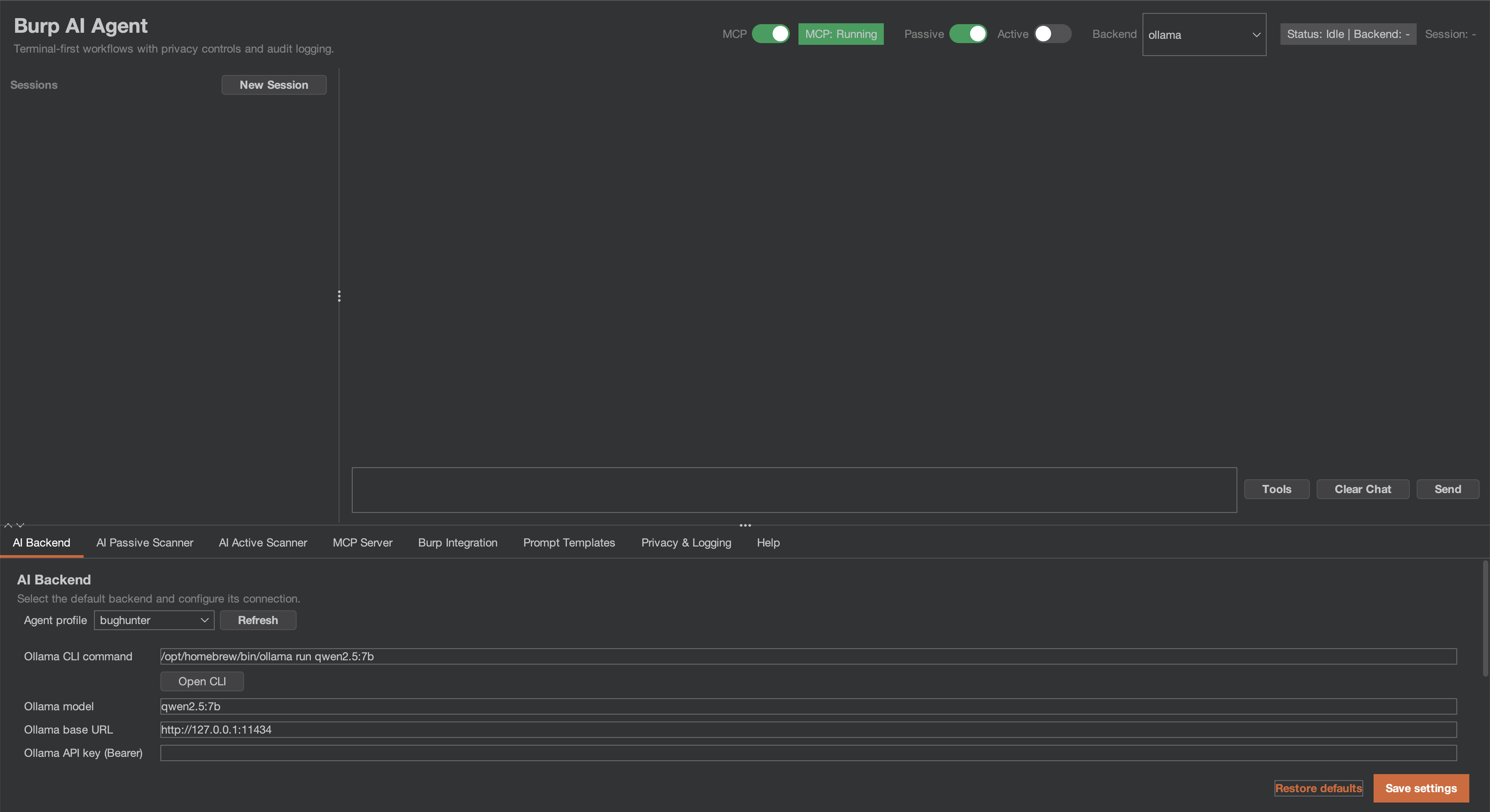
Custom AI Agent is an extension for Burp Suite that integrates AI into your security workflow. Use local models or cloud providers, connect external AI agents via MCP, and let passive/active scanners find vulnerabilities while you focus on manual testing.
[!IMPORTANT] If you are running 1.0.0 or earlier, read the security advisories and upgrade to the latest release, 1.1.0. Audit files written with Audit logging on may hold the MCP token and full prompts, and right-click "send to AI" context could bypass the privacy mode; both advisories say which credentials to rotate. No CVE or GHSA identifier has been issued for any of them.
What's new in v1.1.0
Two builds from one repository, built for the BApp Store resubmission. Full detail in CHANGELOG.md.
- Two builds. The BApp Store build (
./gradlew bappJar) has the 8 extension-native MCP tools, Burp AI and the six HTTP backends. The GitHub full build (./gradlew fullJar) has all 59 MCP tools, the five CLI backends, the external MCP client and the opt-in auto-queue. Both are on Releases, each with a.sha256. Load only one at a time; Which Build? compares them. - The BApp Store build's AI gate. The BApp Store build runs on Burp Community and Burp Professional; it sends AI requests only while Burp's "Use AI" setting is enabled for the extension, and with it off it loads and refuses every AI request.
- Passive scans send nothing to the target. Passive findings the AI Active Scanner can test are listed as suggested targets in its queue dialog, in both builds, and you queue them by hand: nothing is sent to a target before you confirm.
- Clean unload. Unloading leaves no thread, timer or MCP listener of the extension running and starts no new request to an AI provider.
- Issue details are HTML-encoded. Payloads, values taken from the target and AI text show as literal text in Burp's issue view and reports.
- The AI scanners start OFF at every load, in both builds; switching one on lasts until Burp unloads the extension.
What's new in v1.0.1
A correctness and privacy hotfix for 1.0.0. Full detail in CHANGELOG.md and SECURITY.md.
- Non-ASCII prompts work on every HTTP backend (#84, #85, #86, #88). Request bodies are sent as UTF-8 bytes; before, non-ASCII characters were corrupted and target text could change the JSON structure of the request.
- Privacy: right-click context, scanner settings, audit logging and chat links now honour the privacy mode and the hashes-only audit default; chat links open only after a confirmation.
- Scanner safety: state-changing requests are replayed only at DANGEROUS; the Burp Scanner AI checks respect the scan's resource pool and the AI passive switch.
- Reliability: NVIDIA NIM and Perplexity work again, follow-up chat messages keep their context, and redaction no longer drops content on slow or busy machines.
- Bundled libraries: Netty 4.1.138, Jackson 2.22.3.
What's new in v1.0.0
First stable release, and a security-correctness milestone. An external review of 0.9.2 on
2026-08-05 confirmed two exploitable defects by running the shipped code; this release fixes both
plus the wider class of issues the same review surfaced. Full detail in CHANGELOG.md.
Fixed, and disclosed:
- SEC-04 (critical) — MCP access-control checks did not run on resolved routes. With external access enabled the listener accepted unauthenticated tool calls; in local mode the Origin/Host/User-Agent checks and the security response headers were inert on matched routes. The decision now runs ahead of routing. → rotate your MCP token
- PRIV-05 (high) — session cookies reached AI backends unredacted in STRICT and BALANCED. The
passive scanner emitted cookies as bare
name=value, dropping the prefix redaction keyed on, and only a cookie literally namedsessionwas caught. → rotate affected cookies
Hardened:
- Model-emitted tool calls now need your approval (SEC-06) — a tool call parsed out of model output does not reach Burp until you decide. Tiers fail closed: an unrecognised tool name confirms every time, never runs silently. See Privacy and Security Notes.
- The MCP token is no longer disclosed during a port takeover (SEC-07) — a local process squatting the MCP port and echoing the identity header could previously harvest a token granting full MCP tool access. The takeover client now presents an HMAC proof of possession instead, and under TLS it pins the server certificate to its own keystore.
SsrfGuardclassifies alternate IP notations (SEC-07) —http://2852039166/(decimal for169.254.169.254) no longer sidesteps the private/link-local warning by notation alone, and classification now performs no name resolution at all.- Shell arguments are quoted by allowlist (QUAL-06) — closing a settings-import-to-command-execution
path for values carrying metacharacters without whitespace (
foo;id,$(cmd)). - EDT confinement and scheduler robustness — tool execution, backend HTTP and MCP
stop()moved off the Swing event dispatch thread; recurring tasks guarded against death-by-exception.
Verified: test suite grown from 660 to 1131 tests across 158 classes, project line coverage 34% → 58%, and the detekt baseline shrunk 1096 → 1040 rather than grown.
Highlights
- 12 AI Backends — Burp AI (built-in), Anthropic, Ollama, LM Studio, NVIDIA NIM, Perplexity, Generic OpenAI-compatible, Gemini CLI, Claude CLI, Codex CLI, OpenCode CLI, Copilot CLI. The BApp Store build has 7 (Burp AI and the six HTTP backends); the five CLI backends are in the full build only.
- 59 MCP Tools — Let Claude Desktop (or any MCP client) drive Burp autonomously (8 extension-native AI tools in the store build, all 59 in the full build).
- Scoped MCP Access — Optionally confine every MCP tool to your in-scope hosts, so external AI clients can't reach out-of-scope targets through Burp.
- 62 Vulnerability Classes — Passive and Active AI scanners across injection, auth, crypto, and more. The passive scanner runs as a Burp
PassiveScanCheck(Burp Pro). - Install from Releases — Download either build from Releases; Which Build? explains how they differ. Custom AI Agent is not listed in the BApp Store yet: the BApp Store build is going through PortSwigger's review in extension-portal#231.
- Theme-Aware UI — An internal design system styles the settings panel and re-themes automatically with Burp's light/dark switch.
- Burp Scan Skill — Use your preferred AI coding assistant (Claude Code, Gemini CLI, Codex, etc.) as a scanner via MCP.
- Tool-Call Confirmation — Tool calls the AI emits are gated: read-only bounded tools run silently, everything else asks first with an approval card in the chat. Unknown tools fail closed.
- 3 Privacy Modes — STRICT / BALANCED / OFF. Redact sensitive data before it leaves Burp.
- Custom Prompt Library — Save free-form prompts per context (HTTP request or scanner issue); launch them from the right-click menu or type ad-hoc ones via
Custom…. - Audit Logging — Opt-in JSONL log with a per-record SHA-256; prompts, context and responses are recorded as SHA-256 plus length unless Verbose audit is on, and credentials are never written; every launch stamped with
promptSource/contextKindfor reproducibility.
Quick Start
1. Install
Download the latest JAR from Releases: each release carries Custom-AI-Agent-full-<version>.jar (the GitHub full build) and Custom-AI-Agent-bapp-<version>.jar (the BApp Store build), each with a .sha256. Which Build? explains which one to pick. Or build from source (Java 21):
git clone https://github.com/six2dez/burp-ai-agent.git
cd burp-ai-agent

# Full build (GitHub releases) — all 59 MCP tools
JAVA_HOME=/path/to/jdk-21 ./gradlew clean fullJar
# Output: build/libs/Custom-AI-Agent-full-<version>.jar

# Store build (BApp Store submission) — 8 extension-native AI MCP tools only
JAVA_HOME=/path/to/jdk-21 ./gradlew clean bappJar
# Output: build/libs/custom-ai-agent-bapp.jar
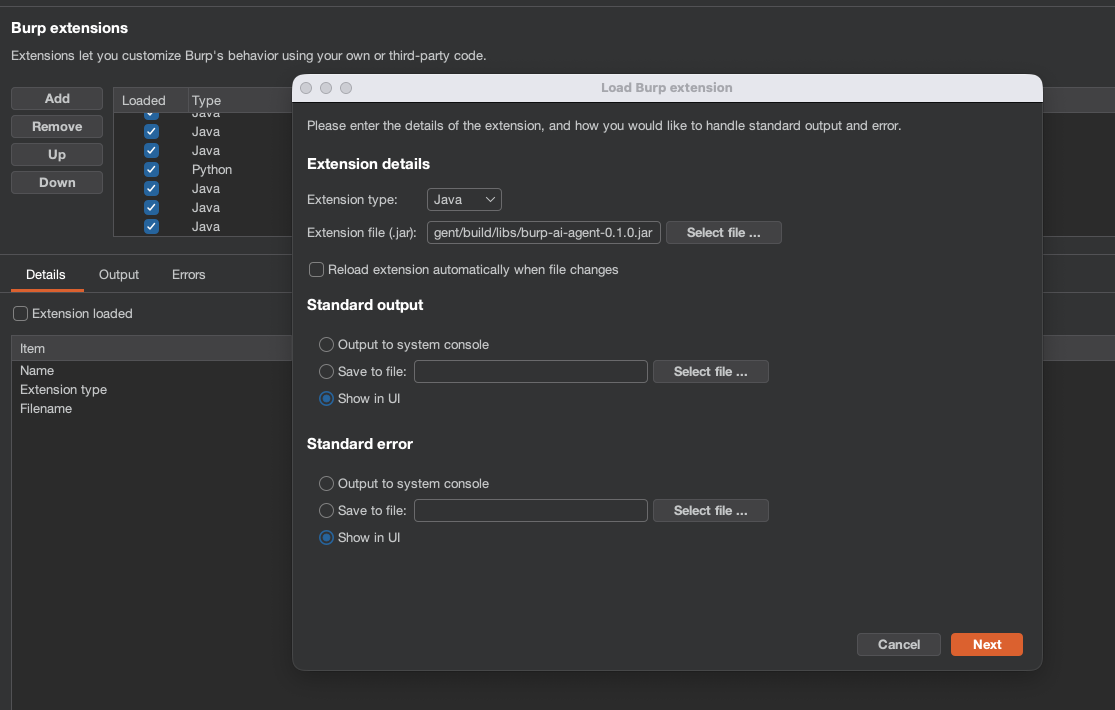
2. Load into Burp
- Open Burp Suite (Community or Professional).
- Go to Extensions > Installed > Add.
- Select Java as extension type and choose the
.jarfile.
The extension registers in Burp as Custom AI Agent (the name in the Extensions list and the Suite tab) to distinguish it from Burp's built-in Burp AI provider.
Load only one build. The full build and the BApp Store build both register as Custom AI Agent, so they look identical in Burp's Extensions list. Loading both at once gives you two Custom AI Agent tabs, two MCP servers competing for the same port, and two copies writing the shared ~/.burp-ai-agent directory. Unload one before you load the other.
Burp edition and "Use AI". The BApp Store build runs on Burp Community and Burp Professional; it sends AI requests only while Burp's "Use AI" setting is enabled for the extension, and with it off it loads and refuses every AI request. PortSwigger documents "Use AI" as a per-extension checkbox, off by default: Extensions > Installed > Custom AI Agent > Use AI.
3. Agent Profiles
The extension auto-installs the bundled profiles into ~/.burp-ai-agent/AGENTS/ on first run.
Drop additional *.md files in that directory to add custom profiles.
4. Configure a Backend
Open the AI Agent tab and go to Settings. Pick a backend:
| Backend | Type | Setup |
|---|---|---|
| Burp AI (built-in) | In-process | Uses Burp's built-in AI and needs Burp's "Use AI" setting enabled for the extension (see Requirements); no extra config required. |
| Ollama | Local HTTP | Install Ollama, run ollama serve, pull a model (ollama pull llama3.1). |
| LM Studio | Local HTTP | Install LM Studio, load a model, start the server. |
| NVIDIA NIM | HTTP | Use the default https://integrate.api.nvidia.com endpoint, set your NVIDIA API key, and choose a model such as moonshotai/kimi-k2.5. |
| Perplexity | HTTP | Use the default https://api.perplexity.ai endpoint, set your pplx-... API key, and choose a model such as sonar, sonar-pro, or sonar-reasoning. |
| Generic OpenAI-compatible | HTTP | Provide a base URL and model for any OpenAI-compatible provider. |
| Gemini CLI | Cloud CLI (full build only) | Install gemini, run gemini auth login. |
| Claude CLI | Cloud CLI (full build only) | Install claude, set ANTHROPIC_API_KEY or run claude login. |
| Codex CLI | Cloud CLI (full build only) | Install codex, set OPENAI_API_KEY. |
| OpenCode CLI | Cloud CLI (full build only) | Install opencode, configure provider credentials. |
| Copilot CLI | Cloud CLI (full build only) | Install copilot and sign in with your GitHub account. |
| Anthropic | Cloud API | Enter your Anthropic API key in Settings. API traffic routes through Burp's proxy. See docs/anthropic-backend.md. |
For NVIDIA NIM, the backend expects the same chat-completions style flow as the NVIDIA hosted endpoint. A working configuration is:
Backend: NVIDIA NIM
Base URL: https://integrate.api.nvidia.com
Model: moonshotai/kimi-k2.5
API Key: <your nvapi token>
Leave extra headers empty unless your gateway requires them. The extension sends requests to /v1/chat/completions and uses the configured bearer token automatically.
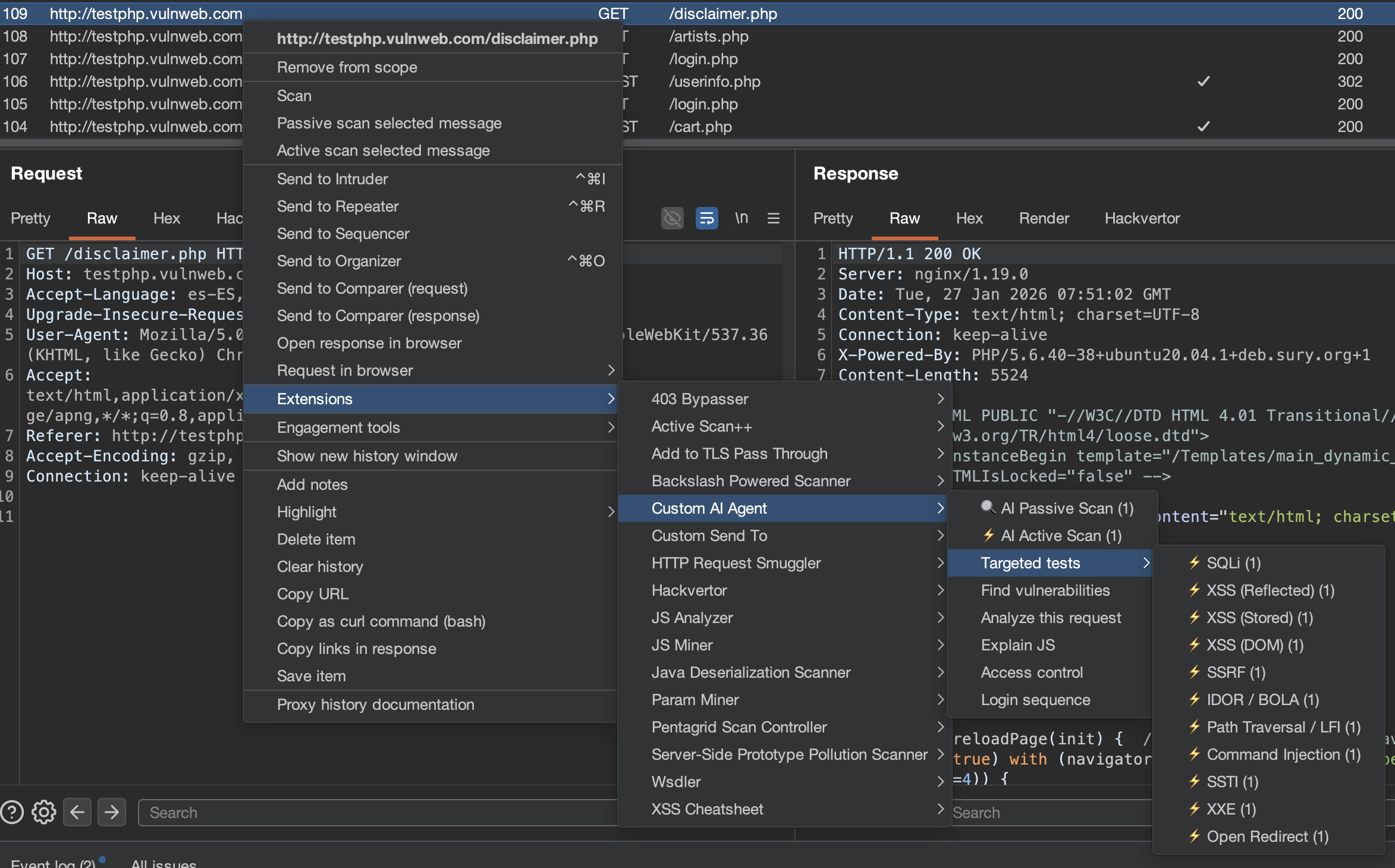
5. Run Your First Analysis
- Browse a target through Burp Proxy.
- Right-click any request in Proxy > HTTP History.
- Select Extensions > Custom AI Agent > Analyze this request.
- A chat session opens with the AI analysis.
6. Connect Claude Desktop via MCP (Optional)
Enable the MCP server in Settings > MCP Server and add this to your Claude Desktop config:
macOS: ~/Library/Application Support/Claude/claude_desktop_config.json
Windows: %APPDATA%\Claude\claude_desktop_config.json
{
  "mcpServers": {
    "burp-ai-agent": {
      "command": "npx",
      "args": [
        "-y",
        "supergateway",
        "--sse",
        "http://127.0.0.1:9876/sse"
      ]
    }
  }
}
Requires Node.js 18+. If you enable External Access, the MCP client must send
Authorization: Bearer <token>on every request.
Full build only. You can also register external or custom MCP servers in Settings > MCP Server > External MCP Servers (SSE or stdio transports). External server auth tokens are stored encrypted at rest, with the caveat described in Privacy and Security Notes. See docs/external-mcp-servers.md for setup details and security notes.
Burp Scan Skill (Terminal AI Scanning)
The burp-scan skill lets you use any AI coding assistant (Claude Code, Gemini CLI, Codex, etc.) as a Burp scanner from your terminal. Instead of the plugin's built-in AI, your terminal AI becomes the reasoning engine while Burp provides the tools via MCP.
What It Contains
- MCP tool reference (up to all 59 tools in the full build) organized by scanning action
- Passive analysis protocol (traffic analysis without sending requests)
- Active testing payload library (200+ payloads for 62 vuln classes with detection patterns)
- End-to-end scanning workflow (scope -> passive -> active -> OOB -> report)
- Issue creation protocol with severity/confidence mapping
Install for Claude Code
Copy the skill to your Claude Code skills directory:
# Global (available in all projects)
cp -r skills/burp-scan ~/.claude/skills/burp-scan

# Or project-specific
cp -r skills/burp-scan .claude/skills/burp-scan
Then use /burp-scan in Claude Code or let it trigger automatically when you mention Burp scanning.
Install for Other AI Assistants
The skill is a standalone Markdown file at skills/burp-scan/SKILL.md. You can use it with any AI assistant that supports system prompts or context files:
- Gemini CLI / Codex / OpenCode: Add as a context file or paste into your system prompt
- Custom MCP clients: Include the skill content as system context alongside your MCP connection
- Any LLM: The file is self-contained — feed it as context along with your MCP tool definitions
Usage Example
You: Connect to Burp MCP at localhost:9876 and scan the proxy history for IDOR vulnerabilities

AI: [Uses proxy_http_history to pull traffic]
    [Identifies endpoints with numeric IDs]
    [Sends http1_request with ID+1, ID-1 payloads]
    [Compares responses for different user data]
    [Creates issue_create for confirmed IDOR]
The skill and the plugin's built-in scanner are complementary: the plugin runs automated background scanning, while the skill enables interactive, analyst-guided scanning from your terminal.
Documentation
Full documentation is available at burp-ai-agent.six2dez.com.
- Installation
- Which Build?
- Quick Start
- UI Tour
- Agent Profiles
- Passive Scanner
- Active Scanner
- MCP Overview
- Privacy Modes
- Settings Reference
- Security Advisories
- Troubleshooting
- Burp Scan Skill
Operator Playbooks
Privacy and Security Notes
- Secrets at rest — what the encryption does and does not do. All stored API keys and tokens (Anthropic, MCP bearer token, TLS keystore password, etc.) are encrypted with AES-256-GCM using a per-install random master key (
SecretCipher). That master key is itself stored in Burp Preferences, Base64-encoded, beside the ciphertext it protects (preferencesecret.master.key.v1). Anyone who can read your Burp Preferences can therefore also read the key and decrypt the secrets. It does not protect against a local attacker or a malicious process running as your user; treat it as obfuscation against casual inspection of a preferences file or an exported project. If a credential must survive that threat model, keep it in a dedicated secret store and paste it per session. - Model-emitted tool calls need your approval. A tool call that the extension parses out of model output does not execute against Burp until you decide. Every tool carries a required security tier: run automatically (read-only and bounded output), confirm with an Approve for session option, or confirm on every single call. A tool name the catalog does not recognise resolves to confirm-every-time, never to automatic, and external
ext:-namespaced tools always confirm every call. The decision appears as a card inline in the chat transcript rather than as a modal dialog, and each decision is recorded — an audit event plus a line in Burp's Output tab, since audit logging is off by default. Denying returns a neutral "not authorised, do not retry" result to the model rather than an error. This tier is independent of the Unsafe Mode switch: Unsafe Mode governs whether a tool may ever run, the tier governs whether the model may run it without asking. Design rationale:DECISIONS.mdADR-15. Operator runbook: docs/ui-safety-guide.md. - STRICT privacy mode anonymizes hosts using real HKDF (HMAC-SHA256 extract/expand). BALANCED mode redacts cookies, tokens, and auth headers. OFF mode sends traffic as-is.
- External MCP server outputs are wrapped in a trust-boundary marker before entering the AI prompt, preventing prompt injection from untrusted server responses (full build only).
Settings are schema-versioned internally (settings.schema.version) and migrated additively on load for safe upgrades.
Requirements
- Burp Suite Community or Professional, 2026.2 or newer
- AI features in the BApp Store build — The BApp Store build runs on Burp Community and Burp Professional; it sends AI requests only while Burp's "Use AI" setting is enabled for the extension, and with it off it loads and refuses every AI request. The GitHub full build's HTTP and CLI backends do not depend on Burp's "Use AI" (Burp AI and the MCP tools
ai_analyzeandai_passive_scanstill do); see Which Build?. - Java 21 (bundled with modern Burp for runtime; required separately for building from source)
- At least one AI backend configured (see table above)
License
This project is licensed under the MIT License.
Disclaimer
Usage of Custom AI Agent for attacking targets without prior consent is illegal. It is the user's responsibility to obey all applicable laws. The developers assume no liability for misuse or damage caused by this tool. Use responsibly.
Contributing
Issues and pull requests are welcome. See CONTRIBUTING.md for development setup and guidelines, or the Developer docs for architecture details.
📈 近 7 天 Star 趋势
🏆 排名变化趋势
📋 历史上榜记录
| 日期 | 榜单 | 排名 | 周期新增 | 总 STAR |
|---|