📄 仓库 README
在 GitHub 查看 ↗Powerlevel10k

- THE PROJECT HAS VERY LIMITED SUPPORT
- NO NEW FEATURES ARE IN THE WORKS
- MOST BUGS WILL GO UNFIXED
- HELP REQUESTS WILL BE IGNORED
Powerlevel10k is a theme for Zsh. It emphasizes speed, flexibility and out-of-the-box experience.
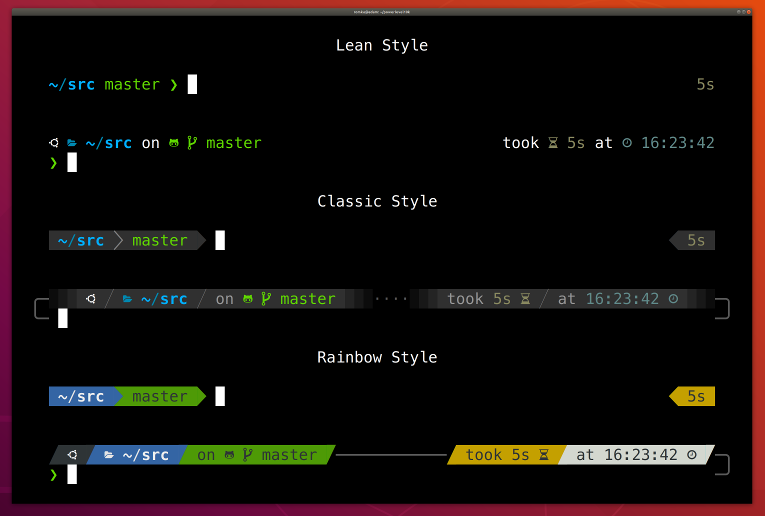
- Getting started
- Features
- Installation
- Configuration
- Fonts
- Try it in Docker
- License
- FAQ
- Troubleshooting
Getting started
- Install the recommended font. Optional but highly recommended.
- Install Powerlevel10k itself.
- Restart Zsh with
exec zsh. - Type
p10k configureif the configuration wizard doesn't start automatically.
Features
- Configuration wizard
- Uncompromising performance
- Powerlevel9k compatibility
- Pure compatibility
- Instant prompt
- Show on command
- Transient prompt
- Current directory that just works
- Extremely customizable
- Batteries included
- Extensible
Configuration wizard
Type p10k configure to access the builtin configuration wizard right from your terminal.
Screen recording
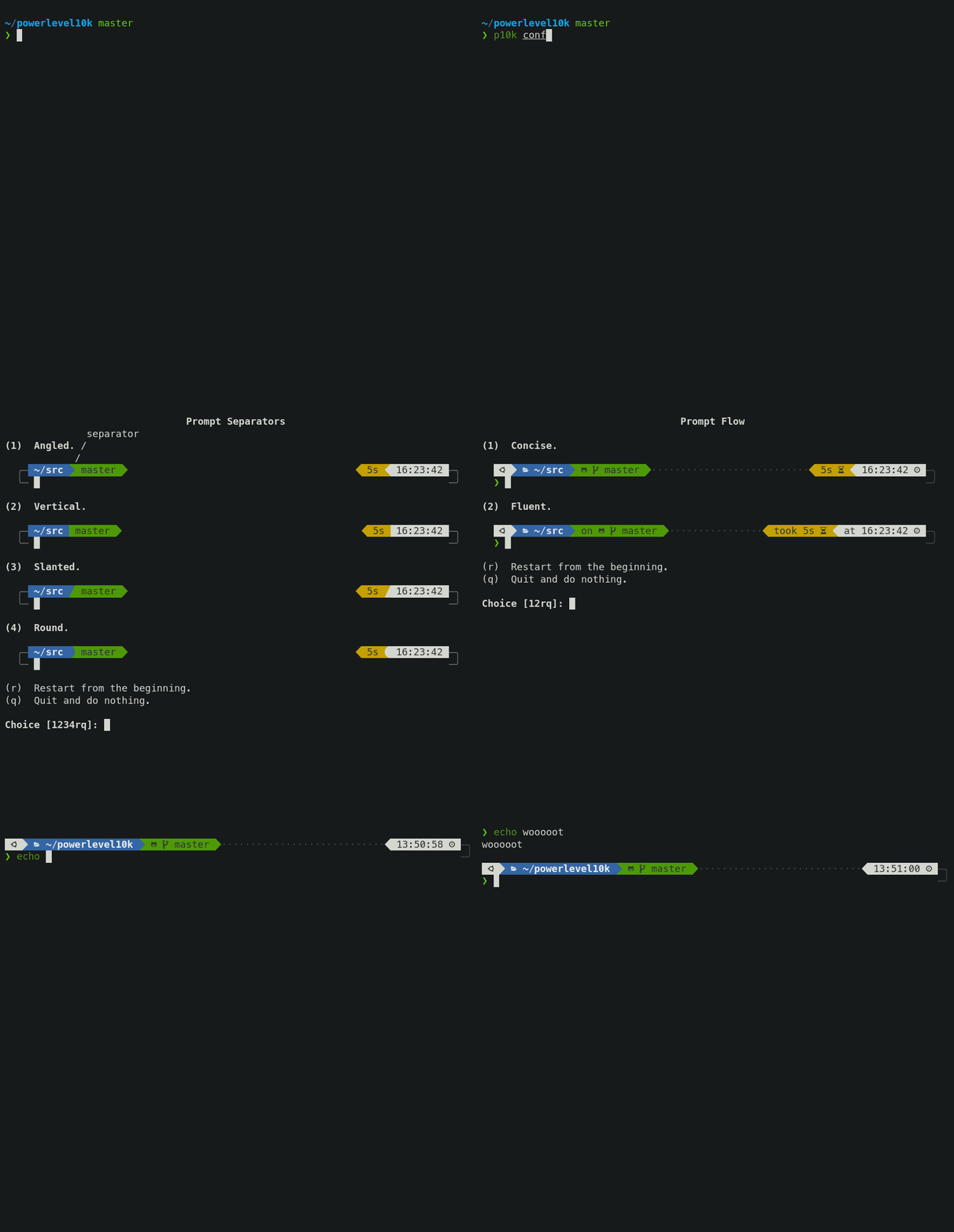All styles except Pure are functionally equivalent. They display the same information and differ only in presentation.
Configuration wizard creates ~/.p10k.zsh based on your preferences. Additional prompt
customization can be done by editing this file. It has plenty of comments to help you navigate
through configuration options.
Tip: Install the recommended font before
running p10k configure to unlock all prompt styles.
FAQ:
- What is the best prompt style in the configuration wizard?
- What do different symbols in Git status mean?
- How do I change prompt colors?
Troubleshooting:
- Some prompt styles are missing from the configuration wizard.
- Question mark in prompt.
- Icons, glyphs or powerline symbols don't render.
- Sub-pixel imperfections around powerline symbols.
- Directory is difficult to see in prompt when using Rainbow style.
Uncompromising performance
When you hit ENTER, the next prompt appears instantly. With Powerlevel10k there is no prompt lag.
If you install Cygwin on Raspberry Pi, cd into a Linux Git repository and activate enough prompt
segments to fill four prompt lines on both sides of the screen... wait, that's just crazy and no
one ever does that. Probably impossible, too. The point is, Powerlevel10k prompt is always fast, no
matter what you do!
Screen recording
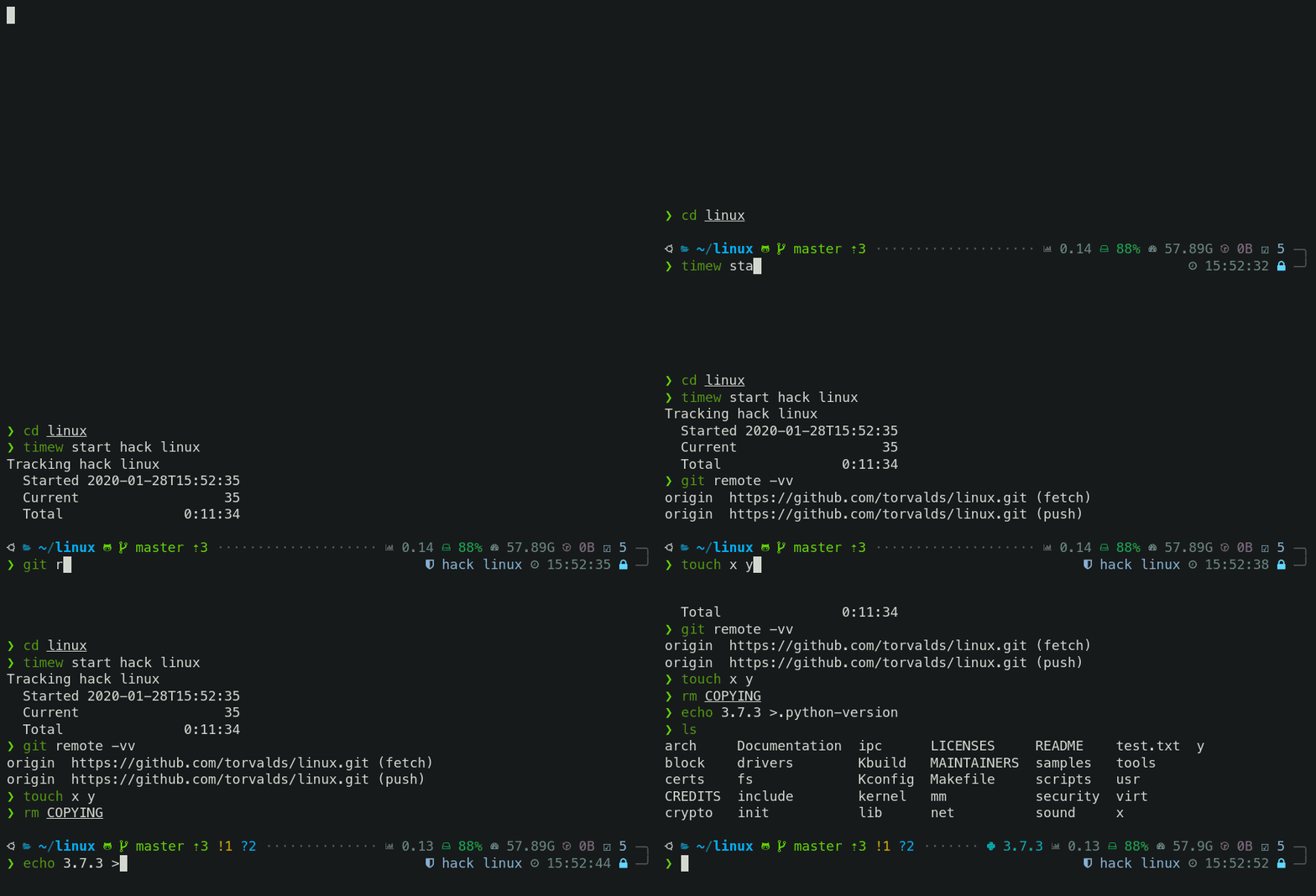Note how the effect of every command is instantly reflected by the very next prompt.
| Command | Prompt Indicator | Meaning |
|---|---|---|
timew start hack linux |
⌚ hack linux |
time tracking enabled in timewarrior |
touch x y |
?2 |
2 untracked files in the Git repo |
rm COPYING |
!1 |
1 unstaged change in the Git repo |
echo 3.7.3 >.python-version |
🐍 3.7.3 |
the current python version in pyenv |
Other Zsh themes capable of displaying the same information either produce prompt lag or print prompt that doesn't reflect the current state of the system and then refresh it later. With Powerlevel10k you get fast prompt and up-to-date information.
FAQ: Is it really fast?
Powerlevel9k compatibility
Powerlevel10k understands all Powerlevel9k configuration parameters.
Screen recording
Migration from Powerlevel9k to Powerlevel10k is a straightforward process. All
your POWERLEVEL9K configuration parameters will still work. Prompt will look the same as before
(almost)
but it will be much faster (certainly).
FAQ:
- I'm using Powerlevel9k with Oh My Zsh. How do I migrate?
- Does Powerlevel10k always render exactly the same prompt as Powerlevel9k given the same config?
- What is the relationship between Powerlevel9k and Powerlevel10k?
Pure compatibility
Powerlevel10k can produce the same prompt as Pure. Type
p10k configure and select Pure style.
Screen recording
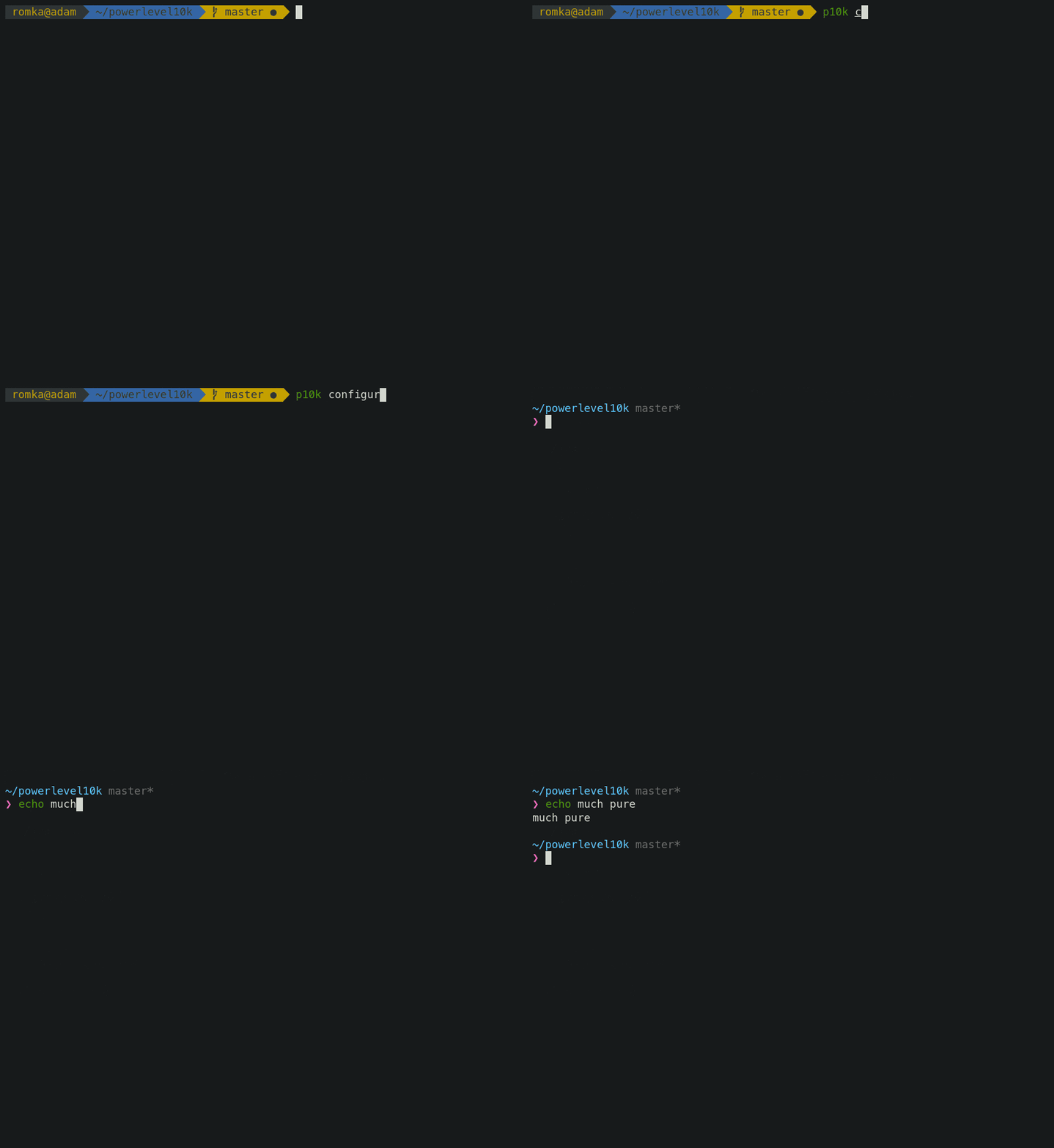You can still use Powerlevel10k features such as transient prompt or instant prompt when sporting Pure style.
To customize prompt, edit ~/.p10k.zsh. Powerlevel10k doesn't recognize Pure configuration
parameters, so you'll need to use POWERLEVEL9K_COMMAND_EXECUTION_TIME_THRESHOLD=3 instead of
PURE_CMD_MAX_EXEC_TIME=3, etc. All relevant parameters are in ~/.p10k.zsh. This file has
plenty of comments to help you navigate through it.
FAQ: What is the best prompt style in the configuration wizard?
Instant prompt
If your ~/.zshrc loads many plugins, or perhaps just a few slow ones
(for example, pyenv or nvm), you
may have noticed that it takes some time for Zsh to start.
Screen recording
Powerlevel10k can remove Zsh startup lag even if it's not caused by a theme.
Screen recording
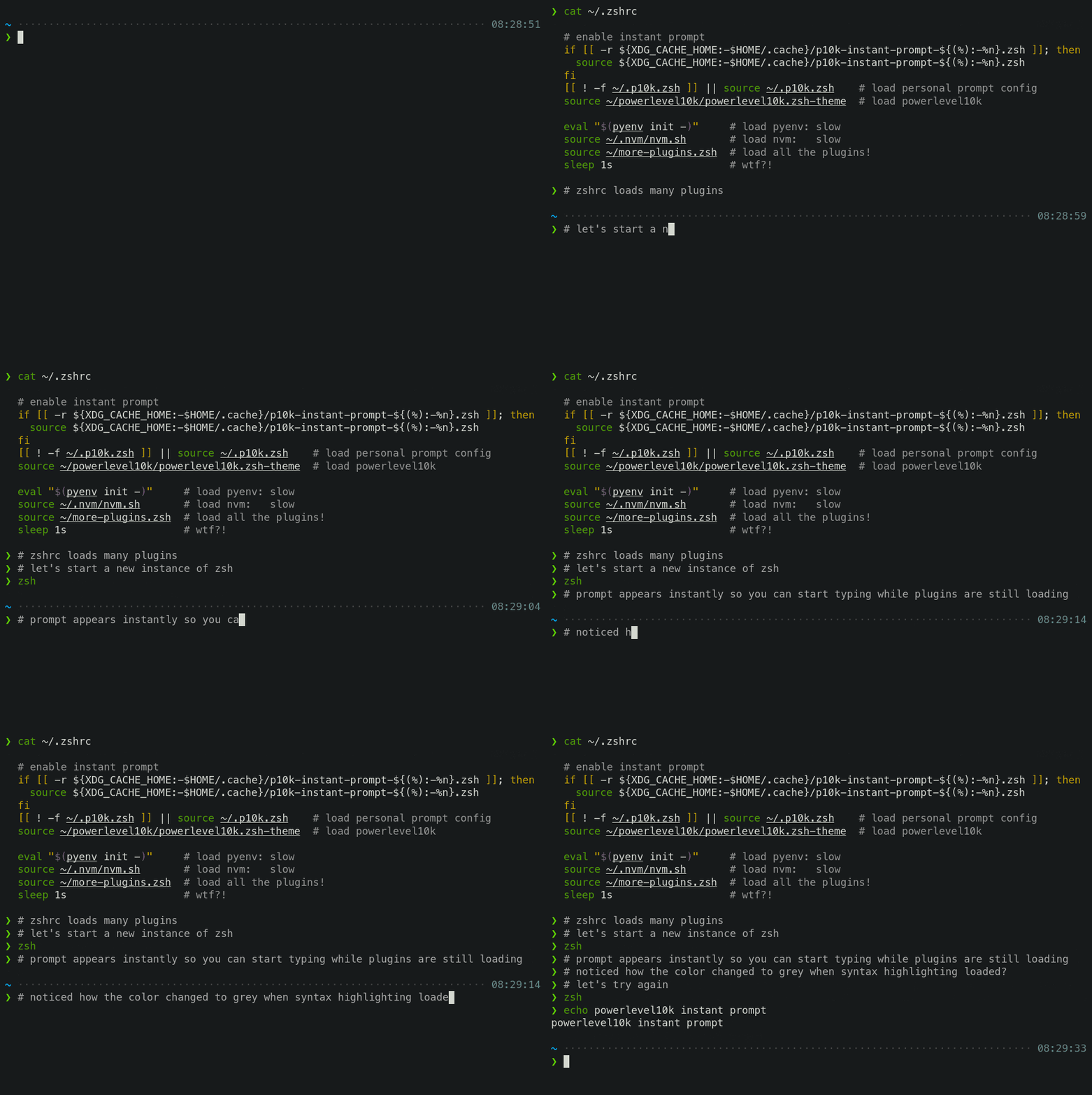This feature is called Instant Prompt. You need to explicitly enable it through p10k configure
or manually. It does what it says on the tin -- prints prompt
instantly upon Zsh startup allowing you to start typing while plugins are still loading.
Other themes increase Zsh startup lag -- some by a lot, others by a just a little. Powerlevel10k removes it outright.
If you are curious about how Instant Prompt works, see this section in zsh-bench.
FAQ: How do I configure instant prompt?
Show on command
The behavior of some commands depends on global environment. For example, kubectl run ... runs an
image on the cluster defined by the current kubernetes context. If you frequently change context
between "prod" and "testing", you might want to display the current context in Zsh prompt. If you do
likewise for AWS, Azure and Google Cloud credentials, prompt will get pretty crowded.
Enter Show On Command. This feature makes prompt segments appear only when they are relevant to the command you are currently typing.
Screen recording
Configs created by p10k configure enable show on command for several prompt segments by default.
Here's the relevant parameter for kubernetes context:
# Show prompt segment "kubecontext" only when the command you are typing invokes one of these tools.
typeset -g POWERLEVEL9K_KUBECONTEXT_SHOW_ON_COMMAND='kubectl|helm|kubens'
To customize when different prompt segments are shown, open ~/.p10k.zsh, search for
SHOW_ON_COMMAND and either remove these parameters to display affected segments unconditionally,
or change their values.
Transient prompt
When Transient Prompt is enabled through p10k configure, Powerlevel10k will trim down every
prompt when accepting a command line.
Screen recording
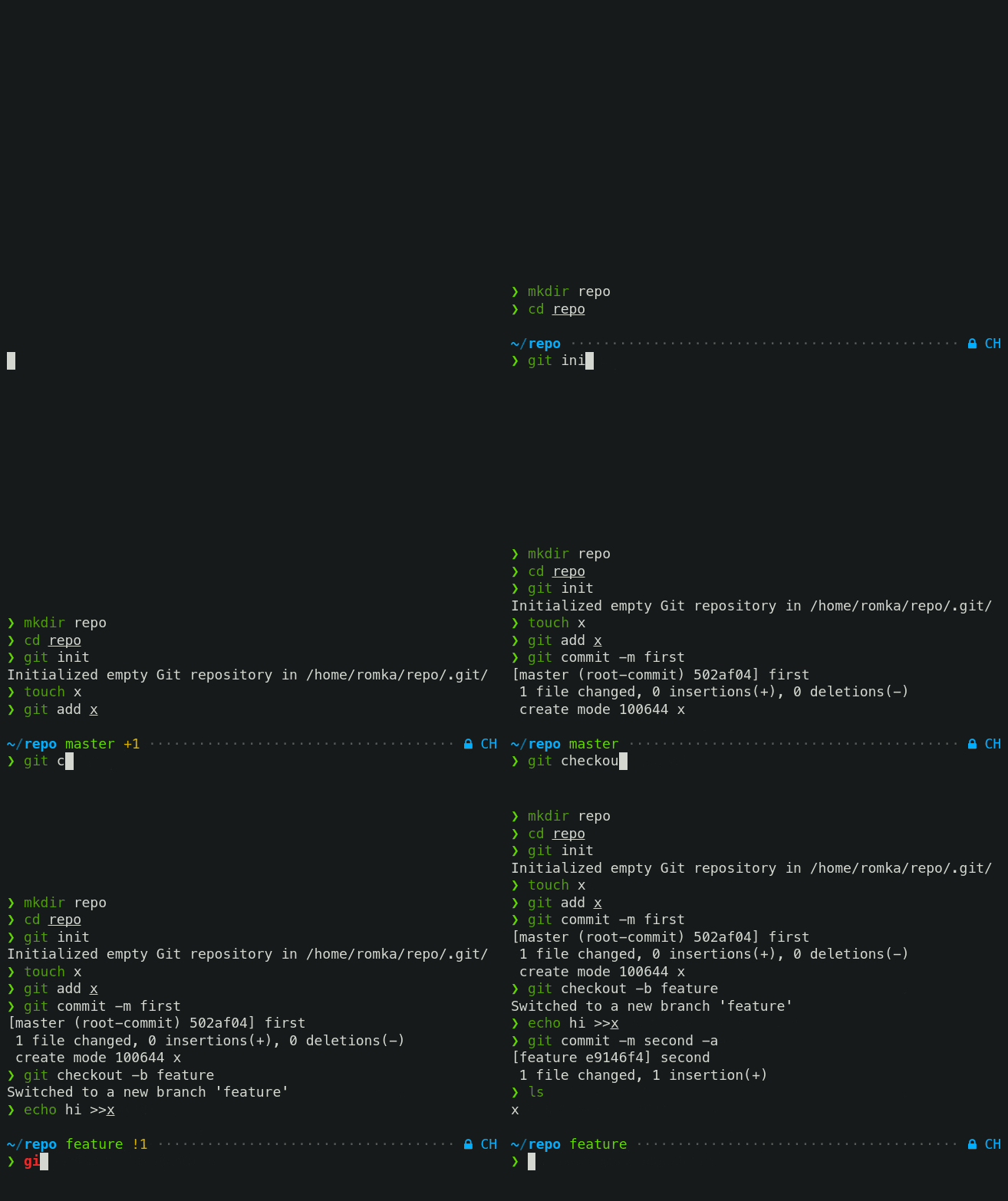Transient prompt makes it much easier to copy-paste series of commands from the terminal scrollback.
Tip: If you enable transient prompt, take advantage of two-line prompt. You'll get the benefit of extra space for typing commands without the usual drawback of reduced scrollback density. Sparse prompt (with an empty line before prompt) also works great in combination with transient prompt.
Current directory that just works
The current working directory is perhaps the most important prompt segment. Powerlevel
📈 近 7 天 Star 趋势
🏆 排名变化趋势
📋 历史上榜记录
| 日期 | 榜单 | 排名 | 周期新增 | 总 STAR |
|---|