📄 仓库 README
在 GitHub 查看 ↗

Boop
An iMessage-based personal agent you can run with either your Claude Code subscription or your Codex / ChatGPT subscription.
Choose your runtime during setup:
- Claude — powered by the Claude Agent SDK and your local Claude Code login.
- Codex — powered by the local Codex app-server runtime and your local
codex login.
No Anthropic or OpenAI API key is required for the agent runtime when using subscription auth.
📺 Watch the walkthrough: YouTube — How I built Boop
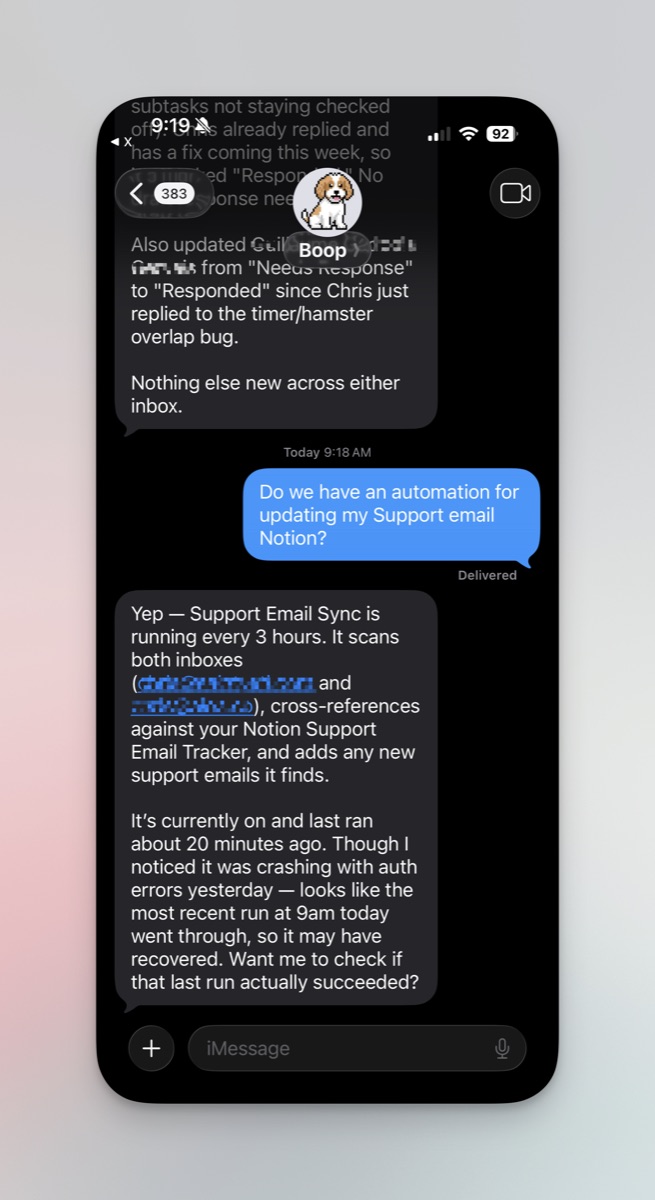
Boop in action — text it like a person, get back an answer with full context.
This is a starting point, not a finished product. It's the architecture I built for my own personal agent, opened up as a template so you can take it, text-enable your own Claude or Codex-backed agent, and extend it however you want. Integrations are plugged in via Composio — drop in an API key and connect Gmail, Slack, GitHub, Linear, Notion, and ~1000 others straight from the debug dashboard.
 iMessage  →  Sendblue webhook  →  Interaction agent  →  Sub-agents (per task)
                                          │                    │
                                          ▼                    ▼
                                    Memory store  ←──  Integrations (your MCP tools)
Built on: - Claude Agent SDK or local Codex runtime — choose your provider during setup - Composio — integrations layer. One API key = Gmail, Slack, GitHub, Linear, Notion, Stripe, Supabase, + ~1000 more with hosted OAuth - Sendblue — iMessage in/out (free on their agent plan) - Convex — real-time database for memory, agents, drafts - Your Claude Code or Codex/ChatGPT subscription — no separate provider API key required
What you get
- iMessage in / iMessage out via Sendblue (with signed inbound requests, typing indicators, and webhook dedup).
- Sendblue CLI integration —
npm run devauto-registers the inbound webhook for you every restart (no re-pasting into the dashboard when free ngrok rotates your URL). - Dispatcher + workers pattern: a lean interaction agent decides what to do, spawns focused sub-agents that actually do the work.
- Pure dispatcher — the interaction agent has only memory + spawn + automation + draft tools. Web access, files, and integrations are explicitly denied to it; sub-agents get
WebSearch/WebFetch/ the integrations. - Tiered memory (short / long / permanent) with post-turn extraction, decay, and cleaning.
- Vector search for recall with a local BGE-large fallback, or optional Voyage/OpenAI embeddings.
- Memory consolidation — a daily 3-phase adversarial pipeline (proposer → adversary → judge) that merges duplicates, resolves contradictions, and prunes noise. Uses the configured runtime, with provider-specific model defaults. Runs every 24h by default, also triggerable manually via
POST /consolidate. - Automations — the agent can schedule recurring work from a text ("every morning at 8 summarize my calendar") and push results back to iMessage.
- Draft-and-send — any external action stages a draft first; the agent only commits when the user confirms.
- Heartbeat + retry — stuck agents auto-fail, debug dashboard can retry.
- Composio-powered integrations — one API key unlocks 1000+ toolkits. Connect Gmail, Slack, GitHub, Linear, Notion, Drive, HubSpot, etc. with a click from the debug dashboard. Composio handles OAuth + token refresh.
- Optional local browser use — when enabled in Settings, spawned agents can use a Patchright-backed Chrome profile for login-required services, visual workflows, or pages that reject ordinary automation.
- Optional local Apple data — Mac-only, read-only iMessage, Apple Notes, and Apple Reminders connectors that stay off until you enable Apple data and connect each source in the debug dashboard.
- Debug dashboard (React + Vite) with a Boop mascot — Dashboard (usage, known cost, tokens, agent status), Agents (timeline + integration logos), Automations, Memory (table + force-directed graph), Events, Connections.
- Convex for persistence — real-time, typed, free tier.
- Uses your Claude Code or Codex/ChatGPT subscription — choose during setup, with no separate provider API key required.
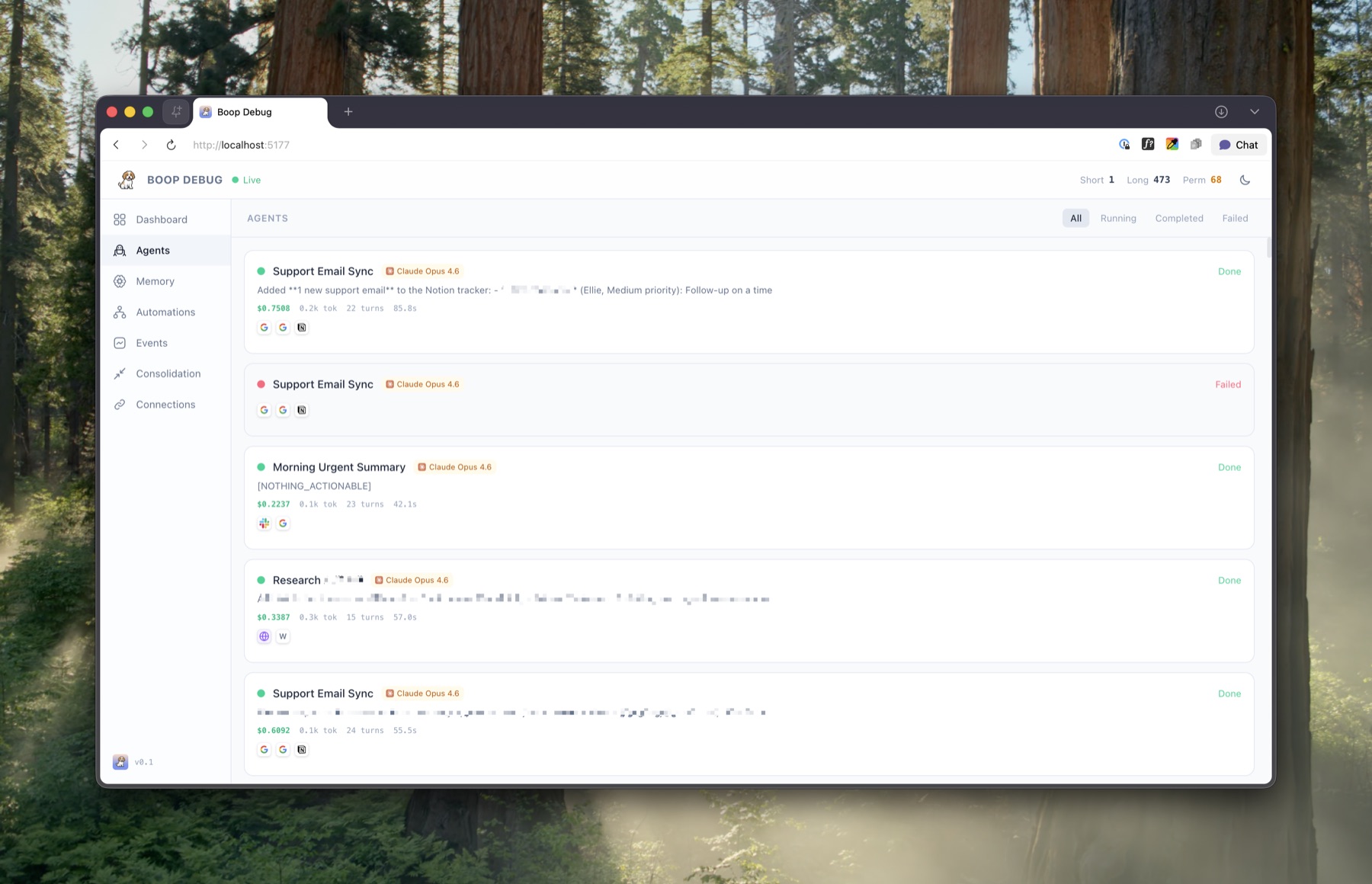
Agents tab — every spawned sub-agent with status, usage/cost, tokens, turns, runtime, and the integrations it touched.
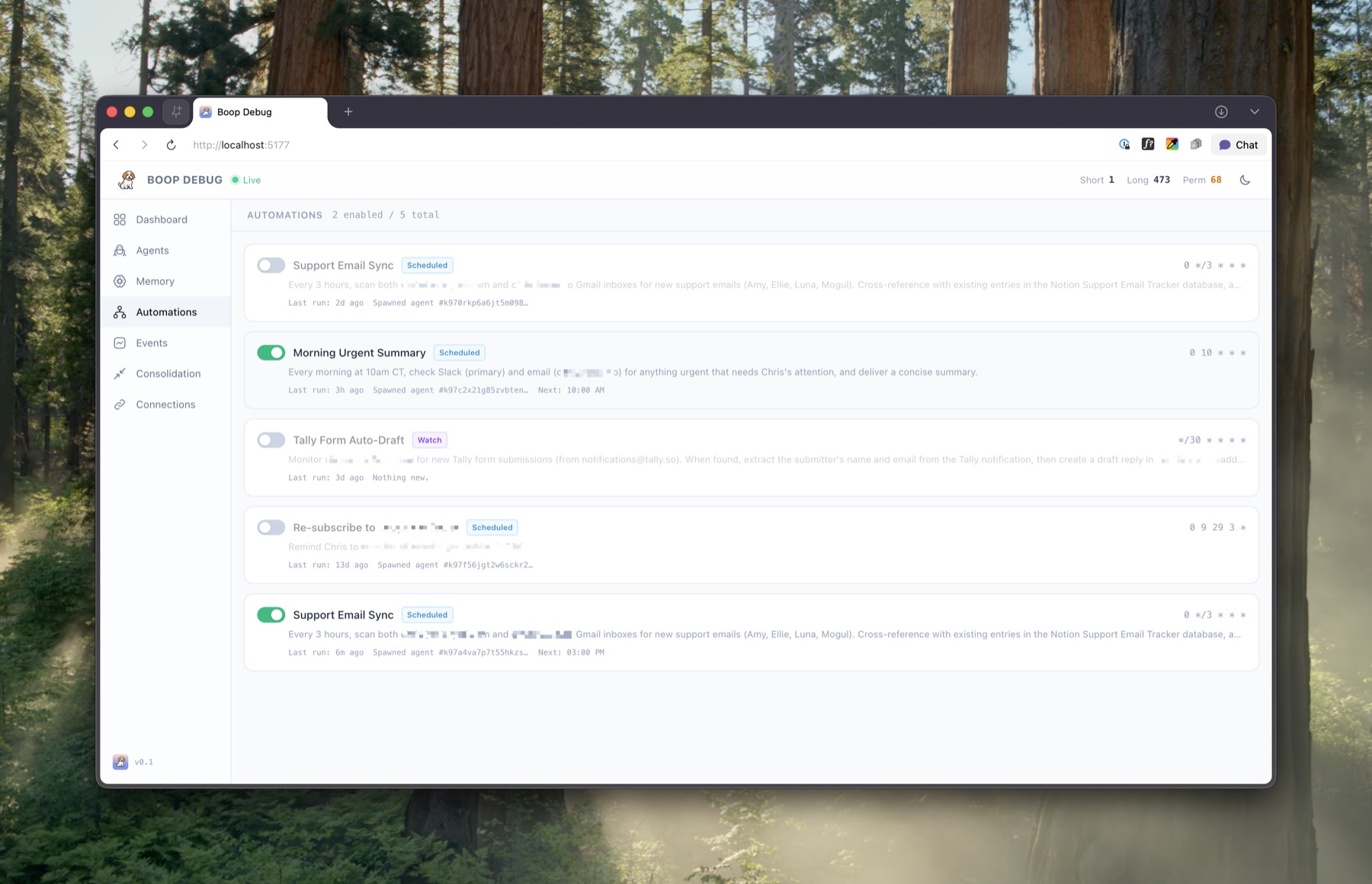
Automations tab — schedule recurring jobs from a text ("every morning at 8 summarize my calendar") and watch them run.
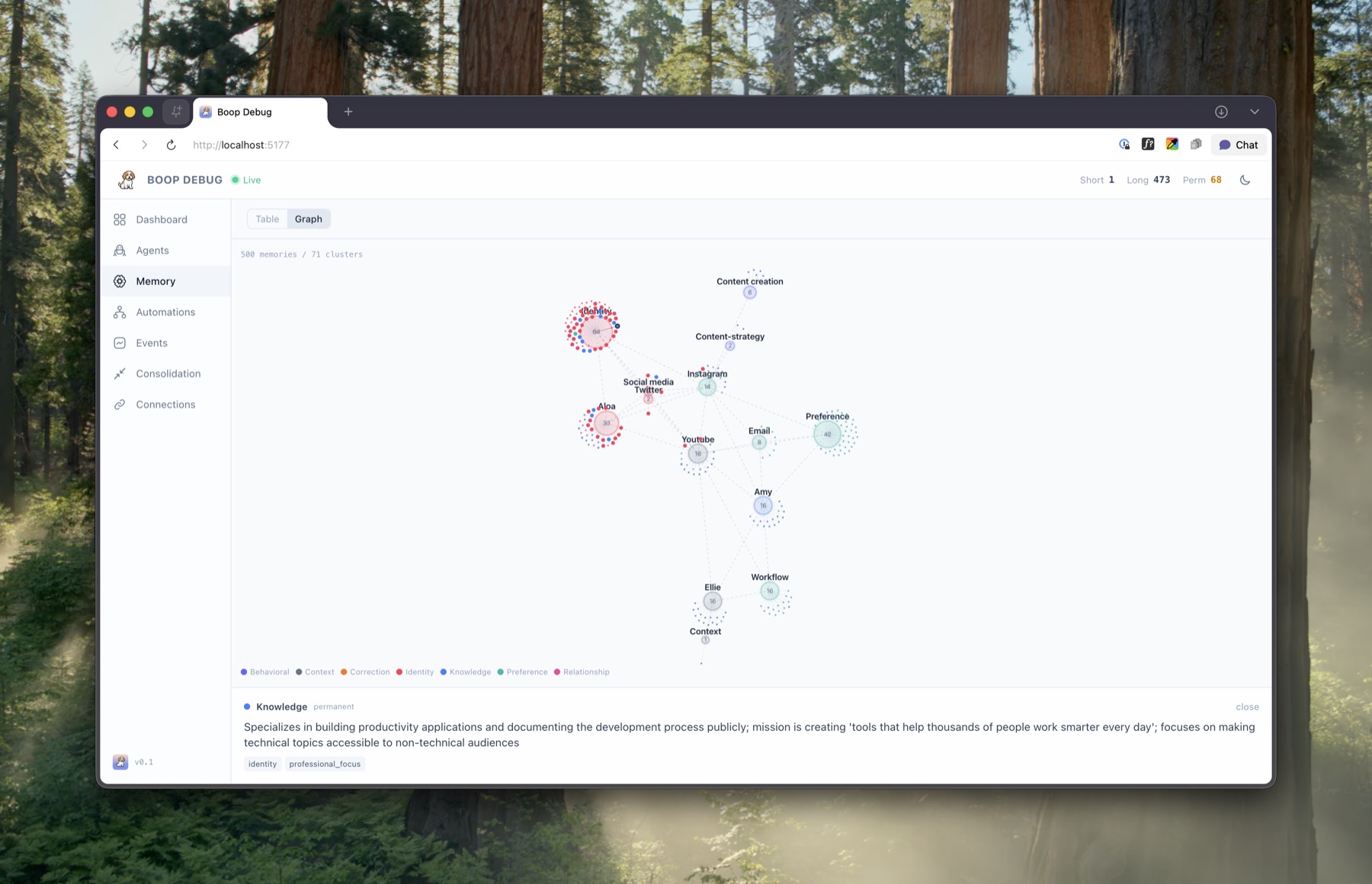
Memory tab — force-directed graph of clustered memories across short, long, and permanent tiers. Tabular view also available.
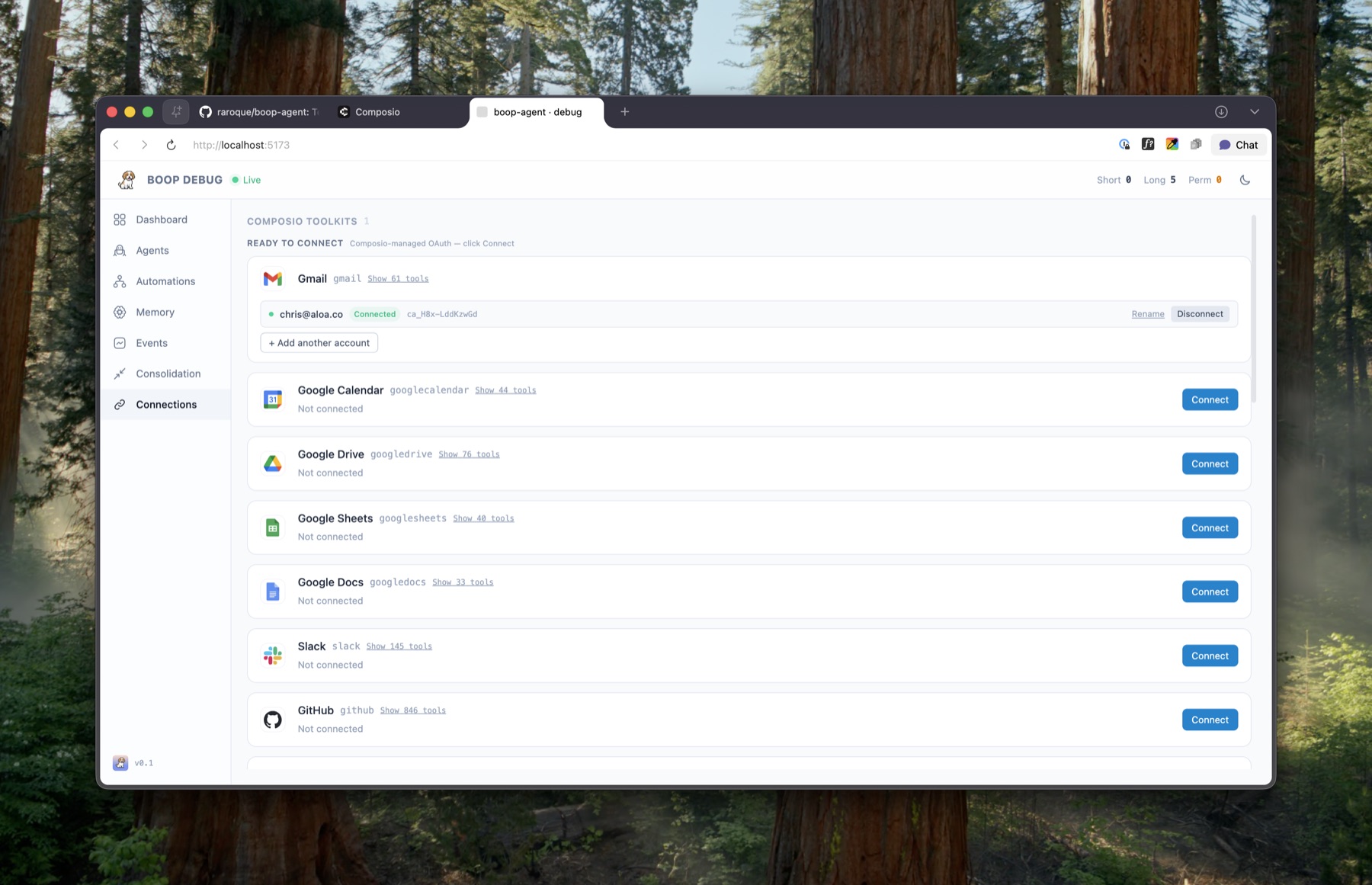
Connections tab — Composio toolkits with OAuth handled for you. Click Connect and the agent can use it on the next message.
Heads up before you use this
- This was never meant to be open-sourced. I built it for personal use and decided to share the architecture after enough people asked. It's not a product.
- Not optimized for cost or security. Use at your own risk. Review the code, set your own budgets, and don't trust it with anything you wouldn't trust yourself with.
- I'm open to PRs for optimizations — performance, bug fixes, DX improvements, new example integrations, better docs.
Why is it named Boop?

Luna, the inspiration.
Boop is meant to be a proactive agent — one that nudges you over iMessage with reminders, drafts, and little follow-ups. A small "boop" whenever it has something for you.
And it's named after my dog, Luna, who gives plenty of them.
A note on the native iOS app
I'm working on open-sourcing the native iOS app I originally built for this. The rewrite is taking much longer to get right than I'd hoped, but it will happen. I don't personally use it anymore — but enough people have asked, and I want to make it happen.
If you want to see what it looked like before I transitioned to an iMessage-based agent, here's the walkthrough on YouTube.
Prerequisites
You need accounts for these. Keep the tabs open — setup will ask for credentials from each.
You should be able to get away with the free plan for each service except your chosen agent subscription, and I'm working to secure discounts for you guys on the pro plans. If you work at any of these companies, please reach out!
| Service | Why | Free? | Discount code |
|---|---|---|---|
| Claude Code or Codex / ChatGPT | Powers the agent. Install the matching CLI, sign in once, Boop uses your local session. | Subscription required | Working on getting one (if you work here, please reach out!) |
| Sendblue | iMessage bridge. Get a number, grab API keys. | Free on their agent plan | RAROQUE20 — 20% off for 6 months (helpful if you plan to commercialize) |
| Convex | Database + realtime. | Free tier is plenty | Working on getting one (in touch with them 👀) |
| Composio | Integrations — one API key unlocks ~1000 toolkits. Optional if you just want chat + memory + automations without third-party access. | Free tier covers personal use | CHRISXCOMPOSIO — 1 month free on starter plan |
| ngrok or similar | Expose your local port so Sendblue can reach it. | Free tier works | Working on getting one (if you work here, please reach out!) |
Custom integrations welcome. Composio covers the common catalog, but you're free to add your own MCP servers under server/integrations/ and register them in server/integrations/registry.ts — the dispatcher treats them the same as Composio-backed ones (just named toolkits the execution agent can spawn against). Useful for in-house APIs, local tools, or anything Composio doesn't ship.
Local browser use is fully optional. Boop can expose a local Chrome/Chromium profile to spawned agents, but it is off by default. Enable it from the debug dashboard under Settings → Local browser use when you want browser automation for login-only services, visual workflows, or bot-wall-sensitive pages. The Patchright browser binary is installed only if you opt in during setup or click the install button in Settings.
Quickstart
# 1. Clone + install
git clone https://github.com/raroque/boop-agent.git
cd boop-agent
npm install

# 2. Install one agent runtime (one-time, global) and sign in
npm install -g @anthropic-ai/claude-code
claude  # sign in, then Ctrl-C to exit
# or:
npm install -g @openai/codex
codex login

# 3. Interactive setup — writes .env.local, creates Convex deployment, offers optional local browser use
npm run setup

# 4. Install ngrok (one-time) and authorize it
brew install ngrok
# or grab from https://ngrok.com/download
ngrok config add-authtoken <your-token>   # free at https://dashboard.ngrok.com

# 5. Start everything with one command — server, Convex, debug UI, and ngrok
npm run dev
npm run dev prints color-prefixed output from all four processes and shows a banner with your ngrok webhook URL once the tunne
📈 近 7 天 Star 趋势
🏆 排名变化趋势
📋 历史上榜记录
| 日期 | 榜单 | 排名 | 周期新增 | 总 STAR |
|---|