📄 仓库 README
在 GitHub 查看 ↗NetFluss



A native macOS menubar app showing real-time upload and download rates, router-wide bandwidth, historical traffic statistics, and built-in speed testing.
Latest release: NetFluss 2.6
NetFluss for Windows — public beta
NetFluss now runs on Windows too: a native Windows 10 and 11 app with the same feature set as NetFluss 2.6 for Mac — live rates on the taskbar, the popover, Bandwidth Statistics, Speed Test, Network Slice, router monitoring and the built-in VPN client.
Download NetFluss 2.6 Beta 2 for Windows — the installer needs no administrator rights and keeps itself up to date. The beta is not yet code-signed for Windows, so SmartScreen asks you to confirm the first start (More info → Run anyway). Feedback is very welcome: open an issue and mention Windows. Building it yourself is described in windows/README.md.
New in Windows Beta 2
- One program file. NetFluss is now a single
NetFluss.exe; the only other files are Microsoft's own signed libraries. Beta 1 shipped its code as many separate files, and Windows' Smart App Control could block one of them minutes after NetFluss had started, which ended the app. - No more vanishing on sleep. Saving statistics and the Traffic Timer as the PC went to sleep could end NetFluss; it no longer can.
- Crash reports that name the cause. If NetFluss ever quits unexpectedly, the next start says so and keeps what Windows recorded. Click the notification to see it, and please include it in a report.
- Easier to find on first launch. NetFluss says where it is running and opens its popover there — Windows hides new icons behind the ^ next to the clock, which made the app look like it had quit.
- Clearer helper messages. A helper newer than the app is no longer called "out of date", and quitting or updating NetFluss no longer logs errors on the way out.
Updating from Beta 1: the installed version offers Beta 2 by itself (About → Install and Relaunch). Top Apps then asks once to update the helper, which needs administrator approval.
Code signing policy
Free code signing provided by SignPath.io, certificate by SignPath Foundation. This covers NetFluss for Windows; the macOS app is signed and notarized with Rana GmbH's Apple Developer ID.
- Committers and reviewers: Robert Rudolph (Rana GmbH)
- Approvers: Robert Rudolph (Rana GmbH)
Every release is built from this repository by GitHub Actions and signed only after a manual approval.
Privacy: see the privacy policy. NetFluss sends no telemetry. The few online lookups it makes on its own — the daily update check and the public IP and country lookups — are listed there, and each can be switched off in the installer and in Preferences.
New in 2.7
- Automatic DNS by Wi-Fi network — the right resolver wherever you are. Give a network a rule and NetFluss switches the resolver when you join it: your own DNS at home, something else on café Wi-Fi.
- Rules are per network name, and can be pinned to one access point — an SSID alone is a weak key, since anyone can name their network after your router.
- A catch-all for any other network covers wired connections and anything without a rule of its own, so a public resolver never follows you home.
- Captive portals are handled. Hotel and café logins work by intercepting DNS, so NetFluss waits until you are actually online before changing anything — switching early is what leaves you connected with nothing loading.
- It stands aside while a VPN profile controls DNS, and needs the privileged helper, so a switch never costs you a password prompt.
-
Set it up under Preferences → DNS → Automatic DNS.
-
Wi-Fi and Ethernet indicator — what the connection is doing, at a glance. An optional symbol right of the rates that follows whichever interface carries your traffic: a Wi-Fi glyph on wireless, a cable plug on Ethernet.
- Green connected, amber connected but no internet, red not connected — each colour yours to choose, so the state does not depend on telling red from green.
- Amber is real: NetFluss checks internet access the way macOS does, often enough to notice a captive portal or a dead upstream, and rarely enough to cost nothing.
-
With a VPN up the symbol still shows the connection underneath, because the VPN shield beside it already says it is tunnelled.
-
The active DNS resolver in the menu bar. Its name appears next to the indicators, in a colour you pick, and only while it is not the system default — so the menu bar stays quiet on a network you have not overridden.

-
Rename the built-in DNS profiles. Call Cloudflare "Home" or Quad9 "Work"; the new name appears in the popover switcher, the menu bar and every rule. The servers stay fixed, so a name can never point somewhere it does not say.
-
Per-node proxy statistics. For sing-box, mihomo, Clash Verge and other clients with a Clash API, NetFluss records how much traffic each outbound node carried and shows it in the Statistics window — useful when your subscription is metered. Traffic the controller counts but cannot attribute to a node is listed separately rather than quietly lost.
-
A bigger, clearer VPN indicator. The shield is sized independently of the rate font (10–18 pt) instead of being stuck at the size of the text, and your chosen colour now applies whether or not a tunnel is up.
-
Fixes. Explanations in Preferences no longer cut off mid-sentence, and hovering shows the full text. The empty settings window that appeared at every launch is gone. "Grant Location Access" now works instead of silently doing nothing.
New in 2.6
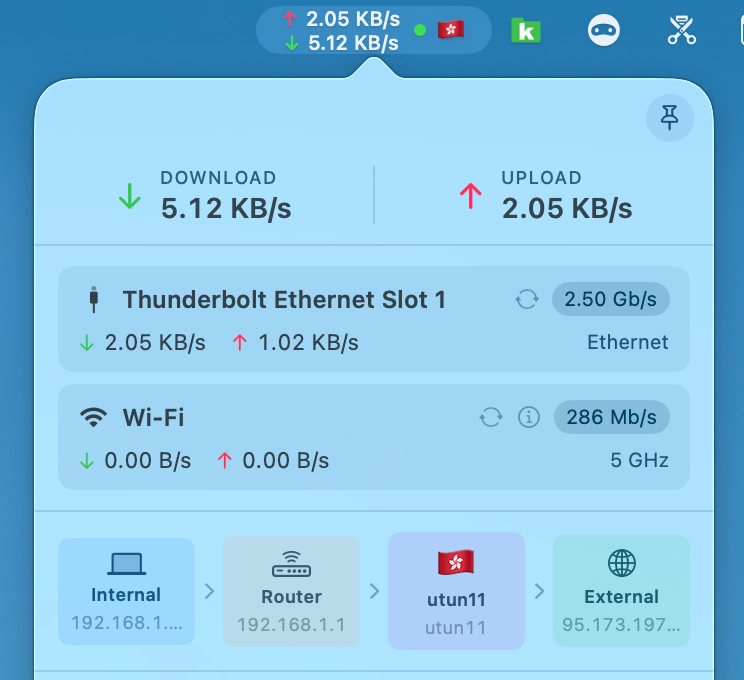
- VPN indicator in the menu bar — protected at a glance. An optional dot or shield right of the upload and download rates shows whether a VPN is up, in a size you pick (10–20 pt) so it stays readable next to the rates. It works with the VPN connections built into NetFluss and with external VPN clients — Tunnelblick, the WireGuard app, Mullvad, Tailscale, the macOS VPN settings and others: NetFluss detects any active tunnel, no matter which app started it.
- Pick the colour, and choose whether the indicator stays visible (dimmed) while no VPN is connected.
- Optionally add the flag of the country your public IP is in, so you see your exit location without opening the popover. It updates within seconds when a VPN connects or disconnects.
- Enable both under Preferences → Appearance. Detection is lightweight and only runs while one of the options is on.
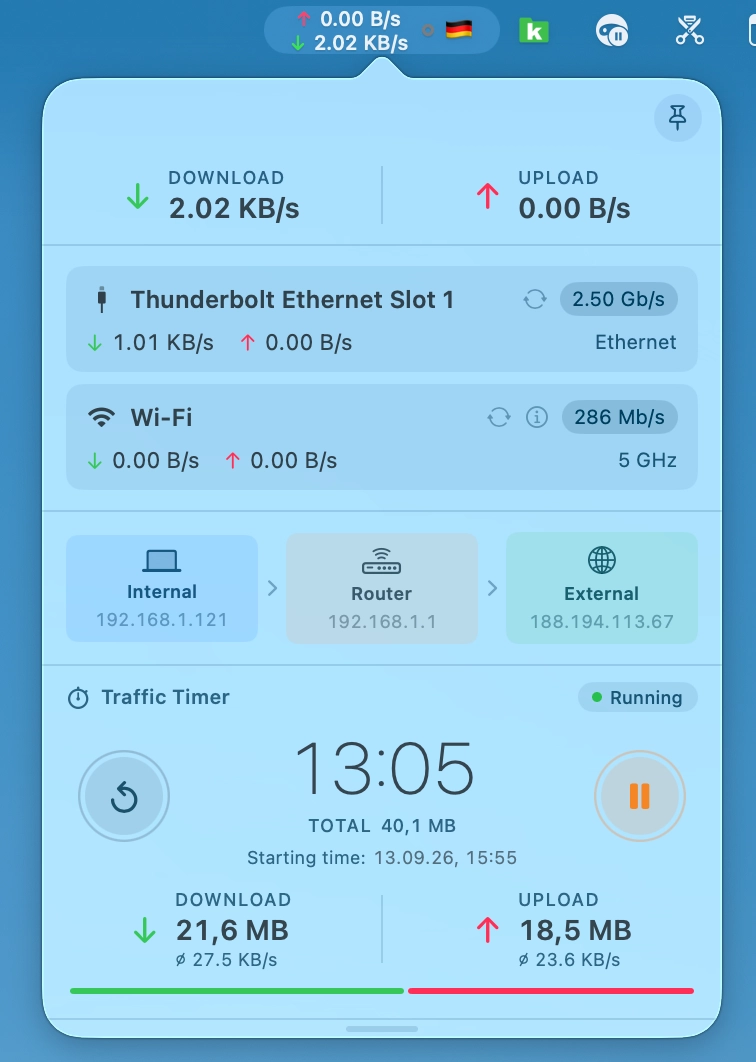
- Traffic Timer — measure traffic from start to stop. A new optional popover section that works like the stopwatch on your phone: press start and it adds up download and upload from that moment on — handy for checking how much a download, a backup or a video call really moves.
- Pause, resume and reset with round buttons; the elapsed time, the running total, the average download and upload rate and a download/upload split bar are always in view.
- The starting time (and, while paused, when you paused) is shown under the total.
- It keeps counting while the popover is closed and survives a restart (it comes back paused). Turn it on in Preferences → Appearance, in the popover sections list.
-
Auto-update — NetFluss now keeps itself up to date. Once a day it checks for a new version and shows you what's new; one click downloads, verifies and installs the update and relaunches NetFluss — or skip it, or get reminded later. Check for Updates… is also in the menu bar icon's right-click menu and in About, and the daily check can be switched off in Preferences → General. Every update is verified with an EdDSA signature and NetFluss's Apple Developer ID before it is installed. Coming from 2.5 or earlier? Download 2.6 once manually — from then on NetFluss updates itself.
-
Clearer router connection errors — OPNsense, OpenWRT and UniFi now say exactly what went wrong instead of a generic "cannot reach": HTTPS refused (with the
http://or port to enter instead), a TLS failure, or a changed router certificate — with a new Trust Current Certificate button in the OPNsense credential test. Addresses likerouter.lan:8443are accepted, and re-trusting a certificate now works for URL-form addresses too. (#56) -
Complete German, 简体中文 and 繁體中文 translations — every remaining dialog and message, including router, VPN and speed-test errors, is now translated.
New in 2.5
- Network Slice — see who your Mac is talking to, right now. A dedicated live-traffic window, opened from the menu bar icon's right-click menu. A rolling Traffic Rate chart at the top, and below it three linked columns — Network Hosts, Services, and Apps — each ranked by volume with a relative usage bar. Remote hosts are reverse-resolved to hostnames and tagged with a country flag, so a row reads
dns.google 🇺🇸instead of a bare IP. - Each column has a ⚡ live / Σ accumulated toggle: ⚡ shows only the last sample interval (what is moving this second), Σ shows the running total since you opened the window.
- Pause freezes the view so you can read a burst without it scrolling away.
- Built on the same lightweight
netstatdiffing NetFluss already uses — no packet capture, nonettopdaemon, no extra privileges, and sampling stops the moment you close the window.
📈 近 7 天 Star 趋势
🏆 排名变化趋势
📋 历史上榜记录
| 日期 | 榜单 | 排名 | 周期新增 | 总 STAR |
|---|