📄 仓库 README
在 GitHub 查看 ↗Markdown Preview

A fast, native macOS app for reading Markdown files.







Drop a
.mdon the icon (or set Markdown Preview as your default handler) and get a clean, scrollable preview with a real document outline — no Electron, no browser tab.
Installation
Markdown Preview is available in the official Homebrew cask repository:
brew install --cask markdown-preview
Or grab the latest signed and notarized DMG from the Releases page.
Screenshots
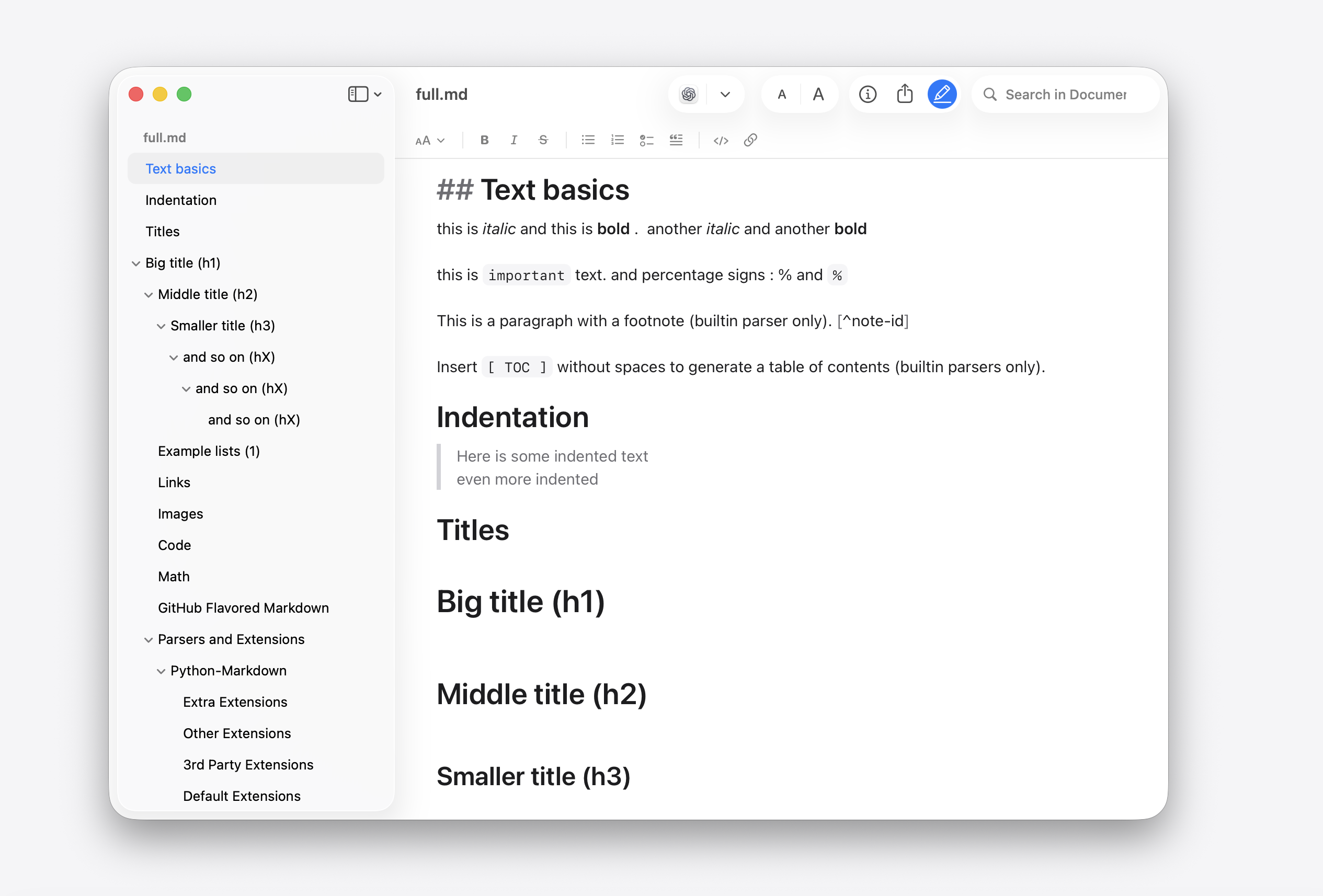
Edit Markdown directly with a native formatting toolbar:
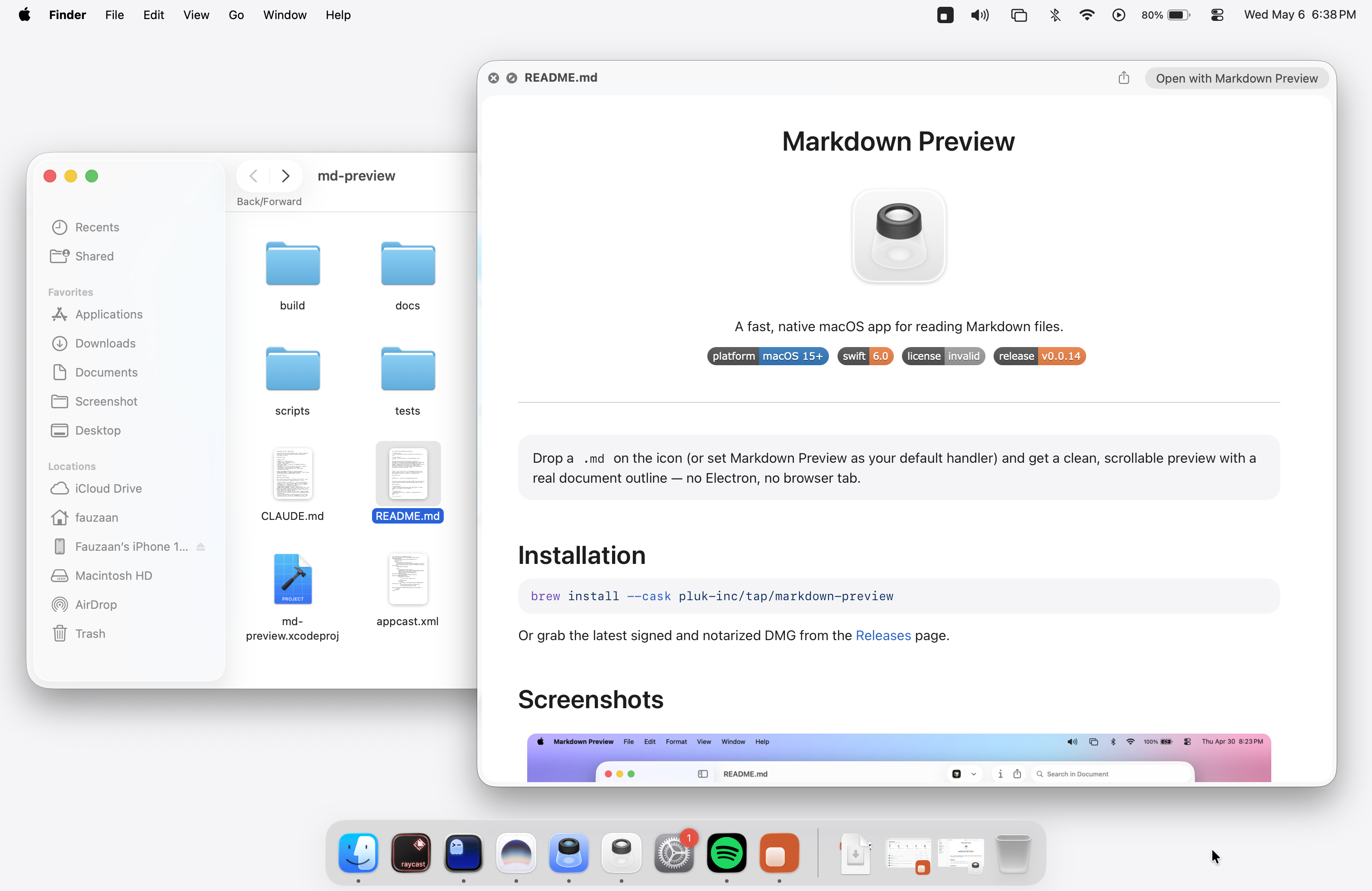
Quick Look preview — spacebar a .md in Finder:
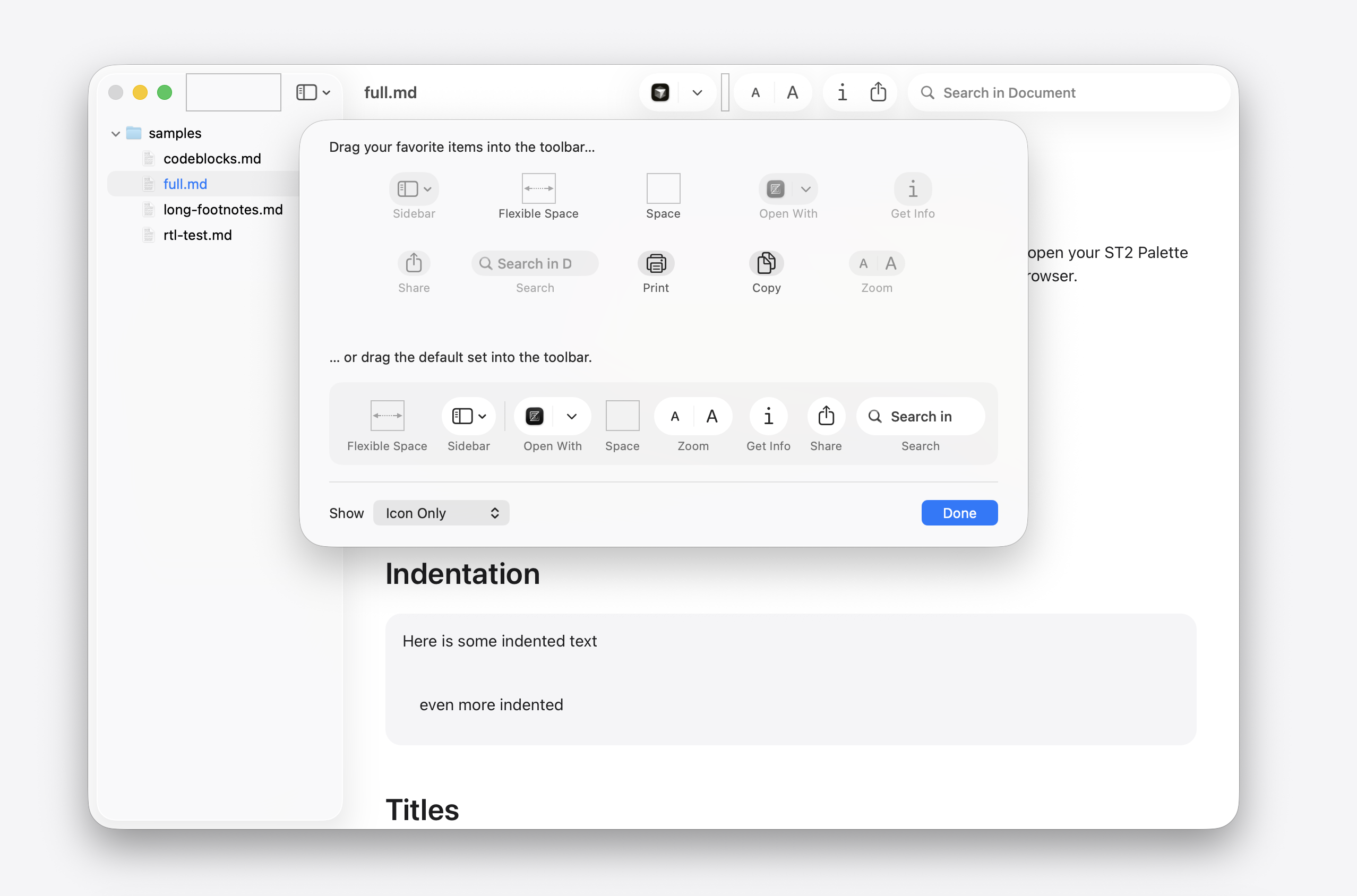
Customize the toolbar — drag in Print, Copy, Zoom and the rest from View → Customize Toolbar…
Features
App language: Choose Settings → General → Language to use a bundled translation independently of your system language. The app offers to restart right away so the choice applies to settings, menus, and document controls; choose Later to keep working, and it applies the next time you open the app. System Default removes the app override and follows macOS again. This preference persists across launches and affects only the app; Quick Look previews continue to use their system-selected language. Available languages are discovered from the app’s bundled translations.
Settings uses toolbar tabs. General holds the language, how files open, Always on Top, automatic saving, and the app the Open button uses. Reading contains text size, content width, text alignment, Markdown line breaks, and outline highlighting. Appearance contains the light/dark choice, themes, and their font, spacing, and color customization, with a live sample; resetting a theme leaves global Reading preferences unchanged. Advanced holds the command line tools installer and the app link approvals.
Text alignment: Choose Settings → Reading → Text alignment for Automatic, Left, Center, Right, or Justified prose. Automatic preserves the document’s existing alignment, including right-to-left text. This global preference persists across launches and theme changes, updates open reading views immediately, and applies to Quick Look when reopened. Code, tables, and explicit HTML alignment remain unchanged. Justification leaves the final paragraph line naturally aligned; enable Strict line breaks to join ordinary source wraps into flowing paragraphs.
Single source newlines remain visible by default. Enable Settings → Reading → Markdown → Strict line breaks to let ordinary source lines flow into paragraphs in reading view and Quick Look. Two trailing spaces or a backslash still create an explicit line break; blank lines still separate paragraphs. Reopen an existing Quick Look preview after changing this setting.
- Native rendering —
WKWebViewpipeline backed by swift-markdown, with heading anchors and link handling. Barehttp://andhttps://URLs are clickable in the app and Quick Look previews. - Read Mode — select and copy text, follow links, and browse tables. Click task checkboxes to save each change directly to the file. Tables and Quick Look previews remain read-only. Table words and inline code retain their natural widths, and in Markdown table cells Chinese and Japanese text wraps at spaces and punctuation instead of between characters; wide tables scroll horizontally. Drag the edge between two header cells to resize a column, and double-click an edge to fit that column to its header text; the widths reset when the document renders again. In Read or Edit mode, use Expand Table above a table to open a read-only snapshot in its own window, which you can resize, minimize, or make fullscreen. The table window opens at the document's text size, and View → Zoom In and Zoom Out change it there without changing the document. For tables with a single-row header, the header stays at the top of the table window while you scroll. Press Escape or close the table window to return to the document.
- App links — Read Mode and Quick Look support custom URL schemes. Before opening an unapproved custom link with a registered app, a compact dialog names the app and offers Cancel, Allow, and Always Allow, with Cancel as the default. For an unapproved custom link with no registered app, an alert reports that no application can open the link. Use Copy Link in the context menu to inspect the destination. “Always Allow” saves approval for that URL scheme across documents, app restarts, and Quick Look. Reset approvals in Settings → Advanced → App links. HTTP, HTTPS, mailto, and the app’s own
md-preview:links open without this prompt, even after resetting approvals. Executable URLs and literalfile://links remain blocked; embedded resources cannot launch custom app links. - Edit Mode — edit Markdown in place with a formatting toolbar for headings, emphasis, lists, quotes, code, and links. Table cells show inline formatting until focused, then reveal their Markdown syntax for editing. Task markers become checkboxes once you finish typing the closing bracket; Enter continues a task list, and Enter on an empty task exits it. Toggle it from the toolbar or with ⌘E, then save with ⌘S.
- Mermaid diagrams — fenced
mermaidcode blocks render as diagrams in both the app and Quick Look previews, using a bundled renderer so previews work offline without a CDN request. - Math equations — LaTeX inline (
$x_1 + x_2$), display ($$\int_0^1 x^2\,dx$$), and fencedmathblocks render with bundled KaTeX in reading and edit modes. In edit mode, click a formula to edit its highlighted LaTeX source; move the caret away to render it again. Inline math source uses inline-code styling; spaces immediately inside either$delimiter leave the expression literal. Standalone$$source uses the code-block card with visible delimiters and no header controls; fencedmathuses the usual code-block controls with hidden fences. Pressing Enter after a standalone$$inserts a matching closing delimiter and places the caret between them; single-line$$ equation $$stays on one source line. Unclosed math stays editable as source. Selecting a rendered formula and copying yields the original LaTeX source (via the officialcopy-texextension). - Document outline — sidebar TOC that mirrors your headings; click to jump.
- Collapsible sidebar — the outline and file picker hides when the sidebar collapses; the sidebar toggle stays available to reopen it.
- File navigator — browse Markdown files in the sidebar. Click a folder's name, icon, or empty row space to expand or collapse it, or use its disclosure triangle. Click a file to open it in the current reading or editing mode. The bar at the bottom has a + menu (New Empty File, New File from Clipboard, New Folder, Add Files to the folder) and a Filter field that narrows the tree to matching file names (Escape clears it); the clock button shows only recently opened files. The filter uses the same folder walk as Search for Document, so it skips the same dependency and build folders. New files and folders appear in the tree at once with their name ready to type, as in Xcode: Return keeps the typed name (a file without an extension gets
.md), Escape keeps the default name, and a new file then opens. They go into the selected folder, or else the open file's folder. If the app has no write access to that folder (for example, when you opened a single file from it), it asks once for access to the project folder and remembers it, so later launches do not ask again. - Inspector panel — toggleable side panel with file metadata.
- In-document search — toolbar search field plus standard ⌘F / ⌘G / ⌘⇧G for next/previous match.
- Search for Document — find a file by name, as against searching inside one. ⇧⌘O, or a toolbar button you can drag in via View → Customize Toolbar…, opens a draggable floating palette over the current document, with native Liquid Glass on macOS 26 and later (Escape or clicking outside dismisses it); the palette remembers where you drag it relative to the document window and stays on that window’s current screen; the empty query shows up to 10 recently opened files across folders, newest first, including when no document is open. Typing keeps matching recents above project file results without duplicates; clearing the query restores recents. History persists across launches and follows File → Open Recent → Clear Menu. Results update in place when each search finishes, with the matched letters picked out in bold and a breadcrumb path beneath each filename. ↑ and ↓ move through the results (Home, End, Page Up and Page Down work too). ↩ opens the highlighted file in the current tab, ⌘↩ in a new tab, ⌥↩ in a new window. It searches the folder the sidebar has mounted and recognizes the same Markdown extensions as the navigator, but leaves out dependency and build folders (
node_modules,vendor,build,DerivedData,Pods,target, and similar), the contents of packages such as.appor.rtfdbundles, and folders more than 12 levels deep. In very large projects it indexes the first 20,000 files and says so. - Open With — switch to your real editor (VS Code, Cursor, Zed, Sublime, BBEdit, Nova, CotEditor, TextMate, MacVim, Xcode, TextEdit) without leaving the preview. The list filters to apps that actually declare an editor role for Markdown, and remembers your pick.
- Open in LLM — send the current Markdown file to Codex, Claude, or ChatGPT from the toolbar. Supported apps open with file or folder context where possible, with a copy-and-open fallback for longer prompts.
- Text zoom — bump text up or down in Read or Edit mode with the toolbar's A A control or ⌘+ / ⌘− / ⌘0, or pinch the trackpad in Read mode. Discrete Safari-style stops from 50% to 300%.
- Paper printing — the Markdown Preview pane in the print dialog provides Font Size (6–48 pt) and Scale (50–200%). Scaling refits tables before pagination and updates the native preview. Font Size is remembered; Scale applies to the current print dialog. PDF and PNG exports preserve the preview’s appearance.
- EPUB export — File → Export… offers EPUB Book alongside PDF, HTML, and PNG, for reading long documents in Apple Books or on an e-reader, where the reader sets the text size and spacing. The book is split into sections at the shallowest heading level that repeats, with a table of contents built from the headings. Images are embedded, Mermaid diagrams become pictures, math is exported as MathML, and
title,author, andlangfrontmatter name the book. Typeface and page colours come from the reading app, not the preview’s theme. - Customizable toolbar — drag in the items you actually use (Print, Copy, Zoom, Sidebar, Open With, Inspector, Share, Search, Search for Document) via View → Customize Toolbar… Standard AppKit affordance, your layout sticks across launches.
- Share = copy the source — the share toolbar feeds the picker the Markdown text itself, so Copy writes the raw source to the clipboard (great for pasting into ChatGPT / Claude), and Mail, Messages, and Notes get the content in the body instead of a file URL. The popover header shows the file name, word count, and size, and Export and Print sit above the system services.
- Publish to Web — File → Publish to Web… or the Share popover uploads the document and copies a link that anyone can read in a browser, or in the app if they have it. Links last 7 days, carry the document's images, and the document is updated behind the same link when you publish again. File → Manage Shared Document… copies the link again or stops sharing. See Share links for what the server can see.
- Quick Look extension — system-wide
.mdpreviews from Finder spacebar, Spotlight, and Mail attachments without launching the app. - Command line tools — install
mdp,md-preview, andmarkdown-previewfrom the app menu, then open files or folders from any shell with commands likemdp README.mdormdp .. - URL scheme — open a file or folder from a browser link or another app with
md-preview://file/<absolute path>(e.g.md-preview://file/Users/me/project/README.md), the same shape ascursor://file/…. Percent-encode special characters in the path (a space becomes%20). - Default handler — offers to register itself as the default
.mdopener on first launch. - Fast opening — a document you open again shows its first screen at once from a saved image while the page loads (documents that look final on first paint, so not ones with images, math, Mermaid diagrams, or code highlighted after load); the app keeps the images for the 40 most recent documents in its own cache, and they never leave your Mac.
Supported file types
.md, .markdown, .mdown, .mdx, .txt
UTI: net.daringfireball.markdown
Requirements
- macOS 15 or later
- Apple Silicon or Intel
Building from source
git clone git@github.com:pluk-inc/markdown-preview.git
cd markdown-preview
open markdown-preview.xcodeproj
Build and run the markdown-preview scheme. Swift Package Manager will resolve Sparkle, Sentry, and swift-markdown on first build.
Crash reporting
Release builds submit native crash reports to the pluk-inc/markdown-preview Sentry project. The integration does not collect performance traces, session data, breadcrumbs, network requests, user information, document contents, or file paths. Users can turn reporting off in Markdown Preview > Settings > Privacy; on later launches, the Sentry SDK will not initialize at all.
The committed DSN is a public client key. Release archives upload the app dSYM with sentry-cli; authenticate locally with sentry-cli login and keep that authentication token outside the repository.
Anonymous usage analytics
Release builds can submit at most one anonymous app became active event per installation per UTC day when Markdown Preview becomes active. The event contains a random installation identifier, app version, macOS major version, processor architecture, locale country or region, and the flag that prevents PostHog from creating a person profile. It is used to count daily and monthly active installations and understand basic platform compatibility. It does not contain document contents, file names or paths, actions, screens, precise location, personal information, or advertising identifiers. Users can disable it from Settings > Privacy.
The PostHog project token is injected from the gitignored Secrets.xcconfig. Copy Secrets.xcconfig.example to Secrets.xcconfig and set POSTHOG_PROJECT_TOKEN before making a release build. If the token is absent, or for a Debug build, analytics remains disabled. Every event disables GeoIP enrichment, and the PostHog project must also be configured to discard IP data in Project Settings > General.
Share links
Publish to Web encrypts the document on your Mac (AES-256-GCM) before it is uploaded to md-preview.app, which runs on Cloudflare. The key is only in the part of the link after #, which browsers never send to a server, so the server stores only encrypted bytes and cannot read the document, its title, or its images. Anyone who has the full link can read the document until it expires after 7 days or you stop sharing it. The server does see who connects (IP address), how large each share is, and when it was made and when it expires, and it keeps no account. The web viewer is a page that md-preview.app serves, so you trust that page as you trust any web-based encrypted paste service: a changed viewer page could read the documents it opens.
Project layout
md-preview/         Main app target (AppKit, WKWebView)
quick-look/         Quick Look extension (.appex)
scripts/            Release & rollback automation
Version.xcconfig    Marketing & build version (single source of truth)
appcast.xml         Sparkle update feed
Releasing
Releases are driven by Amore — it handles building, code signing, notarization, DMG creation, S3 upload, and Sparkle appcast publishing in one shot.
To prepare a release PR, start from latest main, update both MARKETING_VERSION and CURRENT_PROJECT_VERSION in Version.xcconfig, and add the matching CHANGELOG.md entry with contributor credits. Submit these together in a ready PR; see the release-process skill for naming and validation.
When ready to publish the prepared release, run the following from a clean working tree. This builds, notarizes, uploads, tags, and publishes the release:
./scripts/release.sh
Use ./scripts/rollback-release.sh to revert the appcast pointer if a release misbehaves.
Contributing
Pull requests are welcome. For larger changes, please open an issue first to discuss what you'd like to change.
- Fork the repo and create your branch from
main. - Run the app and verify the change end-to-end (UI changes need a manual smoke test — there's no UI test suite yet).
- Keep PRs focused; one logical change per PR.
- Match the existing Swift style (no formatter is enforced; mirror nearby code).
Special Sponsor


Support
Markdown Preview is free and MIT-licensed. If it saved you a browser tab, you can buy us a coffee.
Acknowledgments
- Amore — MacOS release automation (signing, notarization, DMG, hosting, appcast)
- swift-markdown — Markdown parser (Apple, cmark-gfm-backed)
- Pele — Bundled renderer for Mermaid diagrams in
mermaidfenced code blocks - KaTeX — Bundled math typesetter for inline
$…$, display$$…$$, and```mathblocks - Sparkle — Auto-update framework
- Sentry — Privacy-filtered native crash reporting
- LottieFiles — Animated README logo
License
📈 近 7 天 Star 趋势
🏆 排名变化趋势
📋 历史上榜记录
| 日期 | 榜单 | 排名 | 周期新增 | 总 STAR |
|---|