把真实手机交给 Agent 操作,覆盖滚动、点击、输入和读取屏幕。Claude Code、Codex 或任意 agent 都能接入;手机端无需越狱,不用装 Xcode,也不必安装任何应用。iPhone 走 Mac 的 iPhone Mirroring 窗口,Android 走 adb,宿主机支持 macOS、Linux 与 Windows。文档给出的示例是在屏幕中查找 Weather,取得坐标后点击,再读屏判断预报已经显示,说明视觉定位与触控动作可以串成一条链路。这套接入方式把手机当作可读可点的外部设备,命令由 agent 发起,结果通过读屏返回。Phone Harness Cloud 另提供托管 iPhone 和 Android,列出 stealth、真实号码、2FA 与无限设备;云端连接方式写明 Android 走 adb、iPhone 走 HTTPS。适合把移动端操作接入编码 agent 工作流的开发者,许可为 MIT。
📄 仓库 README
在 GitHub 查看 ↗


Enable Claude Code, Codex, or any agent to use your real phone. The agent can scroll, tap, type, and read your phone with no jailbreak, no Xcode, and nothing installed on the phone.
iPhone through the Mac's iPhone Mirroring window
Android over adb from macOS, Linux or Windows
Phone Harness Cloud phone: an Android over adb, or an iPhone over HTTPS
  ● agent: wants to open Weather
  │
  ● find_text("Weather") → (400, 468)
  │
  ● tap(400, 468) → reads the screen → forecast is up
  ✓ done
Try Phone Harness Cloud → Hosted iPhones and Androids with stealth, real numbers, 2FA, and unlimited devices
Get started by sending the setup prompt to your coding agent.
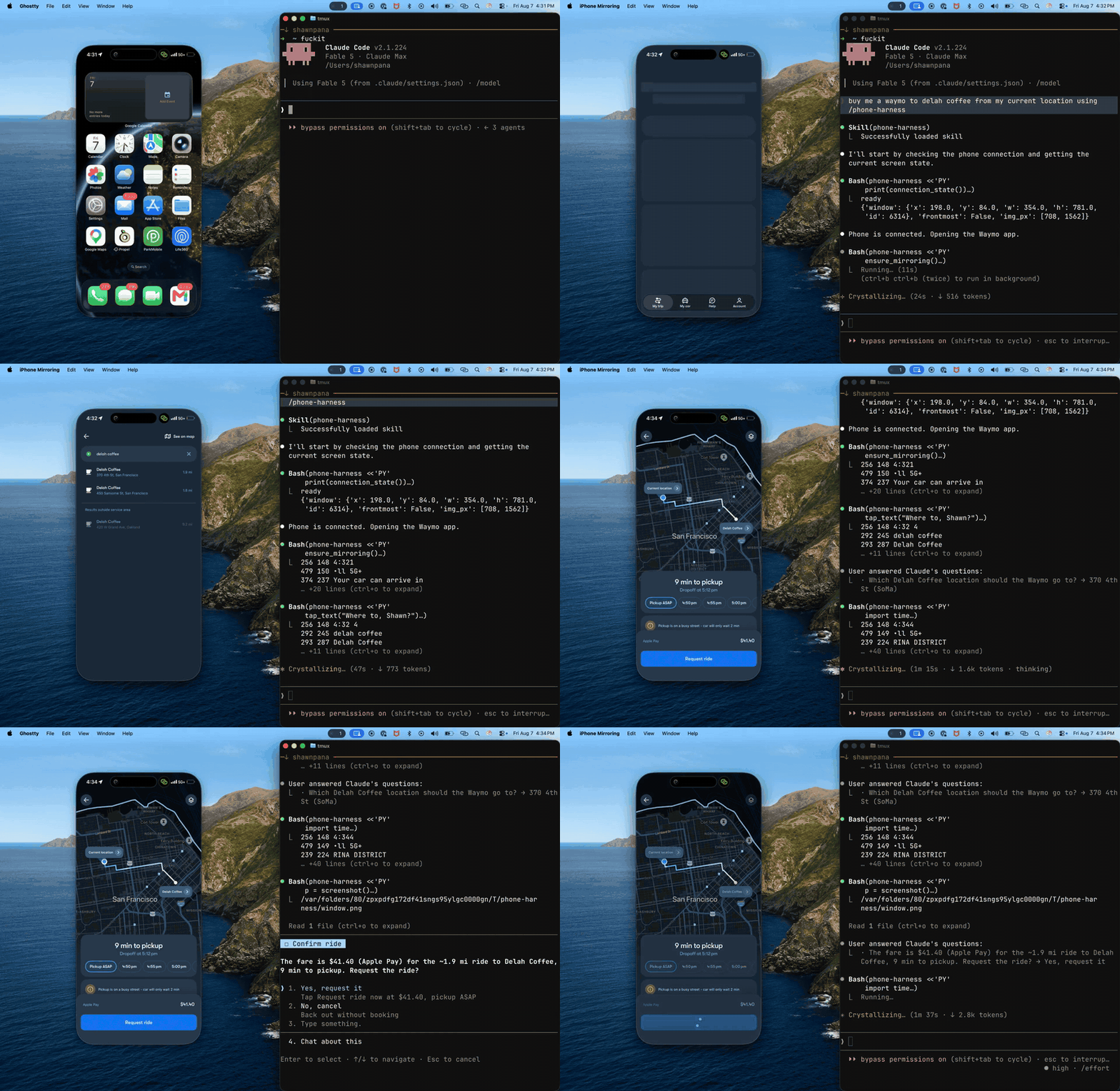
Demo
Task: "Buy me a Waymo to Delah Coffee from my current location."
Setup
For the CLI, send this setup prompt to your agent (Claude Code, Codex, Grok Bot, and more):
Install or upgrade phone-harness to the latest stable version with uv using Python 3.12, register the skill from `phone-harness skill`, then read https://github.com/phone-harness/phone-harness/blob/main/onboarding.md and walk me through it. Follow https://github.com/phone-harness/phone-harness/blob/main/install.md if setup or connection fails.
The agent installs the CLI, asks which phone to use, and walks you through the steps that need your hands. What each phone needs:
| Phone | Needs |
|---|---|
| iPhone | macOS 15+, iPhone Mirroring paired to an iOS 18+ iPhone, Accessibility and Screen Recording permission |
| Android | adb and USB debugging, on macOS, Linux or Windows |
| Cloud Android / iPhone | Phone Harness Cloud account; cloud Android also needs adb |
phone-harness doctor checks the setup. Full details: install.md and setup/.
MCP: add https://mcp.phone-harness.com/mcp to any MCP client (setup). Cloud Android and iPhone only for now.
Hermes Agent: hermes plugins install phone-harness/phone-harness/integrations/hermes. See integrations/hermes.
OpenClaw: openclaw plugins install clawhub:phone-harness. See integrations/openclaw.
Usage
phone-harness <<'PY'
open_app("Notes")
tap_text("New Note")
type_text("hello from the harness")
print([o["text"] for o in screen()][:10])
PY
Helpers are pre-imported; helpers.py has the full list. The agent saves its own helpers in ~/.phone-harness/agent-workspace.
Phone Harness Cloud
No phone on your desk, or need more than one? Phone Harness Cloud hosts them for you:
- Android phones on demand: a fresh one per session, or a saved phone that keeps its apps and logins.
- Dedicated real iPhones, driven over HTTPS from any OS.
- A live view of the phone in your browser while the agent works.
phone-harness cloud login            # once: approve in your browser
phone-harness cloud ls               # phones on the account, and any live session
phone-harness cloud start            # cloud.phone if set, else a temporary Android; 15 min (--for 90s, 15m)
phone-harness cloud start ios        # the account's iPhone, when only one is listed
phone-harness <<'PY'
print(screenshot())
PY
phone-harness cloud stop             # ends the session; a saved Android is written back
The same helpers drive a cloud phone: an Android over adb, an iPhone over HTTPS. cloud start takes a phone's name or id from cloud ls, or ios / android; with none it starts a temporary Android. phone-harness cloud lists every command.
No cloud iPhone on the account yet, or need more of them? Reserve them with a $20 per phone refundable deposit. The command prints a quote, which is the authoritative figure, and a Stripe Checkout link. You pay in your browser, and that payment is what holds your place in the queue, which is in the order deposits were paid; the CLI never pays for you.
phone-harness cloud reserve --type iphone --plan monthly --qty 2 \
  --use-case "Testing our app on real iPhones" --open
phone-harness cloud reservations             # status, place in the queue, deposit, when it was paid
phone-harness cloud reservations cancel ID   # leave the queue; the deposit still held goes back to the card that paid
--type is iphone or iphone-esim, and --plan is monthly or annual. Reservations are for iPhones only (with or without eSIM). Cloud Android emulators are on the $20 plan and are not reserved. The plan starts when a phone is handed over; the deposit comes off its first bill and is then no longer refundable. An account can have five unpaid reservations an hour, and cancelling one does not free a place.
How it works
Every phone sits behind the same helpers, so a script written for one runs on the others.
- iPhone: captures the iPhone Mirroring window, reads it with Apple's Vision OCR, and sends taps, swipes and typing as input events.
- Android: adb for screenshots and input, the accessibility tree for text. USB or Wi-Fi.
- Cloud Android: the same as Android, over adb to a hosted phone.
- Cloud iPhone: ops over HTTPS.
phone-harness config set platform ios|android picks the default phone. phone-harness update upgrades the CLI, and it prints one line when a new version is out (PHONE_HARNESS_NO_UPDATE_CHECK=1 silences it).
Limits
- Unlocking the iPhone pauses mirroring; a PIN-locked Android needs the user.
- OCR sees text, not icons. Unlabeled controls need a screenshot and a vision-capable model.
- No multi-touch, no camera or Face ID flows. DRM video renders black.
- Connecting the phone is always the user's job.
Sponsor
phone-harness is free and maintained in my own time. Sponsoring keeps it that way.
📈 近 7 天 Star 趋势
🏆 排名变化趋势
📋 历史上榜记录
| 日期 | 榜单 | 排名 | 周期新增 | 总 STAR |
|---|