📄 仓库 README
在 GitHub 查看 ↗ ### [Moshi: Terminals weren’t made for phones. Moshi is.](https://getmoshi.app/?utm_source=herdr-reviewr&utm_medium=readme&utm_campaign=sponsor)
[A mobile terminal designed for AI coding agents.](https://getmoshi.app/?utm_source=herdr-reviewr&utm_medium=readme&utm_campaign=sponsor)
### [Moshi: Terminals weren’t made for phones. Moshi is.](https://getmoshi.app/?utm_source=herdr-reviewr&utm_medium=readme&utm_campaign=sponsor)
[A mobile terminal designed for AI coding agents.](https://getmoshi.app/?utm_source=herdr-reviewr&utm_medium=readme&utm_campaign=sponsor)herdr-reviewr


install · quick start · controls · scopes · configuration · limitations · changelog
A code-review pane for herdr. Read your agent's diff beside the chat, comment on lines, and send the comments back.
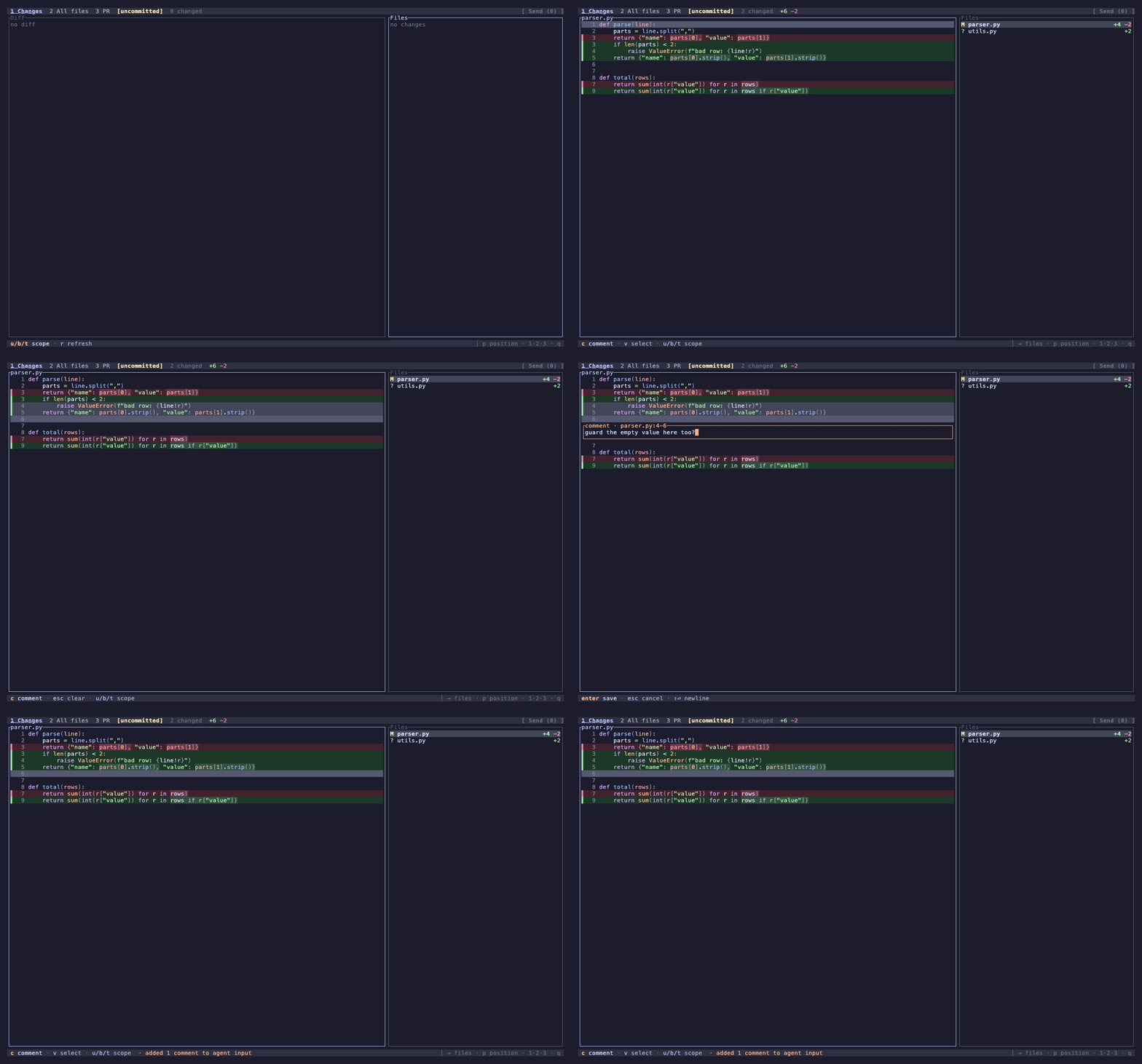
- Diff review — the agent's changes, syntax-highlighted.
- Unified and split views — one column or side by side, flip with
|. - Four diff scopes — uncommitted, branch, last turn, commits.
- Last-turn diff — only what the agent's latest turn changed.
- Line comments — on a line or a range, sent to the agent in one go.
- Text selection — drag to copy, like an editor.
- File viewer — any file in the worktree.
- Search — files by name and code by content, powered by fff.
- Find in file — step through every match.
- PR view — the branch's pull request, read-only.
- Markdown review —
mrenders a.mdfile. - Themes — 20, dark and light.
reviewr never edits your files, never sends on its own, and never posts to your PR.
Requirements
- herdr ≥ 0.9.3 and git.
- A terminal with 24-bit color.
- macOS, Linux, or Windows.
- For the PR tab only:
gh,glab, oraz(with theazure-devopsextension), logged in.
Install
herdr plugin install persiyanov/herdr-reviewr
reviewr opens on its own when herdr creates a workspace for a worktree. To open it yourself:
herdr plugin action invoke open --plugin persiyanov.reviewr
To update, reinstall. Your config stays:
herdr plugin uninstall persiyanov.reviewr && herdr plugin install persiyanov/herdr-reviewr
Without herdr, run a release binary on any repo. Everything but Send and the last turn scope works:
herdr-reviewr ~/some/repo
Quick start
- Pick a file.
j/kin the file list, or]to jump from change to change. - Focus the diff.
Tab. - Select lines.
v, thenj/k, or drag the line numbers. - Comment.
c, type,Enter. - Send.
sputs every comment in the agent's input.
The footer shows the next step. ? lists every key.
To toggle reviewr with a key, add this to ~/.config/herdr/config.toml:
[[keys.command]]
key = "cmd+r"   # many macOS terminals swallow alt+
type = "plugin_action"
command = "persiyanov.reviewr.toggle"
Controls
Every key can be rebound (Keybindings).
Getting around
| Key | Action |
|---|---|
1 2 3 |
Tab: Changes / All files / PR |
u b t g |
Scope: uncommitted / branch / last turn / commits |
B |
Pick the base branch |
G |
Pick commits |
j k · ↑ ↓ |
Move |
] [ |
Next / previous change |
f F |
Next / previous file |
PageUp PageDown |
Page |
Ctrl+U Ctrl+D |
Half page |
Tab |
Switch pane |
→ ← |
Expand / collapse, or scroll sideways |
/ |
Search files and code |
Ctrl+F |
Find in file |
: |
Go to line (:0 first, :$ last) |
w |
Wrap lines |
m |
Rendered / source markdown |
\| |
Unified / split diff (needs 137 columns) |
p |
Move the file list |
z |
Hide / show the file list |
< > |
Widen / narrow the file list |
r |
Refresh |
? |
All keys |
q |
Quit (asks if comments are unsent) |
Q |
Quit and drop unsent comments |
Reviewing
| Key | Action |
|---|---|
v |
Select lines |
c |
Comment |
e |
Edit the comment, or open the file in your editor |
d |
Delete comment |
n N |
Next / previous comment |
l |
List comments |
s |
Send comments to the agent |
y |
Copy comments |
esc |
Clear selection |
Comment box
| Key | Action |
|---|---|
Enter |
Save |
Esc |
Cancel |
Shift+Enter · Alt+Enter · Ctrl+J |
New line |
The usual editing keys work: arrows, Home / End, Ctrl+A / Ctrl+E, Alt+b / Alt+f,
Ctrl+W / Ctrl+U / Ctrl+K.
PR tab
| Key | Action |
|---|---|
j k |
Move through description and comments |
PageUp PageDown |
Scroll |
o |
Open in browser |
r |
Refresh |
Mouse: drag to copy, double-click a word, triple-click a line. Click or drag line numbers to comment. Click files, tabs, and links. Scroll with the wheel.
The three tabs
- Changes — files the current scope changed.
- All files — every file in the worktree. You can comment here too. Git-ignored files are dimmed.
- PR — the branch's pull request (merge request on GitLab): state, checks, description, comments.
Diff scopes
- uncommitted — changes since the last commit, including new files.
- branch — everything since the branch left its base, commits included. The base is the default branch until you pick another (Base branch).
- last turn — changes since the agent's latest turn started.
- commits — one commit or a range, picked with
G.
reviewr starts in uncommitted (default_scope changes that). Git-ignored files never show
in Changes.
Configuration
Flags on the pane command:
| Flag | Default | Meaning |
|---|---|---|
--base <ref> |
auto | base for the branch scope, overrides the pick |
--theme <name> |
catppuccin |
color theme |
--wrap <on\|off> |
on |
wrap long lines |
Everything else goes in ~/.config/herdr/plugins/config/persiyanov.reviewr/config.toml. Saving
it applies at once. An invalid file blocks the pane with the error until you fix it.
theme = "tokyo-night"
default_scope = "branch"            # uncommitted | branch | last-turn
markdown_view = "rendered"          # source | rendered
diff_view = "split"                 # unified | split
navigator_position = "bottom"       # right | bottom | left | top
toggle_placement = "overlay"        # split | overlay | zoomed | tab
toggle_direction = "down"           # right | down, for split
auto_open = false
editor = "code -g {file}:{line}"
url_opener = "browser-bridge --new-tab {url}"
review_prefix = "Fix each comment, then run the tests."
github_host = "github.example.com"
gitlab_host = "git.corp.example"
azure_devops_host = "tfs.corp.example"

[keybindings]
comment = ["c", "ㅊ"]
Theme
Dark: catppuccin, catppuccin-frappe, catppuccin-macchiato, dracula, nord, gruvbox,
one-dark, solarized, monokai, tokyo-night, rose-pine, ayu, everforest.
Light: catppuccin-latte, gruvbox-light, one-light, solarized-light, github-light,
tokyo-night-day, rose-pine-dawn.
Pick one that matches your terminal's background. Shared names match herdr's colors.
Markdown and diff view
m and | stick for every file you open until you press them again. markdown_view and
diff_view set how a new pane starts.
Split needs a diff pane 137 columns wide: hide the file list (z), move it below (p), or open
reviewr zoomed or as an overlay. A narrower pane shows unified until it widens.
File list
navigator_position or p moves it. < / > or dragging its edge resizes it. z hides it.
Base branch
The branch scope compares against the repo's default branch. To pick another, press B or click
the base name in the header. Type to filter, or type any commit reference like HEAD~2. The
pick holds for this worktree until you change it. --base overrides it.
Editor
e opens the file at your line in $VISUAL, $EDITOR, or git's core.editor. Common editors
open at the right line. A terminal editor takes the pane until you quit. For anything else, set
editor; {file} and {line} are filled in.
URL opener
Links open with open, xdg-open, or the Windows default browser. Under herdr --remote, set
url_opener to something that reaches your browser. The URL is passed as one argument, never
through a shell, so don't use ssh host open {url}.
Review prefix
review_prefix goes above your comments on every send and copy. It arrives as pasted text, so
Claude Code won't run a /command in it. To run one, type it in the agent's input before you
press s.
Keybindings
Each action takes a list of keys that replaces its defaults. The footer shows the first. Extra keys help non-Latin layouts: bind the character your layout types on the same key.
| Action | Default |
|---|---|
down / up |
j / k |
next-hunk / prev-hunk |
] / [ |
next-file / prev-file |
f / F |
scope-uncommitted / scope-branch / scope-last-turn / scope-commits |
u / b / t / g |
base-pick / commit-pick |
B / G |
tab-changes / tab-all-files / tab-pr |
1 / 2 / 3 |
wrap |
w |
rendered |
m |
split |
\| |
navigator-position |
p |
navigator-hide |
z |
navigator-grow / navigator-shrink |
< / > |
select |
v |
comment |
c |
edit / delete |
e / d |
next-comment / prev-comment |
n / N |
comments |
l |
search |
/ |
find |
ctrl+f |
goto-line |
: |
keys |
? |
send |
s, S |
copy |
y, Y |
open-pr |
o |
refresh |
r |
quit |
q |
quit-discard |
Q |
A key is one character or a ctrl+ / alt+ chord. Tab, Esc, and Enter are fixed.
GitHub, GitLab, and Azure DevOps
The PR tab reads the upstream remote, else origin, so forks work. Self-hosted servers need
github_host, gitlab_host, or azure_devops_host, matching the remote's hostname exactly.
SSH aliases like github.com-work don't match.
Pane placement
The toggle opens reviewr right of your agent. toggle_placement changes that: overlay covers
the tab, zoomed fills it, tab opens a new one.
reviewr opens on its own in a new worktree's workspace, with split or tab only, and leaves
your agent focused. auto_open = false turns that off.
Layouts
To place reviewr in a herdr layout, give a pane command = "herdr-reviewr". If ~/.local/bin
isn't on your PATH, use ~/.local/state/herdr/plugins/persiyanov.reviewr/bin/herdr-reviewr.
On Windows, point it at the plugin's own bin folder.
Limitations
- Colors need a 24-bit terminal, and the theme must be matched to the background by hand.
- Added and removed lines differ only by color.
- Copying needs
pbcopy,wl-copy,xclip, orxsel(Windows needs none). Send works without. - Windows: a reviewr started by hand in a PowerShell pane isn't recognized, so toggle opens
another. Toggle may open on the pane's launch folder, not where you
cd'd. - Network drives send no file events. macOS and Linux check every five seconds. On Windows,
press
r. - Send needs an agent in the workspace, and refuses one at a permission prompt. Your comments stay.
- last turn shows all of a turn or nothing. If the agent writes the instant a turn starts, the scope shows nothing for that turn and says why.
- The PR tab supports GitHub, GitLab, and Azure DevOps only. A merged or closed PR shows as history. Each comment list shows its newest 100.
- A background pane catches up 30 seconds after a change, or at once when shown.
- A rename can pair with the wrong file until you press
r. - Comments live only in the pane. Closing it loses unsent ones. Send delivers all or none.
- Comments don't follow moved code. reviewr marks them stale instead of dropping them.
- Files over 2 MB or 50,000 lines aren't diffed. Neither are binary files.
Building from source
See CONTRIBUTING.md. To run your build in herdr:
git clone https://github.com/persiyanov/herdr-reviewr
cd herdr-reviewr
just install   # build to bin/herdr-reviewr, re-signed on macOS
herdr plugin uninstall persiyanov.reviewr
herdr plugin link .
Toggle the pane off and on after every just install.
Roadmap
JSON export, marking files reviewed, more named keys, automatic light/dark theme, more themes (kanagawa,
vesper, a dark github), a theme that follows the terminal, copying through the terminal.
Sponsors
reviewr is built by one person. If it saves you time, sponsor it. Company sponsors get their logo here.
License
MIT. Syntax highlighting by syntect and two-face, whose bundled themes color most syntax.
Bundled syntax themes in assets/, each under its own license:
- Catppuccin Mocha — MIT.
- Tokyo Night (
tokyo-night,tokyo-night-day) — Apache-2.0. - Rosé Pine (
rose-pine,rose-pine-dawn) — MIT. - ayu (
ayu) — MIT, converted from its Sublime color scheme. - Everforest (
everforest) — MIT, built from its palette and highlight groups.
📈 近 7 天 Star 趋势
🏆 排名变化趋势
📋 历史上榜记录
| 日期 | 榜单 | 排名 | 周期新增 | 总 STAR |
|---|