📄 仓库 README
在 GitHub 查看 ↗
Open Mercato
Open Mercato Core is MIT licensed
Open Mercato - the AI-Engineering Foundation Framework. Start with 80% done.
Open Mercato is an open-source TypeScript framework on Next.js and PostgreSQL. It ships ready business modules for CRM, ERP, commerce and more, so a new app starts as a working back office. It is built for AI coding agents: Claude Code, Codex and Cursor get the rules and skills that say where code goes, and Cezar, the agentic development IDE, runs each task in its own git worktree and streams it live. It is for teams and developers building business apps and backends, and for business owners who want one.
npx create-mercato-app my-app
No terminal? Open Mercato Cloud gives you the same app in the browser, with Claude Code, Codex and Cezar already inside (account required).
Prefer to delegate? Paste this line into Claude Code, Codex or Cursor:
Read https://raw.githubusercontent.com/open-mercato/open-mercato/main/README.md and follow it for my project, stage by stage. Stop and ask me at every "You decide" and at every open question.
[!NOTE] For AI coding agents. To build an app, scaffold it with
npx create-mercato-app <name> --preset <classic|empty|crm|wms> --agents all --init-git(or a comma-separated list ofclaude-code,codex,cursor,github-copilot) and never clone this repository unless the human wants to change Open Mercato Core. If the request is ambiguous, such as "install this repo", ask that one question first. After scaffolding, the app's ownAGENTS.mdtakes over and every task starts withom-help. Work one stage at a time: ask the You decide question and offer the bold default, do Run, confirm every Done when box. Stop at every "You decide" and at the spec's Open Questions.
Quick start · Cloud · Cezar · Modules · Docs · Tutorials and videos · Discord · Contributing
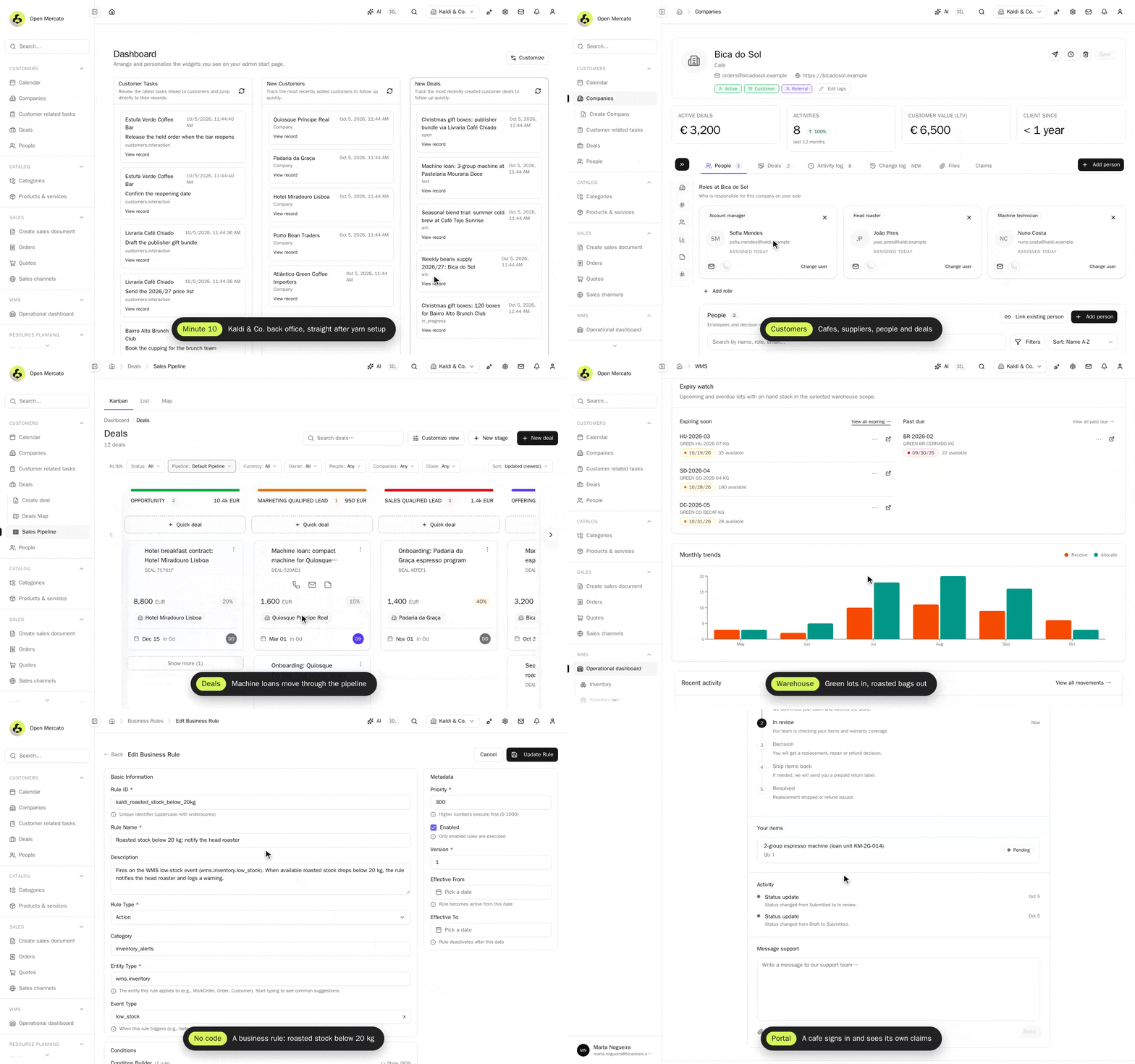
Kaldi & Co. is a fictional specialty coffee roaster in Lisbon. The screens on this page are from the app built with the four stages below, with the roaster's own demo data loaded through the API.
What is Open Mercato
AI code assistants generate code. They do not decide where it goes, how it is layered, or whether it stays consistent across 30 or 50 engineers in a team. Open Mercato gives them a foundation that does:
- Architecture-aware AI harness. Every app ships an
AGENTS.mdand skills that tell the agent where code, modules, data models and UI belong, how to troubleshoot and how to upgrade, from a data table or a design-system form up to a whole feature with unit and integration tests. The open-mercato/skills collection adds code review, ticketing and debugging. - Spec-first. Specs live next to the code in
.ai/specs/and drive the agent's work: plan, approve, then implement. - Start with 80% done. Dozens of business modules already work together: customers, catalog, sales, warehouse, portal, workflows and more (what's in the box).
- Unattended when you want it. Cezar runs the same skills in parallel, on a schedule or on GitHub events, and never merges on its own.
- No lock-in. You own the code. The core is MIT with no per-seat licence; enterprise modules are licensed separately.
Built for CTOs and team leads who already rolled out Cursor or Copilot and noticed it is not enough, and for developers who want to build professional business apps and backends without constantly checking their back.
Get started
Pick your row. Everyone who builds an app goes through the same four stages, and each stage has the same shape: You decide (a question with a bold default), Run (commands or the exact prompt), Done when (checks you can tick), then a screenshot from the Kaldi run. The whole run, from npx to a working module with a business rule and a cafe login, took one agent evening: about 2 hours 10 minutes of wall time, the long parts being the first install and the module build.
| You are | Start with | Then |
|---|---|---|
| A business owner without a terminal | Open Mercato Cloud | the In the Cloud line of each stage, or a Certified Partner Agency |
| A developer | Minute 10 in your terminal | Hour 1, Day 1, Month 1 |
| An AI coding agent | the note at the top of this page | every stage in order, stopping at each You decide |
| A module author | Build and publish a module | create-mercato-module |
| A core contributor | Change Open Mercato Core | CONTRIBUTING.md |
No terminal: Open Mercato Cloud
Open Mercato Cloud is a hosted trial workspace (Beta) with the app already initialised. Inside you get:
- the templates crm, classic or empty, demo users, a View as role switcher and a live preview;
- VS Code in the browser and a web terminal;
- Claude Code and Codex, on managed credits by default or on your own subscription (
claude auth login --claudeai,codex login --device-auth); - Cezar, preinstalled as the AI Coding Agent tab (Beta): the default way to drive the agent here;
- PostgreSQL and Redis. There is no Docker inside, and it is not production hosting.
Keep your work: run gh auth login in the web terminal, then use Create repository and Create PR in the portal, or Export sandbox (a tar with your workspace and a database dump). If sign-up says "Email registration is currently closed", you are on the waitlist. Watch the Open Mercato Cloud tour, or follow the video course for non-developers built on the sandbox (Polish only).
Minute 10: a running back office
You decide: which starter? classic (CRM, catalog, sales, warehouse, portal, demo data) · crm · wms · empty. Which agents? all (Claude Code, Codex, Cursor and GitHub Copilot, which gets instructions only, no hooks) · one of them.
Run in a terminal, as is. You need Docker running (Docker Desktop, OrbStack or Colima) and about 8 GB of free RAM; mise installs Node.js 24 and Yarn 4 for you. On Windows use WSL2 and see Developing on Windows. All options: installation guides.
curl https://mise.run | sh && export PATH="$HOME/.local/bin:$HOME/.local/share/mise/shims:$PATH"
mise use -g node@24 yarn@4      # Node.js 24 and Yarn 4; skip both lines if you already have them
npx create-mercato-app my-app --preset classic --agents all --init-git
cd my-app
docker compose up -d --wait     # PostgreSQL 17 with pgvector, Redis 7, Meilisearch
yarn setup                      # installs, creates .env, migrates, seeds demo data, starts the dev runtime and keeps running
A plain npx create-mercato-app my-app asks these questions plus Git init (its agent default is Claude Code). Without a terminal it silently picks classic, claude-code and no git, so agents always pass the flags and run yarn setup in the background. If docker compose fails, offer Open Mercato Cloud instead. To keep mise after this terminal closes, add eval "$(~/.local/bin/mise activate zsh)" (or bash) to your shell profile. Pushing to GitHub is optional and comes later, in Day 1.
In the Cloud: sign in or request access (registration may be closed, see the waitlist note), create a sandbox from the classic template, wait until it shows Running, then click Open app.
Done when
- [ ] the terminal prints
Backend URL http://localhost:3000/backend; the logins areadmin@acme.com/secret, alsosuperadmin@acme.comandemployee@acme.comwith the same password (the full box is in.mercato/logs/*-dev-setup-runner.log, or runyarn setup --verbose) - [ ] you open
http://localhost:3000/backendand sign in asadmin@acme.com/secret(Cloud: Open app, then View as Admin). Open it aslocalhost, not127.0.0.1or the machine's IP: the dev server serves its scripts tolocalhostonly, so other hosts get a page that never finishes loading (on a remote box, use an SSH tunnel) - [ ] for agents:
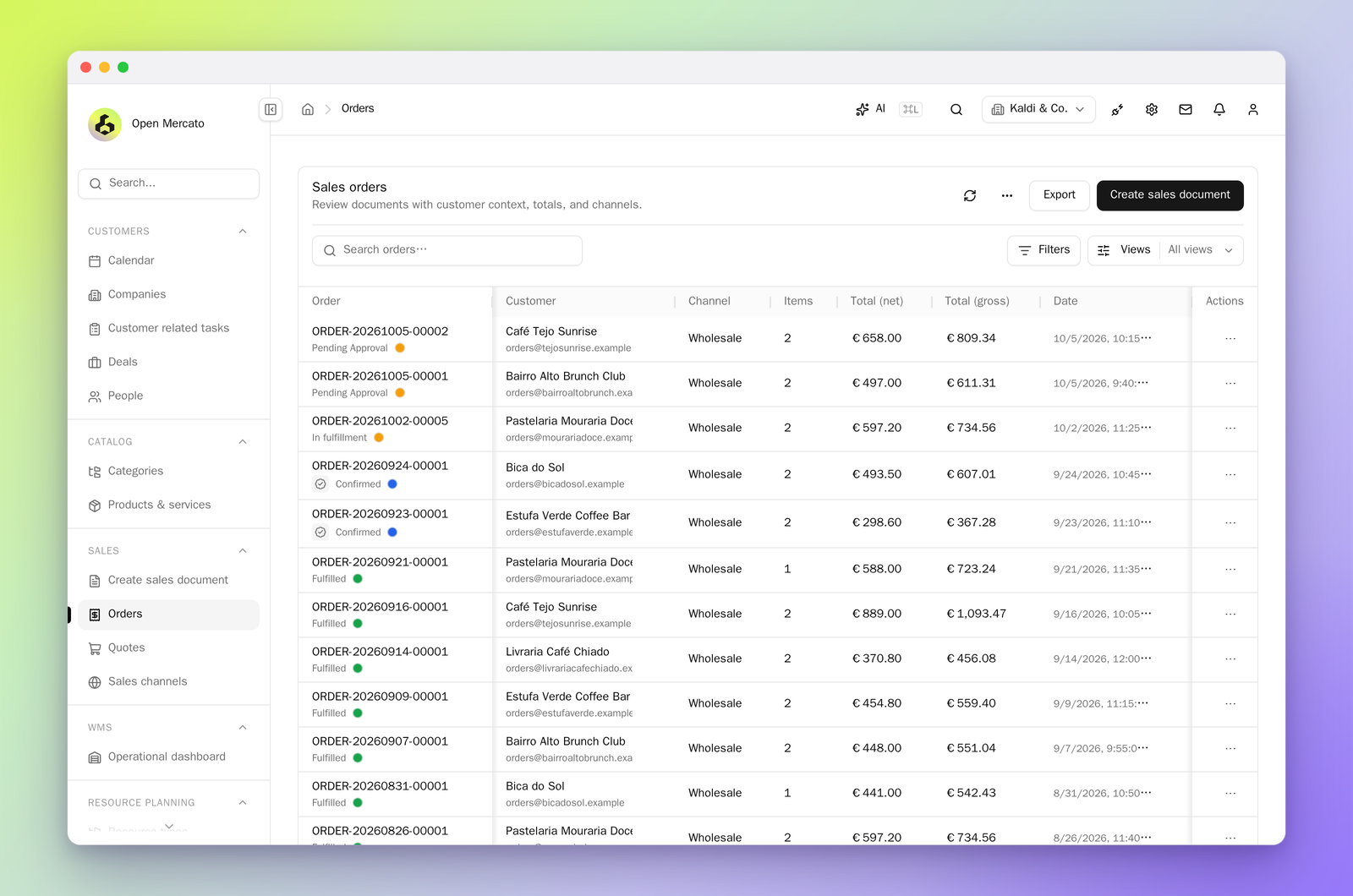
curl -s -o /dev/null -w '%{http_code}' localhost:3000/loginprints200and.agents/skills/om-helpexists (if not, runyarn install-skills) - [ ] Customers lists demo companies and people, and Sales lists demo orders
In the Kaldi run this stage took about 11 minutes from npx to a working login (about 7 minutes of that was installing dependencies and the first setup, on an 8-core Linux box with warm caches). Stuck? See troubleshooting.
Install guides per operating system, Docker and Dev Container
- Standalone app: [macOS](https://docs.openmercato.com/installation/standalone#macos) · [Linux](https://docs.openmercato.com/installation/standalone#linux) · [Windows](https://docs.openmercato.com/installation/standalone#windows), with the video [Bu📈 近 7 天 Star 趋势
🏆 排名变化趋势
📋 历史上榜记录
| 日期 | 榜单 | 排名 | 周期新增 | 总 STAR |
|---|