面向简单需求的终端文本编辑器,向 MS-DOS Editor 致敬,界面与按键习惯则往 VS Code 靠拢,目标是让不熟悉终端的用户也能顺利打开并改一个文件。文档把定位写成 simple editor for simple needs,功能范围因此收得很窄;标签集中在 editor、text-editor、terminal,服务的是最基础的编辑动作而非完整 IDE 工作流。分发有三条路:Windows 用 WinGet 安装 Microsoft.Edit,或从 Releases 页取二进制;Linux 发行版若未打包,可运行官方安装脚本从源码构建,前提是备好 Rust 工具链(可用 rustup 安装)和一个 C 编译器。全部用 Rust 写成,MIT 许可。适合偶尔改配置文件、在服务器上临时编辑文本、又不愿背 vim 命令的人,也适合刚接触命令行、需要看见菜单与快捷键提示的新手。
📄 仓库 README
在 GitHub 查看 ↗ Edit
A simple editor for simple needs.
This editor pays homage to the classic MS-DOS Editor, but with a modern interface and input controls similar to VS Code. The goal is to provide an accessible editor that even users largely unfamiliar with terminals can easily use.
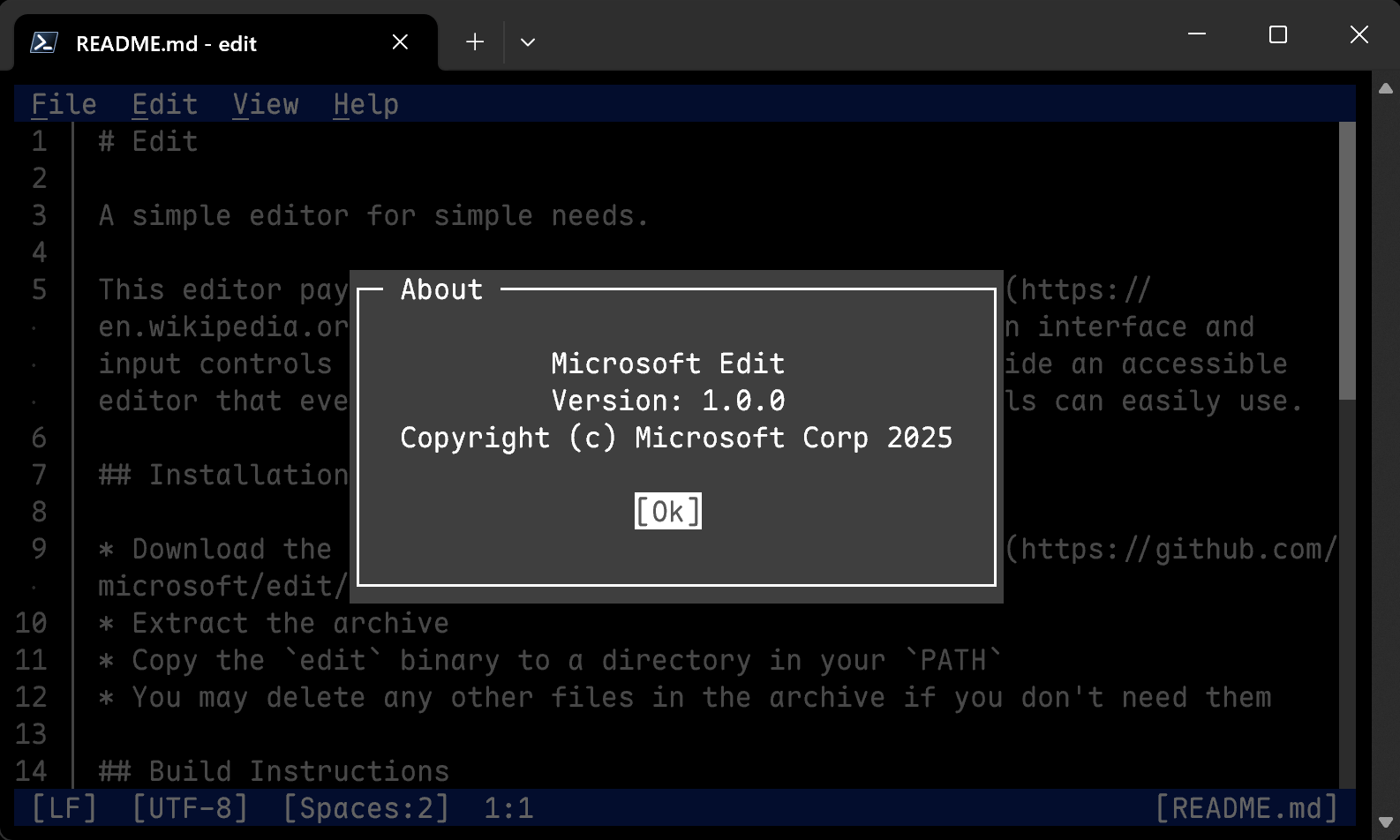
Installation

You can also download binaries from our Releases page.
Windows
You can install the latest version with WinGet:
winget install Microsoft.Edit
Linux (build from source)
If your distribution does not provide binaries, or if you'd like to build your own, you can use our install script, provided you have installed:
* Rust (via rustup or similar)
* A C compiler (e.g. gcc)
* ICU (e.g. libicu78, libicu, icu)
* curl/wget and tar
The following command will then install msedit into ~/.local/bin:
curl --proto '=https' --tlsv1.2 -sSf https://raw.githubusercontent.com/microsoft/edit/main/assets/install.sh | sh
Additional flags are --dev, to build directly from the main branch, and --system to install into /usr/local/bin. For instance:
curl --proto '=https' --tlsv1.2 -sSf https://raw.githubusercontent.com/microsoft/edit/main/assets/install.sh | sh -s -- --dev --system
macOS
You can install the latest version with Homebrew:
brew install msedit
Build Instructions
- Install Rust
- Clone the repository
- If you're using nightly Rust:
sh cargo build --release --config .cargo/release.toml - If you're using stable Rust:
- Ideally: Set the environment variable
RUSTC_BOOTSTRAP=1and use the nightly build instructions above. This is recommended, because it drastically reduces the binary size and slightly improves performance. - Otherwise, simply run:
sh
    cargo build --release
Build Configuration
You can set the following environment variables at build-time to configure the build:
| Environment variable | Description |
|---|---|
EDIT_CFG_ICU* |
See ICU library name (SONAME) below for details. Linux package maintainers are advised to review and configure these options. |
EDIT_CFG_LANGUAGES |
A comma-separated list of languages to include in the build. See i18n/edit.toml for available languages. |
Notes to Package Maintainers
Package Naming
The canonical executable name is "edit" and the alternative name is "msedit". We're aware of the potential conflict of "edit" with existing commands and recommend alternatively naming packages and executables "msedit". Names such as "ms-edit" should be avoided. Assigning an "edit" alias is recommended, if possible.
ICU library name (SONAME)
This project optionally depends on the ICU library for its Search and Replace functionality.
By default, the project will look for the following library names:
| Variable | Windows | macOS | Linux / Other |
|---|---|---|---|
EDIT_CFG_ICUUC_SONAME |
icuuc.dll |
libicucore.dylib |
libicuuc.so |
EDIT_CFG_ICUI18N_SONAME |
icuin.dll |
libicucore.dylib |
libicui18n.so |
If your installation uses a different SONAME, please set the following environment variable at build time:
* EDIT_CFG_ICUUC_SONAME:
For instance, libicuuc.so.76.
* EDIT_CFG_ICUI18N_SONAME:
For instance, libicui18n.so.76.
Additionally, this project assumes that the ICU exports symbols without _ prefix and without version suffix, such as u_errorName.
If your installation uses versioned exports, please set:
* EDIT_CFG_ICU_CPP_EXPORTS:
If set to true, it'll look for C++ symbols such as _u_errorName.
Enabled by default on macOS.
* EDIT_CFG_ICU_RENAMING_VERSION:
If set to a version number, such as 76, it'll look for symbols such as u_errorName_76.
Finally, you can set the following environment variables:
* EDIT_CFG_ICU_RENAMING_AUTO_DETECT:
If set to true, the executable will try to detect the EDIT_CFG_ICU_RENAMING_VERSION value at runtime.
The way it does this is not officially supported by ICU and as such is not recommended to be relied upon.
Enabled by default on UNIX (excluding macOS) if no other options are set.
To test your build settings, run cargo test with the --ignored flag. For instance:
cargo test -- --ignored
📈 近 7 天 Star 趋势
🏆 排名变化趋势
📋 历史上榜记录
| 日期 | 榜单 | 排名 | 周期新增 | 总 STAR |
|---|