📄 仓库 README
在 GitHub 查看 ↗
WinUI Gallery
Companion app for WinUI & Windows App SDK APIs
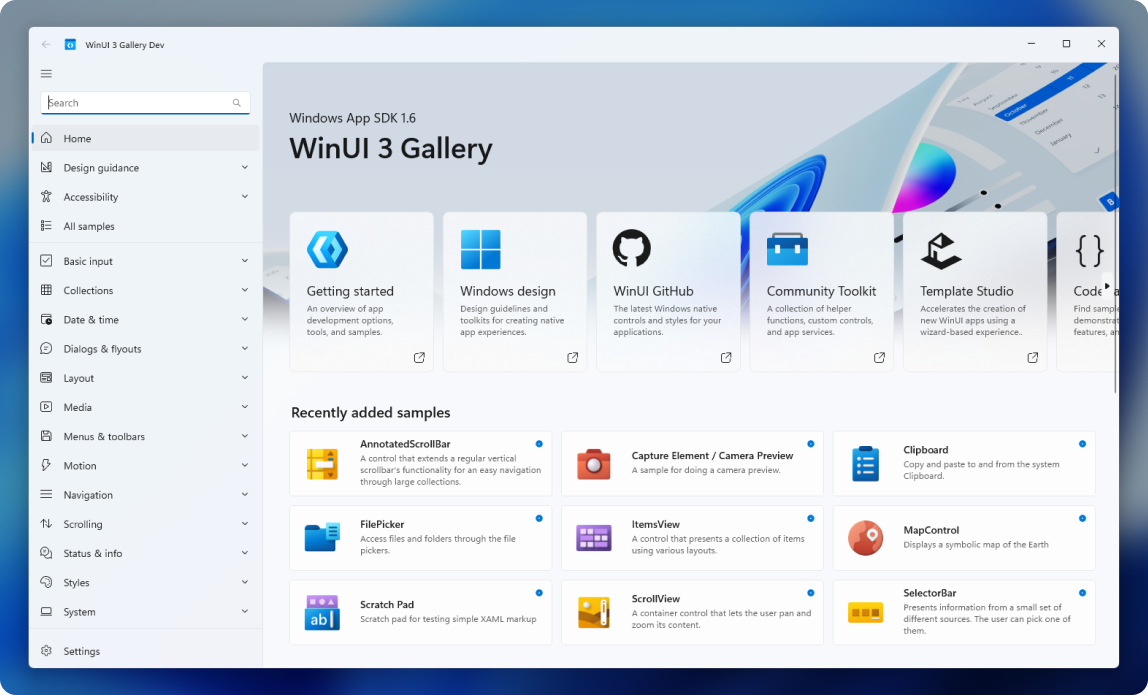
This app demonstrates all of the WinUI 3 controls and styles available to make a modern Windows app with the Windows App SDK. It is the interactive companion to the Fluent Design guidelines and shows the usage of WinUI through interactive samples, tools and code snippets.

⭐ Features
-
WinUI controls samples: each control page shows the markup and codebehind used to create each example.
-
Use the Microsoft.UI.Xaml (WinUI) library: the app includes the latest WinUI NuGet package and shows how to use the WinUI controls like NavigationView, SwipeControl, and more.
-
Adaptive UI: in addition to showing how each control responds to different form factors, the app itself is responsive and shows various methods for achieving adaptive UI.
-
Design & accessibility guidance: design and accessibility pages help make the gallery a useful developer companion app.
👏 Contribute to WinUI Gallery
Any samples or docs improvements you'd like to see? We're always looking for a helping hand. Feel free to file an issue to start the discussion, or even better, create a PR with the change you'd like to see!
Check out these help wanted issues if you don't know where to start.
You can also learn more about current happenings with WinUI Gallery in the project board.
🚀 Getting started
Quick start guide to building the WinUI Gallery:
1. Set up the environment
[!NOTE] The WinUI Gallery requires Visual Studio 2026 or the winapp CLI to build and Windows 10 or later to execute. If you're building an app with WinUI and Windows App SDK for the first time, follow these installation instructions.
Visual Studio 2026: install the WinUI application development workload.
winapp CLI: enable Developer Mode, install the .NET 10 SDK, and install the CLI:
winget install --id Microsoft.WinAppCli --exact --source winget
2. Clone the Repository
git clone https://github.com/microsoft/WinUI-Gallery.git
3. Build and run
Visual Studio: open WinUIGallery.slnx, make sure WinUIGallery is set as the startup project, and press F5.
winapp CLI: from the repository root, run:
winapp run WinUIGallery\WinUIGallery.csproj
Gallery uses an experimental Windows App SDK to demonstrate upcoming features.
Use the normal Debug or Release configuration; the SDK version is pinned in
standalone.props. The runtime is bundled with the app (self-contained deployment)
instead of referencing a shared Windows App SDK framework package. Experimental
APIs can change or be removed before a stable release.
The Windowing APIs page combines stable window creation with experimental window sizing examples. Each experimental example has its own label and warning; the stable example retains its original APIs.
[!WARNING] Try deleting
nuget.configand building again if you get the following build error:Assets file 'C:\Users\...\source\repos\WinUI-Gallery\WinUIGallery\obj\WinUIGallery\project.assets.json' not found. Run a NuGet package restore to generate this file.
➡️ Further information
To learn more about Windows app development, go to the Windows Dev Center.
Maintainers can follow the release runbook to coordinate Microsoft Store publishing with a GitHub release.
Related topics
🏆 Contributors
Thanks to our amazing contributors!
Made with contrib.rocks.
📈 近 7 天 Star 趋势
🏆 排名变化趋势
📋 历史上榜记录
| 日期 | 榜单 | 排名 | 周期新增 | 总 STAR |
|---|