📄 仓库 README
在 GitHub 查看 ↗

One local gateway for your AI coding tools and models.
Use the models you choose with Codex, Claude Code, Claude Desktop and Grok Build,
and connect OpenCode, Pi, Qoder, WorkBuddy, Kilo, Cline, T3 Code and more through managed configs.
See every supported tool →
Part of GOAT: run your coding agents on any model, on any machine → trygoat.ai



npm install -g --allow-scripts=bun @bitkyc08/opencodex
ocx start




| ### Claude Code, running any model The picker is stock Claude Code. The brain behind it isn't. |

|
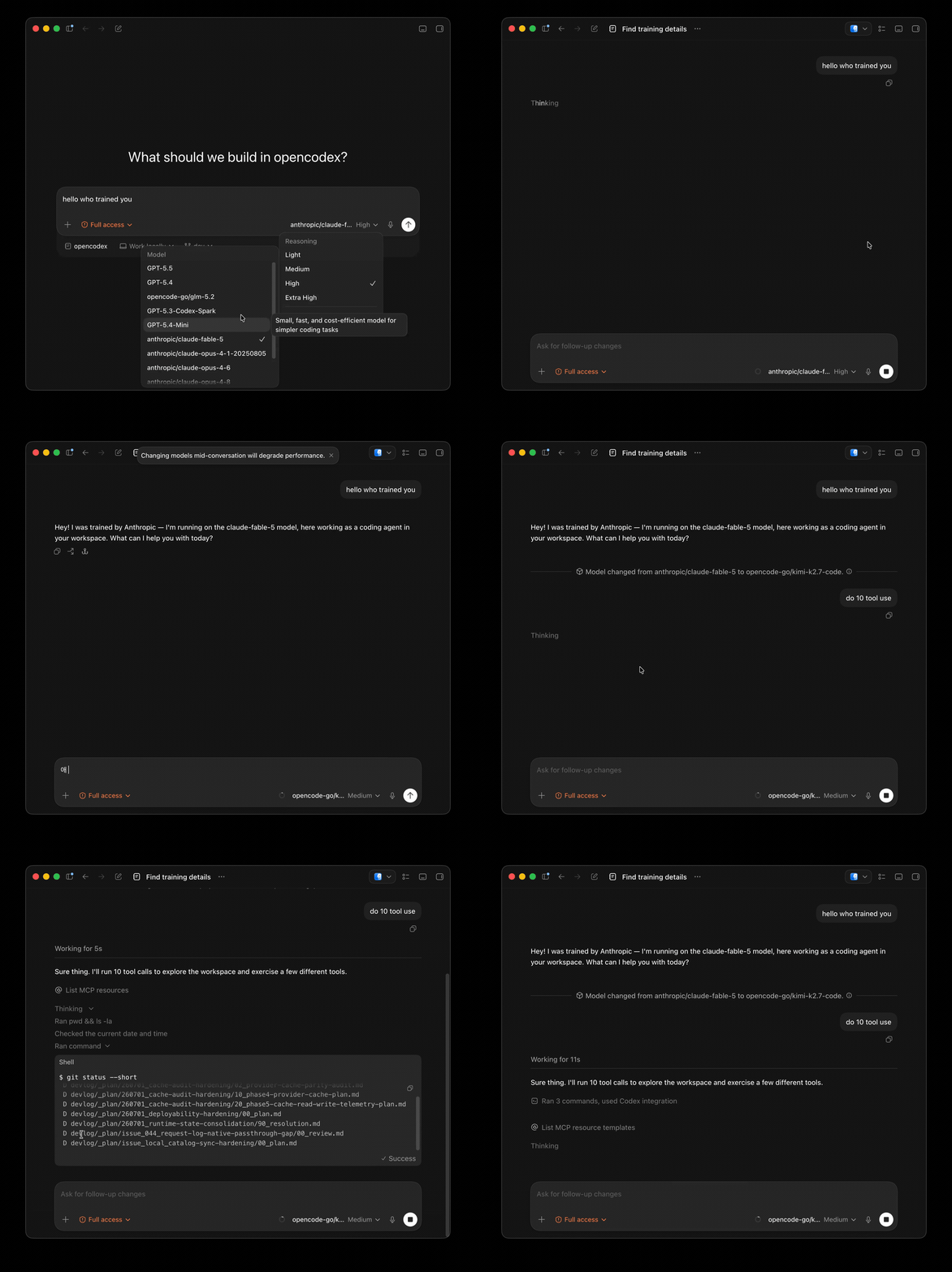
| ### Codex, running any model Pick a provider and go — same workflow, different brain. |
|
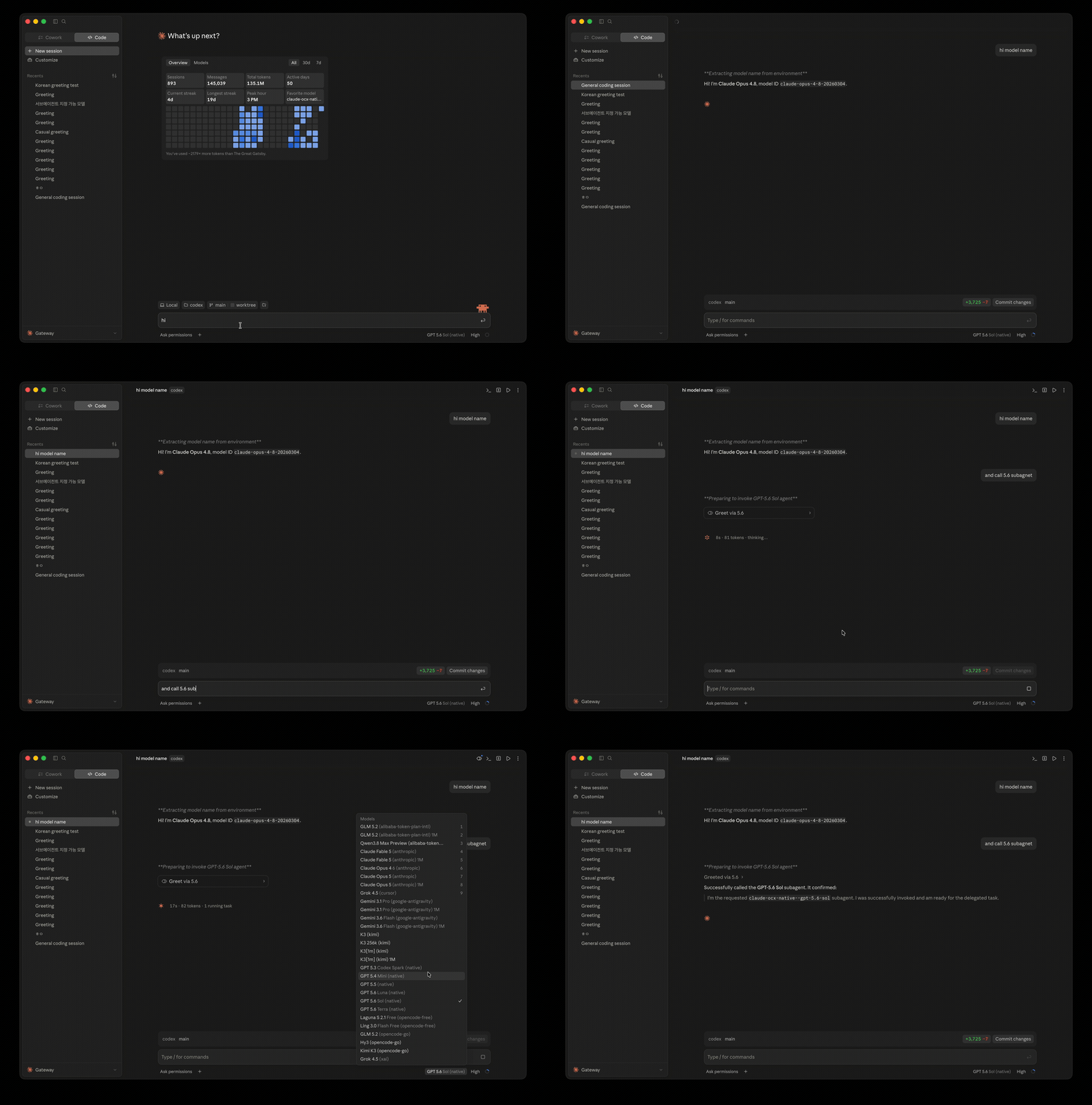
| ### Claude Desktop, running any model Opus answers, then hands the task to a GPT-5.6 Sol subagent. |
|
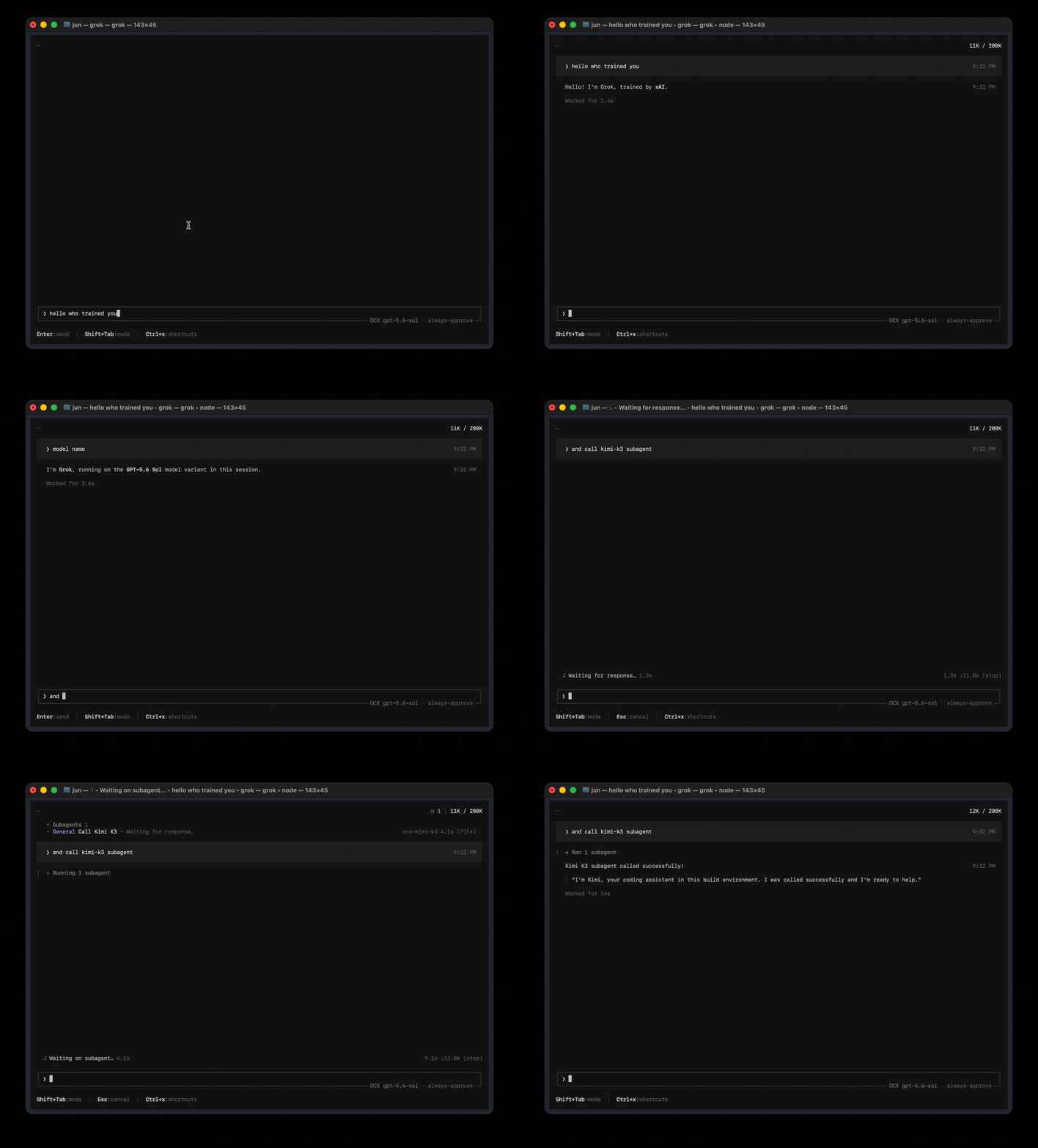
| ### Grok Build, running any model Sol drives the session and calls a Kimi K3 subagent. |
|
English · Français · 한국어 · 简体中文 · 繁體中文 · Русский · 日本語 · Türkçe · 📖 Full documentation →
opencodex is a lightweight local gateway between your coding tools and your model providers. It accepts the Responses, Chat Completions and Anthropic Messages APIs and translates each request into whatever your provider speaks, carrying streaming, tool calls, reasoning and images where the client, model and provider support them. Use Claude, Gemini, Grok, GLM, DeepSeek, Kimi, Qwen, Ollama and other providers with Codex, Claude Code, Claude Desktop, Grok Build and the tools listed on the client support page.
Quick start
Personal install (CLI)
npm install -g --allow-scripts=bun @bitkyc08/opencodex   # Node 18+; the Bun runtime is bundled automatically
ocx start                         # proxy + dashboard on localhost:10100
Use ocx service to run it in the background.
Open http://localhost:10100 and configure everything in the web dashboard — add providers
(40+ built-ins, or any OpenAI-compatible endpoint), pick models, manage accounts. ocx gui
re-opens the dashboard at any time.
Connect your tool
Connect the tool you already use:
| Tool | How to connect |
|---|---|
| Codex | Turn on the Codex switch on the dashboard's Connect page, then run codex as usual. On a local listener this points Codex's built-in provider at the proxy. From the terminal, run ocx init before adding providers in the dashboard and accept its Codex prompt. |
| Claude Code | With the claude CLI installed, run ocx claude. It starts the proxy if needed and launches Claude Code through it. |
| Claude Desktop | Run ocx claude desktop. On a new install it sets up the gateway profile for the whole app; an existing first-party setup is kept, and ocx claude desktop apply --gateway switches explicitly. See the Claude Code guide. Fully quit and reopen Claude Desktop after a switch. |
| Grok Build | On a local listener with Grok integration enabled, ocx start registers the models when ~/.grok exists; pick an ocx-* model in Grok Build. Remote setups: see the Grok Build guide. After adding providers, restart the proxy (or run ocx ensure when Codex autostart is enabled) to refresh the list. |
| Tools with a managed integration | Use the dashboard Connect page, or ocx integration client enable --client <id>. |
| Any other tool | Set a custom OpenAI-compatible base URL of http://localhost:10100/v1, or an Anthropic base URL of http://localhost:10100. |
The client support page lists which path each tool has and which protocol it speaks.
Desktop app (beta)
The desktop app is the same proxy and dashboard in a native window, with a tray and bundled `ocx`. It attaches to a proxy that is already running, or starts its bundled one, and the dashboard stays on the proxy port (**http://localhost:10100** unless you configured another). Pick the file for your platform from the [latest release](https://github.com/lidge-jun/opencodex/releases/latest): | Platform | File | Notes | |---|---|---| | macOS 13+ (Apple Silicon and Intel) | `OpenCodex--macos.dmg` | Universal build, signed with a Developer ID and notarized | | Windows (x64) | `OpenCodex--windows-x64.msi` | Code signing via SignPath Foundation is rolling out ([code signing policy](https://opencodex.me/reference/code-signing/)); until a release is signed, SmartScreen asks once: choose **More info → Run anyway** | | Linux (x86_64) | `OpenCodex--linux-x86_64.AppImage` or `-linux-amd64.deb` | The tray needs an AppIndicator-capable desktop | Every file has a `.sha256` next to it on the release page. On macOS 14+ the app also ships a WidgetKit extension that shows proxy status, today's usage and provider quotas; the snapshot model it renders lives in [`app/`](https://github.com/lidge-jun/opencodex/blob/HEAD/app) (`MenuBarCore`). To build the app yourself, run `bun install && bun run build:gui` at the repository root, then in `desktop/` run `bun install && bun run prepare-sidecar && bun run prepare-widget && bun run build:local` on macOS, or `bun install && bun run prepare-sidecar && bun run build:local` on Windows and Linux (the widget step needs macOS). The [Desktop App guide](https://opencodex.me/guides/desktop-app/) and the [macOS Menu Bar App guide](https://opencodex.me/guides/macos-menu-bar/) cover first launch, and [`AGENTS_INSTALL.md`](https://github.com/lidge-jun/opencodex/blob/HEAD/AGENTS_INSTALL.md#where-things-are-installed) lists everything written to disk.Sponsors
Sponsors keep opencodex maintained across every upstream protocol change. Interested? See SPONSORS.md.
 |
Thanks to OrcaRouter for sponsoring this project! OrcaRouter is one OpenAI-compatible AI gateway for production AI: adaptive routing that grades every prompt and sends it to the model that clears your bar, automatic failover, routing rules as code, zero-markup provider pricing with prompt caching, and guardrails, an agent firewall, and request logs on every call across 200+ models. Pick OrcaRouter in the Add provider picker or run ocx provider add orcarouter; orcarouter/auto is the adaptive router. |
 |
Thanks to TokenLab for sponsoring this project! TokenLab gives coding agents one API key for leading models, supporting OpenAI Responses and Chat Completions, Anthropic Messages, and Gemini's native API formats, with streaming and tool calling. It also provides an MCP server and agent Skills for easy integration. Choose your delivery mode and pay as you go. Pick TokenLab in the Add provider picker or run ocx provider add tokenlab.TokenLab 为编程智能体提供统一的多模型 API,一枚 API Key 即可接入主流模型,支持 OpenAI Responses、Chat Completions、Anthropic Messages 和 Gemini 原生 API 格式,以及流式输出和工具调用。同时提供 MCP 服务器和 Agent Skills,方便接入现有工作流;交付模式可选,按量付费。 |
Docker Compose
The repository ships a digest-pinned, non-root Compose build. The build generates and verifies the canonical compatibility manifest from the selected Git snapshot. A local clone needs Git and Docker Compose; a remote Git context needs Docker Compose. Neither path needs host Bun or a preparation step. Initialize the data-plane token once through stdin and start the hub:git clone https://github.com/lidge-jun/opencodex.git
cd opencodex
docker compose build
openssl rand -hex 32 | docker compose run --rm -T hub bun run docker/bootstrap-token.ts
docker compose up -d
curl --fail --silent http://127.0.0.1:10100/healthz
curl --fail --silent http://127.0.0.1:10100/readyz
services:
  hub:
    pull_policy: build
    build:
      context: https://github.com/lidge-jun/opencodex.git#dev
      dockerfile: Dockerfile
      target: runtime
      args:
        BUILDKIT_CONTEXT_KEEP_GIT_DIR: "1"
Install from source (latest dev)
**macOS / Linux:**curl -fsSL https://bun.sh/install | bash
git clone -b dev https://github.com/lidge-jun/opencodex.git
cd opencodex && ~/.bun/bin/bun install
~/.bun/bin/bun run build:gui
~/.bun/bin/bun run src/cli/index.ts start
irm bun.sh/install.ps1 | iex
git clone -b dev https://github.com/lidge-jun/opencodex.git
cd opencodex; bun install
bun run build:gui
bun run src/cli/index.ts start
For agents
npm install -g --allow-scripts=bun @bitkyc08/opencodex
ocx start     # or `ocx service`
ocx init      # interactive setup: writes ~/.opencodex/config.json and wires Codex
Supported platforms
| OS | Status | Service manager | Desktop app (beta) |
|---|---|---|---|
| macOS (arm64 / x64) | Fully supported | launchd | Universal .dmg |
| Linux (x64 / arm64) | Fully supported | systemd (user unit) | x86_64 .AppImage / .deb |
| Windows (x64) | Fully supported | Task Scheduler (hidden) / opt-in native service (--native, WinSW) |
x64 .msi |
The CLI install requires Node 18+; the desktop app needs neither Node nor Bun. The Bun runtime is bundled on npm install — no separate
Bun install needed, no WSL needed on Windows. If npm blocked the bundled runtime's install scripts,
see the installation docs.
Highlights
- Use any LLM with Codex, Claude Code, Claude Desktop, and Grok Build — 40+ providers out of the box, each keeping its own native UI.
- Combos — one virtual model id with failover or weighted round-robin across providers. See the combo guide.
- Sub-agents on any model — feature routed models in Codex's sub-agent picker, with v1/v2 surface control and fallback chains. See the sub-agent guide.
- Log in once, skip the API key — OAuth for xAI, Anthropic, and Kimi; or forward
codex login, paste a key, or use${ENV_VAR}references. - Web search & vision sidecars — non-OpenAI models get real web search and image understanding through a sidecar over your ChatGPT login.
- See what's happening — the dashboard shows providers, OAuth status, model selection, and a live request log with cache token counts.
- Clean exit, zero residue —
ocx stoprestores Codex to its original configuration. - Bounded memory ownership — every long-lived cache, ring buffer, and protocol-translation
store has a finite cap, byte budget, or active reconciliation. No unbounded
MaporSetsurvives a config reload.
Memory ownership details
OpenCodex tracks process-retained state in the categories below. Each has a documented bound: - **14 retained stores** (request log, debug rings, image cache, model cache, vision descriptions, cursor blobs, responses continuation, etc.) are byte-accounted and evicted by the app-owned memory budget (default 256 MiB), except the native control replay store, which is pinned and never evicted. - **4 observed buffers** (translator accumulators, image/OAuth/Grok tails) are monitored for in-flight byte pressure without eviction. - **32 state-store registrations** handle expiry sweeps (60 s interval) and config-generation reconciliation so stale provider/account keys are removed. - **Path and fingerprint memos** (workspace metadata, hardened identities, installation salts, mode-hint capabilities) use insertion-order LRU caps (8–128 entries). - **Model-cache generation tombstones** are deleted after reconciliation; a global generation increment prevents stale in-flight discoveries from repopulating removed providers. - **Lab event-id deduplication** runs under a ledger lock from disk, with no process-level RAM index. Run `GET /api/system/memory` (with the admin token) to inspect live retained bytes, eviction counters, and watchdog samples.Model routing
Target any configured provider and model with the provider/model syntax:
codex -m "anthropic/claude-opus-5" "Explain this stack trace"
codex -m "google/gemini-3-pro" "Write unit tests for auth.ts"
codex -m "ollama/llama3" "Refactor this function"
Omit the provider/ prefix to use the default provider or auto-match by model name pattern.
Provider model ids containing / are exposed with inner slashes aliased to -; the raw
full-slash form keeps working too. Details: model routing docs.
JEV Auto routing (optional)
TypeSafe JEV can choose the first model and reasoning effort for an opt-in Combo while the normal
model picker and every direct route stay unchanged. Add the credential with ocx login jev, from
Providers → TypeSafe JEV → Add API key, or through TYPESAFE_API_KEY/JEV_API_KEY. Then open
Models → Combos → Create JEV Auto, choose the allowed target models, and check the exact efforts
JEV may select for each target. Leaving a target's effort setting untouched allows all efforts that
model currently advertises.
JEV is consulted only for jev-auto and only once per logical model call. Missing credentials,
network failures, or invalid decisions fail open to the first currently eligible target; caller
cancellation still cancels the request. Automated tests use a mocked TypeSafe endpoint and do not
validate a live JEV account.
A JEV Combo can instead ask a self-hosted decision model, such as Ollama's keyless tev1: add a
jev-decision provider whose baseUrl is the full /v1/systemone endpoint and set the Combo's
decisionProvider to it. TypeSafe credentials are never sent there. Details:
System One-compatible server.
Providers & adapters
OpenAI (ChatGPT login or API key), Anthropic, Google Gemini, xAI, Kimi, Azure OpenAI, Ollama
(local + Cloud), Cursor (experimental), and every OpenAI-compatible endpoint — plus DeepSeek,
Groq, OpenRouter, OpenGateway, Together, Fireworks, Cerebras, Mistral, Hugging Face, NVIDIA NIM, MiniMax,
Qwen Cloud, Qoder Global and CN (official PAT + CLI), SiliconFlow, and more. Full list: ocx init or the
provider docs.
CLI
ocx init                       # interactive setup (writes config, wires Codex, offers the shim)
ocx start [--port 10100] [--socks5 [host:port] | --socks5-off]  # SOCKS5 defaults to socks5://127.0.0.1:10808
ocx stop                       # stop + restore native Codex
ocx service [install|repair|restart|start|stop|status|uninstall|remove]  # background service
ocx codex-shim install         # start the proxy on demand whenever `codex` launches
ocx health [--json]            # check immediate proxy liveness
ocx ready [--json] [--wait [--timeout <seconds>]]  # check post-sync readiness
ocx status                     # is the proxy running?
ocx gui                        # open the web dashboard
ocx provider <...>             # manage providers (list/add/edit/test/remove)
ocx account <...>              # manage ChatGPT accounts & API-key pools
ocx combo <...>                # manage failover / round-robin combos
ocx v2 <...>                   # multi-agent v1/v2 surface controls
ocx update [--tag preview]     # update opencodex
A start whose preferred port is busy stops and names the holder instead of moving to another port,
so it can never leave a second proxy running beside the first. Free the port, or name a different
one with --port. Full reference: CLI docs.
Health and readiness
GET /healthz reports immediate proxy liveness. The unauthenticated GET /readyz endpoint reports
post-sync readiness with the sanitized JSON identity {service, version, uptime, pid, port, status}.
It returns 200 when status is ready; pending and terminal failed return 503 with
Retry-After: 1.
ocx ready [--json] [--wait [--timeout <seconds>]] performs one probe by default. --wait polls
for up to 45 seconds by default, but exits immediately when it observes terminal failed;
--timeout <seconds> sets a 1–300 second limit, requires --wait, and accepts only positive integers. CLI --json output is
{ready, status, pid, port}, where status is ready, pending, failed, or unreachable.
| Exit | Result |
|---|---|
0 |
Ready |
1 |
Not ready: pending, failed, timeout, or unreachable |
64 |
Invalid arguments |
An older proxy without /readyz fails closed as unreachable with exit 1, while ocx health
remains compatible.
Autostart: service vs shim
Use the service (ocx service) for an always-on proxy that restarts on crash. Use the
shim (ocx codex-shim install) for lightweight, on-demand startup without a background
daemon. Remove them with ocx service uninstall / ocx codex-shim uninstall.
Uninstall
ocx uninstall                  # stop, remove service/shim, restore native Codex, clean up state
npm uninstall -g @bitkyc08/opencodex
Remote access
By default opencodex binds to 127.0.0.1 and needs no extra authentication. Binding beyond
loopback ("hostname": "0.0.0.0") requires a bearer token — the proxy refuses to start
without OPENCODEX_API_AUTH_TOKEN, and every client request must carry it as
x-opencodex-api-key. Details: configuration reference.
Advanced usage
Self-hosted options for power users. Review each provider's terms before you enable them.
ChatGPT account pool
opencodex can also manage a ChatGPT account pool for Codex auth. Add multiple ChatGPT / Codex accounts, refresh their 5h / weekly / 30d quota in the dashboard. Under quota routing, new sessions can use the lowest-usage healthy account; round-robin and fill-first use their own policies. Existing Codex threads normally retain affinity to the account that started them, so long SSH, tmux, or mobile-connected sessions do not jump accounts mid-conversation — but quota re-evaluation, failover, account exclusion, affinity expiry, or 401/403 and 429 recovery can rebind them. Give the accounts a selection order when one of them — usually your Codex Desktop login — should only be reached for once the others are drained.
- Pool ChatGPT accounts — thread affinity, quota-aware auto-switching, cooldown and fail-closed auth handling.
Provider-policy note: Account pooling is for routing and operational resilience only; it does not guarantee protection from provider rate limits, enforcement, suspension, or other account actions. OpenCodex does not endorse using additional accounts to circumvent provider limits or sharing account credentials between people. You are responsible for complying with each provider's current terms. See the Codex Auth account-pool guidance and OpenAI's current Terms of Use.
Documentation
The public docs — install, providers, routing, combos, sub-agents, sidecars, integrations, and
the CLI/config/management-API references — are built from docs-site/ and
published to opencodex.me.
Maintainer source-of-truth notes live under structure/, contributor setup in
CONTRIBUTING.md, and security reporting in SECURITY.md.
Report undisclosed vulnerabilities privately through
GitHub private vulnerability reporting,
not a public issue.
That form is the only technical channel — there is no security email. Follow-ups stay in the
private report itself; a public issue may carry coordination only, never vulnerability details.
Acknowledging a report is not the same as triaging it, and no first-response target is promised.
Development
Source development requires the bun CLI on your PATH. The published npm package bundles its own
Bun runtime for installed ocx commands; package scripts may also resolve Bun through that bundled dependency.
git clone https://github.com/lidge-jun/opencodex.git
cd opencodex
bun install
bun run typecheck
bun run test
See Contributing.
Contributor work that landed through a maintainer carry or reimplementation, where the commit does not name its original author, is recorded in CREDITS.md.
Code signing policy
Windows binaries are moving to Authenticode signing (#7207). The Windows Code Signing guide covers the rollout, how to verify a signature, and the full policy.
Free code signing provided by SignPath.io, certificate by SignPath Foundation.
- Committers and reviewers: lidge-jun
- Approvers: lidge-jun
- Privacy: opencodex sends one anonymous daily usage summary (a per-day install hash that changes daily, version, release channel, platform, install channel, provider kind, coarse model family, active minutes and request, token and error counts; never prompts, model outputs, keys, accounts, hostnames or paths) to telemetry.opencodex.me, and only after the person installing or operating it has seen the notice in the dashboard or an interactive CLI prompt and has not declined. It can be turned off in that notice, in the Windows installer ("Send anonymous usage statistics", checked by default), in Proxy details, or with ocx telemetry disable, OCX_TELEMETRY=0 or DO_NOT_TRACK=1. Only project-wide aggregates of this anonymous data are public. A separate public leaderboard profile is off unless you connect one yourself (dashboard Home or ocx telemetry profile connect); it shares only a chosen handle, display name and colour and your daily request, token and model-family totals, never your anonymous telemetry ID, and disconnecting deletes it. Everything else goes only to the providers and services you configure. See the telemetry guide.
Disclaimer
opencodex is an independent, community-maintained project and is not affiliated with or endorsed by OpenAI, Anthropic, or any other provider.
Some providers — notably Anthropic (Claude) — may suspend or restrict accounts that route API traffic through third-party proxies. Use at your own risk (UAYOR). Before connecting a provider, review its Terms of Service to confirm that proxy-based access is permitted. The opencodex maintainers are not responsible for any account actions taken by upstream providers.
License
MIT
📈 近 7 天 Star 趋势
🏆 排名变化趋势
📋 历史上榜记录
| 日期 | 榜单 | 排名 | 周期新增 | 总 STAR |
|---|