📄 仓库 README
在 GitHub 查看 ↗ # Forel
**The Hazel alternative for macOS. Open source and privacy-focused.**
[](https://www.apple.com/macos/)
[](https://www.swift.org)
[](https://github.com/lab421/forel/releases)
[](LICENSE)
# Forel
**The Hazel alternative for macOS. Open source and privacy-focused.**
[](https://www.apple.com/macos/)
[](https://www.swift.org)
[](https://github.com/lab421/forel/releases)
[](LICENSE)
**New** · project from the Forel team — check out [Ombrelle](https://ombrelle.app) →
This project is built and maintained on my personal time. A ⭐ on the repo is the simplest way to say thanks and helps Forel get discovered by others who might need it. For anyone who wants to go further, you can support the work with a [buy me a coffee](https://buymeacoffee.com/lionelguic9) ☕
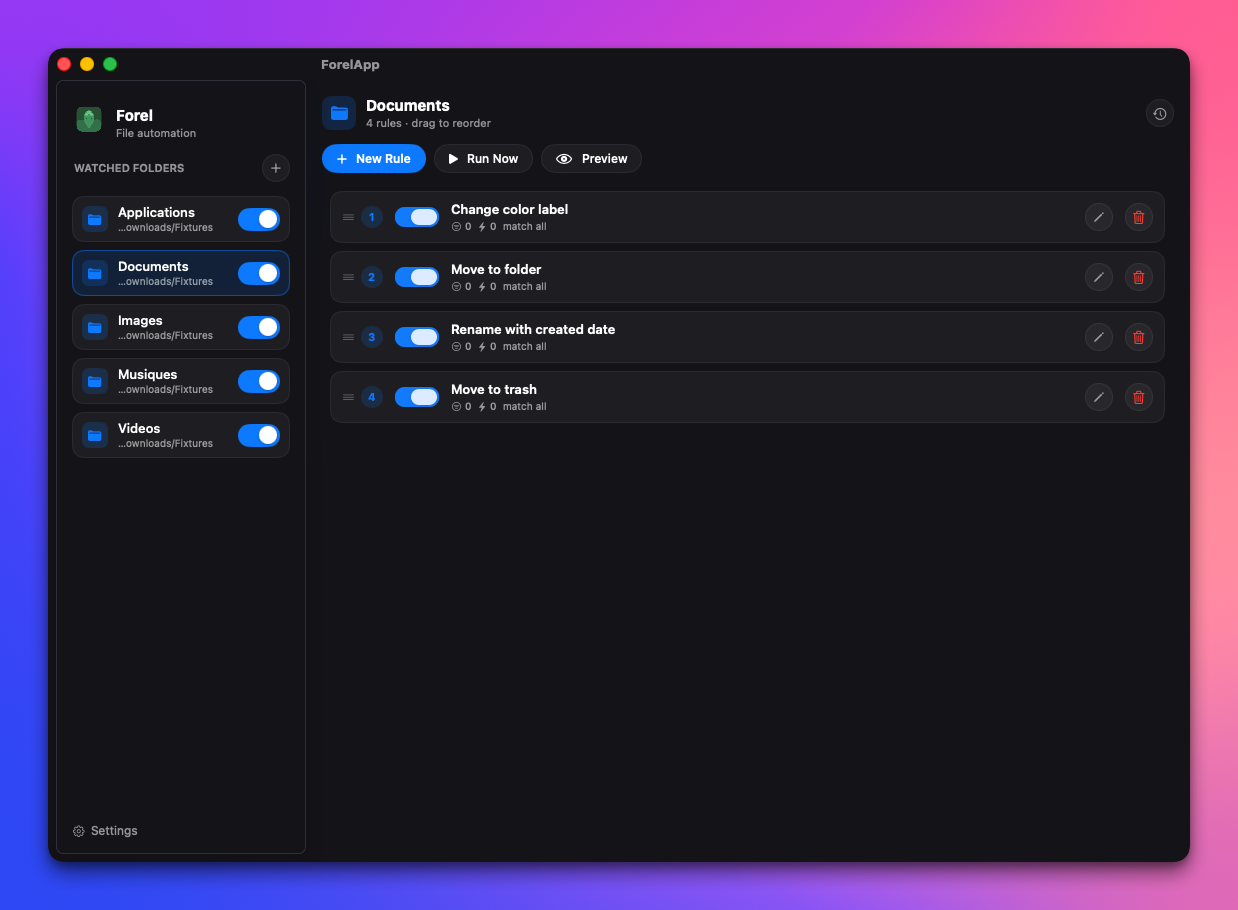
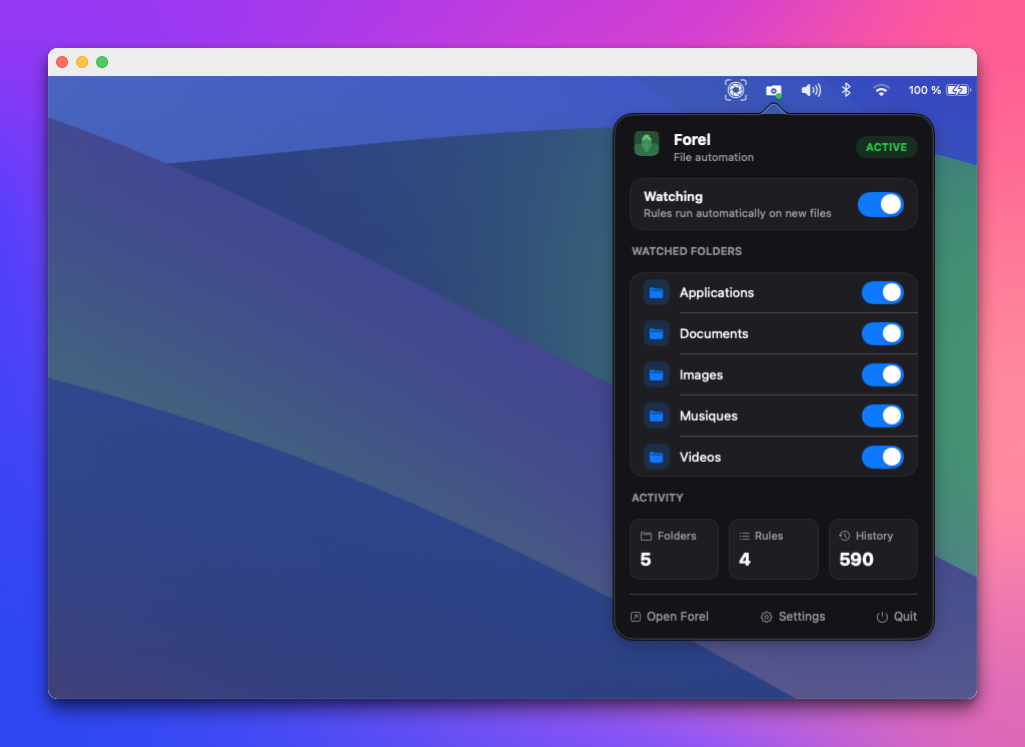
Open source, 100% on-device
Install with Homebrew:
brew install --cask lab421/tap/forel
Why Forel
Forel is an open-source, community-driven take on folder automation for macOS.
Define rules once watch folders, match files, and move, rename, tag, or label them automatically then let Forel run quietly in your menu bar.
What Forel does
Forel watches your folders and organizes your files automatically based on rules you define — by filename, extension, kind, size, date, tags, color label, or file contents. On-device OCR lets you match text in images and scanned PDFs, too.
Downloads/
├── invoice_march_2026.pdf     →  Work/Invoices/2026/
├── photo_2026-03-14.jpg       →  Photos/2026/March/
├── contract_draft_v3.docx     →  Work/Legal/Pending/
└── bank_statement_march.pdf   →  Finance/2026/
Set up a rule once. Forel handles the rest — even when the window is closed.
File matching and processing happen locally on your Mac. Forel does not upload your files to a processing service. Your configured destinations and scripts determine where files go, including network volumes.
Highlights
- Open source (GPLv3) — source code available, community-driven development.
- On-device processing — file matching and OCR run locally, without a cloud processing service or AI API keys.
- Rule-based — match by name, extension, kind, size, date, tags, color label, or file contents.
- Native menu-bar app — runs quietly in the background; toggle rules without opening the window.
- Community-driven — built in the open, contributions welcome.
Features
- Rule-based automation — Create flexible rules combining filename patterns, file types, sizes, dates, tags, and Finder color labels.
- Content matching & OCR — Match text inside documents, images, and scanned PDFs using local extraction and on-device OCR. See Content matching for supported formats and limits.
- Folder watching — Monitor folders in real time with native macOS FSEvents: up to 2 in Free, unlimited in Pro.
- Dry Run & Run Now — Preview matching files and planned actions without changing files, then run rules manually on existing files when ready.
- Copy rules — Copy a rule to another watched folder, or select several with ⌘-click and choose Copy rules to folder…. Copies are independent and keep their action destinations.
- History & Undo — Review action results and undo supported actions when it is safe to do so.
- Menu bar app — Forel lives in your menu bar. Toggle individual rules on/off without opening the main window.
- Actions — Move, copy, rename, tag, trash, delete, or run a custom script.
- SQLite persistence — Rules, folders, and history are stored locally in a bundled SQLite database.
Installation
Forel Free is available indefinitely without a license. Pro is a paid license; there is no trial.
Free and Pro
| Feature | Free | Pro |
|---|---|---|
| Watched folders | 2, including disabled folders | Unlimited |
| Files processed | 300 per calendar month | Unlimited |
| Rules per folder and actions per rule | Unlimited | Unlimited |
| Background watching and Run Now | Included | Included |
| Move, copy, rename, tags, labels, trash, delete, uncompress, open app | Included | Included |
| Filename, type, size, dates, tags, and download metadata conditions | Included | Included |
| Text matching in documents and PDFs with a text layer | Included | Included |
| On-device OCR for images and scanned PDFs | — | Included |
| Custom scripts and Apple Shortcuts | Included | Included |
| Imports into Photos, Music, and TV | — | Included |
| Dry Run preview, history, and supported Undo | Included | Included |
| File processing on your Mac | Included | Included |
| Scheduler | — | Planned |
| Sync actions | — | Planned |
| AI features | — | Planned |
Free: organize your everyday folders automatically with rules, custom scripts, and Apple Shortcuts. Pro: automate all your folders, process unlimited files, and recognize scanned documents.
View pricing and buy Forel Pro, then activate your license in Settings → License. The Free badge in the quick panel also opens License settings. Monthly file usage is visible in the app; attempting a Pro action or reaching a quota explains the benefit and offers a purchase or activation link.
Free includes 2 watched folders and 300 processed files per calendar month, with unlimited rules and actions. Each item counts once per run when an action is applied; Dry Run does not count. The allowance renews on the first day of each month. At the limit, files stay in place and automatic processing resumes after renewal or Pro activation.
Switching back to Free keeps your configuration. Reorder folders to choose which 2 remain available. OCR for images and scanned PDFs, and media library imports, require Pro.
Homebrew
brew install --cask lab421/tap/forel
or
brew tap lab421/tap
brew install --cask forel
Manual
Download the latest release .dmg from the Releases page, open it, and drag Forel to your Applications folder.
Build from source
Prerequisites: Swift 6 · macOS 14 or later
git clone https://github.com/lab421/forel.git
cd forel
swift build
swift test
swift run
To build and package the app, use the Swift package tooling and the existing release workflow.
Requires macOS 14 Sonoma or later.
Quick Start
- Launch Forel — the icon appears in your menu bar.
- Open the main window from the menu bar icon.
- Click + next to Watched Folders to add a folder, then select it in the sidebar.
- Click New Rule and define your conditions — by name, extension, kind, size, date, tags, color label, or file contents.
- Set an action: move, rename, tag, copy, or run a script, then save the rule.
- Use Dry Run to preview matches and planned actions without changing files. Use Run Now to process existing files manually.
- Keep the rule enabled and Watching on for automatic processing — even when the window is closed. Review results in the history and use Undo for supported actions.
Example: lowercase filenames and replace spaces with underscores
Add a watched folder and create an enabled rule with a Kind → is → File condition. Choose Run script and paste this Bash command:
file="$FOREL_FILE"; dir="${file%/*}"; name="${file##*/}"; new_name=$(printf '%s' "$name" | LC_ALL=C tr '[:upper:] ' '[:lower:]_'); target="$dir/$new_name"; if [ "$file" != "$target" ]; then if { [ -e "$target" ] || [ -L "$target" ]; } && ! [ "$file" -ef "$target" ]; then printf 'Cannot rename: destination exists: %s\n' "$target" >&2; exit 1; fi; mv "$file" "$target"; fi
For example, My Report.PDF becomes my_report.pdf. This example lowercases ASCII letters (including the extension), replaces each space with an underscore, and leaves the parent folder unchanged. It refuses to replace a different existing file and supports changes to letter case on a case-insensitive Mac volume. Already-normalized names are left alone.
Forel runs /bin/bash -c once per matching file, with its full path in the FOREL_FILE environment variable. Always quote "$FOREL_FILE" to handle spaces and shell characters. No filenames are passed as positional arguments, and the script's working directory is not set to the watched folder. Do not use for f in *: Forel already iterates over matching files.
Use Dry Run to check which files match, then Run Now to rename existing files. With Watching on, the same script runs automatically for arriving files. Dry Run does not execute scripts or predict their resulting names. Script actions cannot be undone by Forel, and Forel cannot track a path changed by a script, so keep this rename script as the last action in the rule. The native Rename action supports previews and Undo; its Clean file name option produces hyphens instead of underscores.
Architecture
Forel is built as a native Swift macOS app:
forel/
├── Package.swift              # Swift Package Manager manifest
├── Sources/
│   ├── ForelApp/              # SwiftUI app, menu bar, settings, editor, views
│   └── ForelCore/             # Rule engine, watcher, SQLite persistence, models
├── Tests/
│   └── ForelCoreTests/        # Core engine and persistence tests
Key technology choices:
| Layer | Technology | Why |
|---|---|---|
| App shell | SwiftUI + AppKit | Native macOS UI with direct control over windows, menu bar, and focus |
| Backend | Swift 6 | Unified app and core logic, strong typing, simple packaging |
| File watching | Native FSEvents wrapper | Low-latency, battery-friendly folder monitoring |
| Database | SQLite | Embedded, no server, predictable schema and queries |
| Persistence layer | Custom Swift database wrapper | Direct control over transactions, migrations, and rule round-trips |
| Updates | GitHub Releases | Checks for new releases and can download and install updates in place |
| Build | Swift Package Manager | Single toolchain for development, test, and release |
Execution pipeline:
Input
  - FSEvents (real‑time watcher)
  - Run Now (manual — whole folder)
  - Dry Run / Preview (manual — whole folder)
        ↓
Rule Engine (per file, sorted by cost)
  ├─ Scope check (recursion depth)
  ├─ Condition matching (name, extension, kind,
  │   size, date, tags, color label, contents, …)
  └─ Plan actions (conflict‑aware)
        ↓
Action Executor
  ├─ Move / Copy / Rename
  ├─ Tag / Color label
  ├─ Trash / Delete
  └─ Run Script / Shortcut
        ↓
History / Undo (SQLite)
Roadmap
- [x] Folder watching
- [x] Rule engine (name, extension, kind, size, date)
- [x] Actions: move, copy, rename, trash, delete, tag, run script
- [x] SQLite persistence
- [x] Menu bar icon with live rule toggle
- [x] Action history & undo
- [x] Automatic updates
- [x] Preferences: launch at login
- [x] Drag & drop to reorder rules
- [x] Rules based metadata files
- [x] Activity logs
- [x] Automatic cleaning database
- [x] Uncompress actions
- [x] Shortcuts actions
- [x] Open App actions
- [x] Validate actions / conditions before save
- [x] Native notifications on rule actions
- [ ] Export / Import rules
- [ ] Toggle extension hidden / visible
- [ ] Move folder based on criteria
- [ ] Scheduler — Pro · Coming soon
- [x] Copy rules across watched folders
- [ ] Compress actions
- [ ] Sync actions — Pro · Coming soon
- [ ] Dynamic destination folders with date tokens (e.g.
~/Screenshots/{year}/{month}) - [ ] Upload actions
- [ ] AI features — Pro · Coming soon
Content matching
The Contents condition matches text found inside files. Everything is read locally — no cloud, OCR runs on-device. When a file's text can't be read, the Dry Run tells you why.
Document text matching is available in Free and Pro. Vision OCR for images and scanned PDFs requires Pro; Free never runs OCR. The technical extraction limits below apply to both plans where the feature is available.
File path
  │
  ├─ Known plain text (.txt, .md, .json, …) ────► read as UTF‑8 / UTF‑16 / ISO Latin 1
  │
  ├─ PDF ──► text layer ─(empty)─► Vision OCR (Apple Neural Engine)
  │
  ├─ RTF / .doc/.docx ──► AppKit document reader (main thread)
  │
  ├─ .xlsx/.xltx / .pptx/.potx / .odt/.ods/.odp ──► ZIP → XML → strip tags
  │
  ├─ .pages / .numbers / .key ──► ZIP → Preview.pdf → PDF text
  │
  ├─ Images (.png, .jpg, .heic, .webp, .gif, …) ──► Vision OCR (Apple Neural Engine)
  │
  ├─ .xls / .ppt / .epub ──► Spotlight query (contains only)
  │
  └─ Unknown extension ──► try plain text ─(binary/undecodable)─► no match
| Type | Formats | Limits |
|---|---|---|
| Plain text | .txt .md .csv .tsv .json .xml .yaml .yml .html .css .js .ts .swift .rs .py .rb .go .java .c .cpp .h .log, plus any other text file (.ini, .conf, no extension, …) |
100 MB |
.pdf (text layer, or OCR for scanned PDFs) |
100 MB / 100 pages · OCR 20 pages | |
| Rich text | .rtf .rtfd |
100 MB |
| Word | .doc .docx .dotx |
100 MB |
| Excel | .xlsx .xltx |
100 MB |
| PowerPoint | .pptx .potx |
100 MB |
| Apple iWork | .pages .numbers .key |
100 MB |
| OpenDocument | .odt .ods .odp |
100 MB |
| Images (OCR) | .png .jpg .jpeg .heic .tiff .tif .webp .gif .bmp .jp2 .psd |
25 MB / 12000 px |
| Spotlight fallback | .xls .ppt .epub |
contains only |
[!NOTE] Apple iWork files are read from the preview the app saves inside the document; one saved without a preview falls back to Spotlight.
The Spotlight fallback is used for formats Forel can't read directly. It relies on macOS having already indexed the file and can only answer the
containsoperator (notis,starts with, regex, …). When a file isn't indexed, it simply doesn't match.
Contributing
Forel is in early development and contributions are very welcome.
git clone https://github.com/lab421/forel.git
cd forel
swift build
swift test
Please read the repository guidelines before submitting. Bug reports, feature requests, and documentation improvements are all appreciated.
License
The source code is licensed under GPL-3.0-or-later, copyright © 2026 lab421 — see LICENSE. That license covers the source code only.
The Forel name, logo, and look are not covered by the GPL and are protected separately — see TRADEMARKS.md.
Star History
📈 近 7 天 Star 趋势
🏆 排名变化趋势
📋 历史上榜记录
| 日期 | 榜单 | 排名 | 周期新增 | 总 STAR |
|---|