📄 仓库 README
在 GitHub 查看 ↗Audionaut
A free, open-source multitrack audio editor that AI agents can drive over MCP.
audionaut.app · Features · Discussions · Sponsor
Audionaut is a free, open-source desktop application for effortless audio editing and recording. Whether you're working on music, podcasts, or multitrack recordings, it gives you precise cutting, per-track playlists, flexible multi-channel support, and clean exports — without the weight and complexity of a full DAW. Audionaut is written in modern C++ on the JUCE framework and runs natively on Windows, macOS, and Linux.


Install
- macOS — installer on GitHub Releases or Mac App Store
- Windows — installer on GitHub Releases
- Linux —
.deb, AppImage and Flatpak bundle on GitHub Releases, or install and update the Flatpak through FlatPark
Use with Claude
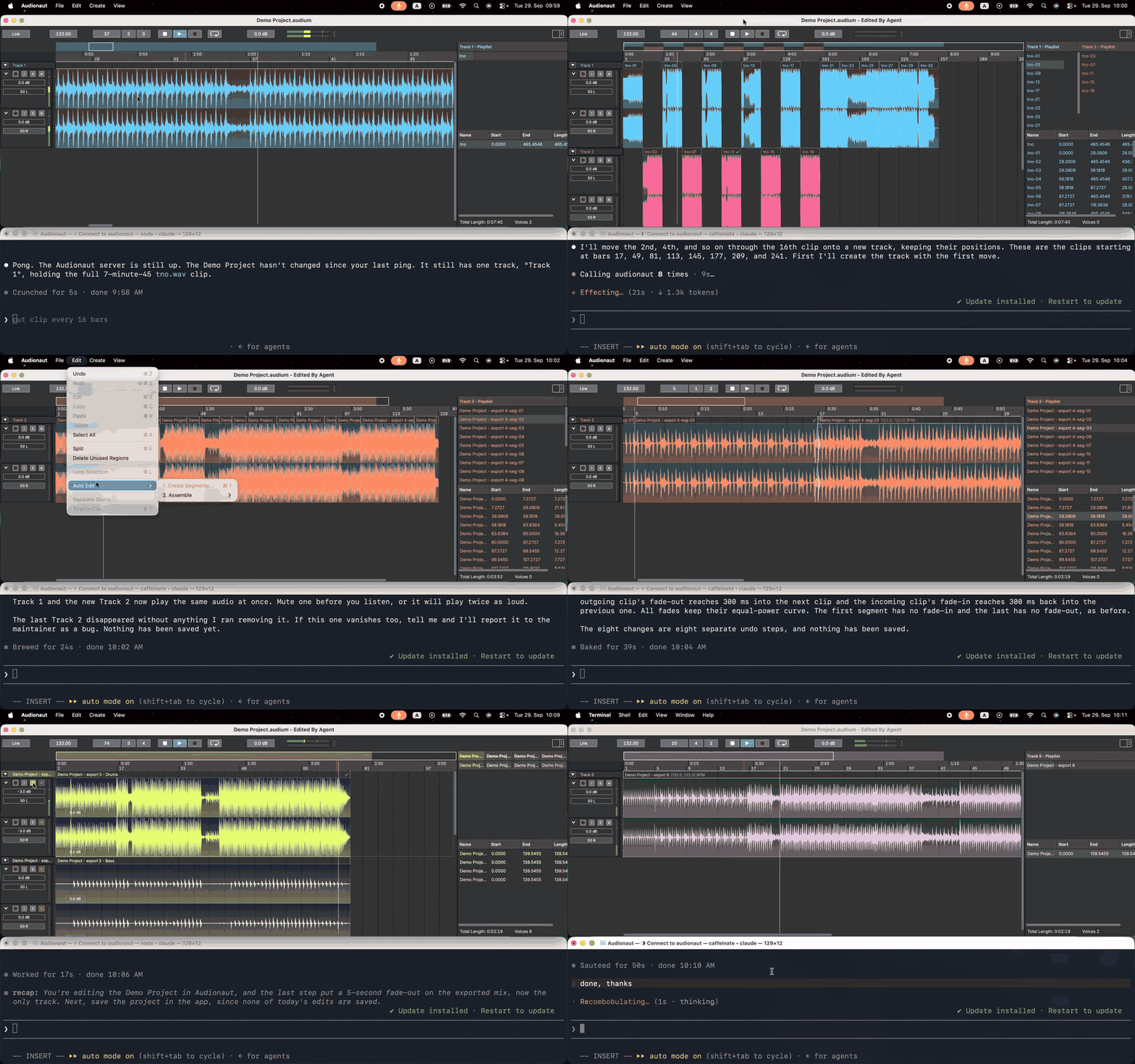
Audionaut speaks MCP, so Claude and other agents can edit your sessions. With the app and Node.js 18+ installed:
claude mcp add audionaut -- npx -y audionaut-mcp
Keep the project open in Audionaut and each edit arrives as one undo step. On macOS, keep projects in your Music folder. Claude Desktop setup and details: manual, chapter 11.
Checkout
Make sure to clone with submodules:
git clone --recursive https://github.com/kvoltmer/Audionaut.git
or once cloned do:
git submodule update --init --recursive
Audio analysis
The analysis features (segment boundaries, beat tracking with tempo, onset detection) are part of the source tree, in Audionaut/Source/Engine/Analysis, built on JUCE's DSP module. There is nothing to build or install for them.
demucs.cpp (stem separation)
Stem separation runs demucs.cpp, a C++ port of Meta's Demucs, compiled straight from the Submodules/demucs.cpp submodule — no separate build step. It needs the submodule's vendored Eigen (Submodules/demucs.cpp/vendor/eigen, a nested submodule that --recursive fetches); the CMake build detects it and sets AUDIONAUT_ENABLE_DEMUCS accordingly. The model weights are not in the repository: the app downloads them on first use into its Models folder, or point the CLI at a copy with --model.
Build
Xcode — open the Xcode project located here:
Audionaut/Builds/MacOSX/Audionaut.xcodeproj
Visual Studio 2026 — open the Visual Studio solution located here:
Audionaut/Builds/VisualStudio2026/Audionaut.sln
Linux Makefile — install dependencies:
sudo apt install libasound2-dev libjack-jackd2-dev ladspa-sdk libcurl4-openssl-dev libfreetype-dev libfontconfig1-dev libx11-dev libxcomposite-dev libxcursor-dev libxext-dev libxinerama-dev libxrandr-dev libxrender-dev libwebkit2gtk-4.1-dev libglu1-mesa-dev mesa-common-dev libxi-dev libegl-dev
then compile:
cd Audionaut/Builds/LinuxMakefile/
make CONFIG=Release -j8
Tests
See the Catch2 tests README.
Command-line tool (audionaut-cli)
audionaut-cli gives scripts, CI and AI agents headless access to .audium
projects — no GUI, no audio device. It builds alongside the tests:
cmake -B build -S Audionaut/Catch2Tests
cmake --build build -j8 --target AudionautCli
./build/AudionautCli_artefacts/AudionautCli --help
Every command takes --json to emit exactly one machine-readable result
envelope on stdout ({"ok": true, "result": ...} or {"ok": false, "error":
...}) with all logging on stderr, plus --quiet. Exit codes: 0 success,
1 operation failed, 2 usage error, 3 feature unavailable in this build
(e.g. separate without Demucs). Option values may be given as --opt value
or --opt=value.
audionaut-cli create  song.audium --channels 2
audionaut-cli import  song.audium take1.wav take2.wav --position 4.5
audionaut-cli info    song.audium --json
audionaut-cli analyze song.audium --types segments,beats
audionaut-cli auto-edit song.audium --track 0 --measures 4
audionaut-cli assemble  song.audium --duration 60 --mode random
audionaut-cli split   song.audium --at 23              # bar 23; --unit beats|seconds|clocks
audionaut-cli create-region song.audium --name chorus --start 17 --end 25
audionaut-cli set-region  song.audium --region chorus --rename drop --length 8
audionaut-cli place-clip  song.audium --region drop --at 33
audionaut-cli move-clip   song.audium --region drop --to 41
audionaut-cli remove-clip song.audium --at 41 --track 0
audionaut-cli clip-gain   song.audium --region drop --gain -6 --db
audionaut-cli clip-fades  song.audium --region drop --fade-in 1 --fade-out 2 --unit beats
audionaut-cli separate  song.audium --track 1                  # Drums/Bass/Other/Vocals tracks; needs the Demucs model
audionaut-cli export  song.audium -o mix.wav --sample-rate 48000 --bit-depth 24
A typical agent flow: create → import → analyze → auto-edit/assemble
→ export, checking ok in each --json envelope. Projects written by the
CLI open in the GUI app and vice versa.
End-user documentation lives in the User Manual.
CLI invocations report anonymous usage statistics under the same strictly
opt-in consent as the app (one cli_command event: verb and exit code) —
nothing is sent unless consent was granted in the app's settings. Set
AUDIONAUT_DISABLE_ANALYTICS=1 to switch the CLI's reporting off regardless
(CI environments, scripts).
The main Audionaut app also accepts the same verbs (Projucer-style): run the app binary with a verb and it executes headlessly and quits with the command's exit code, even while a GUI instance is open — a file argument or no arguments launches the GUI as usual.
./Audionaut.app/Contents/MacOS/Audionaut export ~/Music/song.audium -o ~/Music/mix.wav
Note: the macOS app is sandboxed, so its in-app CLI can only reach
entitlement-covered locations such as ~/Music; the standalone
audionaut-cli build has no such restriction. On Windows, the app is a GUI
program — the shell prompt returns immediately and output interleaves with
it; prefer audionaut-cli for scripting there.
License
Audionaut is dual-licensed under GPL3 (or later) and a commercial license — see LICENSE.md for details.
Contributing
Contributions are welcome — see CONTRIBUTING.md for how to get started and the required Contributor License Agreement (CLA.md).
Support
If Audionaut is useful to you, consider sponsoring its development — sponsorship directly funds development time and keeps the project sustainable.
📈 近 7 天 Star 趋势
🏆 排名变化趋势
📋 历史上榜记录
| 日期 | 榜单 | 排名 | 周期新增 | 总 STAR |
|---|