📄 仓库 README
在 GitHub 查看 ↗
English | 中文








Turn a Codex account pool into an observable, schedulable, operations-ready OpenAI / Anthropic compatible gateway. Codex2API is not a thin forwarding proxy. It is a long-running Codex access hub: it exposes /v1/chat/completions, /v1/responses, /v1/messages, Images, Videos (Grok Imagine), and Models endpoints while managing Refresh Token / Access Token accounts, health scoring, dynamic concurrency, rate-limit recovery, usage tracking, and admin operations behind the scenes.
Run it as a full PostgreSQL + Redis production stack or as a single-container SQLite + in-memory cache deployment. Point Codex CLI, Claude Code, the OpenAI SDK, or any compatible client at one Base URL, then manage accounts, proxies, API keys, prompt filtering, image workflows, and runtime settings from the built-in dashboard.
| One compatible gateway | OpenAI-style Chat Completions / Responses / Images, Anthropic Messages, prefixless compatibility routes, and native Codex Responses forwarding are all exposed through one service. |
| Account-pool scheduler | Selection is driven by account status, health tier, scheduler score, dynamic concurrency, cooldown recovery, and recent usage so unhealthy accounts are avoided automatically. Supports round_robin and remaining_quota modes, with per-account credit billing flags. |
| Visual admin console | The embedded React / Vite dashboard covers account import and testing, API keys, proxy pools, image studio (text-to-image + image-to-image), prompt filtering, usage analytics, operations, scheduler board, and system settings. |
| Two deployment shapes | Use PostgreSQL + Redis for production or SQLite + Memory for lightweight single-node deployments; Docker images, source builds, local development, and the interactive deploy script are ready to use. SQLite mode binds to 127.0.0.1 by default for security. |
| Billing and observability | Per-account 5h/7d windowed USD cost tracking, credit quota support, API key usage tracking, OAuth PKCE token acquisition, prompt filtering, and a usage dashboard with request logs and trend charts. |
| Quality check | Compare selected accounts, models, and reasoning effort with an editable pelican-on-a-bicycle HTML/SVG animation challenge. Run up to three background tests across accounts, keep persistent test history, and review isolated animation previews, source, timing/token metrics, and HTML downloads. |
Sponsors

ProxyLane 提供住宅代理,支持 HTTP / HTTPS / SOCKS5,提供中文界面及 USDT 付款。
免费 3GB 测试流量,限前 50 名,兑换码:CODEX2API3GB。
首次购买使用优惠码 CODEX2API30 享七折优惠。

RapidProxy 为开发者和企业提供高性能代理 IP 服务,覆盖全球 200+ 国家和地区的 9000 万+ 住宅 IP,支持智能轮换、精准地理定位、流量永不过期及高并发连接。
广泛适用于网页采集、AI 数据获取、SEO 监控和电商分析,支持 HTTP / HTTPS / SOCKS5 协议。
支持免费试用,九折优惠码:RAPID10

IPWO 提供覆盖 195+ 地区的住宅代理 IP 资源,支持动态、静态及不限量住宅代理方案。
可用于区域化访问测试、网页数据采集和跨境业务等场景,支持 HTTP / HTTPS / SOCKS5 协议。
支持免费测试,九折优惠码:0203
Live Demo
- Demo URL: https://codex2api-latest-vu8j.onrender.com
- Demo password:
codex2api
The demo is only for trying the admin dashboard and basic UI flows. Do not upload real Refresh Tokens, Access Tokens, API keys, or any other sensitive data.
Screenshots
Screenshots use demo data. The actual dashboard depends on your account pool, request logs, and runtime environment.
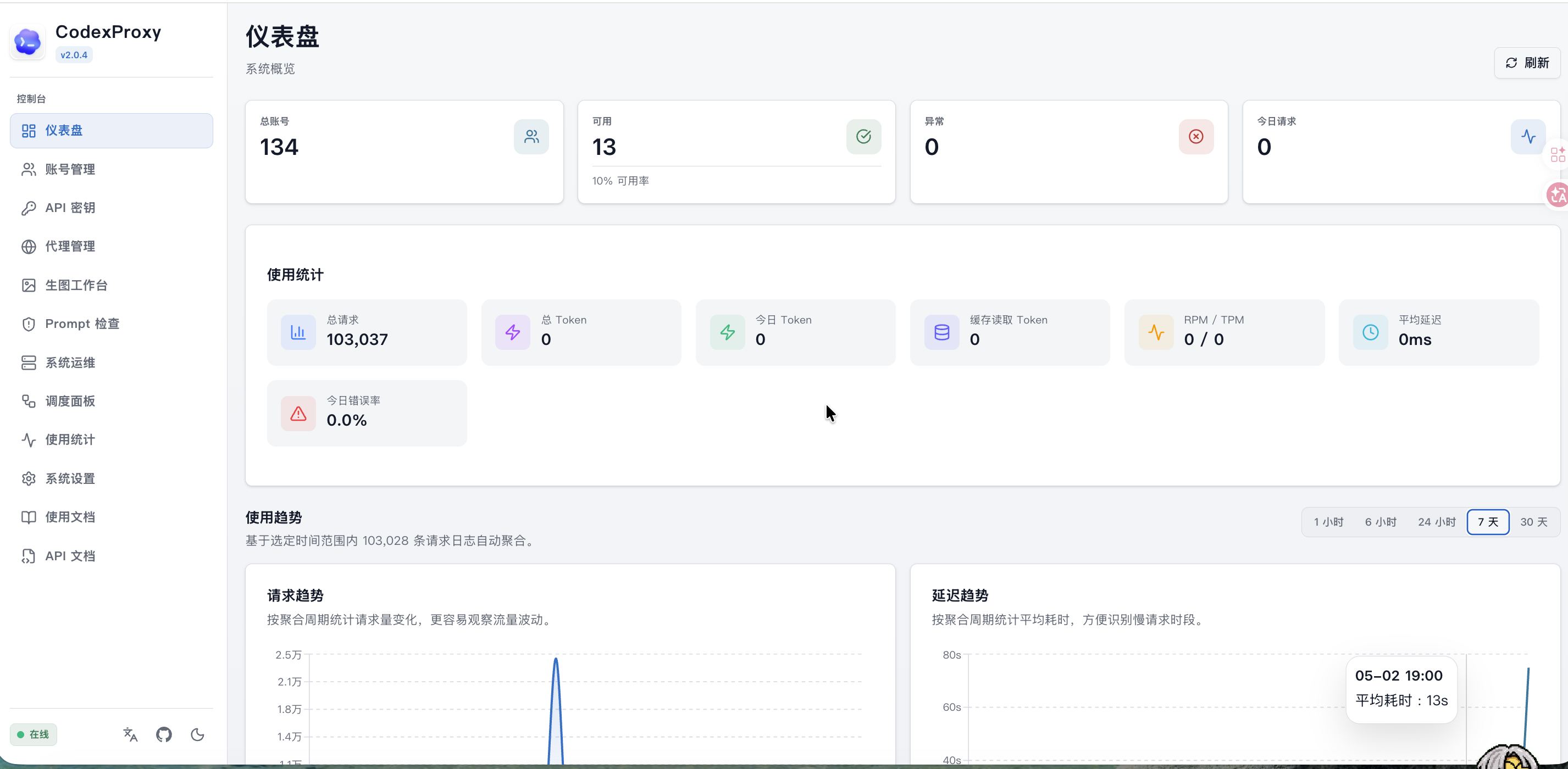
More admin dashboard screenshots
| Accounts | Dashboard Trends | | --- | --- | |  |  | | Image Studio | Prompt Filter | | --- | --- | |  |  | | Operations | Usage | | --- | --- | |  |  | | Usage Guide | API Reference | | --- | --- | |  |  |Contents
- Sponsors
- Live Demo
- Screenshots
- Quick Start
- Documentation
- Upgrade and Local Development
- Configuration
- Public API
- Token Upload and Account Management
- Admin Dashboard
- Core Capabilities
- Project Structure
- Notes
- Community
- Disclaimer and License
- Star History
- Links
Quick Start
For detailed deployment instructions, see DEPLOYMENT.md.
Deployment Modes
| Mode | File | Use Case |
|---|---|---|
| Docker image deployment | docker-compose.yml |
Recommended for servers and test environments using the prebuilt image |
| Local source container build | docker-compose.local.yml |
Full container verification after local source changes |
| SQLite lightweight deployment | docker-compose.sqlite.yml |
Single-node deployment without PostgreSQL or Redis |
| SQLite local source build | docker-compose.sqlite.local.yml |
Local source verification for the lightweight SQLite mode |
| Local development | go run . + npm run dev |
Backend and frontend development |
Commands
Standard image mode:
git clone https://github.com/james-6-23/codex2api.git
cd codex2api
cp .env.example .env
docker compose pull
docker compose up -d
docker compose logs -f codex2api
Standard local build mode:
cp .env.example .env
docker compose -f docker-compose.local.yml up -d --build
docker compose -f docker-compose.local.yml logs -f codex2api
SQLite image mode:
cp .env.sqlite.example .env
docker compose -f docker-compose.sqlite.yml pull
docker compose -f docker-compose.sqlite.yml up -d
docker compose -f docker-compose.sqlite.yml logs -f codex2api
SQLite local build mode:
cp .env.sqlite.example .env
docker compose -f docker-compose.sqlite.local.yml up -d --build
docker compose -f docker-compose.sqlite.local.yml logs -f codex2api
After startup:
- Admin dashboard:
http://localhost:8080/admin/ - Health check:
http://localhost:8080/health
Notes:
- Standard and SQLite modes both read
.env. - Before switching deployment modes, replace
.envwith the matching example file. - The SQLite lightweight mode runs a single
codex2apicontainer and stores data at/data/codex2api.db. - SQLite compose files bind to
127.0.0.1by default for security. To expose the SQLite service on all interfaces, setBIND_HOST=0.0.0.0in.envor override the port binding in the compose file. The standard compose files bind to0.0.0.0by default. - The image studio library is stored under
/data/images; uploaded admin backgrounds are stored under/data/backgrounds; Docker configurations persist/data. docker compose downdoes not delete named volumes by default. Data is removed only by commands such asdocker compose down -v,docker volume rm, ordocker volume prune.
Antigravity channel (experimental API Key path)
Antigravity accounts are managed as a dedicated Google channel with browser/imported OAuth credentials and an optional Google API Key credential shape. Admin tooling includes secret-bearing JSON/ZIP credential export plus sanitized state, explicit control-plane sync, and bounded capability probing. OAuth reques
📈 近 7 天 Star 趋势
🏆 排名变化趋势
📋 历史上榜记录
| 日期 | 榜单 | 排名 | 周期新增 | 总 STAR |
|---|