📄 仓库 README
在 GitHub 查看 ↗
SkillHub
An enterprise-grade, open-source agent skill registry — publish, discover, and manage reusable skill packages across your organization.

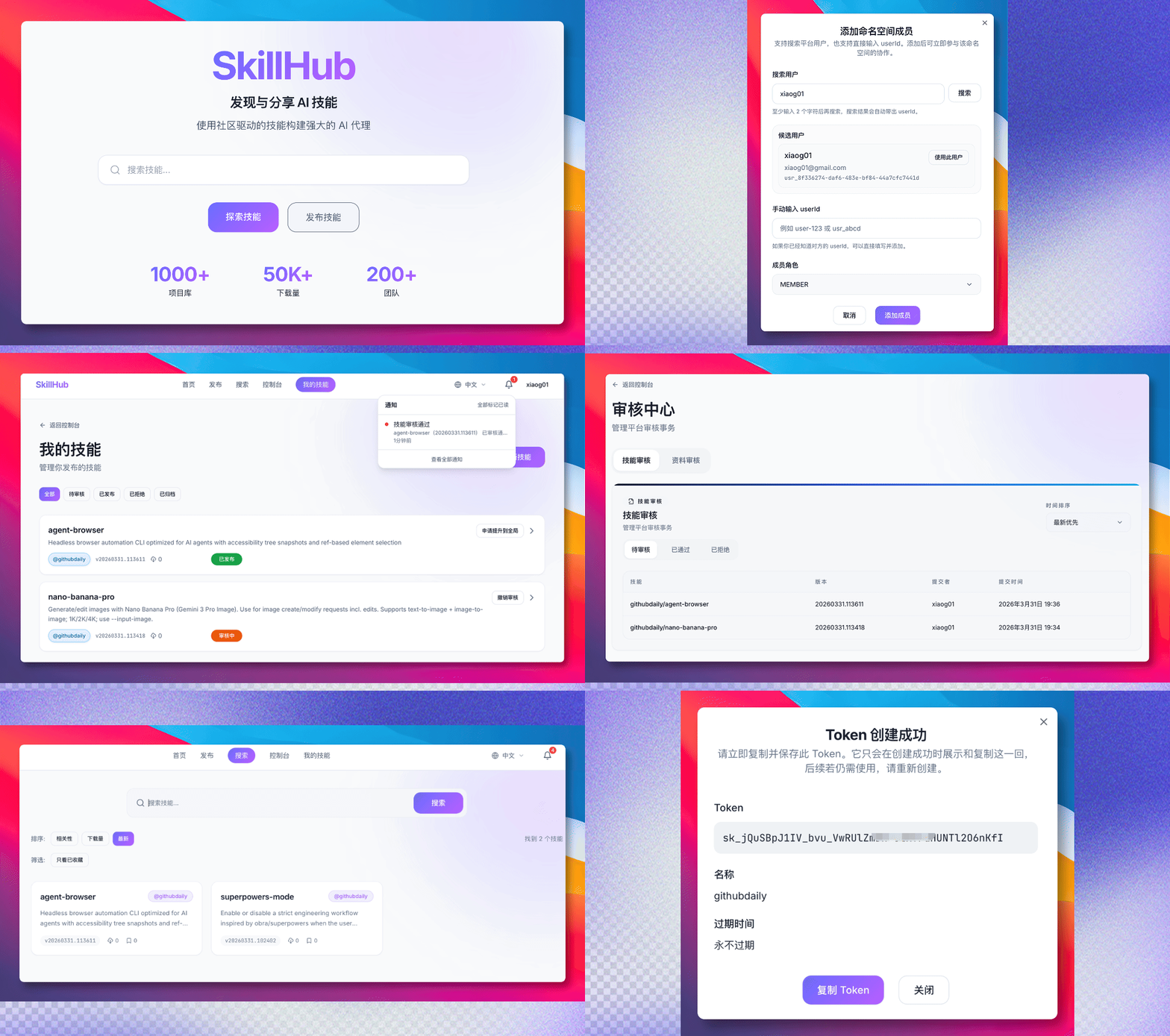
SkillHub is a self-hosted platform that gives teams a private, governed place to share agent skills. Publish a skill package, push it to a namespace, and let others find it through search or install it via CLI. Built for on-premise deployment behind your firewall, with the same polish you'd expect from a public registry.
⭐ If SkillHub fits your team, star the repo to help other teams find it, and Watch → Custom → Releases to get notified when a new version ships.
Share Great Skills
Great Skills become more valuable when they are shared. If you have a Skill that has proved useful in real work or everyday life, share it with the SkillHub community and help grow an open, practical Skill ecosystem. We welcome Skills for daily life, office work, learning and research, travel and events, content creation, data analysis, and software development—not only engineering workflows.
High-quality community contributions may join the curated starter collection, making new SkillHub deployments useful from day one. You do not need to finish the full adaptation before joining in: open an issue with the Skill's source and the problem it solves, or submit a PR by following the Skill sharing guide.
Documentation
- User Guide — 中文 / English: find, install, and use skills in your agent
- CLI reference — Authentication, installation, upgrades, namespace synchronization, and local inventory
- Skill Suites — Install a versioned collection and use its entry skill; Suite Bundle import is the separate authoring workflow
- Self-hosting — Docker Compose configuration and upgrades; Kubernetes for clusters
- Developer workflow — Source development, checks, and documentation maintenance; operations reference for deployment details
- Generated code overview — Supplementary architecture exploration; repository source and versioned documentation define current behavior
- Python Examples — Search, download, and publish skills via the REST API
Governance and Safety
- Privacy and Data Governance — Data categories, operator responsibilities, retention, portability, and incident handling for public and self-hosted instances
- Content Safety — Package safety expectations, review and reporting controls, appeals, and child-safety responsibilities
- Code of Conduct — Community standards and the private reporting channel
- Security Policy — Private vulnerability reporting and coordinated disclosure
Highlights
- Self-Hosted & Private — Deploy on your own infrastructure.
Keep proprietary skills behind your firewall with full data
sovereignty. One
make dev-allcommand to get running locally. - Publish & Version — Upload agent skill packages with semantic
versioning, custom tags (
beta,stable), and automaticlatesttracking. - Discover — Full-text search with filters by namespace, downloads, ratings, and recency. Visibility rules ensure users only see what they're authorized to.
- Team Namespaces — Organize skills under team or global scopes. Each namespace has its own members, roles (Owner / Admin / Member), and publishing policies.
- Review & Governance — Team admins review within their namespace; platform admins gate promotions to the global scope. Governance actions are audit-logged for compliance.
- Social Features — Star skills, rate them, and track downloads. Build a community around your organization's best practices.
- Account Merging — Consolidate multiple OAuth identities and API tokens under a single user account.
- API Token Management — Generate scoped tokens for CLI and programmatic access with prefix-based secure hashing.
- CLI-First — Native REST API plus a compatibility layer for existing ClawHub-style registry clients. Native CLI APIs are the primary supported path while protocol compatibility continues to expand.
- Pluggable Storage — Local filesystem for development, S3 / MinIO for production. Swap via config.
- Internationalization — Multi-language support with i18next: English, Simplified Chinese, Russian, and Korean.
Quick Start
To host your own registry using release images, start with:
curl -fsSL https://imageless.oss-cn-beijing.aliyuncs.com/runtime.sh | sh -s -- up
The default command pulls the latest stable release images. Use --version edge if you want the newest build from main.
Configure public URL (recommended for production):
curl -fsSL https://imageless.oss-cn-beijing.aliyuncs.com/runtime.sh | sh -s -- up --public-url https://skillhub.your-company.com
The --public-url parameter sets the public access URL for your SkillHub instance. This ensures:
- CLI install commands show the correct registry URL
- Agent setup instructions display the correct skill.md URL
- OAuth callbacks and device auth links work properly
For users in China (Aliyun mirror):
curl -fsSL https://imageless.oss-cn-beijing.aliyuncs.com/runtime.sh | sh -s -- up --aliyun --public-url https://skillhub.your-company.com --version latest
Keep the existing runtime home when rerunning or updating the deployment. The
runtime script reuses its .env.release file; deleting the directory discards
your custom configuration, including the public URL and generated anonymous
download cookie secret.
If deployment runs into problems, inspect the ps and logs lifecycle commands
printed by the runtime script, then retry up with the same runtime home. If you
intentionally want a fresh configuration, back up .env.release before clearing
the runtime home.
SkillHub CLI
Install and manage Agent skills from the command line:
# Install CLI
npm install -g @astron-team/skillhub

# Or run directly
npx @astron-team/skillhub@latest version

# Login
skillhub login --token sk_xxx --registry https://skill.xfyun.cn

# Search and install skills
skillhub search pdf
skillhub install pdf-parser --agent codex

# List installed skills
skillhub list
📖 Full guide: docs/skillhub/en/guide/cli.md
Prerequisites
- Docker & Docker Compose for container dependencies and release deployments
- For source development: Java 21, Node.js 22.13+ (22.x) or 24.x, and the pnpm version declared in
web/package.json - For CLI development: Bun (see
cli/README.md)
Local Development
make dev-all
For developers in China: If Maven dependency download times out, configure Aliyun mirror. See Local Development Guide for details.
Then open:
- Web UI:
http://localhost:3000 - Backend API:
http://localhost:8080
By default, make dev-all starts the backend with the local profile.
In that mode, local development keeps the mock-auth users below and also
creates a password-based bootstrap admin account by default:
local-userfor normal publishing and namespace operationslocal-adminwithSUPER_ADMINfor review and admin flows
Use them with the X-Mock-User-Id header in local development.
The local bootstrap admin is enabled by default in application-local.yml:
- username:
admin - password:
ChangeMe!2026 - To disable it, set
BOOTSTRAP_ADMIN_ENABLED=falsebefore starting the backend.
Stop everything with:
make dev-all-down
Only when deliberately discarding local dependency data, reset with:
make dev-all-reset
Run make help to see all available commands.
Useful backend commands:
make test
make test-backend-app
make build-backend-app
Do not run ./mvnw -pl skillhub-app clean test directly under server/.
skillhub-app depends on sibling modules in the same repo, and a standalone clean build
can fall back to stale artifacts from the local Maven repository, which surfaces misleading
cannot find symbol and signature-mismatch errors. Use -am, or the make test-backend-app
and make build-backend-app targets above.
For the full development workflow (local dev → staging → PR), see docs/dev-workflow.md.
API Contract Sync
OpenAPI types for the web client are checked into the repository. When backend API contracts change, regenerate the SDK and commit the updated generated file:
make generate-api
For a stricter end-to-end drift check, run:
./scripts/check-openapi-generated.sh
This starts local dependencies, boots the backend, regenerates the frontend schema, and fails if the checked-in SDK is stale.
Container Runtime
Published runtime images are built by GitHub Actions and pushed to GHCR.
This is the supported path for anyone who wants a ready-to-use local
environment without building the backend or frontend on their machine.
Published server and web images target linux/amd64, linux/arm64, and
linux/riscv64; the scanner image currently targets linux/amd64 and
linux/arm64.
Quick deployment with curl:
# Default (GHCR images)
curl -fsSL https://imageless.oss-cn-beijing.aliyuncs.com/runtime.sh | sh -s -- up --public-url https://skillhub.your-company.com

# Aliyun mirror (recommended for users in China)
curl -fsSL https://imageless.oss-cn-beijing.aliyuncs.com/runtime.sh | sh -s -- up --aliyun --public-url https://skillhub.your-company.com --version latest
Deployment parameters:
| Parameter | Description | Example |
|---|---|---|
--public-url <url> |
Public access URL (recommended) | --public-url https://skill.example.com |
--version <tag> |
Specific image tag | --version v0.2.0 |
--aliyun |
Use Aliyun mirror (China) | --aliyun |
--home <dir> |
Runtime directory | --home /opt/skillhub |
--no-scanner |
Disable security scanner | --no-scanner |
Important: Configure
--public-urlfor production deployments to ensure CLI install commands and Agent setup instructions display the correct URLs.
For sub-path deployments, keep the public URL and runtime base path aligned in
.env.release: set SKILLHUB_PUBLIC_BASE_URL=https://skill.example.com/skillhub,
SKILLHUB_WEB_BASE_PATH=/skillhub/, and SKILLHUB_WEB_API_BASE_URL=/skillhub.
Manual deployment:
- Copy the runtime environment template.
- Pick an image tag.
- Start the stack with Docker Compose.
cp .env.release.example .env.release
Recommended image tags:
SKILLHUB_VERSION=latestfor the latest stable release (default)SKILLHUB_VERSION=edgefor the latestmainbuildSKILLHUB_VERSION=vX.Y.Zfor a fixed release
Start the runtime:
make validate-release-config
docker compose --env-file .env.release -f compose.release.yml up -d
Then open:
- Web UI:
SKILLHUB_PUBLIC_BASE_URL对应的地址 - Backend API:
http://localhost:8080
Stop it with:
docker compose --env-file .env.release -f compose.release.yml down
The runtime stack uses its own Compose project name, so it does not
collide with containers from make dev-all.
The production Compose stack now defaults to the docker profile only.
It does not enable local mock auth. The release template (.env.release.example)
enables the bootstrap admin by default, so zero-config quickstart via
runtime.sh works out of the box:
- username:
admin - password:
ChangeMe!2026
Recommended production baseline:
- set
SKILLHUB_PUBLIC_BASE_URLto the final HTTPS entrypoint - if the service is published under a sub-path such as
/skillhub/, setSKILLHUB_WEB_BASE_PATH=/skillhub/andSKILLHUB_WEB_API_BASE_URL=/skillhubas well - keep PostgreSQL / Redis bound to
127.0.0.1 - use external S3 / OSS via
SKILLHUB_STORAGE_S3_* - change
BOOTSTRAP_ADMIN_PASSWORDto a strong password (validate-release-config.shrejects the defaultChangeMe!2026) - rotate or disable the bootstrap admin after initial setup
- run
make validate-release-configbeforedocker compose up -d
If the GHCR package remains private, run docker login ghcr.io before
docker compose up -d.
Upload Allowlist Override
Skill package upload validation uses the default extension allowlist from
SkillPackagePolicy.java.
SkillPublishProperties uses that same list by default for
skillhub.publish.allowed-file-extensions.
If you need to replace the default allowlist at runtime, set:
SKILLHUB_PUBLISH_ALLOWED_FILE_EXTENSIONS=.md,.json,.xsd,.xsl,.dtd,.docx,.xlsx,.pptx
Spring Boot binds this environment variable to
skillhub.publish.allowed-file-extensions. When set, it replaces the default
allowlist instead of appending to it.
Monitoring
The optional monitoring/ directory provides Prometheus and Grafana deployment examples. It is not a ready-to-scrape backend configuration: the default application exposes only health and info Actuator endpoints. /actuator/prometheus also requires the SUPER_ADMIN or AUDITOR role under the current route policy, while the example scraper has no credentials configured.
Before enabling monitoring, configure metrics exposure and an authenticated access path appropriate to your deployment; verify that the scraper can actually read the endpoint. Do not make management endpoints public merely to satisfy the example. The example targets host.docker.internal:8080, which must resolve to your backend from the Prometheus container.
After adapting that configuration, start the optional stack:
cd monitoring
docker compose -f docker-compose.monitoring.yml up -d
Prometheus uses port 9090 and Grafana uses port 3001. Replace the example Grafana administrator credentials before exposing it. Confirm scrape targets are healthy and metrics are present; starting the containers alone does not establish monitoring coverage. For tracing and request correlation, see the observability developer guide.
Kubernetes
Basic Kubernetes manifests are available under deploy/k8s/:
configmap.yamlsecret.yaml.examplebackend-deployment.yamlfrontend-deployment.yamlservices.yamlingress.yaml
For a configurable deployment with bundled PostgreSQL and Redis dependencies,
use the Helm chart under charts/skillhub/:
helm dependency build ./charts/skillhub
helm upgrade --install skillhub ./charts/skillhub \
  --namespace skillhub \
  --create-namespace \
  -f values-production.yaml
See the Helm chart guide for required secrets, Ingress/TLS, external data services, storage migration, and upgrade constraints.
Apply them after creating your own secret:
kubectl apply -f deploy/k8s/configmap.yaml
kubectl apply -f deploy/k8s/secret.yaml
kubectl apply -f deploy/k8s/backend-deployment.yaml
kubectl apply -f deploy/k8s/frontend-deployment.yaml
kubectl apply -f deploy/k8s/services.yaml
kubectl apply -f deploy/k8s/ingress.yaml
Smoke Test
A lightweight smoke test script is available at scripts/smoke-test.sh.
Run it against a local backend:
./scripts/smoke-test.sh http://localhost:8080
Local Compose and staging runs can keep using one backend URL. For an ingress deployment where the public URL exposes application APIs but keeps Actuator on the backend service, set a separate Actuator target:
ACTUATOR_BASE_URL=http://skillhub-server:8080 \
  ./scripts/smoke-test.sh https://skillhub.example.com
The health check requires an Actuator JSON response, so an HTML SPA fallback is reported as a routing or target error instead of a successful health response.
Admin label-management smoke checks run only when current admin credentials are supplied explicitly:
SMOKE_ADMIN_USERNAME=admin SMOKE_ADMIN_PASSWORD='current-password' \
  ./scripts/smoke-test.sh http://localhost:8080
Use SMOKE_ADMIN_CHECKS=false for persistent environments where only non-admin
smoke checks should run. The script no longer falls back to bootstrap admin
password defaults.
Architecture
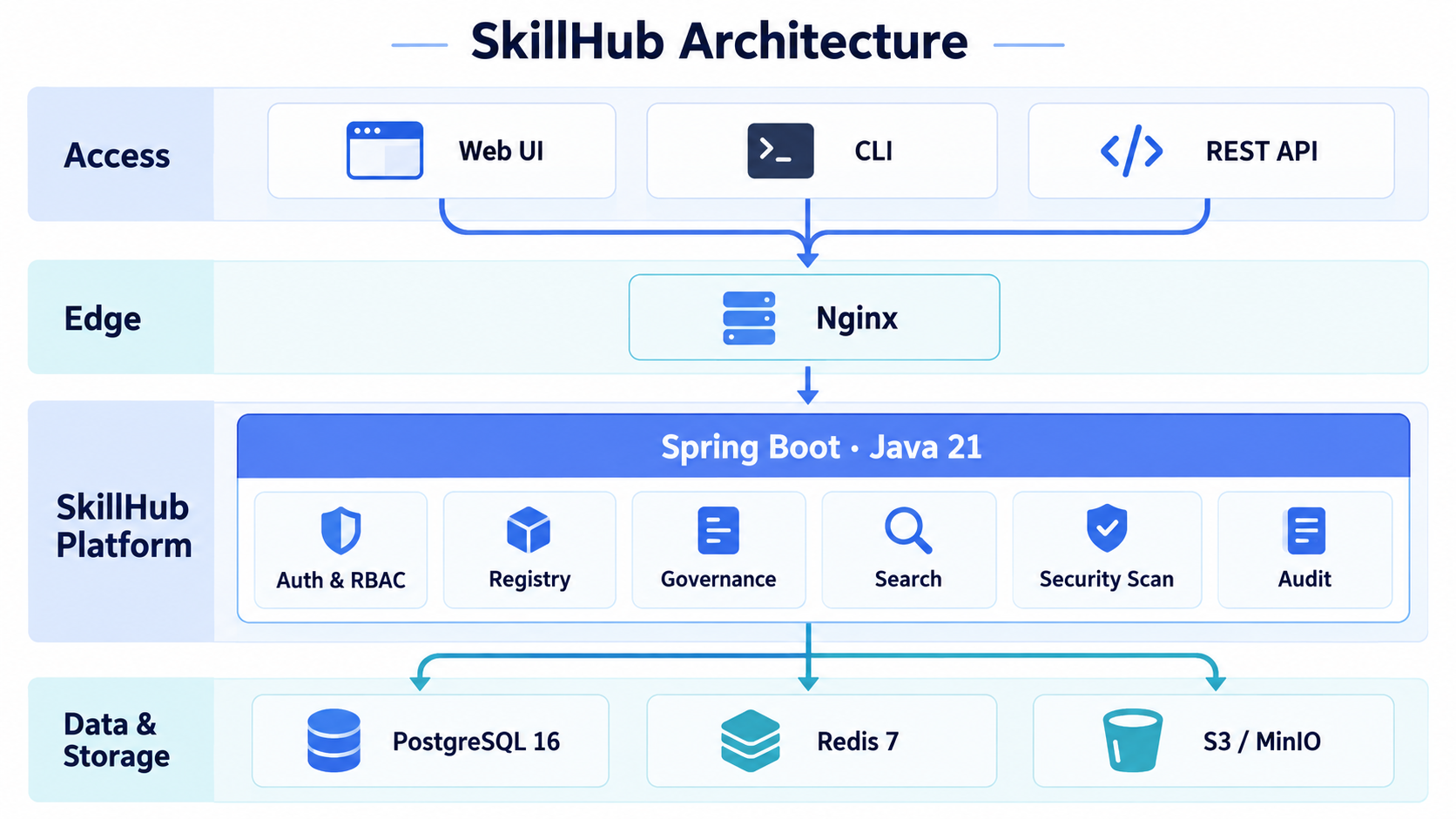
Backend (Spring Boot 3.2.3, Java 21): - Multi-module Maven project with clean architecture - Modules: app, domain, auth, search, storage, infra - PostgreSQL 16 with Flyway migrations - Redis for session management - S3/MinIO for skill package storage
Frontend (React 19, TypeScript, Vite): - TanStack Router for routing - TanStack Query for data fetching - Tailwind CSS + Radix UI for styling - OpenAPI TypeScript for type-safe API client - i18next for internationalization
SkillHub and the Agent Skills Ecosystem
SkillHub is a registry and governance platform — not a skill collection.
It is complementary to open skill catalogs such as
anthropics/skills: that repository
popularized the Agent Skill format (a SKILL.md with name / description
frontmatter plus supporting files) and ships a curated set of example skills.
SkillHub is where your organization hosts, versions, governs, and distributes
those skills privately.
anthropics/skills |
SkillHub | |
|---|---|---|
| What it is | A curated collection of example Agent Skills + the format spec | A self-hosted registry & governance platform for skills |
| Layer | Content — the skills themselves | Infrastructure — hosting, versioning, discovery, access control |
| Hosting | Public GitHub repository | Your own infrastructure, behind your firewall |
| Versioning | Git history | Semantic versions, tags (beta / stable), latest tracking |
| Access control | Public | Namespaces, RBAC, review & audit logging |
| Distribution | Clone / copy files | Full-text search + CLI install |
Because SkillHub speaks the same SKILL.md format, skills from anthropics/skills
— or any Agent Skill folder — publish straight into your registry:
# Grab a skill from an open collection...
git clone https://github.com/anthropics/skills

# ...and publish it into your private SkillHub registry
export SKILLHUB_REGISTRY=https://skillhub.your-company.com
export SKILLHUB_TOKEN=YOUR_API_TOKEN
npx @astron-team/skillhub@latest publish ./skills/<category>/<skill-name>
⚖️ Licensing: honor each skill's own license when republishing. Most skills in
anthropics/skillsare Apache 2.0, but the document skills (DOCX/PDF/PPTX/XLSX) are source-available rather than open source — check the skill'sLICENSEbefore redistributing.
In short: use collections like anthropics/skills for content, and SkillHub to
distribute it across your organization under governance.
Usage with Agent Platforms
SkillHub works as a skill registry backend for several agent platforms. Point any of the clients below at your SkillHub instance to publish, discover, and install skills.
OpenClaw
OpenClaw is an open-source agent skill CLI. Configure it to use your SkillHub endpoint as the registry:
# Configure registry URL
export CLAWHUB_REGISTRY=https://skillhub.your-company.com

# Authenticate once if needed
clawhub login --token YOUR_API_TOKEN

# Search and install skills
npx clawhub search email
npx clawhub install my-skill
npx clawhub install my-namespace--my-skill

# Publishing uses the first-party SkillHub CLI
export SKILLHUB_REGISTRY=https://skillhub.your-company.com
export SKILLHUB_TOKEN=YOUR_API_TOKEN
npx @astron-team/skillhub@latest publish ./my-skill --namespace my-space
my-space--my-skill is the canonical compat slug. SkillHub parses it as
namespace my-space plus skill slug my-skill.
ClawHub compatibility covers search, inspection, and installation. Its publish protocol is not compatible with SkillHub; use the first-party CLI shown above.
💡 Tip: The above commands are not only applicable to OpenClaw, but also to other CLI Coding Agents or Agent assistants by specifying the installation directory (
--dir). For example:npx clawhub --dir ~/.claude/skills install my-skill
📖 Complete OpenClaw Integration Guide →
Hermes Agent
Hermes Agent uses the standard SKILL.md format and recursively discovers skills under $HERMES_HOME/skills/. Use SkillHub CLI's explicit --dir option to install a complete SkillHub package into Hermes without a registry adapter, then verify it with hermes skills list.
📖 Complete Hermes Agent Integration Guide →
DeepSeek Harness
DeepSeek Harness (dsh) discovers standard SKILL.md packages from .dsh/skills and the shared .agents/skills roots. Install directly into its native user directory with the first-party SkillHub CLI:
skillhub install my-skill --agent dsh --scope user
Project-scoped installs use <repository>/.dsh/skills; run them from the repository root. dsh watches its skill roots, so newly installed skills are discovered without restarting the process.
📖 Complete DeepSeek Harness Integration Guide →
HarnessClaw Engine
HarnessClaw Engine is a Go LLM programming assistant engine that exposes its capabilities over WebSocket. It loads skills from SKILL.md files with YAML frontmatter and parameter substitution, scanning each configured directory for skill-name/SKILL.md (default ~/.harnessclaw/workspace/skills/, with earlier directories taking priority on name conflicts). Install a SkillHub package straight into that directory with the CLI's --dir option, no registry adapter required:
npx clawhub --dir ~/.harnessclaw/workspace/skills install my-skill
AstronClaw
AstronClaw is a cloud AI assistant built on OpenClaw's core capabilities, providing 24/7 online service through enterprise platforms like WeChat Work, DingTalk, and Feishu. It features a built-in skill system with over 130 official skills. You can connect it to a self-hosted SkillHub registry to enable one-click skill installation, search repository, dialogue-based automatic installation, and even custom skills management within your organization.
Loomy
Loomy is a desktop AI work partner focusing on real office scenarios. It integrates deeply with local files and system tools to build efficient automated workflows for individuals and small teams. By connecting Loomy to your SkillHub registry, you can easily discover and install organization-specific skills to enhance your local desktop automation and productivity.
astron-agent
astron-agent is the iFlytek Astron agent framework. Skills stored in SkillHub can be referenced and loaded by astron-agent, enabling a governed, versioned skill lifecycle from development to production.
Related Projects
SkillHub is part of the iFlytek Astron open-source ecosystem. If SkillHub is useful to you, these sibling projects may be too:
- astron-agent — Enterprise-grade, commercial-friendly agentic workflow platform for building next-generation SuperAgents. Skills published to SkillHub can be loaded and run by astron-agent.
- astron-rpa — Agent-ready RPA suite with out-of-the-box automation tools, built for individuals and enterprises.
🌟 Show & Tell — Have you built something with SkillHub? We'd love to hear about it! Share your use case, integration, or deployment story in the Discussions → Show and Tell category.
Contributing
Contributions are welcome. Please open an issue first to discuss what you'd like to change.
- Contribution guide:
CONTRIBUTING.md - Code of conduct:
CODE_OF_CONDUCT.md
📞 Support
- 💬 Community Discussion: GitHub Discussions
- 🐛 Bug Reports: Issues
- 👾 Discord: Join our Server
- 👥 WeChat Work Group:

License
Apache License 2.0
📈 近 7 天 Star 趋势
🏆 排名变化趋势
📋 历史上榜记录
| 日期 | 榜单 | 排名 | 周期新增 | 总 STAR |
|---|