📄 仓库 README
在 GitHub 查看 ↗AI File Sorter












AI File Sorter is a cross-platform desktop application that uses AI to organize files and suggest cleaner, more consistent names for images, documents, and supported audio/video files. It is designed to reduce clutter, improve consistency, and make files easier to find later, whether for review, archiving, or long-term storage.
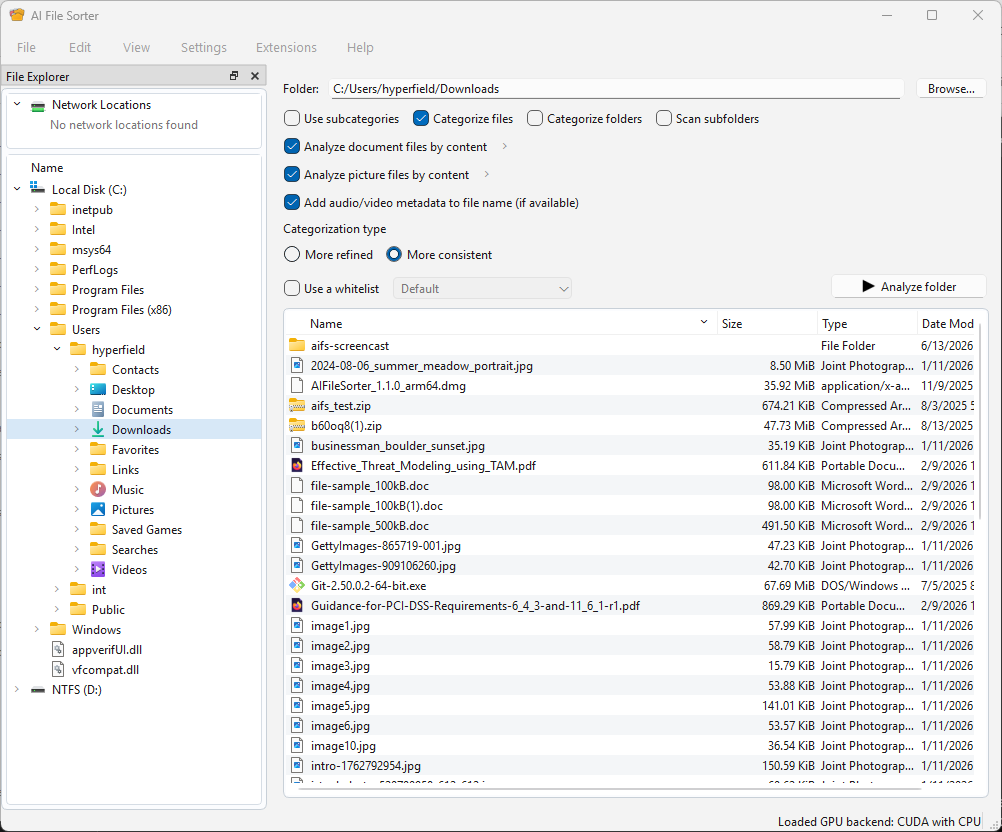
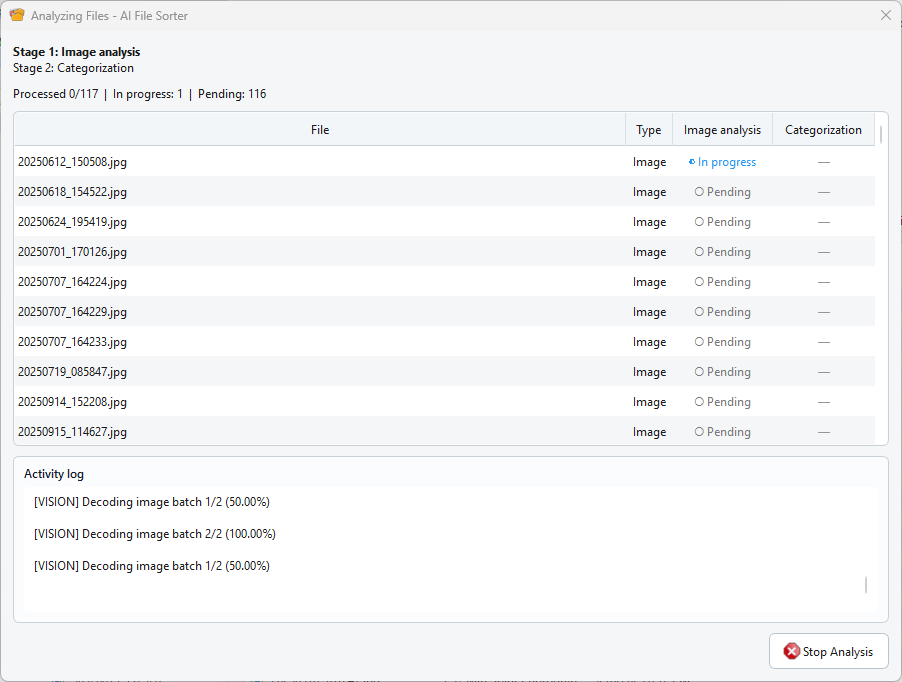
The app can analyze picture files locally with built-in visual LLM backends and suggest meaningful, human-readable names. For example, a generic file like IMG_2048.jpg can be renamed to something descriptive such as clouds_over_lake.jpg. It can also analyze supported document files and propose clearer names based on their text content. AI File Sorter can also clean up messy audio and video filenames by using the metadata already stored inside supported media files. If tags such as year, artist, album, or title are available, the app can turn them into a clear suggestion like 2024_artist_album_title.mp3, which you can review, edit, or ignore before any change is applied.
AI File Sorter helps tidy up cluttered folders such as Downloads, external drives, or NAS storage by grouping files based on their names, file types, folder context, and past sorting results.
Instead of relying only on fixed rules, the app combines AI suggestions with optional whitelists, recent similar results, and your approved review decisions. This helps keep sorting more consistent over time while still letting you review and adjust everything before anything is changed.
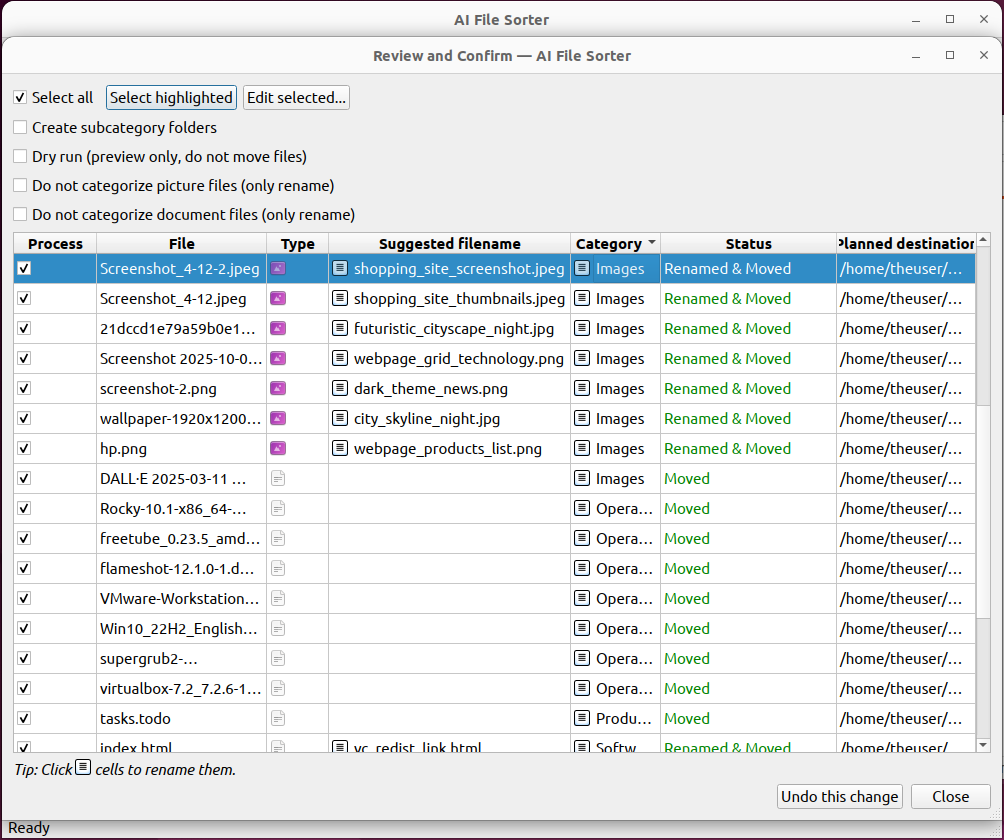
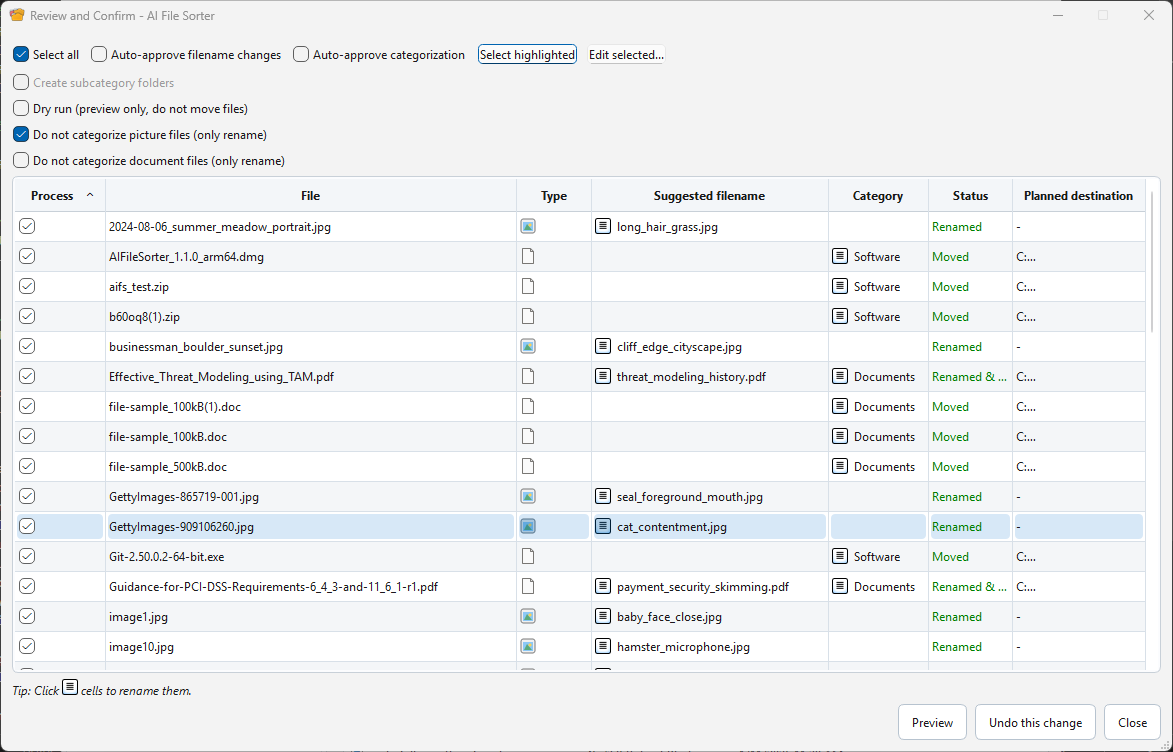
Categories (and optional subcategories) are suggested for each file, and for supported file types, rename suggestions are provided as well. Once you confirm, the required folders are created automatically and files are sorted accordingly.
Privacy-first by design: AI File Sorter can run entirely on your device. When you use a local model, your files, filenames, images, and metadata stay on your computer, and no telemetry is sent. An internet connection is only needed if you choose to use a remote model.
How It Works
- Point the app at a folder or drive
- Files (and image content, when applicable) are analyzed using the selected local or remote model
- Category and rename suggestions are generated
- You review and adjust if needed before anything is changed
Safe First Run
If you are trying AI File Sorter for the first time, start with a small test folder instead of a full archive or drive. Copy 20-50 files from Downloads, screenshots, photos, or documents into a temporary folder, run the analysis, and inspect the review table before applying anything.
This keeps the first run low risk: your files stay on your computer when you use local models, the AI only suggests categories and filenames, and no move or rename happens until you approve it. If you do apply changes and then want to reverse them, use Edit -> Undo last run.

- AI File Sorter
- Safe First Run
- Technical reference
- Changelog
- Features
- Categorization
- Image analysis (Visual LLM)
- Document analysis (Text LLM)
- Audio/video metadata filename suggestions
- System compatibility check
- Requirements
- Installation
- Categorization cache and learned behavior
- Uninstallation
- Using your OpenAI API key
- Using your Gemini API key
- Using a custom OpenAI-compatible API
- Testing
- Diagnostics
- Help and onboarding
- How to Use
- Sorting a Remote Directory (e.g., NAS)
- Contributing
- Credits
- License
- Donation
Technical reference
The main README stays focused on installation, features, and normal everyday use. For contributor-facing and integration-facing details that are too deep for the main entry page, use these technical references:
- Architecture
- Headless runtime contract
- Configuration and environment
- Categorization behavior
- Testing
- Updater contract
Changelog
[1.9.2] - 2026-08-14
- Fixed a Windows startup crash in Qt GUI theme refresh handling.
[1.9.1] - 2026-08-06
- Fixed bundled Windows local-LLM runtime builds so the packaged GGML libraries run on generic SSE4.2-capable x64 CPUs instead of requiring AVX2.
- Fixed embedded CA bundle staging for packaged and Microsoft Store builds by writing the certificate bundle under writable app data instead of the read-only install directory.
[1.9.0] - 2026-07-03
- Added smart branching whitelists so categories can have their own allowed subcategories, with an improved whitelist editor that keeps global and category-specific subcategory modes mutually exclusive.
- Added structured project-folder protection for recursive scans, covering Unity, Unreal, Godot, Blender, Git repositories, and common source-code project layouts.
- Added file preview support in the Categorization Review dialog and improved accessibility labels/progress announcements for screen readers.
- Added custom visual model support, configurable local model storage, and improved reuse of already-downloaded Gemma 3 4B model files.
- Improved category and filename consistency by localizing suggested filenames, preserving UTF-8 metadata, stripping inline subcategory artifacts, and keeping date suffixes out of canonical cache labels.
- Improved remote LLM handling with rate-limit/backoff parsing and optional request pacing.
- Improved local runtime and release packaging reliability across Windows, Linux, and macOS, including safer backend probing, CUDA/Vulkan fallback handling, RPM packaging, and verified macOS release helpers.
[1.8.0] - 2026-05-10
- Added backend status indicator to the status bar.
- The app now runs as a single instance - opening it again brings the existing window to the front instead of starting a second copy.
- Restored the app launcher for the non-Microsoft Store versions of the app and improved GPU se
📈 近 7 天 Star 趋势
🏆 排名变化趋势
📋 历史上榜记录
| 日期 | 榜单 | 排名 | 周期新增 | 总 STAR |
|---|