📄 仓库 README
在 GitHub 查看 ↗

👺 SickoMenu


A powerful utility for Among Us designed to enrich your game experience with custom features!
Intended for educational and experimental use only.
📋 Table of Contents
- ⚠️ Disclaimer
- ⁉️ Frequently Asked Questions
- 🛑 Ethical Use Protocol
- ⚙️ Features
- 📸 Screenshot
- 👌 Supported Versions
- ⬇️ Download & Install
- ⌨️ Default Hotkeys
- ⚒️ Building / Compilation
- 💁 Contributing
- ✨ Inspiration
- 🙏 Special Thanks
⚠️ Disclaimer
This project is maintained by g0aty, with contributions from other developers.
It is intended solely for educational and non-commercial research purposes, such as exploring game mechanics and studying anti-cheat systems.
This project is not affiliated with, endorsed, or supported by Innersloth LLC in any capacity.
By downloading, installing, or using this software, you acknowledge and agree that:
- You are solely responsible for how you use it.
- You will not use it to violate Innersloth’s Terms of Service or disrupt public gameplay.
- The developers, including g0aty and all contributors, assume no responsibility or liability for:
- Any direct or indirect consequences of misuse,
- Violations of third-party rules or terms,
- Game bans, data loss, or damage caused by use of this utility.
Legal Notice:
Portions of the game referenced or interacted with may be intellectual property of Innersloth LLC. © Innersloth LLC.
This project is designed to comply with their Modding Policy for private and non-malicious experimentation.
⚠️ Use responsibly. This software is provided "as is", without any warranties or guarantees of safety, support, or fitness for purpose.
⁉️ Frequently Asked Questions
Click here to read the list of FAQs!
🛑 Ethical Use Protocol
By using SickoMenu, you agree to:
1. Use exclusively in private lobbies with consenting players.
2. Never exploit features in public matches or to harass others.
3. Respect Innersloth's Terms of Service and the integrity of the game.
4. Immediately disable the mod (PAUSE BREAK hotkey) if joining public lobbies accidentally.
🚫 Misuse may result in punitive actions on your Among Us account, including permanent bans. We do not condone cheating.
Report unethical usage in our Discord.
⚙️ Features
A huge amount of features!
- NoClip (CTRL)
- Ghost Visibility
- Confuser (May disrupt gameplay)
Miscellaneous Features:
- Zoom Out
- Disable Kill Animation
- SickoChat (/sc [message])
Full Feature List: FEATURES.md
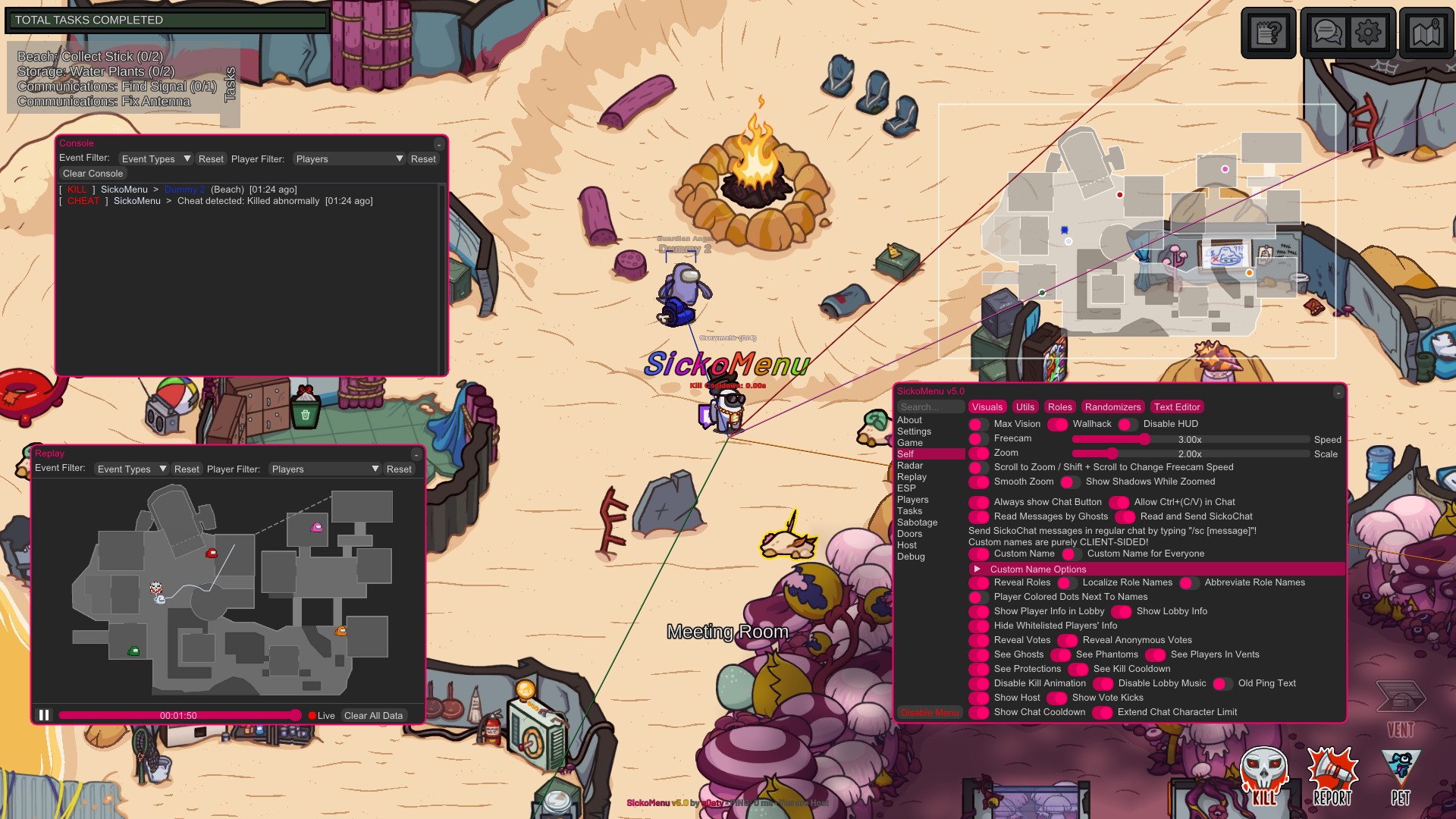
📸 Screenshot
👌 Supported Versions
- ✅ Steam (Supported)
- ✅ itch.io (Supported)
- ✅ Epic Games (Supported)
- ✅ Microsoft Store/XBOX App - Windows (Supported)
- 🟡 Cracked (may work if you know what you're doing; I don't condone it, and support will NOT be provided)
- ❌ iOS/iPadOS/Android (Not Supported)
- ❌ Switch/Xbox/Playstation (Not Supported)
⬇️ Download & Install
For Windows
You can find the latest release here.
Either inject SickoMenu.dll with a reliable injector or put version.dll in your Among Us directory (the folder containing Among Us.exe). Make sure to use the correct DLL for your Among Us platform!
Accessing the Among Us directory for supported platforms:
- 🚂 Steam Right-click Among Us in your Library → Click Manage → Click Browse local files.
- 🛖 itch.io Go to wherever you normally execute Among Us.exe.
- 🛍️ Epic Games Right-click Among Us in your Library → Click Manage → Click the folder icon in the Installation box.
- 🪟 Microsoft Store Go to C:\Program Files\WindowsApps\ and search for Among Us.exe, the location of it is the required folder.
- ❎ XBOX App Right-click Among Us in your Library → Click Manage → Open the FILES tab → Click BROWSE... → Open the Among Us folder → Open the Content folder.
- ❌ Other Platforms Unsupported!
For Linux (Proton/Wine) (Version Proxy Only)
Method 1: (Recommended)
- Place
version.dllin your Among Us directory - Add
WINEDLLOVERRIDES="version=n,b" %command%to your Among Us launch options. SickoMenu should now load!
If you're facing issues - try Method 2:
First, you'll need protontricks. You can install it with your packager of choice.
- Make sure you are running Among Us under Proton. On Steam, you can check by going to Properties -> Compatibility
- Put
version.dllinto your Among Us directory (the folder containingAmong Us.exe). - Run
protontricks --gui - Choose Among Us
- Click on Select the default wineprefix and then OK
- Click on Run winecfg and then OK
- In the configuration window, click on Libraries
- Enter
versioninto the New override for library input field - Click Add and then Apply
- SickoMenu should now work properly!
For macOS (Version Proxy Only)
[!NOTE] This method uses CrossOver. If you have ANY other ways to use this with other software, refer to the contributing section!
[!TIP] The hotkey to trigger SickoMenu depends on your Mac model. There are 2 possible triggers: Command+Backspace OR Function+Backspace.
Backspace corresponds to the ⌫ on your keyboard.
Method 1:
- Install a bottle of CrossOver, install Steam in it and install Among Us.
- Open the C drive inside of CrossOver (there should be a button). Quit CrossOver. A Finder window will open.
- Go to
Program Files (x86)/Steam/steamapps/common/Among Us/and put theversion.dllinto it. Then reopen CrossOver. - Go to the Configure Wine panel, go to Libraries, open the menu below New Replacement for: and search for
version. - Select it and click Add, then Apply and OK.
- Start Among Us and press Fn+Backspace or Command+Backspace, depending on your model to show SickoMenu.
Method 2:
- Download from PlayOnMac and install it.
- Open PlayOnMac and click Install. - Search for "Among Us" (even if not listed) and select Install a non-listed program. - Name the virtual drive (e.g., "Among Us Modded") and ensure it’s set to 32-bit architecture.
- Download the Steam installer from store.steampowered.com. - In PlayOnMac’s installation wizard, select Install components directly > Steam. - Follow prompts to install Steam in the virtual drive.
- Launch Steam from PlayOnMac, log in, and install Among Us.
- Add SickoMenu’s
version.dll- Right-click your virtual drive in PlayOnMac > Open virtual drive’s directory. - Navigate to:
drive_c/Program Files (x86)/Steam/steamapps/common/Among Us
- Place theversion.dllfile here. - In PlayOnMac, select your virtual drive > Configure > Wine > Libraries.
- Add
versionto the overrides and set it to Native (Windows). 7.Run Among Us through Steam in PlayOnMac. Use the hotkey Fn+Backspace or Command+Backspace to toggle the mod menu, depending on your model.
Method 3: (recommended)
- Open Terminal and install Wine via Homebrew.
bash /bin/bash -c "$(curl -fsSL https://raw.githubusercontent.com/Homebrew/install/HEAD/install.sh)" brew install --cask wine-stable - In Terminal, create a dedicated Wine prefix for Among Us:
bash
   mkdir -p ~/AmongUsWine
   WINEPREFIX=~/AmongUsWine winecfg
- In the Wine Configuration window, set Windows Version to Windows 10 and close. - Download the Steam Installer from store.steampowered.com.
- Install Steam into your Wine prefix:
bash WINEPREFIX=~/AmongUsWine wine ~/Downloads/SteamSetup.exe - Follow the installer prompts. Launch Steam from Terminal afterward:
bash WINEPREFIX=~/AmongUsWine wine ~/AmongUsWine/drive_c/Program\ Files\ \(x86\)/Steam/Steam.exe - Log in to Steam and install Among Us.
- Locate the Among Us folder:
- Open Finder > Go to Go > Go to Folder and paste:
~/AmongUsWine/drive_c/Program Files (x86)/Steam/steamapps/common/Among Us
- Drag theversion.dllfile into this folder. - In Terminal, run:
bash
   WINEPREFIX=~/AmongUsWine winecfg
- Go to the Libraries tab.
- Under New override for library, typeversion, click Add, then set it to Native (Windows).
- Click Apply > OK. - Launch Steam from Terminal (as in Step 3.3).
- Start Among Us from your Steam library.
- Use Command + Backspace or Fn+Backspace to toggle SickoMenu in-game, depending on your Mac model.
Method 4: Whisky + Apple Game Porting Toolkit (Apple Silicon)
[!NOTE] This method uses Whisky with Apple’s Game Porting Toolkit. It is completely separate from CrossOver, PlayOnMac, and manual Wine prefixes.
[!TIP] This method works best on Apple Silicon (M1 / M2 / M3) Macs running macOS Ventura (13+).
- Download and install Whisky from: https://getwhisky.app Drag Whisky into your Applications folder and open it.
- Allow Whisky to install Wine and Apple Game Porting Toolkit when prompted. Create a new bottle in Whisky: Click + New Bottle. Name it something like Among Us GPTK. Set Windows Version to Windows 10. Leave architecture at default (64-bit). Create the bottle.
- Install Steam inside the bottle: Select your bottle and click Run Installer. Download the Steam installer from https://store.steampowered.com/about/ Select SteamSetup.exe and complete the installation. Launch Steam from Whisky: Log in to your Steam account. Install Among Us normally through Steam. Close Steam once the installation finishes.
- Add SickoMenu’s version.dll: In Whisky, select your bottle and click Open Bottle in Finder.
- Navigate to:
drive_c/Program Files (x86)/Steam/steamapps/common/Among UsPlace the version.dll file into this folder. - Configure the DLL override: With the bottle selected, open Bottle Settings. Click Wine Configuration. Go to the Libraries tab. Under New override for library, type version. Click Add, set it to Native (Windows). Click Apply and OK.
- Launch the game: Start Steam from Whisky. Launch Among Us from your Steam library. Use Fn + Backspace or Command + Backspace (depending on your Mac model) to toggle SickoMenu.
Note:
For Method 2:
- macOS Catalina+ Users: macOS versions ≥10.15 lack 32-bit support, which may cause issues. Use Wine-Staging (via Homebrew) for better compatibility:
bash
  brew install --cask wine-stable
For Method 3:
- The bash in the first step will install Homebrew, if you don't have it on your os. I recommend this method for users comfortable with basic terminal commands.
⌨️ Default Hotkeys
| Action | Key |
|---|---|
| Show Menu | DELETE |
| Show Radar | INSERT |
| Show Console | HOME |
| Show Replay | END |
| Repair Sabotage | PAGE DOWN |
| NoClip | CTRL |
| Panic / Disable SickoMenu | PAUSE BREAK |
Hotkeys can be customized in-game under Settings → Keybinds.
⚒️ Building / Compilation
You can compile two different versions of the menu. Normal or Version Proxy. Steps to compile can be found here.
Normal (SickoMenu.dll)
Inject it with any injector you have.
- Debug (With Debug Information and can be attached to process)
- Release (Optimized with all information stripped)
Version Proxy (version.dll)
Will automatically be loaded by the Game itself if the dll is in the game directory.
- Debug_Version (With Debug Information and can be attached to process)
- Release_Version (Optimized with all information stripped)
💁 Contributing
Contributions are welcome and appreciated!
- Fork the repository here
- Create your feature branch:
git checkout -b feature/your-feature-name - Commit your changes:
git commit -am 'Add some feature' - Push to the branch:
git push origin feature/your-feature-name - Open a Pull Request
[!TIP] - Keep your changes focused and well-described
- Documentation and README improvements are welcome as long as they have effort put in to them - For larger features or big changes, consider discussing them in the Discord first
✨ Inspiration
Inspiration from/credit to other mods has been mentioned in the source code. If you think we haven't given you credit for a feature, open an issue for it!
🙏 Special Thanks
- The BitCrackers team for creating AmongUsMenu
- KulaGGin (Helped with some ImGui code for replay system)
- tomsa000 (Helped with fixing memory leaks and smart pointers)
- cddjr (Helped in updating to the Fungle map, saved a lot of my time)
- Everyone else who contributed to the code and I couldn't list here. Thank you!
📈 近 7 天 Star 趋势
🏆 排名变化趋势
📋 历史上榜记录
| 日期 | 榜单 | 排名 | 周期新增 | 总 STAR |
|---|