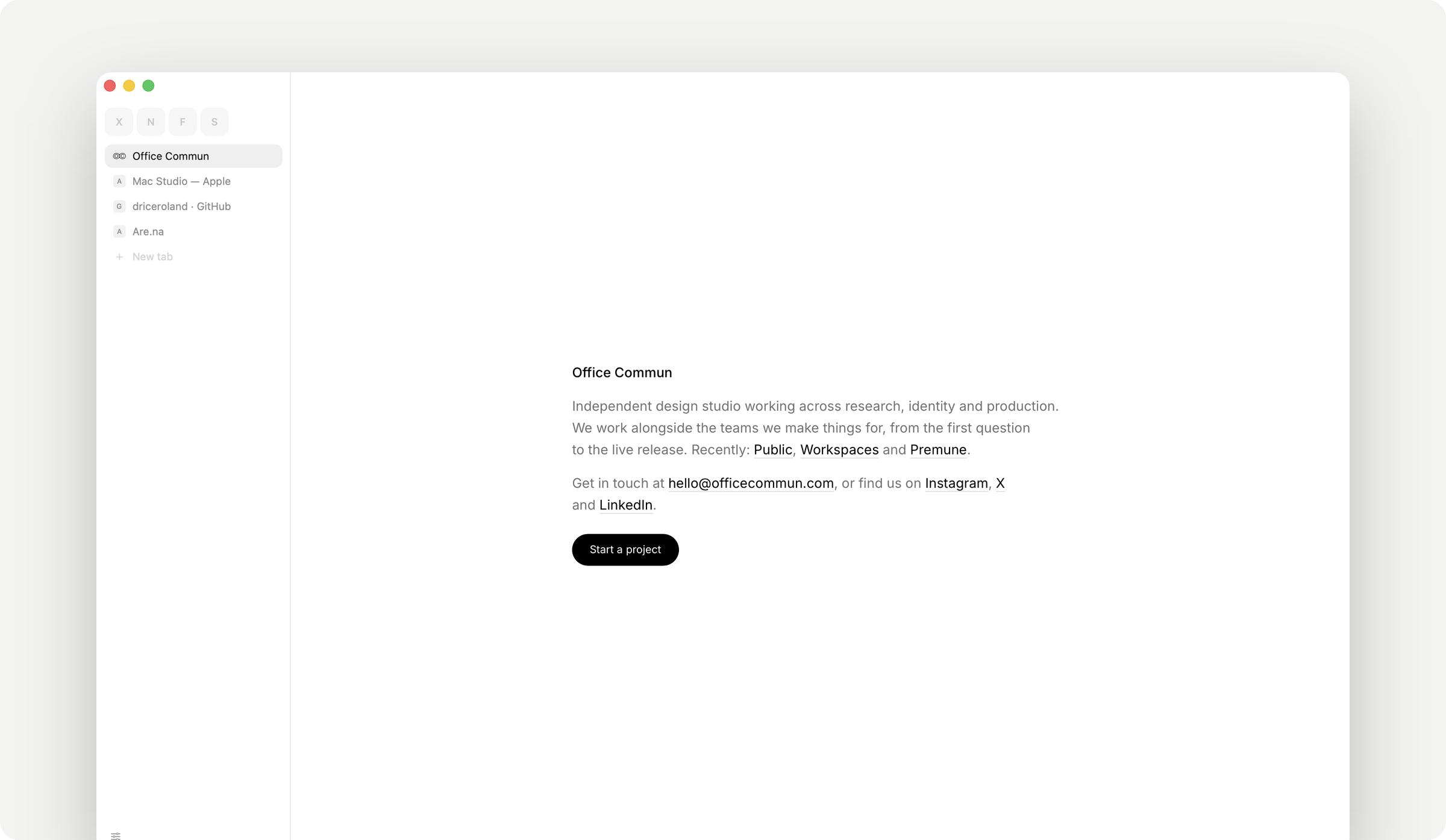
面向 macOS 的轻量浏览器,由 Office Commun 开发,用 Swift 写成,直接采用系统自带的 WebKit 引擎,因此整个应用体积只有约 10 MB 左右。界面被压到最低限度:标签栏可以放在左侧,也可以横向排在顶部,除此之外只有网页本身——没有工具栏、没有起始页、没有推荐侧栏,也没有账号登录。地址栏兼作搜索框,输入网址或几个关键词就直接进入页面。要求 macOS 14 或更高版本,免费,除官网直接下载外,也能用 Homebrew cask 从 driceroland/tap 安装。许可为 MIT。适合那些嫌主流浏览器越做越重、只想安静打开几个页面的 Mac 用户,或者想在旧机器上留一个占用极小的备用浏览器的人。
📄 仓库 README
在 GitHub 查看 ↗Search
A small, fast, quiet web browser for the Mac, by Office Commun.
Download for macOS → · macOS 14 or later · free · about 10 MB
Or with Homebrew: brew install --cask driceroland/tap/search
What it is
Search is a browser with nothing in the way. A row of tabs — down the left, or across the top if you prefer — and the page. There is no toolbar, no start page, no sidebar of suggestions, no account to sign into, nothing that wants your attention. You type an address or a few words in one field and you are on the page.
It uses WebKit, the engine already inside every Mac (it is what Safari runs on). That is why the whole app is about 10 MB on disk and opens instantly: there is no second copy of Chromium to download, update and keep in memory.
It was built by a design studio that spends its whole day in a browser and was tired of the ones that had become products. This one is a tool.
What it does
- One field. Type an address and you go there; type words and you search. It finishes addresses from your own history and never sends what you type anywhere until you press Return.
- Tabs that stay out of the way. Pin the pages you keep open all day and they shrink to a letter or their icon. Tabs from your last session come back instantly and cost nothing until you click them.
⌘Klists your open tabs by name. - Keep an important site running. Enable Keep selected sites awake in Settings › Tabs, then choose Keep This Site Awake in the site card. It prevents sleeping and automatic closure, even under memory pressure, at the cost of more memory. Private choices last only in that tab; manual closing still works.
- Two pages side by side. Turn on Split View in Settings › Tabs, then drag a tab onto a page or choose Tabs › Split Current Page. Drag the divider to resize the panes; the outlined pane receives page commands. Pairs and their widths come back with their Space, including after a restart.
- Reading mode.
⇧⌘Rstrips a page down to the article. - Hide anything, for good.
⇧⌘H, then click a cookie banner, a newsletter overlay, a rail of "related" nonsense — it goes, and it is still gone on that site next time, before the page has drawn a single frame. - An ad blocker that runs before the page. Third-party trackers and ad networks are stopped at the network level, so there is nothing to render and nothing to slow down. On by default, off per site if something breaks.
- Video that follows you.
⇧⌘Plifts the video out of the page into a small window that stays above everything, including other apps. - Passwords, in your keychain. Search offers to save a sign-in once it has actually worked, and offers your saved accounts, and the Mac's passkeys for the site, under the field when you click it — the way Safari does, never filling anything on its own. Everything lives in the macOS keychain, encrypted by the system, readable only by Search. Bring yours in from Chrome, Arc, Dia, Brave or Edge in one click; nothing leaves the Mac. Keep them in Apple's Passwords app instead? Turn it on in Settings › Passwords and its accounts and verification codes come up under their box too.
- Light, dark, or the Mac's own. The frame and the pages follow.
- Bookmarks, history, downloads — each a panel, each searchable, each one keystroke away.
- Chrome extensions, without Chrome. Paste a Chrome Web Store link in Settings › Extensions, or open the extension's page in Search and press Add. It runs on WebKit's own extension engine — the one Safari uses — and where Chrome has APIs WebKit doesn't (bookmarks, history, downloads, side panel, offscreen documents, fonts, notifications, speech, OAuth sign-in), Search fills them in itself. They live behind the puzzle button; pin the ones you use often. Building your own? Load its folder as an unpacked extension and press Reload after each change, as in Chrome's developer mode. macOS 15.4 or later.
- Updates itself, quietly. Once a day it checks for a newer build, downloads it, verifies it is signed by Office Commun, and swaps it in for the next launch. Nothing restarts on its own.
What it doesn't do
On purpose:
- No extension you have to install to feel at home. Blocking ads, hiding clutter, reading mode, picture-in-picture and passwords are built in; extensions are there for everything else.
- No sync, no account, no cloud. Your tabs, history and passwords are on your Mac and nowhere else.
- No telemetry, no analytics, no crash reports sent anywhere. The only things that leave your Mac are the pages you ask for, their icons, and one small request a day to see whether there is a newer version.
- One window. Tabs are the only kind of "new" there is.
Privacy, concretely
| What | Where it is | Who can read it |
|---|---|---|
| Passwords | The macOS login keychain, as ordinary keychain items tagged Search |
Search, signed by Office Commun. Any other app triggers the system's permission dialog. |
| History, bookmarks, open tabs, hidden elements | Small JSON files in ~/Library/Application Support/Search/ |
You. |
| Cookies and site data | WebKit's own store for the app | The sites that set them, as in any browser. |
| Extensions | Unpacked in ~/Library/Application Support/Search/Extensions/, their data in WebKit's extension store |
Each extension, within the permissions you accepted when adding it. |
| Anything else | Nowhere. There is no server. | — |
A private tab (⇧⌘N) has its own cookie jar and leaves nothing behind when it closes.
Apps you allow in System Settings › Privacy & Security › Automation can read the address and title of your tabs with AppleScript, and the name of the space and profile each window is in; private tabs are never shown, and a window with one in front shows neither name.
Keyboard
⌘L address · ⌘K switch tab · ⌘T new tab · ⌘W close · ⇧⌘T reopen |
⌘[ ⌘] back, forward · ⇧⌘[ ⇧⌘] previous, next tab · ⌘1–⌘9 jump |
⇧⌘S tabs down the left or across the top · ⌘S fold the sidebar away · ⇧⌘B bookmark this page |
⇧⌘R reading mode · ⇧⌘P float the video · ⇧⌘H hide something · ⇧⌘U what is hidden here |
⌘F find · ⌘D duplicate tab · ⇧⌘C copy address · ⇧⌘V paste and go |
⌘Y history · ⇧⌘J downloads · ⌘, settings · ⌥⌘L passwords |
Space keys (Control+1–9 by default) and the modifier used to peek at a link can be changed in Settings › Shortcuts while those features are enabled.
⌘R reloads the page; ⌥⌘R reloads it from origin, checking everything cached with the site again, as Safari's Reload Page From Origin, which is also in a right-click on the reload button.
⌃Tab and ⌃⇧Tab walk along the row of tabs; Tab stays the page's, for moving through a form. esc puts away whatever is open.
With Split View on, ⌥⌘N splits the current page and ⌃⌘← / ⌃⌘→ go from one page to the other. ⌘W closes the focused tab and gives the remaining page the whole area. Tabs › Separate Split Tabs keeps both tabs open separately.
For developers
Why the source is here
So anyone can read exactly what a browser handling their passwords and history is doing, build it themselves, or fix something that bothers them. The code is small enough to actually read — about 42,000 lines of Swift, no dependencies beyond what Apple ships with macOS, one file per concern.
Building it
- macOS 14 or later, Xcode 16 / Swift 6 toolchain
swift build— runs the app straight from the SwiftPM binary./build.sh— assembles a real, double-clickableSearch.appinbuild/, ad-hoc signed so it runs on your own Mac.SEARCH_DEV=1 ./build.shmakes it a dev build, on a yellow icon and named for its branch (Search-split-viewfromclaude/split-view-4a6927), so it's never mistaken for an installed Search or for another worktree's build;SEARCH_FEATURE=namepicks the name. It shares the installed app's settings and its bundle id, so while both run, a link from another app may land in either
A build you make yourself won't be notarized or carry Office Commun's Developer ID, so the first launch needs a right-click → Open (or an allow in System Settings → Privacy & Security). That's expected — it's the same thing that happens with any app that isn't from the App Store or a notarized DMG. Your own build also keeps its passwords apart from a signed Search's: the keychain tells the two apart by their signatures.
./build.sh release dmg also makes Search.dmg / Search.zip. ./build.sh release ship additionally notarizes and staples — that step needs a Developer ID certificate and Apple credentials, so it only really does anything for Office Commun's own releases.
How it's put together
- SwiftUI for everything drawn, AppKit for the handful of things SwiftUI doesn't reach on macOS (the window's title bar, dragging the window by an empty part of the tab row), WKWebView for pages.
- One
Tabper page. Its web view is built lazily — a tab restored from last session doesn't cost a process until you switch to it. That's most of why launching with twenty tabs is still instant. Each page runs in WebKit's own content process, as in Safari; a tab you close is really gone. - The ad blocker is a
WKContentRuleListcompiled once at launch and enforced inside WebKit's networking, before a request is made — zero cost at run time, unlike a JavaScript blocker. - Hidden elements are a per-site list of selectors injected as a stylesheet at document start, so nothing is ever seen appearing and vanishing.
- Every colour is a light/dark pair in
Design.swift, resolved by the window's appearance; nothing else in the code knows which mode it is in. - Extensions run on
WKWebExtension(macOS 15.4+).Crx.swiftfetches an extension from the Chrome Web Store's public update address and checks the CRX3 signature against the extension's id before anything is unpacked.Extensions.swiftis the browser's side of WebKit's contract — tabs, the window, permissions, popups.ExtensionShims.swiftadds, at install, a small script to the extension's worker, pages and content scripts: it defines the Chrome APIs WebKit lacks —userScripts,privacy,browsingData,sessions, the old FileSystem API and more — as calls answered natively by Search, and mends the places where WebKit behaves differently from Chrome: replies from pages that don't answer, listeners added after a worker starts, workers WebKit loses track of, members and constants it leaves out. Extension pages are served fromchrome-extension://<id>/, the address they have in Chrome, so servers and sites recognise them../bench ext-*drives all of it from the shell against a test run.ExtensionNative.swiftspeaks Chrome's native messaging to hosts registered in Chrome'sNativeMessagingHostsfolders. Sources/Search/is one file per concern:Vault.swiftis the keychain,Shield.swiftthe ad blocker,Curtain.swiftthe hidden elements,Session.swiftwhat comes back at launch,Updater.swiftthe update,Bench.swiftthe test socket, and so on. There's no framework of its own to learn first.
Testing it without closing it
Turn on Settings › General › Let a script drive Search and the running app listens on a Unix socket in its own folder (readable by your user only). ./bench at the root of the repository speaks it:
./bench open https://example.com     # a tab of its own, at the end of your row, marked with a flask
./bench wait 2e7e7e89                 # until it has loaded
./bench text 2e7e7e89                 # the page's text
./bench shot 2e7e7e89 out.png         # a picture of it
./bench click 2e7e7e89 "button.go"    # click, type, submit — through the page's own events
./bench probe                         # the window's state: open panels, a modal, every window
./bench close all
Bench tabs are never selected for you, never enter the session or the history, and go when the script says so. It is how this browser is tested while somebody is using it.
A coding agent can drive it through ./bench-mcp, an MCP server over the same socket: claude mcp add search-bench -- "$PWD/bench-mcp" (or codex mcp add …). Each session starts this checkout's build/Search.app hidden, in a test world of its own, and wipes that world when it closes; the browser you use is never in reach. Its tools read a page as roles and names, click with real mouse events, type and check what the field holds, and wait on a condition, and a handle that has gone stale or a button that is covered is an error, never a guess. python3 Tests/bench_mcp.py checks it end to end.
To let an agent use the Search you have open instead, turn on Settings › About › Developer › Let coding agents use Search, and give it ./search-mcp: claude mcp add search -- "$PWD/search-mcp". Search asks you in the window each time one connects, shows a pill with Stop while it is there, and keeps it to tabs of its own; the rules are in Sources/Search/AgentControl.swift, and python3 Tests/agent_control.py checks them in a hidden probe.
python3 Tests/split_view.py, after ./build.sh, checks Split View through the app's own model in a hidden test run with its own settings and files, all removed afterwards. It never makes or shows a window; what can only be seen (dragging onto a page's edge, the divider under the pointer, the motion) is checked by hand on a release candidate.
Contributing
Issues and pull requests are genuinely welcome — see CONTRIBUTING.md for how this is reviewed and what tends to get merged. The short version: small changes, no new dependencies, nothing that phones home. Found a security problem? Please report it privately, as SECURITY.md says.
License
MIT — see LICENSE. Do what you want with the code. "Search" and the app icon are Office Commun's; please rename a fork before distributing it under another name.
📈 近 7 天 Star 趋势
🏆 排名变化趋势
📋 历史上榜记录
| 日期 | 榜单 | 排名 | 周期新增 | 总 STAR |
|---|