Windows 桌面播放器,打开视频后画面立刻出来,可读字幕稍后追上,主打边看边生成的双语字幕;没有字幕文件也能先看,是它想解决的核心流程,作者把不用再四处找字幕站当作卖点。字幕由内置语音识别实时产出,界面会显示进度,让人知道它在工作而不是卡住;译文、原文、双语三种显示模式可切换。适合看外语片、剧集和动画时手头没有字幕文件的场合。文档有英、简中、日、韩四种语言。当前版本 v1.8.0,安装包和免安装压缩包都提供,可从 GitHub 或 GitCode 获取,应用内也留了检查更新入口。C# 编写,仓库未声明开源许可。
📄 仓库 README
在 GitHub 查看 ↗# Transub Player









Open a video. Subtitles follow.
Foreign films, dramas, anime — watch first, even without a subtitle file.
Open a video and the picture appears right away; readable subtitles catch up soon after. No more hunting subtitle sites just to keep watching.
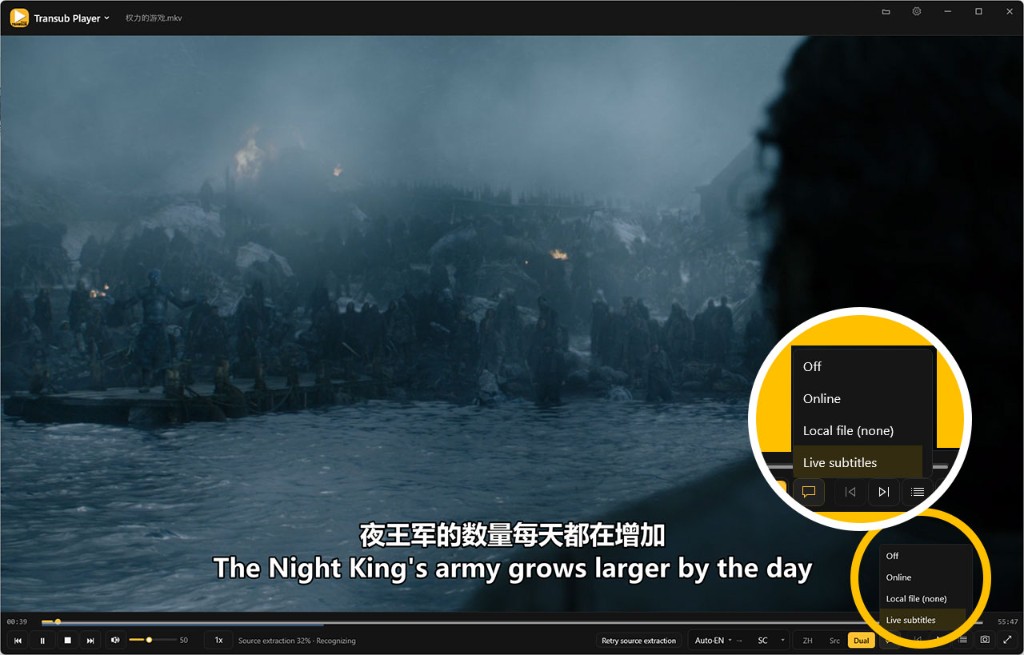
Windows desktop player · v1.8.0
Download the installer or portable zip from GitHub or GitCode. You can also use Check for updates inside the app.
Why Transub Player
Live subtitles while you watch
Subtitles are generated on the fly with built-in speech recognition. Progress stays visible — you can tell it’s working, not hanging.
Translation · Source · Dual — one click
Casual viewing? Switch to translation. Learning? Switch to dual. If translation isn’t ready yet, source subtitles still play — watching never stops.
Chinese / Japanese / Korean / English / Spanish
Change source and target languages while playing; Spanish UI is available too. The file name can help guess the source language. Defaults aim for “understand quickly,” with room to upgrade later.
More languages are planned.
Streams play — and record
Open common network stream URLs directly. Want to rewatch later? Record to local storage in one step.
Scan to play on your phone
Control-bar Wi‑Fi entry plus shared folders; pick files in the phone browser. Live subtitles still come from desktop Whisper / translation — switch translation / source / dual / off on the page. Minimize to tray so LAN and recognition keep running.
Color grade & LUT
Right-click → Color grade: tweak brightness / contrast / saturation and more with live preview, or save named presets. Built-in 3D LUT looks, browse custom .cube / .3dl, or auto-apply a same-stem LUT next to the video.
Picture enhance
Right-click → Picture enhance, or press E to cycle Off / Light / Enhance (sharpen, deband, high-quality scale). Default off; turn down if playback stutters.
Seek thumbnail preview
Hover the progress bar to preview a frame at that time — easier scrubbing.
Deep match with Transub
Generate high-quality subtitles with the Transub subtitle tool; when they’re ready, the player can prompt you to play them.
Who it’s for
- You want to understand foreign media now — without hunting subtitle sites
- You don’t have ready-made subtitles, and don’t want a heavy workflow just to watch one episode
- You care more about “can I keep watching?” than “is this release-ready subtitle?”
For publish-ready Chinese subtitles, full cleanup, and QC, use the companion product Transub.
Download & start
- Get a release from GitHub Releases or GitCode Releases (or use Check for updates in the app):
- Installer (recommended):
TransubPlayer-*-win-x64-setup.exe— next, next, done - Portable:TransubPlayer-*-win-x64.zip— unzip and runTransubPlayer.exe - If SmartScreen says Windows protected your PC, choose More info → Run anyway
- Finish the first-run setup wizard (you can associate common video formats)
- Open or drop a video; if recognition / translation models aren’t installed yet, follow the prompts — then live subtitles start
If a subtitle file already sits next to the video, it loads first; you can switch back to live subtitles anytime.
Installed builds store settings and models under%LocalAppData%\Transub Player\data\; portable builds usedata\next to the exe.
Three steps
- Open or drop a local video (or open a stream URL)
- Wait for subtitles, then watch along
- Switch as needed: translation / source / dual (
1/2/3)
Shortcuts
| Action | Keys |
|---|---|
| Open | Ctrl+O |
| Play / Pause | Space · click video |
| Seek back / forward | ← / → |
| Translation / Source / Dual | 1 / 2 / 3 |
| Delay / advance subtitles | Z / X |
| Show / hide subtitles | V |
| Picture enhance (Off / Light / Enhance) | E |
| Playlist | L |
| Next / Previous | N / P |
| Fullscreen | F · F11 · Enter · double-click |
| Screenshot | S |
| Mute | M |
| Exit fullscreen | Esc |
More options live in the context menu and Settings (UI language, file associations, subtitle look, model install, and more).
How it works
| Layer | Tech |
|---|---|
| Shell / UI | WPF |
| Video | mpv |
| Speech recognition | Built-in Whisper (whisper.cpp / GGML turbo, download on demand) |
| Translation | llama-server + Hy-MT GGUF (on demand) |
Main path: open a local video → readable subtitles ASAP → translation can fall back → quit clean.
Build from source
Requires Windows + .NET SDK. First run needs network access to fetch mpv and models.
powershell -ExecutionPolicy Bypass -File tools\fetch-mpv.ps1
dotnet run --project src\TransubPlayer\TransubPlayer.csproj
Pack a release (Player + mpv + embedded Whisper; model weights not included). Output goes to artifacts\pack\ (setup + portable zip; Inno Setup 6 is required to build the setup):
powershell -ExecutionPolicy Bypass -File tools\pack-release.ps1
# Portable or setup only:
# powershell -ExecutionPolicy Bypass -File tools\pack-release.ps1 -Target Portable
# powershell -ExecutionPolicy Bypass -File tools\pack-release.ps1 -Target Setup
First recognition: Settings → Models → download whisper turbo.
System requirements
- Windows 10 / 11 (64-bit)
- Internet required the first time to download recognition / translation models (offline playback afterward for prepared content)
- Optional GPU acceleration (auto or manual; with multiple GPUs, pick the recognition GPU under Settings → Advanced); works without a discrete GPU
Tips
- Subtitles appear slightly behind the picture — normal for live generation; if they lag far behind, recognition can restart from the playhead (or use Restart from here)
- Goal is “understandable and followable,” not release-grade subtitles
- Without a translation model, source subtitles still work
- On quit, processes started by the player exit together — nothing left running in the background
Changelog
See CHANGELOG.md (English) · CHANGELOG.zh-CN.md · CHANGELOG.ja.md · CHANGELOG.ko.md
In one line
Open it. Watch it. Subtitles catch up.
📈 近 7 天 Star 趋势
🏆 排名变化趋势
📋 历史上榜记录
| 日期 | 榜单 | 排名 | 周期新增 | 总 STAR |
|---|