📄 仓库 README
在 GitHub 查看 ↗
K9s - Kubernetes CLI To Manage Your Clusters In Style!
K9s provides a terminal UI to interact with your Kubernetes clusters. The aim of this project is to make it easier to navigate, observe and manage your applications in the wild. K9s continually watches Kubernetes for changes and offers subsequent commands to interact with your observed resources.
Note...
K9s is not pimped out by a big corporation with deep pockets. It is a complex OSS project that demands a lot of my time to maintain and support. K9s will always remain OSS and therefore free! That said, if you feel k9s makes your day to day Kubernetes journey a tad brighter, saves you time and makes you more productive, please consider sponsoring us! Your donations will go a long way in keeping our servers lights on and beers in our fridge!
Thank you!





Screenshots
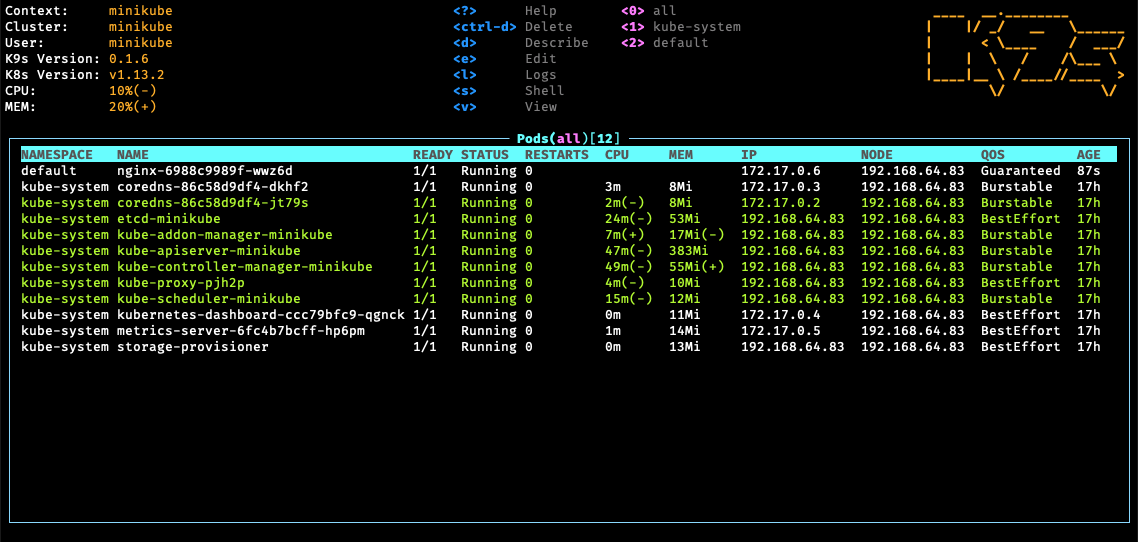
- Pods
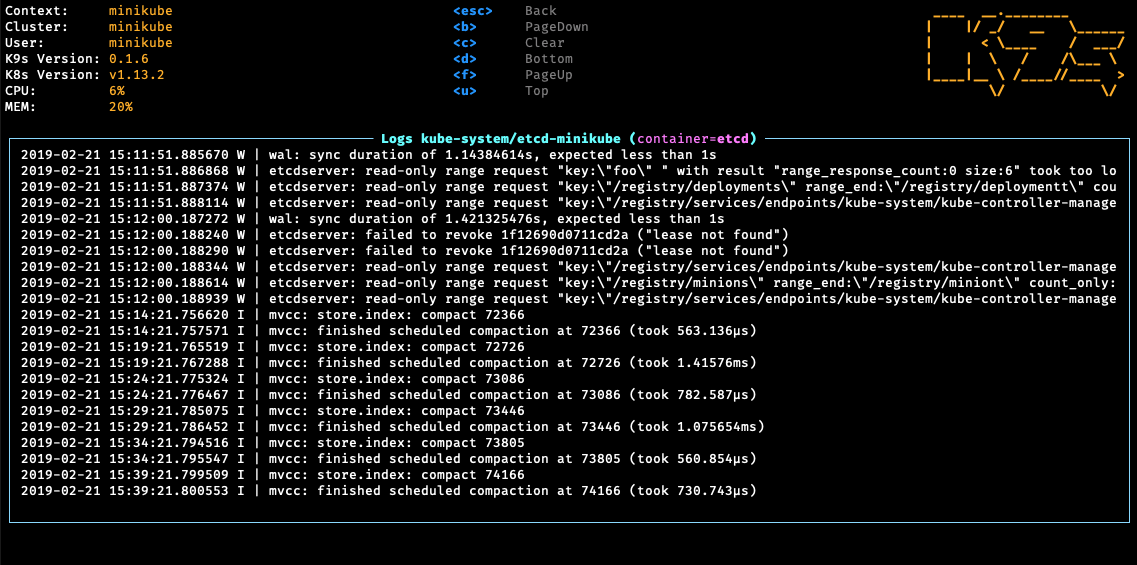
- Logs
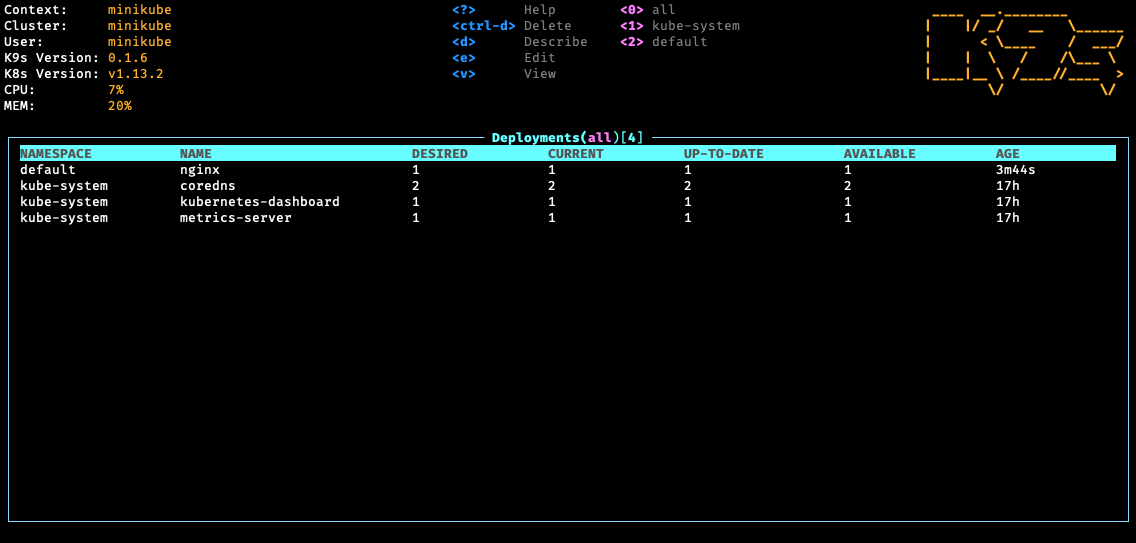
- Deployments
Demo Videos/Recordings
- K9s v0.40.0 -Column Blow- Sneak peek
- K9s v0.31.0 Configs+Sneak peek
- K9s v0.30.0 Sneak peek
- Vulnerability Scans
- K9s v0.29.0
- K9s v0.21.3
- K9s v0.19.X
- K9s v0.18.0
- K9s v0.17.0
- K9s Pulses
- K9s v0.15.1
- K9s v0.13.0
- K9s v0.9.0
- K9s v0.7.0 Features
- K9s v0 Demo
Documentation
Please refer to our K9s documentation site for installation, usage, customization and tips.
Slack Channel
Wanna discuss K9s features with your fellow K9sers or simply show your support for this tool?
- Channel: K9sersSlack
- Invite: K9slackers Invite
Installation
K9s is available on Linux, macOS and Windows platforms. Binaries for Linux, Windows and Mac are available as tarballs in the release page.
- Via Homebrew for macOS or Linux
shell
   brew install derailed/k9s/k9s
- Via MacPorts
shell
   sudo port install k9s
- Via snap for Linux
shell
  snap install k9s --devmode
- On Arch Linux
shell
  pacman -S k9s
- On OpenSUSE Linux distribution
shell
  zypper install k9s
- On FreeBSD
shell
  pkg install k9s
- On Ubuntu
shell
  wget https://github.com/derailed/k9s/releases/latest/download/k9s_linux_amd64.deb && sudo apt install ./k9s_linux_amd64.deb && rm k9s_linux_amd64.deb
- On Fedora (42+)
shell
  dnf install k9s
- Via Winget for Windows
shell
  winget install k9s
- Via Scoop for Windows
shell
  scoop install k9s
- Via Chocolatey for Windows
shell
  choco install k9s
- Via a GO install
shell
  # NOTE: The dev version will be in effect!
  go install github.com/derailed/k9s@latest
- Via Webi for Linux and macOS
shell
  curl -sS https://webinstall.dev/k9s | bash
- Via pkgx for Linux and macOS
shell
  pkgx k9s
- Via gah for Linux and macOS
shell
  gah install k9s
- Via Webi for Windows
shell
  curl.exe -A MS https://webinstall.dev/k9s | powershell
- As a Docker Desktop Extension (for the Docker Desktop built in Kubernetes Server)
shell
  docker extension install spurin/k9s-dd-extension:latest
Building From Source
K9s is currently using GO v1.23.X or above. In order to build K9s from source you must:
- Clone the repo
-
Build and run the executable
shell
  make build && ./execs/k9s
Running with Docker
Running the official Docker image
You can run k9s as a Docker container by mounting your KUBECONFIG:
shell
  docker run --rm -it -v $KUBECONFIG:/root/.kube/config derailed/k9s
For default path it would be:
shell
  docker run --rm -it -v ~/.kube/config:/root/.kube/config derailed/k9s
Building your own Docker image
You can build your own Docker image of k9s from the Dockerfile with the following:
shell
  docker build -t k9s-docker:v0.0.1 .
You can get the latest stable kubectl version and pass it to the docker build command with the --build-arg option.
You can use the --build-arg option to pass any valid kubectl version (like v1.18.0 or v1.19.1).
shell
  KUBECTL_VERSION=$(make kubectl-stable-version 2>/dev/null)
  docker build --build-arg KUBECTL_VERSION=${KUBECTL_VERSION} -t k9s-docker:0.1 .
Run your container:
shell
  docker run --rm -it -v ~/.kube/config:/root/.kube/config k9s-docker:0.1
Building a multi-platform image
The make imgx target builds for linux/amd64 and linux/arm64 via Docker
buildx:
shell
  make imgx
Cross-architecture builds rely on QEMU emulation. Docker Desktop includes this out of the box. On a plain Docker Engine install, see the buildx multi-platform docs for enabling emulation.
Override the defaults with BUILD_PLATFORMS, IMG_NAME and VERSION:
shell
  make imgx BUILD_PLATFORMS=linux/amd64,linux/arm64 IMG_NAME=your-org/k9s VERSION=v0.0.1
PreFlight Checks
-
K9s uses 256 colors terminal mode. On `Nix system make sure TERM is set accordingly.
shell export TERM=xterm-256color -
In order to issue resource edit commands make sure your EDITOR and KUBE_EDITOR env vars are set.
```shell
Kubectl edit command will use this env var.
export KUBE_EDITOR=my_fav_editor ```
-
K9s prefers recent kubernetes versions ie 1.28+
K8S Compatibility Matrix
| k9s | k8s client |
|---|---|
| >= v0.27.0 | 1.26.1 |
| v0.26.7 - v0.26.6 | 1.25.3 |
| v0.26.5 - v0.26.4 | 1.25.1 |
| v0.26.3 - v0.26.1 | 1.24.3 |
| v0.26.0 - v0.25.19 | 1.24.2 |
| v0.25.18 - v0.25.3 | 1.22.3 |
| v0.25.2 - v0.25.0 | 1.22.0 |
| <= v0.24 | 1.21.3 |
The Command Line
# List current version
k9s version

# To get info about K9s runtime (logs, configs, etc..)
k9s info

# List all available CLI options
k9s help

# To run K9s in a given namespace
k9s -n mycoolns

# Start K9s in an existing KubeConfig context
k9s --context coolCtx

# Start K9s in readonly mode - with all cluster modification commands disabled
k9s --readonly
Logs And Debug Logs
Given the nature of the ui k9s does produce logs to a specific location. To view the logs and turn on debug mode, use the following commands:
# Find out where the logs are stored
k9s info
 ____  __.________
|    |/ _/   __   \______
|      < \____    /  ___/
|    |  \   /    /\___ \
|____|__ \ /____//____  >
        \/            \/

Version:           vX.Y.Z
Config:            /Users/fernand/.config/k9s/config.yaml
Logs:              /Users/fernand/.local/state/k9s/k9s.log
Dumps dir:         /Users/fernand/.local/state/k9s/screen-dumps
Benchmarks dir:    /Users/fernand/.local/state/k9s/benchmarks
Skins dir:         /Users/fernand/.local/share/k9s/skins
Contexts dir:      /Users/fernand/.local/share/k9s/clusters
Custom views file: /Users/fernand/.local/share/k9s/views.yaml
Plugins file:      /Users/fernand/.local/share/k9s/plugins.yaml
Hotkeys file:      /Users/fernand/.local/share/k9s/hotkeys.yaml
Alias file:        /Users/fernand/.local/share/k9s/aliases.yaml
View K9s logs
tail -f /Users/fernand/.local/data/k9s/k9s.log
Start K9s in debug mode
k9s -l debug
Customize logs destination
You can override the default log file destination either with the --logFile argument:
k9s --logFile /tmp/k9s.log
less /tmp/k9s.log
Or through the K9S_LOGS_DIR environment variable:
K9S_LOGS_DIR=/var/log k9s
less /var/log/k9s.log
Key Bindings
K9s uses aliases to navigate most K8s resources.
| Action | Command | Comment |
|---|---|---|
| Show active keyboard mnemonics and help | ? |
|
| Show all available resource alias | ctrl-a |
|
| To bail out of K9s | :quit, :q, `ctrl- |
📈 近 7 天 Star 趋势
🏆 排名变化趋势
📋 历史上榜记录
| 日期 | 榜单 | 排名 | 周期新增 | 总 STAR |
|---|