📄 仓库 README
在 GitHub 查看 ↗
Dagu
Dagu is a local-first workflow engine for operations and internal automation. It is open source and self-hostable: a single binary with a built-in Web UI, no external database or message broker, running on Linux, macOS, and Windows. Define DAGs in a declarative YAML format. It natively supports shell commands, Docker containers, Kubernetes Jobs, remote commands via SSH, and more through Dagu Actions.
Dagu turns existing scripts and runbooks into production workflows with scheduling, retries, human tasks, and run history. It runs where your data and credentials live: on-prem, air-gapped, edge, or cloud, and scales from a single node to a fleet of workers.
Highlights:
- Single binary installation.
- Self-contained: no external DBMS or message broker required.
- Runs on Linux, macOS, and Windows.
- Declarative YAML format for defining DAGs.
- Run existing shell commands, Docker containers, Kubernetes Jobs, and remote commands over SSH without modifications.
- Compose reusable Sub-DAGs and run work in parallel with concurrency controls.
- Schedule workflows with cron syntax, timezones, overlap policies, and catch-up windows.
- Keep logs, run history, retries, notifications, and webhook triggers in one place.
- Built-in MCP server for inspecting workflows and runs, maintaining Wiki pages, applying changes, and controlling runs.
- Optional monitoring in Dagu Console: every server's runs and trends in one place, and an email when a workflow fails or a server stops reporting. Opt-in, outbound HTTPS only, metadata only.
Quick Look
For a quick look at how workflows are defined, see the examples.
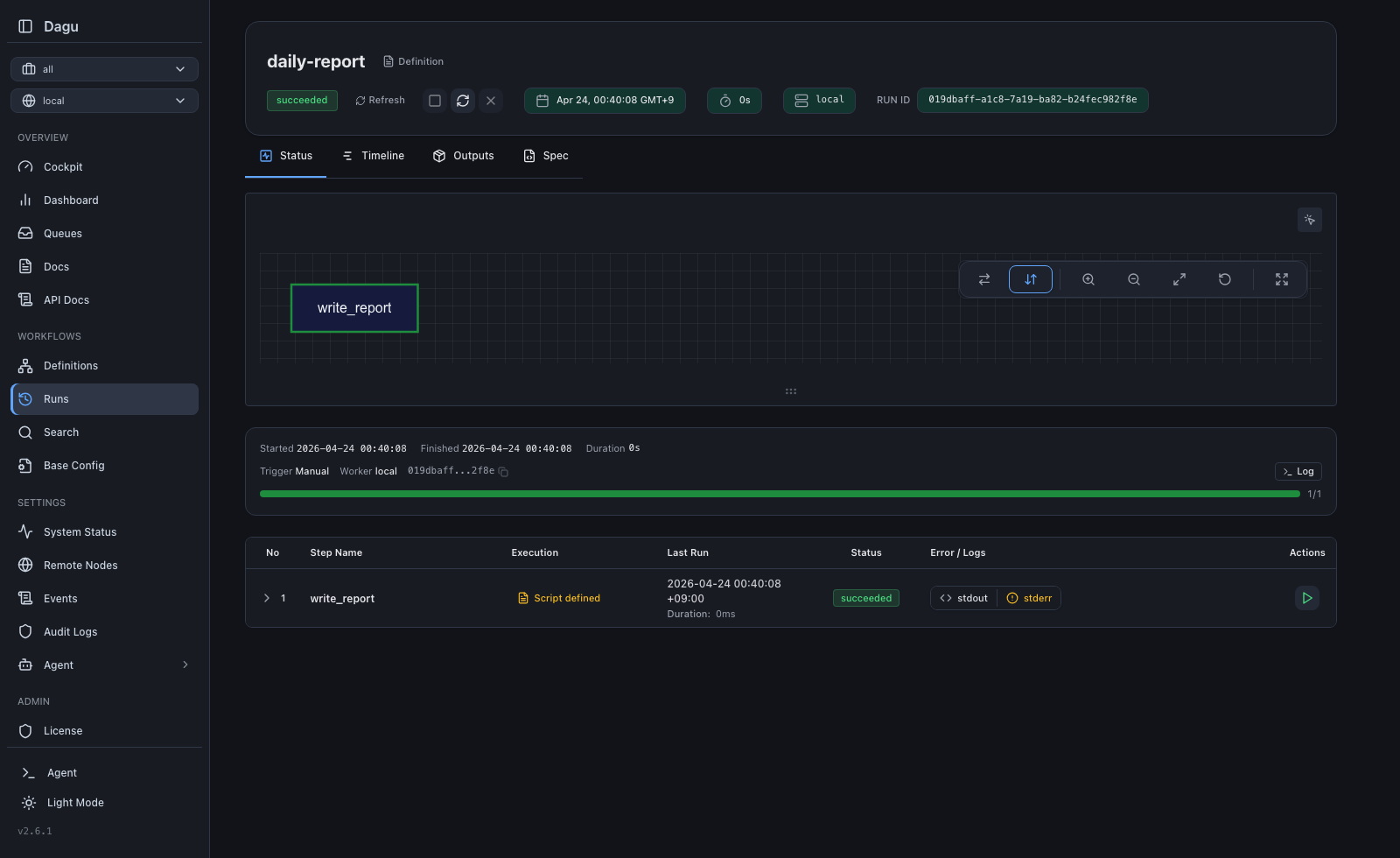
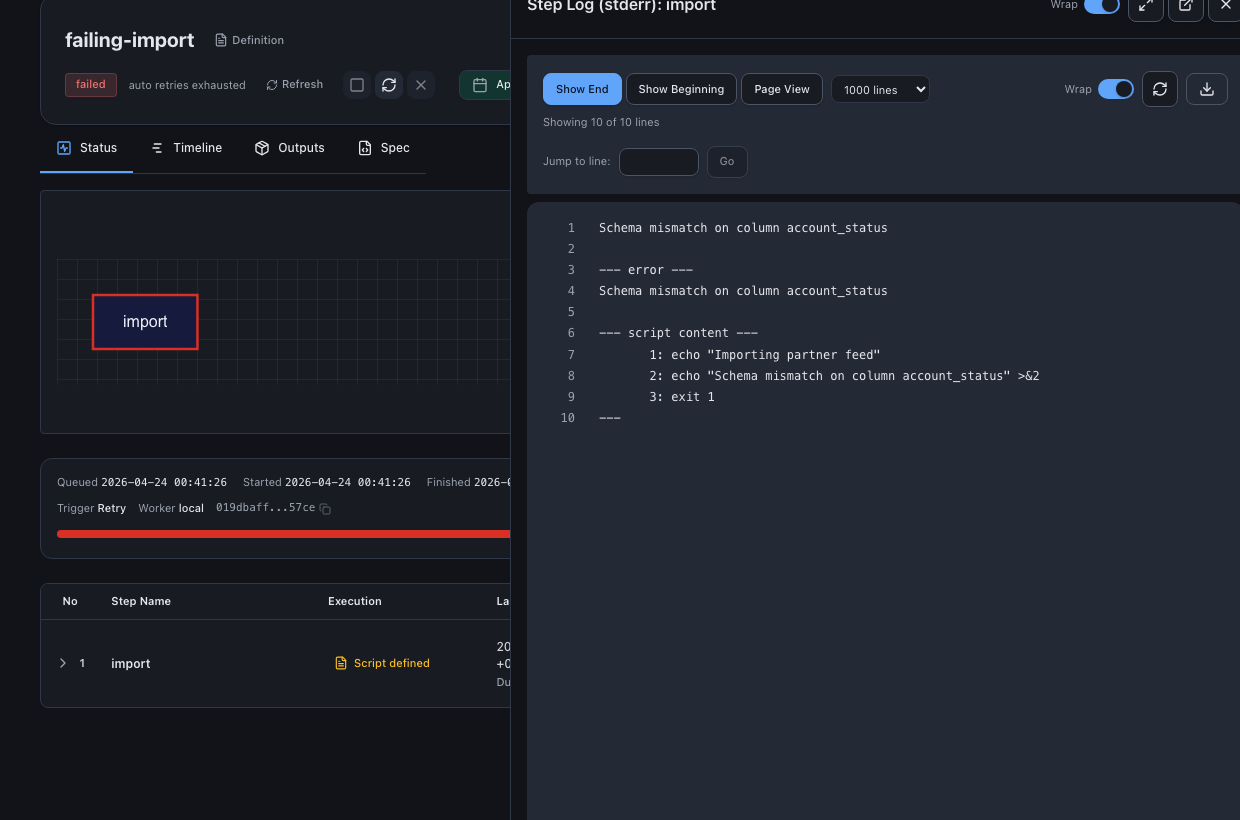
| Run Details | Step Logs | Wiki |
|---|---|---|
 |
 |
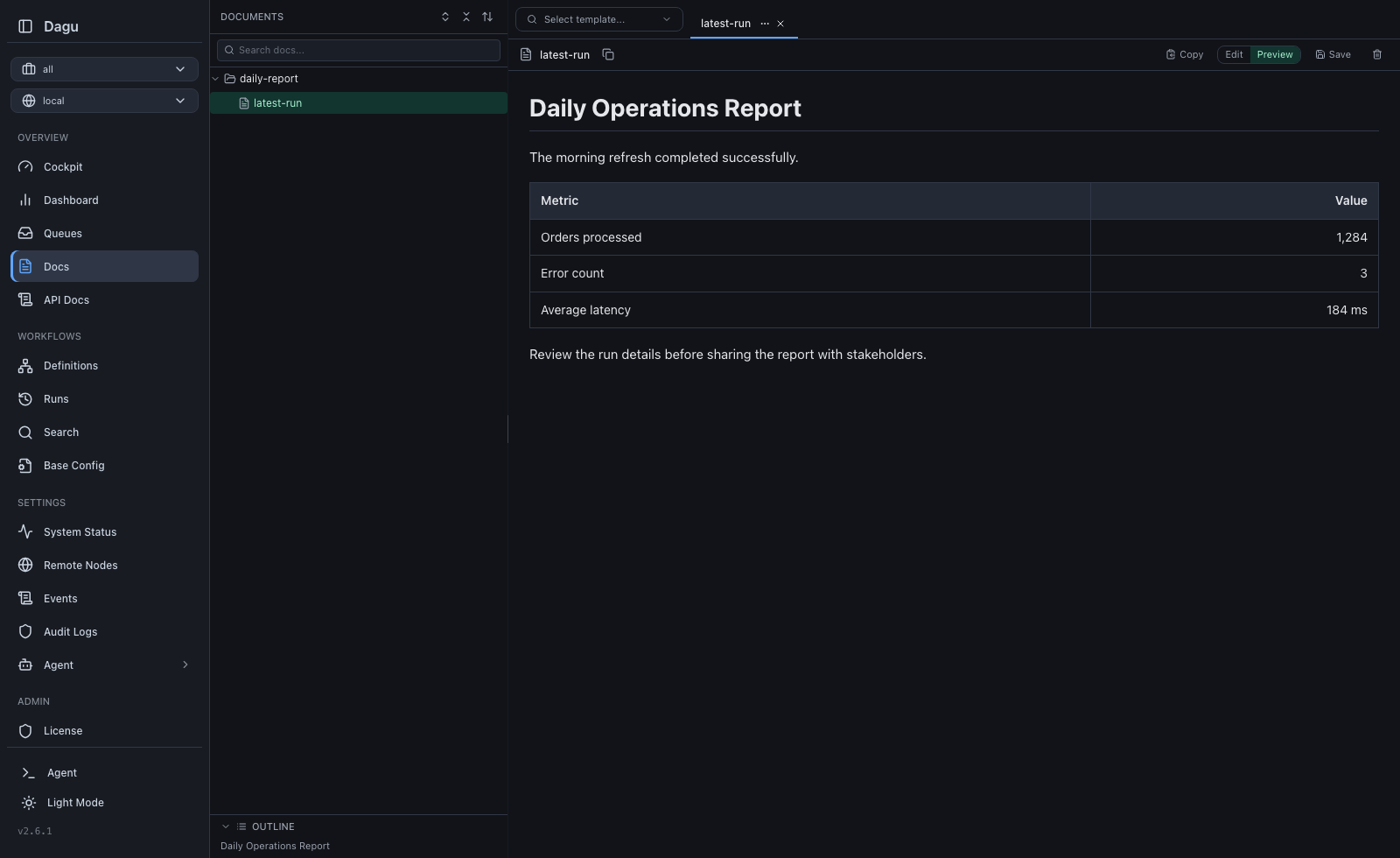 |
Try it live: Live Demo (credentials: demouser / demouser)
Why Dagu?
Orchestration is not your main work. You have scripts and containers that already work. You want a schedule, retries, dependencies, and a place to see logs. The usual options each have a cost:
- cron runs commands, but gives you no dependencies, no retries, no history.
- Airflow orchestrates, but you operate a platform for it (scheduler, metadata database, workers, a Python environment), and your jobs get rewritten as
@dag/@taskframework code. - Temporal gives durable execution, but your business logic moves into its SDK and programming model.
You wanted to schedule some jobs. Now you operate a second system, and the orchestrator lives inside the code it was supposed to serve.
Dagu treats workflow structure as configuration, not code. Order, dependencies, retries, schedules, and human tasks go in one YAML file next to your scripts; the engine that runs them is a single process:
  Traditional Orchestrator          Dagu
  ┌────────────────────────┐        ┌──────────────────┐
  │  Web Server            │        │                  │
  │  Scheduler             │        │  dagu start-all  │
  │  Worker(s)             │        │                  │
  │  PostgreSQL            │        └──────────────────┘
  │  Redis / RabbitMQ      │         Single binary.
  │  Python Runtime        │         Self-hosted.
  └────────────────────────┘         Adds scheduling, retries, and human tasks around existing automation.
    6+ services to manage
Your scripts never import the orchestrator. Delete the YAML and they run exactly as before. Keep it, and every run gets a dependency graph, retries, per-step logs, history, and a Web UI.
Performance
Dagu stores state in local files and reaches production throughput without external services.
- Throughput: A single machine can run thousands of workflow runs per day. Actual capacity depends on CPU, memory, disk, and workflow shape.
- Load control: Queues, concurrency limits, and resource limits control how many runs execute at once and where they run.
- Scale out: Workers spread execution across machines when one node is not enough.
Real-World Use Cases
| Use Case | How Dagu Helps |
|---|---|
| ETL and data operations | Turn data extraction scripts, SQL queries, dbt commands, and data-processing runbooks into observable pipelines with durable execution. |
| Legacy scripts and scheduled jobs | Turn interdependent scripts into maintainable DAGs with a UI, automatic logging, retries, and notifications instead of opaque cron jobs. |
| Media conversion | Run ffmpeg for video transcoding and format conversion. File-backed state allows workers to run heavy conversions in parallel without single-machine bottlenecks or external databases. |
| Infrastructure and server automation | Run any command or script over SSH on remote servers, keeping logs, results, and notifications in one place. |
| GitHub-driven workflows | Trigger workflows from GitHub events to run automation on private infrastructure without exposing servers to the public internet. |
| Container and Kubernetes workflows | Run Docker containers and Kubernetes Jobs as steps in your workflows without building a custom control plane around containers. |
| Customer support automation | Provide self-service workflows that non-engineering teams can run for diagnostics, database queries, and routine operations without escalating to engineering. |
| IoT and edge workflows | Run sensor polling, local ML inference, data preprocessing, backups, offline sync, and health checks close to the data source with Web UI visibility. |
Quick Start
Install
macOS/Linux:
curl -fsSL https://raw.githubusercontent.com/dagucloud/dagu/main/scripts/installer.sh | bash
Homebrew:
brew install dagu
npm:
npm install -g --ignore-scripts=false @dagucloud/dagu
Windows (PowerShell):
irm https://raw.githubusercontent.com/dagucloud/dagu/main/scripts/installer.ps1 | iex
Docker:
docker run --rm -v ~/.dagu:/var/lib/dagu -p 8080:8080 ghcr.io/dagucloud/dagu:latest dagu start-all
This command does not expose the host Docker daemon to Dagu. Workflows that use
container:oraction: docker.runneed the container-step Docker setup. Mounting the Docker socket grants workflows control of the host daemon.
Kubernetes (Helm):
helm repo add dagu https://dagucloud.github.io/dagu
helm repo update
helm install dagu dagu/dagu --set persistence.storageClass=<your-rwx-storage-class>
Replace
<your-rwx-storage-class>with a StorageClass that supportsReadWriteMany. See charts/dagu/README.md for chart configuration.
The script installers run a guided wizard that can add Dagu to your PATH, set it up as a background service, and create the initial admin account. Homebrew, npm, Docker, and Helm install without the wizard. See the Installation documentation for all options.
Create and run a workflow
Create hello.yaml in an empty folder:
steps:
  - id: hello
    run: echo "hello from Dagu"
Run the workflow with:
dagu start hello.yaml
Start the server
From that folder, run:
dagu start-all --dags .
Open http://localhost:8080. On first launch, create the admin account unless the installer wizard already created one.
If a script installer set Dagu up as a background service, it is already running on port 8080, so add workflows from the UI or put hello.yaml in the DAGs directory the installer printed.
How You Run Dagu
Dagu runs on one machine, on temporary workers your platform creates for each run, or on workers you keep running. All three are self-hosted, and the same workflow YAML runs on any of them. Any of them can report to Dagu Console, which shows your servers together and emails you when a workflow fails or a server goes silent. See the Deployment Models guide.
Single server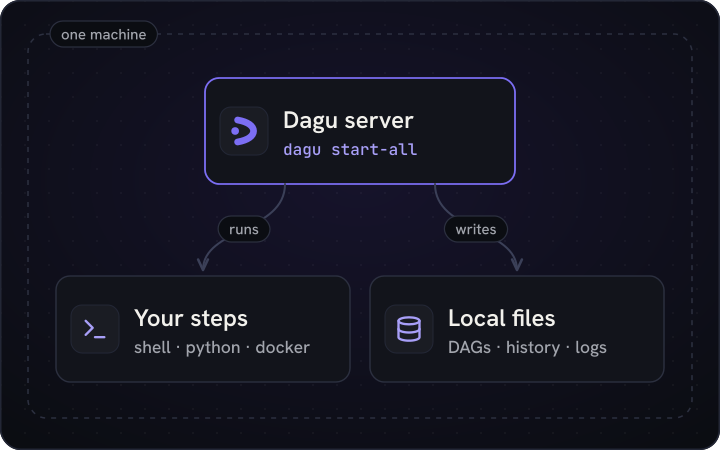
|
Temporary workers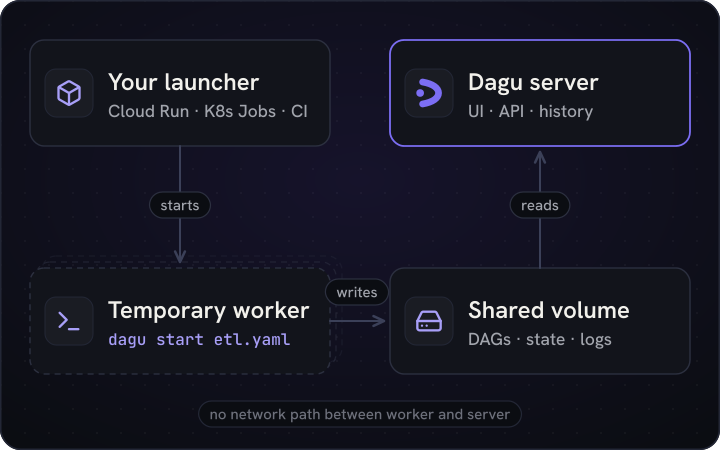
|
Distributed workers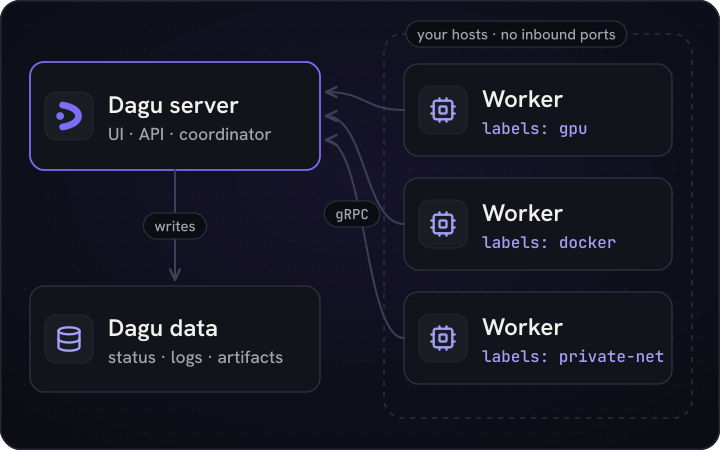
|
Monitoring with Dagu Console |
📈 近 7 天 Star 趋势
🏆 排名变化趋势
📋 历史上榜记录
| 日期 | 榜单 | 排名 | 周期新增 | 总 STAR |
|---|