📄 仓库 README
在 GitHub 查看 ↗

Spotifast
Spotify, native and fast.
A lightweight music app for Linux, macOS, and Windows.
Download · Getting started · User guide · Contribute



Spotifast is a Spotify client written in Rust with egui and fastframe, the framework behind a family of native desktop apps. It plays music through Spotify Soloist or the built-in librespot player, and has no browser engine.
The interface includes complete translations for all supported languages.
Playback needs Spotify Premium. Free accounts can browse and search, but cannot play music through Spotifast.
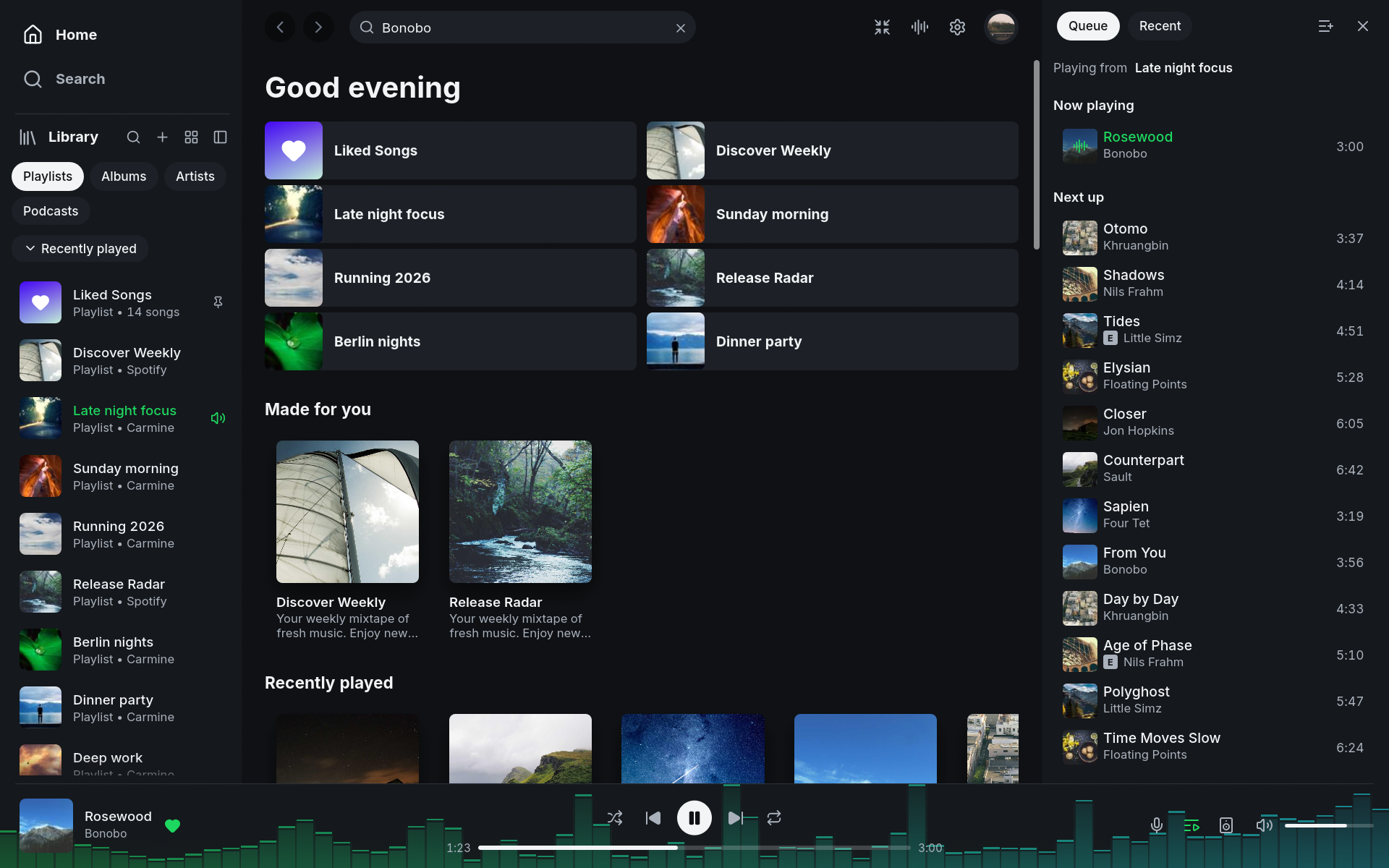
Watch Spotifast in action
https://github.com/user-attachments/assets/a5f669ce-b3b7-4f8e-9933-976a78876c7eFeatures · Install · First playback · Mini player · MilkDrop · Help
Since 0.15, setup leads with Spotify's Soloist player, with guided key setup, one-time pairing and automatic renewal of expiring builds. New listeners and people updating see this choice once after sign-in on supported platforms. Use the built-in player keeps librespot, with Spotifast's EQ, visualizers, local files and full queue editing. The choice is remembered. On Linux with PipeWire, Soloist also supports Spotifast’s EQ and visualizers through a private audio route. Native audio support adds EQ and visualizers on macOS 14.2 or newer, and visualizers on Windows 11, including MilkDrop. Windows Soloist playback does not support audible EQ. The Mac route keeps Soloist at full volume after redirecting its output, then applies Spotifast’s volume after the visualizers, including mute. Phone volume changes adjust that output level; Spotify’s indicator returns to 100%. Windows visuals follow Soloist’s source volume and stop when it is muted. When enabled, Soloist appears as This computer; settings show the controls that apply to it. Turning it off restores the built-in player's preferences. While Soloist starts and its account is verified, the Spotify loading screen shows Verifying Soloist… and waits to accept playback commands. Set up Soloist opens setup if pairing needs attention. After downloading, the wizard focuses on choosing the named device in Spotify, with the built-in player available as a quiet alternative below the card. Settings → Account → Spotify access connects the separate Spotify session for Made for you, listening activity and Spotify lyrics without changing players.
Your music, on your desktop
| Feature | What you can do |
|---|---|
| Library and search | Browse playlists, Liked Songs, albums, artists, and podcasts. Search the catalogue and edit playlists you own. |
| Local files | Play the local files your playlists list from a folder you choose in Settings, at any sample rate. Names show spaces and accents correctly, including in cached playlists. |
| Lyrics | Spotify lyrics when the playback session is signed in, with LRCLIB as fallback. Temporary LRCLIB overloads retry and try search; older cached lyrics remain available during outages. |
| Spotify Connect | Play on this computer or control playback on your other devices, including Google Cast speakers and groups. Cast devices appear as they are discovered; frequently and recently chosen outputs rise to the top. Remote volume keeps your chosen level while Spotify updates. |
| Queue | Add songs to the queue, or choose Play next to put a song or selection first when playing on this computer. |
| Themes | Choose light, dark, system appearance, or custom colours, with one theme for light mode and one for dark mode that switch with the system. On Omarchy, follow your desktop theme. |
| Desktop controls | Use keyboard shortcuts and media keys. Keep music playing from the tray when supported by your desktop and settings, and start Spotifast with your computer, with its window or in the tray. |
| Winamp mini player | Use classic skins with an equalizer, playlist, and animated sound displays. |
| MilkDrop | Watch music-reactive visuals in a separate window or full screen. See platform availability below. |
Install
| Platform | Installation |
|---|---|
| macOS | brew install --cask crmne/tap/spotifast, or download the Mac app. |
| Arch Linux | yay -S spotifast-bin |
| Windows | Choose your build on the Download page. |
| Other Linux | Find Flatpak, AppImage, Nix, and other options on the Download page. |
| From source | Follow Build from source for dependencies and commands. |
Start listening
- Make your own free Spotify app, as the sign-in screen shows: in the
Spotify developer dashboard,
create an app with the redirect URI
http://127.0.0.1:8989/loginand Web API ticked. Spotify requires Premium on the account that creates it. Getting started has the steps. - Paste its Client ID into Spotifast and choose Sign in with Spotify. Approve access in your browser, then return to the app to see your library.
- To listen on this computer, open the device menu in the bottom player bar and choose Set up playback here, also available in Settings.
- Complete the separate playback approval in your browser. Your computer appears as a Spotify Connect device named Spotifast.
Library access and local playback have separate approvals. Spotifast remembers both using your computer's protected storage. See Getting started for the full walkthrough and How it connects for the details.
The Winamp mini player
A classic look for your music, with Winamp 2 .wsz skins, an equalizer,
a playlist, and animated sound displays. Switch with Ctrl+M
(Cmd+Shift+M on macOS), the shrink button, or Settings.
The spectrum analyser and oscilloscope also work in the collapsed title bar.
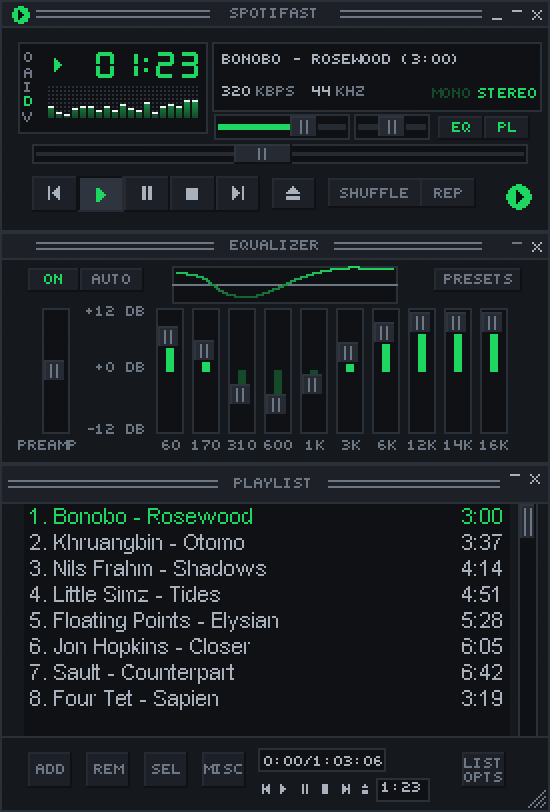
Explore the mini player, including skins, window sizes, controls, and the return to the main player.
Music in motion
MilkDrop reacts to music playing on this computer, with more than 10,000 presets downloaded on first use. Open it from the visualiser button, Settings, or the mini player's V menu.

Included on Linux, macOS, and Windows Intel/AMD builds. It is not included in the Windows on ARM download. Read the MilkDrop guide for presets, controls, and fullscreen mode.
Guides and help
The complete guide lives at spotifast.rocks.
| You want to… | Read |
|---|---|
| Sign in, set up playback, or configure themes, fonts, and proxies | Getting started |
| Learn shortcuts, command-line controls, and updates | Everyday use |
| Find configuration and stored files | Settings and files |
| Understand scrolling performance and reduce loading delays | Make it even faster |
| Fix "Spotify refused the audio key" or "Spotify is being slow" | When something goes wrong |
| Understand what is stored and sent | Privacy · How it connects |
| Check Spotify and librespot limitations | What Spotify allows |
| Understand account risk | Will my account get banned? |
| Report a bug or propose a feature | Read Contributing, then use the issue forms. |
Contributing
Read CONTRIBUTING.md before opening an issue or pull request. To look at the interface without a Spotify account, run:
cargo run --features demo -- --demo
Translations live in assets/i18n/; see
Translating Spotifast. Release packaging
is described in PACKAGING.md.
More native apps
Want WhatsApp just as fast and native? ZapFast is Spotifast's sibling. Both are built on fastframe.
Sonos playback
Sonos speakers use the Spotify Connect session for playback control. Enable local playback first, then select the speaker in the device picker.
Acknowledgements
Spotifast uses librespot, egui, fastframe, the Inter typeface (OFL), and Lucide icons (ISC).
Spotifast is an independent project and is not affiliated with Spotify. Spotify is a trademark of Spotify AB.
Licensed under the MIT License.
Star history
📈 近 7 天 Star 趋势
🏆 排名变化趋势
📋 历史上榜记录
| 日期 | 榜单 | 排名 | 周期新增 | 总 STAR |
|---|