📄 仓库 README
在 GitHub 查看 ↗MHI2 AU37x CarPlay patches







CarPlay additions for Audi MHI2 head units on the MHI2_ER_AU37x train:
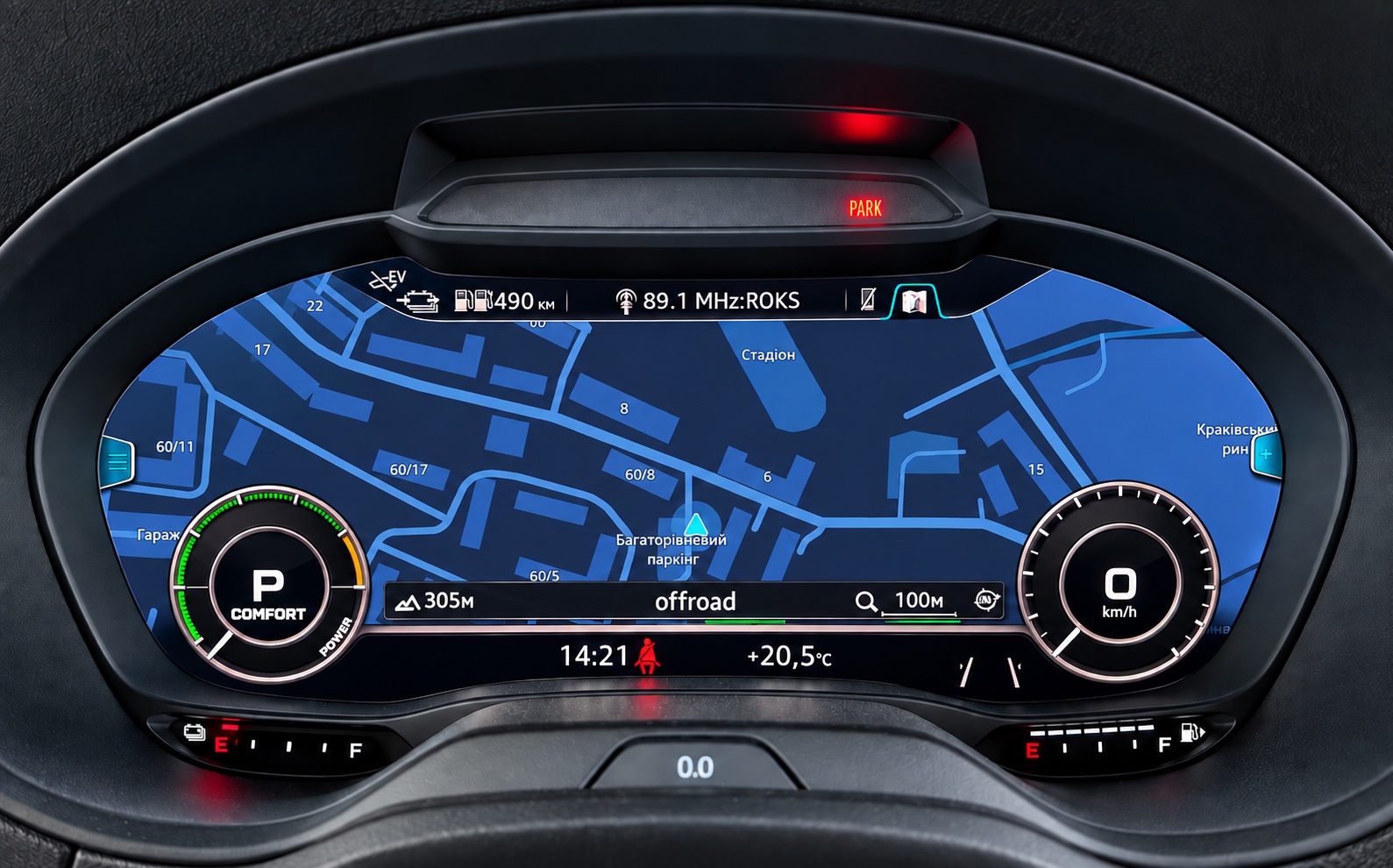
- CarPlay map in the Virtual Cockpit — the phone's own navigation map (Apple Maps, Google Maps, Waze) in the cluster in place of the stock one, 30 fps, decoded by the head unit's video hardware. Follows the cluster's large, Sport and Classic views.
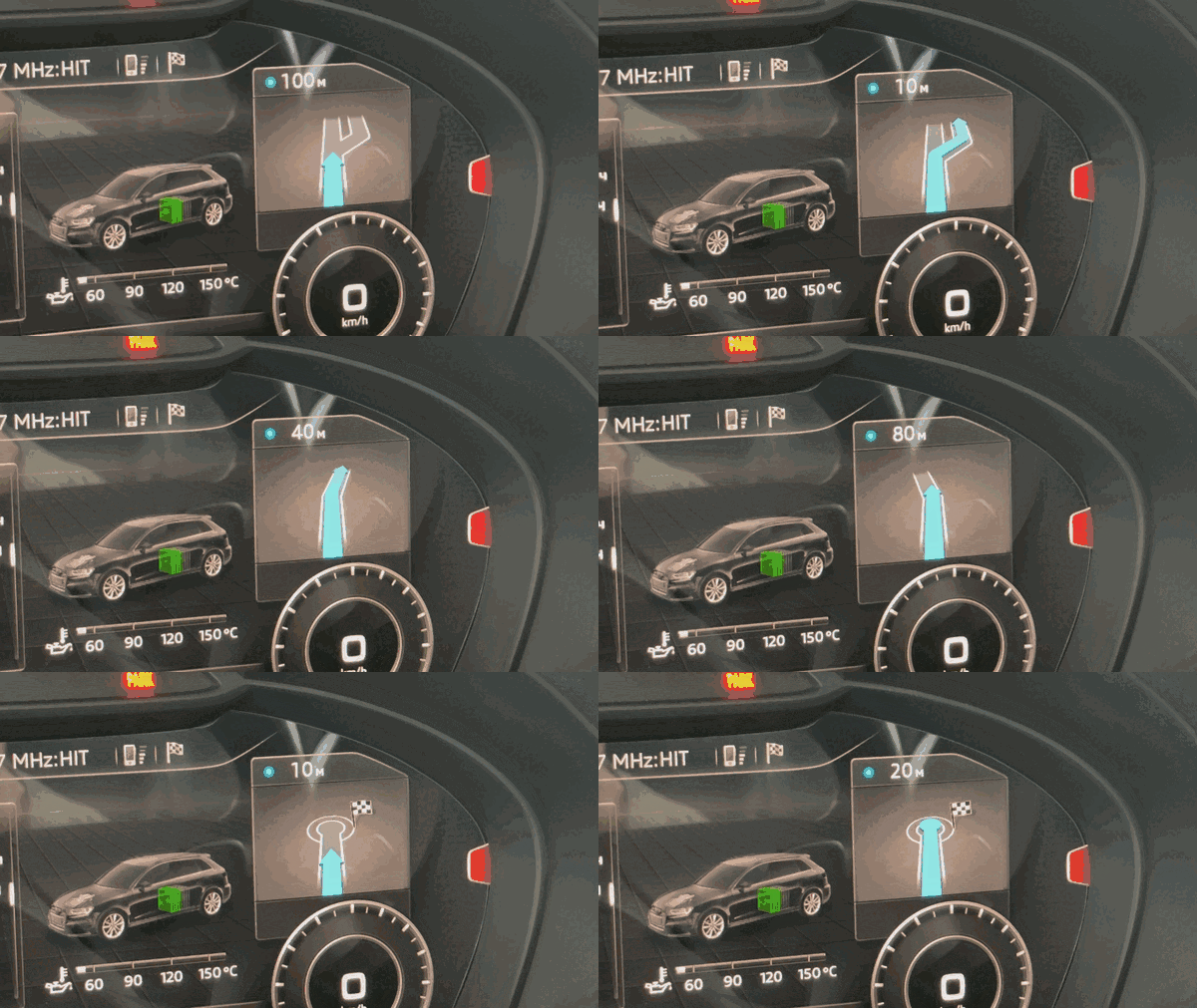
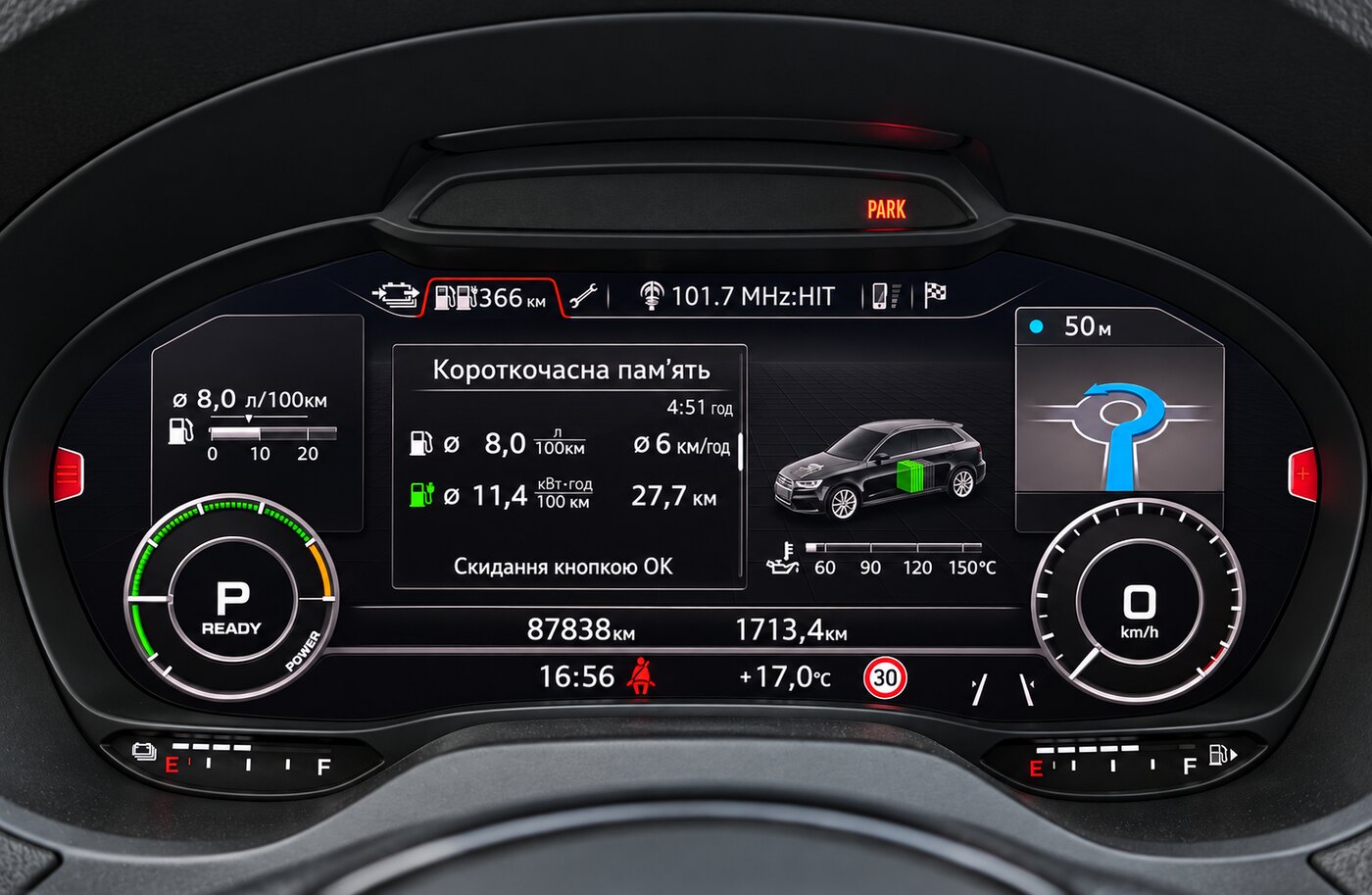
- Route guidance — CarPlay turn-by-turn maneuvers in the cluster's maneuver tile: the arrow, the distance, the street and lane guidance, drawn live in 3D.
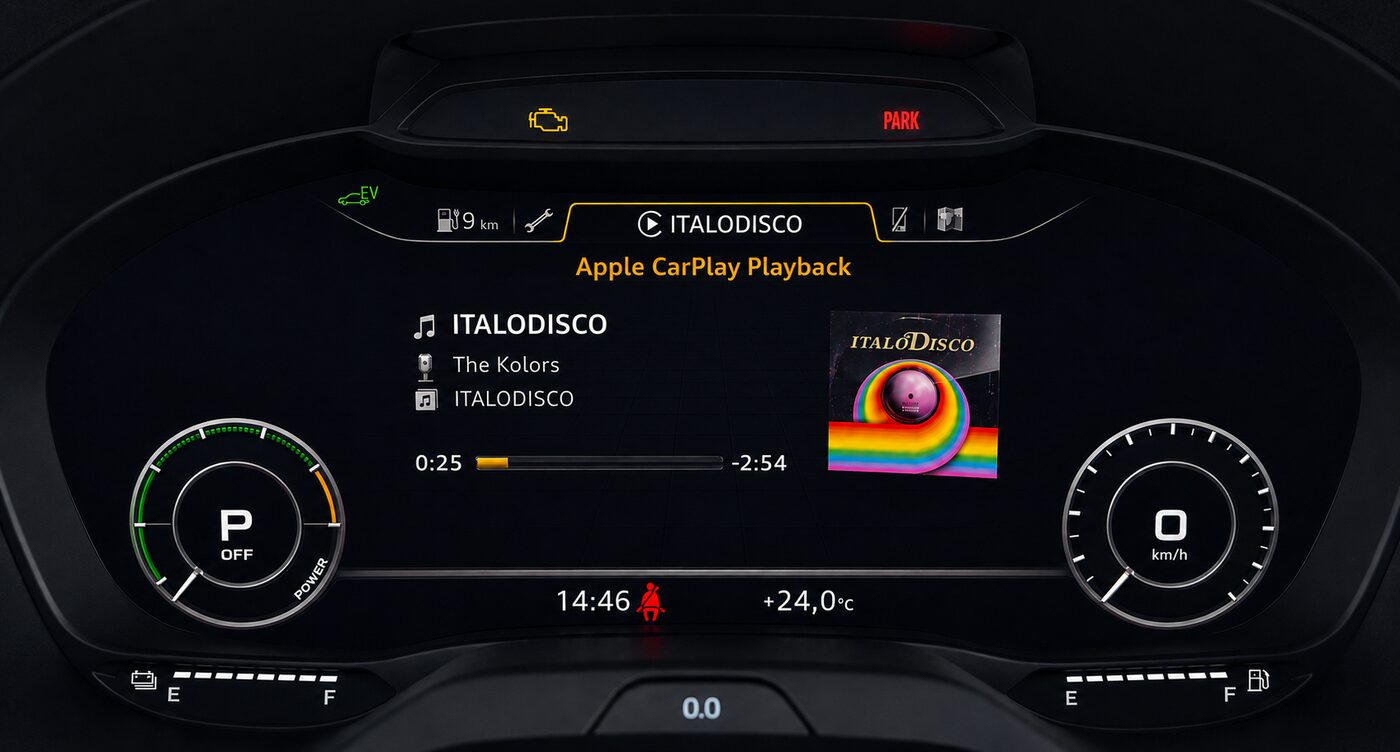
- Cover art — CarPlay album artwork on the cluster's now-playing widget.
- Touchpad → D-pad — the MMI touchpad navigates CarPlay menus.
- Maneuver arrow fills blue as the turn gets closer. For the plain arrow:
touch /mnt/app/rgd_no_arrow_filland reboot. - Phone tab in the cluster — CarPlay calls in the cluster's phone tab as with a Bluetooth phone: caller, call state and timer, accept, end, hold, mute, recents and favourites, signal and carrier. The Tel key and the phone menu go straight to CarPlay, and a short press of the voice key starts Siri.
- Parking sensors over CarPlay — the side sensors open their small popup beside CarPlay instead of taking the whole screen. Installed by default on the firmware it was checked against (P5089, Q2 P5088).
Prebuilt binaries, installed from an M.I.B. SD card or over a network cable.
Use at your own risk. Everything is reversible, but read Recovery before you start.
Compatibility
Tested on MHI2_ER_AU37x_P5089, MU1326, part 8V1035036A — Audi A3 8V with the
Virtual Cockpit and the HARMAN iAP2 stack. Other MHI2_ER_AU37x_* builds are expected
to work but are not verified: read Compatibility before installing.
Audi Q2 (MHI2_*_AU276_*) runs the same HMI classes, and the release is confirmed
working on a Q2. The installer checks the firmware train first and stops, changing
nothing, on anything that is not MHI2_*_AU37x_* or MHI2_*_AU276_*. Other trains
carry other versions of the HMI classes these patches replace, and installing there
can leave the main screen black.
If another CarPlay mod is installed on the unit, remove it first.
- CarPlay map in the cluster needs the iPhone by cable; most wireless CarPlay
adapters do not pass the cluster stream. Confirmed to carry it: the Carlinkit 2Air
with
WIRELESS_MAP(#25) and the Smart Boxlylink2921 with its test firmware 26060215. Zooming with the roller works by cable only. - Cover art needs module 17, adaptation
Picture_Upload_Download= active. - Route guidance works with Apple Maps and Google Maps. Waze sends no turn-by-turn data over CarPlay; its map still shows in the cluster.
- D-pad is self-contained:
bin/dpad_hook.jaralone in/mnt/app/eso/hmi/lsd/jars/.
Install
Download the …-sd.zip of the latest release from
Releases. What changed in
each release is listed there and in the CHANGELOG.
From an SD card (M.I.B.):
- Unpack the archive. It contains a single folder,
mod. - Copy that
modfolder to the root of an empty FAT32 card. Eject the card safely. Don't drag it over an existingmodfolder on a Mac: Finder replaces the folder, it doesn't merge them. - Insert the card, then in M.I.B. run
Advanced Settings → Run Custom Script. On M.I.B. V3.6 and later the item isAdvanced Settings → Run individual script. - Read the log on screen, then reboot the unit (see below).
Over a network cable: unpack the archive, then from the folder that contains mod:
ssh root@172.16.250.248 'mount -uw /mnt/app; mkdir -p /mnt/app/root/carplay'
scp -O -r mod/carplay/* root@172.16.250.248:/mnt/app/root/carplay/
ssh root@172.16.250.248 'sh /mnt/app/root/carplay/install.sh'
Reboot. The patches load only after a reboot. Hold the button combination for your
MMI until the screen goes dark. On the A3/S3 8V that is NAV/MAP + RADIO + the big
rotary knob. Over SSH: on -f rcc /usr/apps/mib2_ioc_flash reboot.
Running the installer again upgrades in place.
Before installing, the installer checks:
- The firmware train. On anything other than
MHI2_*_AU37x_*orMHI2_*_AU276_*it stops without changing anything. - Other mods. It stops if MIBSI, another CarPlay mod, or jars it does not know are on the unit. Remove the other mod first. M.I.B.'s NavActiveIgnore is switched off, and uninstalling switches it back on.
| Option | Cable | SD card (empty file in mod/carplay/) |
|---|---|---|
| leave out route guidance and the cluster map | RGI=0 sh install.sh |
NO_RGI |
| leave out only the cluster map | ALTSCREEN=0 sh install.sh |
NO_ALTSCREEN |
| offer the cluster map to a wireless adapter that does not ask for it | WIRELESS_MAP=1 sh install.sh |
WIRELESS_MAP |
| start the line under the maneuver on the arrival time | ETA_DEFAULT=1 sh install.sh |
ETA_DEFAULT |
| the cluster map without route guidance (no maneuver tile) | MAP_ONLY=1 sh install.sh |
MAP_ONLY |
| install the parking popup beside CarPlay (P5089 and Q2 P5088 only; off by default) | PDC=1 sh install.sh |
PDC |
| let unknown jars through | IGNORE_CONFLICTS=1 sh install.sh |
IGNORE_CONFLICTS |
Step by step, and what gets changed on the unit: Installation.
Using it
- Cluster map: comes up with the phone, after a short intro. A long press of the left steering-wheel roller swaps between the CarPlay map and the stock one; the choice survives the ignition.
- Route guidance: start a route on the phone. A short press of the left roller
swaps the line under the maneuver between the next street and the arrival time with
the time left; to start on the arrival time,
touch /mnt/app/rgd_eta_default(ETA_DEFAULT=1/ an emptyETA_DEFAULTfile at install time). Off without uninstalling:touch /mnt/app/rgd_disableand reboot; delete the file to turn it back on. - Phone tab in the cluster: with CarPlay it shows the iPhone's calls, recents and
favourites. Back to stock ("iPhone in CarPlay mode"):
touch /mnt/app/rgd_no_teland reboot. - Siri: a short press of the voice key on the steering wheel; a long press works as before.
- Sport layout is detected by itself. To force it:
touch /mnt/app/rgd_sport(SPORT=1/ an emptySPORTfile at install time).
Something not right: Troubleshooting.
Uninstall
ssh root@172.16.250.248 'sh /mnt/app/root/carplay/uninstall.sh'
or from the card: the release's …-uninstall-sd.zip, copied the same way as for the
install, and the same M.I.B. menu item. Reboot.
Support
This project is free and stays free. Donations are optional and don't change what you get: Ko-fi or monobank.
Credits
- luka-dev/mib2q-carplay-rgi — the HMI patch pattern, the cover-art pipeline, the route-guidance BAP work, the maneuver renderer and lane guidance, the cluster phone tab and Siri, and the parking popup, here ported to the HARMAN iAP2 stack.
- Mich795 — cover-art fixes from a version of their own.
- aberbic — the hardware-decoder layer setup that lit the cluster map.
📈 近 7 天 Star 趋势
🏆 排名变化趋势
📋 历史上榜记录
| 日期 | 榜单 | 排名 | 周期新增 | 总 STAR |
|---|