📄 仓库 README
在 GitHub 查看 ↗ClearDisk

Your Mac is hiding 50–500 GB of developer caches. ClearDisk finds them in seconds.
A free, open-source macOS menu bar app that monitors and cleans developer caches, Xcode, npm, Homebrew, Docker, pip, Cargo, Go, Gradle, and more. No data collection. No analytics. Network access is limited to signed update checks.


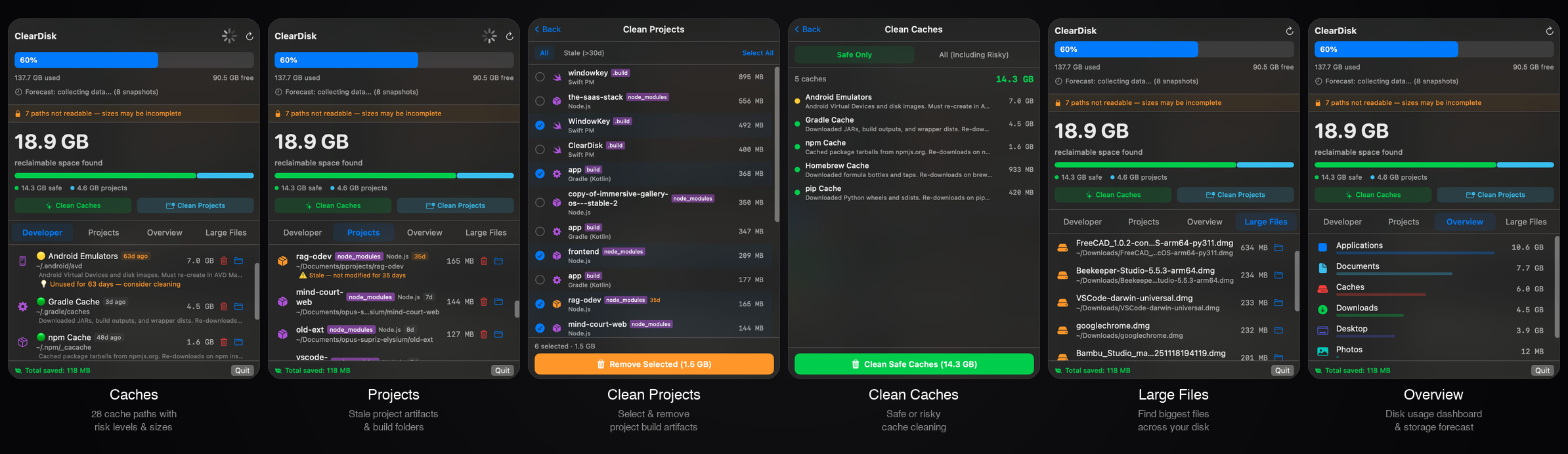
Why ClearDisk?
Your Mac's SSD is full of developer caches you forgot about. Xcode DerivedData alone can eat 200 GB. Add npm, Homebrew, Docker, pip, and Cargo — and you're losing hundreds of gigabytes to files that can be safely rebuilt.
Existing tools don't solve this: - DaisyDisk ($10) — shows what's big, but doesn't know what's safe to delete - DevCleaner for Xcode (1,500 ⭐) — only cleans Xcode. Ignores npm, pip, brew, Docker, Go, Cargo, Gradle - CleanMyMac ($40/yr) — bloated, expensive, trust issues - SquirrelDisk — dead (3 years, no updates)
ClearDisk scans 79 developer cache paths in one tool. Lives in your menu bar. Alerts you when disk gets full.
Features
- 79 Developer Caches — Xcode (DerivedData, Archives, Simulators, Caches, Device Support, Logs, Previews), Swift PM, CocoaPods, Carthage, Homebrew, npm, Yarn, pnpm (store and cache), Bun, Deno, node-gyp, TypeScript, pip, UV, Conda, Poetry, pipenv, Gradle, Maven, SBT/Ivy, Gradle Wrapper, Docker, Terraform, Composer, .NET NuGet, Go (modules and build cache), Rust Cargo, Bazel, Flutter/Pub, JetBrains, Ruby (Gems, rbenv, mise, RVM, Bundler), Android (Emulators, System Images, NDK), Testing (Playwright, Puppeteer, Prisma), AI Tools (Claude Desktop, Claude Code, Ollama, HuggingFace, ChatGPT, Cursor, Windsurf), VS Code (Cache, CachedData, Extensions, Chromium Cache, Logs, Updater), Game Engines (Unity, Unity Hub, Godot), Version Managers (nvm, pyenv, mise, rustup), Cloud (AWS CLI)
- Project Artifact Scanner — Finds stale per-project caches in your project folders, including repositories kept directly in your home directory. Detects 23 project types: Node.js / JS (incl.
.next,.nuxt,.svelte-kit,.angular,.turbo,.vite,.parcel-cache,.yarn/cache,dist,build), Python (.venv,venv,__pycache__,.pytest_cache,.mypy_cache,.ruff_cache,.tox,*.egg-info), Rust, Swift PM, CocoaPods (Pods/), Carthage, Xcode (in-projectbuild/,DerivedData/), Go, Gradle (Java + Kotlin), Maven, PHP/Composer, Ruby, Flutter/Dart, CMake, Terraform, .NET / C# (bin/,obj/), Godot (.godot/,.import/), Unity (Library/,Temp/,Logs/), Unreal (Binaries/,Intermediate/,DerivedDataCache/), Haskell, Elixir, Zig, Crystal. Each project can expose multiple artifacts (e.g. a Next.js project showsnode_modulesand.nextanddistseparately). - Cache Descriptions — Every cache shows a human-readable explanation ("Downloaded Swift packages. Re-downloads on next build.") so you know exactly what you're deleting
- DerivedData Project Breakdown — Shows which projects live inside DerivedData (e.g. "MyApp: 2.3 GB, OtherApp: 1.1 GB") by reading
info.plist - Hero Dashboard — Big, clear display of total cleanable space with breakdown by dev caches and trash
- Menu Bar Monitor — Always-on disk usage display. Changes color at 80%/90% thresholds. Shows cleanable amount when disk is stressed
- Risk Levels — 🟢 Safe (rebuilds with a command), 🟡 Caution (large re-download needed), 🔴 Risky (may contain irreplaceable data)
- Xcode Running Check — Warns you if Xcode is running when you try to clean Xcode-related caches
- Safe Delete — Files go to Trash first and remain recoverable until Trash is emptied
- Visual Category Bars — Color-coded proportional bars showing what's eating your disk
- Appearance — Follow the system theme or use Light or Dark across ClearDisk's windows and panels
- Cleanup Tracking — distinguishes bytes moved to Trash from space actually reclaimed after Trash is emptied
- Storage Forecast — Predicts when your disk will be full based on usage trends (linear regression, 90-day history)
- Smart Suggestions — Age-based recommendations ("Not used for 90 days — safe to clean")
- Smart Notifications — Alerts at 80% and 90% disk usage, no spam
- Signed Automatic Updates — Checks GitHub Releases and installs Developer ID, notarized, EdDSA-verified updates through Sparkle
- 100% Private — No data collection or analytics. Network access is limited to signed update checks, and the source is open to inspection
Comparison
| Feature | ClearDisk | DevCleaner | npkill | kondo | mac-cleanup | DaisyDisk | CleanMyMac |
|---|---|---|---|---|---|---|---|
| Native macOS GUI | ✅ | ✅ | ❌ CLI | ❌ CLI | ❌ CLI | ✅ | ✅ |
| Menu bar monitor | ✅ | ❌ | ❌ | ❌ | ❌ | ❌ | ❌ |
| Xcode cleanup | ✅ 9 paths | ✅ 6 paths | ✅ | ✅ | ✅ | ❌ | ✅ |
| npm/pip/brew/go/cargo | ✅ | ❌ | Partial | ❌ | ✅ | ❌ | Partial |
| Docker/Gradle/Maven | ✅ | ❌ | ❌ | ❌ | Partial | ❌ | ❌ |
| Risk levels | ✅ | ❌ | ❌ | ❌ | ❌ | ❌ | ❌ |
| Cache descriptions | ✅ | ❌ | ✅ | ❌ | ❌ | ❌ | ❌ |
| Storage forecast | ✅ | ❌ | ❌ | ❌ | ❌ | ❌ | ❌ |
| Safe delete (Trash) | ✅ | ❌ removeItem |
❌ rm -rf |
❌ rm -rf |
❌ rm -rf |
N/A | ❌ |
| Total cache paths | 79 | 6 | 50+ | 24 types | 42 modules | 0 | Unknown |
| Price | Free | Free | Free | Free | Free | $10 | $40/yr |
| Open source | ✅ MIT | ✅ GPL-3 | ✅ MIT | ✅ MIT | ✅ Apache-2 | ❌ | ❌ |
Installation
Homebrew (Easiest)
brew tap bysiber/cleardisk
brew trust bysiber/cleardisk
brew install --cask cleardisk
That's it. Homebrew handles everything, including the quarantine flag.
brew trustis required: recent Homebrew refuses to load casks from third-party taps until you explicitly trust them (Error: Refusing to load cask ... from untrusted tap). See Tap Trust.
Download DMG
- Download the latest DMG from Releases
- Open the DMG and drag ClearDisk to Applications
- Open ClearDisk from Applications. Release builds are Developer ID signed and notarized by Apple.
Once installed, ClearDisk checks for signed updates automatically and can install them directly from Settings → Check for Updates. Homebrew is not required for subsequent updates.
Build from Source
git clone https://github.com/bysiber/cleardisk.git
cd cleardisk
bash scripts/build_app.sh
cp -R ClearDisk.app /Applications/
xattr -cr /Applications/ClearDisk.app
open /Applications/ClearDisk.app
That's it. Click the disk icon in your menu bar.
Source builds are ad-hoc signed, while downloadable releases are Developer ID signed and notarized. The app is fully open-source, so every part of the update and cleanup flow can be inspected.
Requires macOS 14+ (Apple Silicon and Intel). Release builds are universal (arm64 + x86_64). Xcode Command Line Tools needed for building from source (xcode-select --install).
How It Works
ClearDisk refreshes free disk capacity every 5 minutes and scans known developer cache directories every 30 minutes:
~/Library/Developer/Xcode/DerivedData           → 🟢 Safe
~/Library/Developer/Xcode/Archives              → 🟡 Caution
~/Library/Developer/CoreSimulator/Devices        → 🟡 Caution
~/Library/Developer/Xcode/Products              → 🟢 Safe
~/Library/Developer/Xcode/iOS DeviceSupport     → 🟢 Safe
~/Library/Logs/CoreSimulator                    → 🟢 Safe
~/Library/Developer/Xcode/UserData/Previews     → 🟢 Safe
~/Library/Developer/CoreSimulator/Caches        → 🟢 Safe
~/Library/Caches/org.swift.swiftpm              → 🟢 Safe
~/Library/Caches/CocoaPods                      → 🟢 Safe
~/Library/Caches/Homebrew                       → 🟢 Safe
~/.npm/_cacache                                 → 🟢 Safe
~/Library/pnpm/store                            → 🟢 Safe
~/.bun/install/cache                            → 🟢 Safe
~/Library/Caches/pip                            → 🟢 Safe
~/.conda/pkgs                                   → 🟢 Safe
~/.gradle/caches                                → 🟢 Safe
~/.m2/repository                                → 🟢 Safe
~/.android/avd                                  → 🟡 Caution
~/Library/Containers/com.docker.docker          → 🔴 Risky
~/.pub-cache                                    → 🟢 Safe
~/.cache/JetBrains                              → 🟢 Safe
~/.gem                                          → 🟢 Safe
~/.deno                                         → 🟢 Safe
~/.cache/uv                                     → 🟢 Safe
~/Library/Caches/ms-playwright                  → 🟢 Safe
~/.cache/huggingface                            → 🟡 Caution
...and more
It only looks at these specific paths — no full disk scan, no file indexing, no background processes.
When you clean, files are moved to Trash (not permanently deleted). You can recover them anytime before emptying Trash.
Privacy & Trust
- Update-only network access — ClearDisk contacts its public GitHub Releases feed only to check for signed updates
- Zero telemetry — no analytics, no crash reports, no usage data
- No persistent helper processes — Sparkle helpers run only while installing an update
- Open source — read every line of code yourself
- Safe delete — everything goes to Trash first
Tech Stack
- Swift + SwiftUI
- macOS
- SPM (Swift Package Manager)
- Sparkle 2 for signed, native macOS updates
- ~1,500 lines of code total
Contributing
Issues and PRs welcome. See CONTRIBUTING.md for details.
FAQ
How much disk space can ClearDisk recover?
Typically **50-200 GB** for active developers. Xcode DerivedData alone can grow to 80+ GB. Add node_modules, Docker images, and package manager caches and it's common to find 100+ GB of reclaimable space.Is it safe to clean these caches?
Yes. All cleaned files are moved to Trash first -- nothing is permanently deleted. Xcode will rebuild DerivedData on next build. Package managers (npm, pip, Homebrew) will re-download packages when needed. ClearDisk also shows risk levels (Safe/Caution/Risky) for each cache type.What's the difference between ClearDisk and CleanMyMac?
CleanMyMac ($40/yr) is a general-purpose Mac cleaner. ClearDisk is free, open-source, and specifically designed for **developer caches** (Xcode, npm, Docker, Cargo, Gradle, etc.). ClearDisk lives in your menu bar for quick access and shows real-time storage forecasts.Does ClearDisk work on Intel Macs?
Yes. ClearDisk requires macOS 14+ (Sonoma) and ships as a universal binary for both Apple Silicon and Intel Macs.How do I clean Xcode DerivedData?
With ClearDisk installed, click the menu bar icon and you'll see DerivedData size. Click "Clean" to move it to Trash. Manually: `rm -rf ~/Library/Developer/Xcode/DerivedData/*`How do I find and delete old node_modules?
ClearDisk scans for node_modules in common project directories automatically. You can also use the manual command: `find ~ -name "node_modules" -type d -prune | xargs du -sh | sort -hr`License
MIT -- Kadir Can Ozden
📈 近 7 天 Star 趋势
🏆 排名变化趋势
📋 历史上榜记录
| 日期 | 榜单 | 排名 | 周期新增 | 总 STAR |
|---|