📄 仓库 README
在 GitHub 查看 ↗







Apify MCP server
Connect your agent to the largest marketplace of tools for AI.
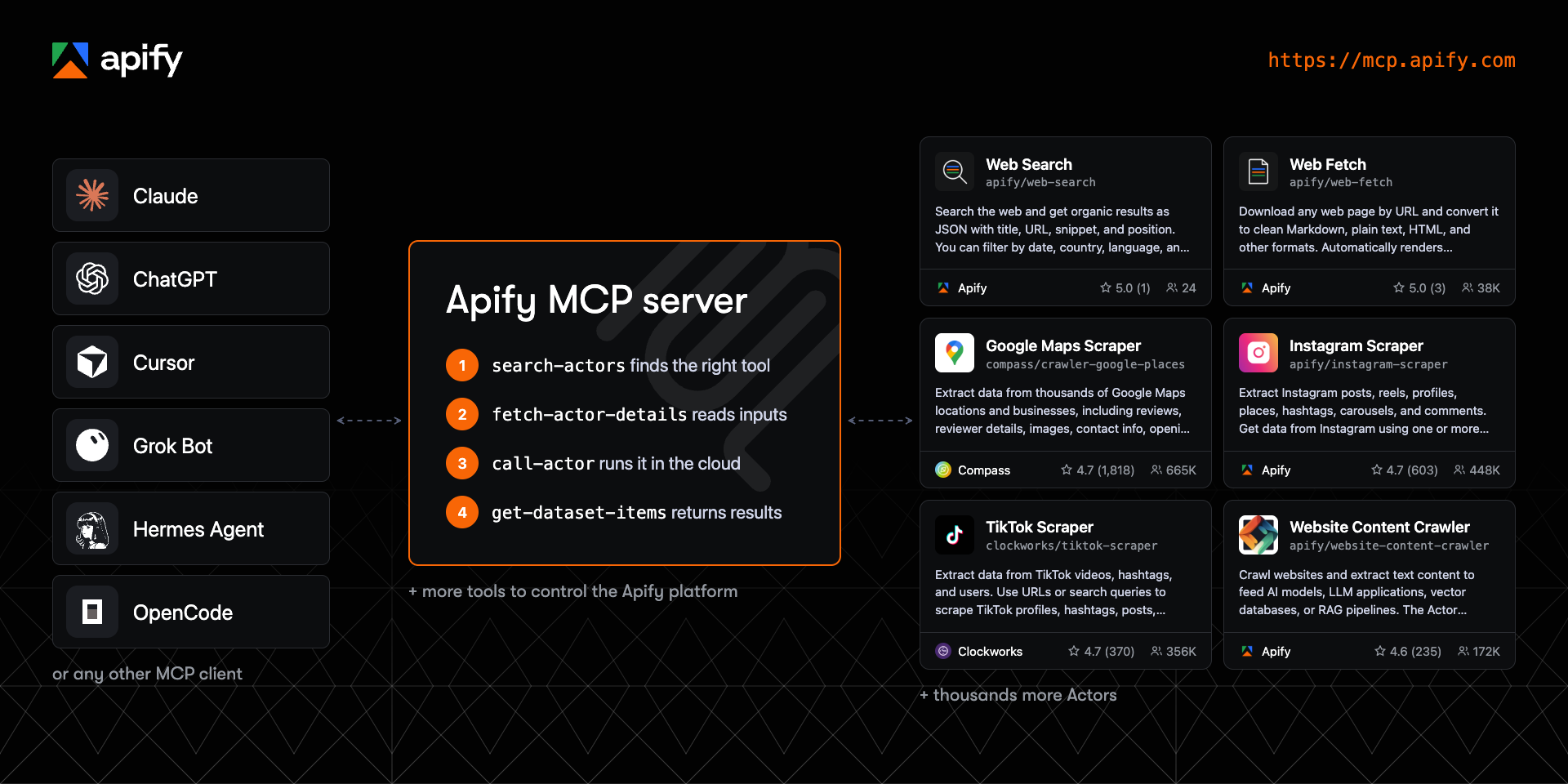
The official Apify Model Context Protocol (MCP) server gives AI agents web scraping, data extraction, and browser automation through thousands of ready-made Actors from Apify Store, at https://mcp.apify.com.
Apify is the marketplace of ready-to-run tools for AI agents. One connection to the Apify MCP server gives your agent thousands of tools to choose from, for jobs like web fetch, SERP monitoring, lead generation and enrichment, and pulling data from e-commerce sites and social media. The server loads only what each task needs.
Your agent searches Apify Store, checks an Actor's input and pricing, runs it, and reads the structured results, so you don't install a separate MCP server for every site. Connect to the hosted server with OAuth, or run it locally over stdio with the @apify/actors-mcp-server npm package.
Contents
- Quickstart
- Set up your client
- Remote (hosted) or local MCP server
- How an agent uses Apify Actors
- Tools, resources, and prompts
- Choose which tools load
- UI mode configuration
- Example prompts
- Pricing and limits
- Telemetry
- Troubleshooting and limitations
- FAQ
- Development
- Contributing
- Privacy and license
- Learn more
🚀 Quickstart
- Open the MCP configurator, pick your client, and choose the tools you want.
- Copy the generated configuration, deeplink, or command into your client.
- Sign in to Apify in the browser window that opens. If you don't have an account, you can create a free one there.
The hosted endpoint is https://mcp.apify.com. If your client can't use OAuth, send your Apify API token in an Authorization: Bearer <APIFY_TOKEN> header instead. Treat the token like a password and keep it out of repositories.
Using a coding agent such as Claude Code, Codex, Cursor, or GitHub Copilot? An official Apify plugin installs this MCP server together with Apify agent skills in one step.
🤖 Set up your client
The configurator generates the exact setup for each supported client, including Claude Code, ChatGPT, Cursor, VS Code, GitHub Copilot CLI, Claude, Claude Desktop, Codex, OpenCode, Kiro, and more. The snippets below cover the most common cases.
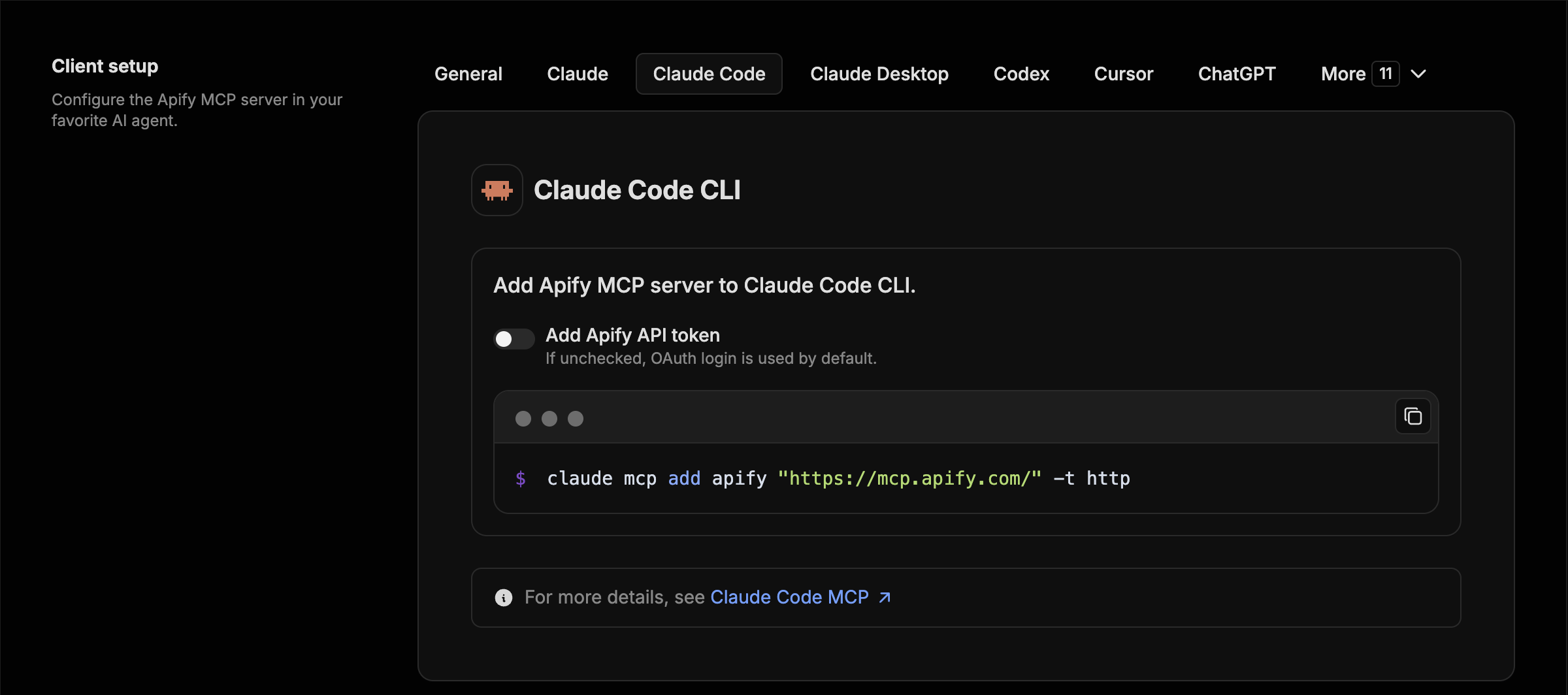
Claude Code
claude mcp add apify "https://mcp.apify.com" -t http
ChatGPT
1. Open [ChatGPT Plugins](https://chatgpt.com/plugins), select **+**, then **Add custom MCP server**. 2. Name it `Apify`, enter `https://mcp.apify.com` as the server URL, and choose **OAuth** authentication. 3. Review the risk warning, select **I understand and want to continue**, then **Create as a plugin**. 4. Sign in with Apify, review the tools, and install the plugin. No API token is needed. 5. Start a new conversation, type `@`, and select **Apify**. In Business, Enterprise, and Edu workspaces, an admin or owner may need to create or publish the plugin. If the option is missing, ask your workspace admin. When the server's tools change, open the plugin and select **Refresh**. The ChatGPT desktop app uses local MCP configuration shared with Codex instead: go to **Settings** > **MCP servers** > **Add server**, choose Streamable HTTP, and enter `https://mcp.apify.com`. See OpenAI's [custom MCP server guide](https://help.openai.com/en/articles/12584461-connecting-custom-mcp-servers-in-chatgpt).Cursor
Use the one-click install link from the [configurator](https://mcp.apify.com), or let the [Apify CLI](https://docs.apify.com/cli) write the configuration, including your API token:apify mcp install cursor
VS Code and GitHub Copilot
Use the one-click install link from the [configurator](https://mcp.apify.com), run `apify mcp install vscode`, or add `https://mcp.apify.com` as an HTTP server in your MCP configuration:{
"servers": {
"apify": {
"type": "http",
"url": "https://mcp.apify.com"
}
}
}
Claude
Apify is available as a Claude connector. Open **Settings** > **Connectors**, find **Apify** in the connector directory, and connect it. You can also select **Add custom connector**, name it `Apify`, and enter `https://mcp.apify.com` as the remote MCP server URL. Sign in with Apify when prompted. The same connector works on Claude.ai and in Claude Desktop. See the [Claude guide](https://docs.apify.com/integrations/claude-desktop).Any other MCP client (JSON config)
Most clients that support remote servers and OAuth accept a configuration like this:{
"mcpServers": {
"apify": {
"url": "https://mcp.apify.com"
}
}
}
Local stdio (npx)
Requires Node.js 22 or later.{
"mcpServers": {
"actors-mcp-server": {
"command": "npx",
"args": ["-y", "@apify/actors-mcp-server"],
"env": {
"APIFY_TOKEN": "YOUR_APIFY_TOKEN"
}
}
}
}
The server is also listed in the Docker MCP catalog, and each release ships an MCP bundle file (apify-mcp-server.mcpb) for one-click installation in clients that support it.
Remote (hosted) or local MCP server
The hosted remote MCP server with OAuth is the recommended option. Use the local server when you want to run the MCP process on your own machine; Actors still run and store their results on the Apify platform in both modes. If your client supports only stdio, you can also bridge it to the hosted server with mcp-remote: npx mcp-remote https://mcp.apify.com.
Hosted (https://mcp.apify.com) |
Local (npx @apify/actors-mcp-server) |
|
|---|---|---|
| Transport | Streamable HTTP | stdio |
| Authentication | OAuth or Bearer token | APIFY_TOKEN environment variable or Apify CLI login |
| Output schemas inferred for Actor results | Yes | No |
| Tool selection | tools URL parameter |
--tools flag or TOOLS environment variable |
| Updates | Always the latest server | The npm version you install |
How an agent uses Apify Actors
Actors are serverless programs on the Apify platform. Each one does a specific job, like scraping Google Maps, crawling a website for RAG, or collecting social media posts. The MCP server turns Actors into tools an agent can find and call without you configuring each one in advance.
A typical task follows four steps:
search-actorsfinds candidate Actors in Apify Store for the task.fetch-actor-detailsreturns the Actor's input schema, README, and pricing, plus its output schema on request.call-actorstarts the run and waits for it to finish, 30 seconds by default and up to 45. It returns the run status and storage IDs; the scraped items stay in the run's dataset.get-dataset-itemsreads the results from the run's dataset, withlimitandoffsetfor pagination.
The server adds get-dataset-items, `get-key-
📈 近 7 天 Star 趋势
🏆 排名变化趋势
📋 历史上榜记录
| 日期 | 榜单 | 排名 | 周期新增 | 总 STAR |
|---|