📄 仓库 README
在 GitHub 查看 ↗Gemini Watermark Tool








🆕 Free-tier half-scale watermarks supported (v0.3.2) — free Gemini accounts now emit half-scale images (e.g. 1376x768) carrying a 48x48 logo with the current opacity profile. Detection and removal handle them automatically; custom 48x48 regions follow the selected profile instead of always assuming legacy. Detection is also more robust on busy backgrounds, and --threshold / the GUI slider are honored above 0.35 (thanks to Gerardo Leiserson, PR #41).
Gemini 3.5 watermark profile supported, with automatic legacy fallback (v0.3.1) — the CLI tries the current Gemini 3.5+ profile first; if detection skips, it automatically retries with the legacy (pre-3.5) profile. Disable with --no-legacy, or pin legacy directly with --legacy. Details below.
🎬 Veo Video Watermark Remover v0.6.1 is out — full Gemini 3.5 video watermark removal across Windows / Linux / macOS. Auto-detect for 1080p + 720p (standard and compact diamond variants), adaptive per-frame alpha via bisection feedback, tick-exact transcoder timing, audio passthrough + AI denoise. Drag-and-drop simple, no cloud, no AI hallucination — just the same reverse alpha blending math, evolved for video. Details below.
▶️ Watch: GeminiWatermarkTool — Quick Start & Feature Overview
📌 Original Author Notice (Reverse Alpha Blending)
I am the original author of GeminiWatermarkTool and the reverse alpha-blending restoration method used to remove the visible "Gemini" watermark while preserving image detail (Allen Kuo / allenk).
This project achieves high-precision restoration by using my calibrated 48×48 and 96×96 Reverse-Alpha Masks to invert the blending equation. Since I published this work and these assets, many derivative tools (desktop apps, websites, browser extensions, etc.) have appeared using the same approach and/or directly reusing the masks produced by this project — because the method is deterministic and highly effective.
✅ MIT License reminder
This project is released under the MIT License. Commercial use and ports are allowed.
However, if you redistribute any substantial portion of this project (including code or mask assets), you must: - Preserve the original copyright notice - Include the full MIT license text - (Recommended) Provide attribution with a link back to this repository📖 For the full technical write-up (including how the Reverse-Alpha Masks were derived and calibrated), see:
Removing Gemini AI Watermarks: A Deep Dive into Reverse Alpha Blending
https://allenkuo.medium.com/removing-gemini-ai-watermarks-a-deep-dive-into-reverse-alpha-blending-bbbd83af2a3f
Gemini Watermark Tool removes Gemini visible watermarks from images using a mathematically accurate reverse alpha blending algorithm.
Unlike many tools that rely entirely on generative inpainting, this project focuses on deterministic reconstruction combined with lightweight AI-assisted cleanup.
The design philosophy is simple:
small, standalone, fast, and reliable.
The entire toolkit is distributed as a portable executable with zero runtime dependencies, making it easy to install, automate, and integrate into scripts or pipelines without complex setup.
Key capabilities include:
- Fast & offline: single executable, no external services or dependencies
- Standalone & portable: small footprint, easy to deploy and use anywhere
- GUI + CLI: drag-and-drop desktop workflow or command-line automation
- Deterministic watermark reconstruction: reverse alpha blending algorithm designed specifically for Gemini watermark overlays
- AI-assisted cleanup: optional GPU-accelerated FDnCNN denoise (NCNN + Vulkan) for residual artifacts
- Smart detection: three-stage NCC detection with confidence scoring to automatically skip non-watermarked images
- Batch processing: process entire directories with preview and progress tracking
- Cross-platform: Windows / Linux / macOS / Android (CLI)
- AI Agent ready: Claude Code Skill + MCP Server for automation and agent workflows
✨ Gemini 3.5 Support — New
GeminiWatermarkTool now supports the new Gemini 3.5 watermark layout out of the box. Starting with Gemini 3.5, Google shifted the watermark position and updated its alpha map relative to legacy Gemini outputs. The tool targets the new profile by default and ships a one-click Legacy toggle for pre-3.5 outputs — no command-line flags or re-calibration needed.
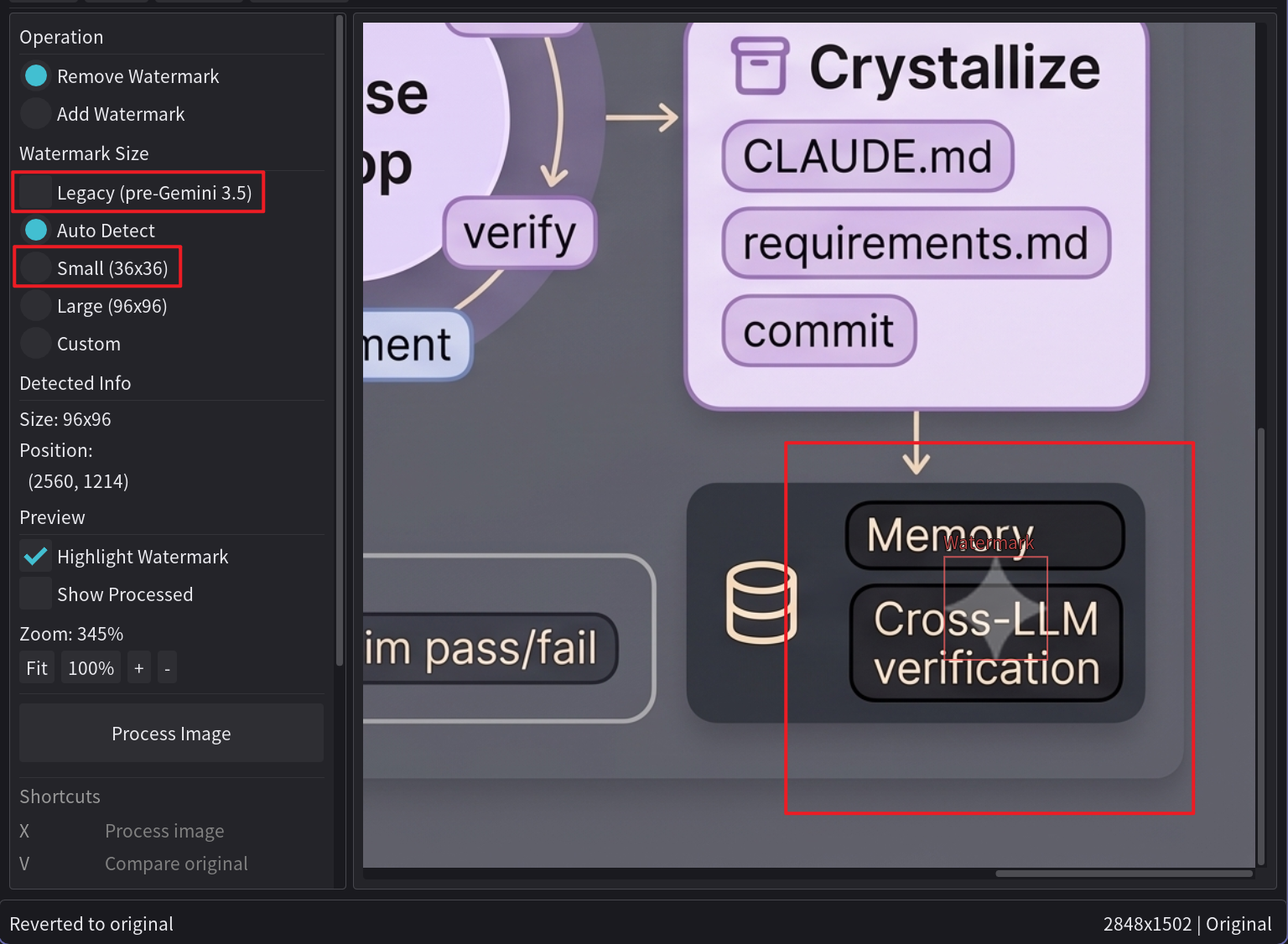
| Gemini 3.5+ (default) | Legacy (pre-Gemini 3.5) | |
|---|---|---|
| Profile | V2 | V1 |
| Small logo | 36×36 | 48×48 |
| Large logo | 96×96 | 96×96 |
| Margin | shifted (per-aspect calibrated) | original |
| GUI | "Auto Detect" / "Small" / "Large" radios | tick "Legacy (pre-Gemini 3.5)" checkbox |
| CLI | default | pass --legacy |
Both profiles use the same deterministic reverse alpha blending pipeline — switching profiles only changes the alpha map and position formula, not the math.
Automatic Legacy Fallback (v0.3.1, CLI only)
The CLI default now handles mixed Gemini-3.5+ and pre-3.5 inputs without the user having to script the retry. When the current-profile detector returns skipped (confidence below threshold), the CLI automatically runs the same image through the legacy profile before reporting the final outcome. Behaviour matrix:
| Invocation | First attempt | Fallback | Notes |
|---|---|---|---|
GeminiWatermarkTool image.png |
V2 (current) | V1 if V2 skips | new v0.3.1 default |
GeminiWatermarkTool --legacy image.png |
V1 only | — | pin legacy, no fallback |
GeminiWatermarkTool --no-legacy image.png |
V2 only | — | matches v0.3.0 default |
GeminiWatermarkTool --legacy --no-legacy … |
— | — | conflict, exits 2 |
The safety contract is unchanged: each profile attempt is still gated by the confidence threshold, so non-Gemini images skip on both V2 and V1 and remain untouched. The GUI is unchanged — its Legacy checkbox is explicit, no automatic fallback.
Exit Codes (v0.3.1)
The CLI now returns distinct exit codes so scripts can chain retries without inspecting stdout or checking for an output file:
| Code | Meaning |
|---|---|
| 0 | File processed (or batch directory completed with no errors) |
| 1 | Single-file invocation skipped — no watermark detected on any tried profile |
| 2 | Real failure — bad arguments, missing input, IO/write error |
Batch directory mode (-i somedir -o somedir) keeps lenient semantics:
exit 0 unless something actually fails, since partial skips are normal
when scanning a folder.
Example Windows shell chain:
GeminiWatermarkTool.exe -i image.png -o clean.png
if %ERRORLEVEL% equ 1 (
    rem auto-fallback tried both V2 and V1 and skipped; user may want --force
    GeminiWatermarkTool.exe -i image.png -o clean.png --force
)
🎬 Veo Video Watermark Removal — v0.6.1 Released
GeminiWatermarkTool now supports removing Google Veo and Gemini 3.5 video watermarks across Windows, Linux, and macOS. The same reverse alpha blending engine, evolved for video — direct mp4-to-mp4, with audio preserved, mathematically deterministic.
VeoWatermarkRemover v0.6.1-demo — Download →
What's supported
- Gemini 3.5 diamond watermark (default, no flag needed) — auto-detected per file:
- 1080p: 1920×1080 landscape, 1080×1920 portrait (validated end-to-end)
- 720p: 1280×720 landscape, 720×1280 portrait — both standard (48×48) and compact (44×44) diamond variants
- Legacy "Veo" text watermark (
--legacy) — pre-Gemini-3.5 outputs still supported - Audio passthrough — original audio kept without re-encoding
- AI denoise — GPU-accelerated FDnCNN cleanup (Vulkan, automatic CPU fallback)
- Cross-platform binaries — Windows x64, Linux x64, macOS Universal (Intel + Apple Silicon)
v0.6.1 algorithm highlights
- Multi-frame detection probe — auto-detect probes 12 frames spread across the video, so intro fade-ins / splash screens no longer cause false SKIPs.
- Adaptive per-frame alpha via bisection feedback — applies a candidate intensity, evaluates whether the result matches the surrounding background, and adjusts up (residue) or down (over-subtraction) for up to 5 rounds per frame. Visual-consistency goal rather than predictive accuracy, so neighbouring frames that look similar also remove similarly.
- Per-shot seed + per-frame change cap — a stable per-video baseline anchors the bisection, and a ±0.05 per-frame movement cap prevents single-frame metric noise from causing visible flashes on content with heavy foreground motion.
- Tick-exact transcoder timing — output frame count, duration, and FPS metadata match input exactly. No drift in NLE / editor alignment (fix for previous releases that silently dropped 1-3 tail frames).
--variant 720p-1/--variant 720p-2escape hatch when auto-detect can't lock on (very rare with the multi-frame probe).--sigmatuning —--sigma 15for anime / illustration content,--sigma 25when default AI denoise feels too aggressive.
Drag-and-drop simple
# Default — Gemini 3.5 diamond removal (1080p + 720p auto-detected)
GeminiWatermarkTool-Video video.mp4

# Pre-Gemini-3.5 video with "Veo" text watermark
GeminiWatermarkTool-Video --legacy old_veo_video.mp4

# Anime / illustration content (lighter AI denoise)
GeminiWatermarkTool-Video --sigma 15 video.mp4
Hon
📈 近 7 天 Star 趋势
🏆 排名变化趋势
📋 历史上榜记录
| 日期 | 榜单 | 排名 | 周期新增 | 总 STAR |
|---|