📄 仓库 README
在 GitHub 查看 ↗[ Languages: English | 日本語 (Japanese) ]
ble.sh (/blɛʃ/) ―Bash Line Editor―
[ README | Manual |
Q&A |
contrib |
Recipes ]
Bash Line Editor (ble.sh†1) is a command line editor written in pure Bash†2 which replaces the default GNU Readline.
The current devel version is 0.4.
This script supports Bash 3.0 or higher although we recommend using ble.sh with release versions of Bash 4.0 or higher.
The POSIX standard utilities are also required.
Currently, only UTF-8 encoding is supported for non-ASCII characters.
This script is provided under the BSD License (3-clause BSD license).
Quick instructions
There are two ways to get ble.sh: to get the source using git and build
ble.sh, or to download the nightly build using curl or wget.
See Sec 1.1 and Sec 1.2 for the details of trial and installation.
See Sec 1.3 for the details of the setup of your ~/.bashrc.
[!NOTE] If you want to use fzf with
ble.sh, you need to check Sec 2.8 to avoid compatibility problems.
Download source using git and make ble.sh
This requires the commands `git`, `make` (GNU make), and `gawk` (GNU awk)†3.
In the following, please replace `make` with `gmake` if your system provides GNU make as `gmake` (such as in BSD).
# TRIAL without installation

git clone --recursive --depth 1 --shallow-submodules https://github.com/akinomyoga/ble.sh.git
make -C ble.sh
source ble.sh/out/ble.sh

# Quick INSTALL to BASHRC (If this doesn't work, please follow Sec 1.3)

git clone --recursive --depth 1 --shallow-submodules https://github.com/akinomyoga/ble.sh.git
make -C ble.sh install PREFIX=~/.local
echo 'source -- ~/.local/share/blesh/ble.sh' >> ~/.bashrc
Download the nightly build with curl
This requires the commands `curl`, `tar` (with the support for the `J` flag), and `xz` (XZ Utils).
# TRIAL without installation

curl -L https://github.com/akinomyoga/ble.sh/releases/download/nightly/ble-nightly.tar.xz | tar xJf -
source ble-nightly/ble.sh

# Quick INSTALL to BASHRC (If this doesn't work, please follow Sec 1.3)

curl -L https://github.com/akinomyoga/ble.sh/releases/download/nightly/ble-nightly.tar.xz | tar xJf -
bash ble-nightly/ble.sh --install ~/.local/share
echo 'source -- ~/.local/share/blesh/ble.sh' >> ~/.bashrc
Download the nightly build with wget
This requires the commands `wget`, `tar` (with the support for the `J` flag), and `xz` (XZ Utils).
# TRIAL without installation

wget -O - https://github.com/akinomyoga/ble.sh/releases/download/nightly/ble-nightly.tar.xz | tar xJf -
source ble-nightly/ble.sh

# Quick INSTALL to BASHRC (If this doesn't work, please follow Sec 1.3)

wget -O - https://github.com/akinomyoga/ble.sh/releases/download/nightly/ble-nightly.tar.xz | tar xJf -
bash ble-nightly/ble.sh --install ~/.local/share
echo 'source -- ~/.local/share/blesh/ble.sh' >> ~/.bashrc
Install a package using a package manager (currently only a few packages)
This only requires the corresponding package manager. - [AUR (Arch Linux)](https://github.com/akinomyoga/ble.sh/wiki/Manual-A1-Installation#user-content-AUR) `blesh-git` (devel), `blesh` (stable 0.3.4) - [NixOS (nixpkgs)](https://github.com/akinomyoga/ble.sh/wiki/Manual-A1-Installation#user-content-nixpkgs) `blesh` (devel) - [Guix](https://packages.guix.gnu.org/packages/blesh) `blesh` (devel)Update an existing copy of ble.sh
# UPDATE (in a ble.sh session)

ble-update

# UPDATE (outside ble.sh sessions)

bash /path/to/ble.sh --update
Create a package of ble.sh
Since `ble.sh` is just a set of shell scripts and do not contain any binary (i.e., "`noarch`"),
you may just download the pre-built tarball from a release page and put the extracted contents in e.g. `/tmp/blesh-package/usr/local`.
Nevertheless, if you need to build the package from the source, please use the following commands.
Note that the git repository (`.git`) is required for the build.
# BUILD & PACKAGE (for package maintainers)

git clone --recursive https://github.com/akinomyoga/ble.sh.git
make -C ble.sh install DESTDIR=/tmp/blesh-package PREFIX=/usr/local
# ${prefix}/share/blesh/lib/_package.bash

_ble_base_package_type=XXX
function ble/base/package:XXX/update {
  update-the-package-in-a-proper-way
}
Features
- Syntax highlighting: Highlight command lines input by users as in
fishandzsh-syntax-highlighting. Unlike the simple highlighting inzsh-syntax-highlighting,ble.shperforms syntactic analysis to enable the correct highlighting of complex structures such as nested command substitutions, multiple here documents, etc. Highlighting colors and styles are fully configurable. - Enhanced completion:
Extend completion
by syntax-aware completion, completion with quotes and parameter expansions in prefix texts, ambiguous candidate generation, etc.
Also, menu-complete
supports the selection of candidates in the menu (candidate list) by cursor keys, TAB, and S-TAB.
The feature auto-complete
supports the automatic suggestion of completed texts as in
fishandzsh-autosuggestions(with Bash 4.0+). The feature menu-filter integrates automatic filtering of candidates into menu completion (with Bash 4.0+). There are other functionalities such as dabbrev and sabbrev like zsh abbreviations orzsh-abbr. - Vim editing mode: Enhance
readline's vi editing mode available withset -o vi. Vim editing mode supports various vim modes such as char/line/block visual/select mode, replace mode, command mode, operator pending mode as well as insert mode and normal mode. Vim editing mode supports various operators, text objects, registers, keyboard macros, marks, etc. It also providesvim-surroundas an option. - Other interesting features include status line, history share, right prompt, transient prompt, xterm title, etc.
Note: ble.sh does not provide specific settings of the prompt, aliases, functions, etc.
ble.sh provides a more fundamental infrastructure so that users can set up their own prompt, aliases, functions, etc.
Of course ble.sh can be used in combination with other Bash configurations such as bash-it and oh-my-bash.
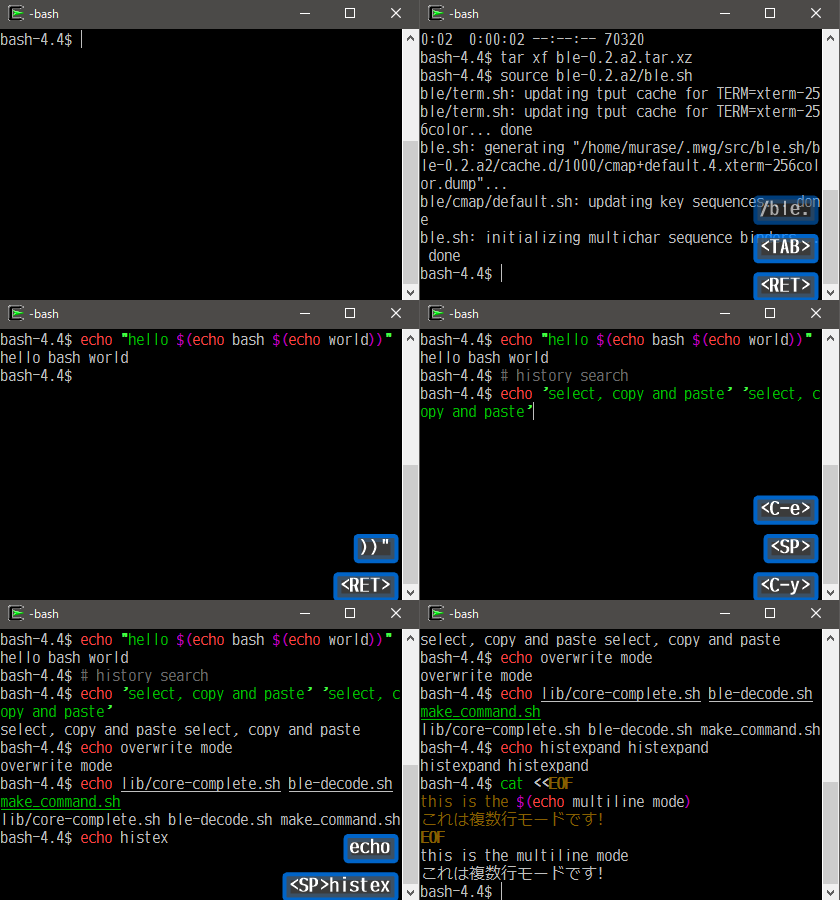
Demo (version 0.2)
History and roadmap
My little experiment took place in one corner of my bashrc at the end of May 2013 after I enjoyed an article on zsh-syntax-highlighting.
I initially thought something could be achieved by writing a few hundred lines of code
but soon realized that everything needs to be re-implemented for the authentic support of syntax highlighting in Bash.
I decided to make it as an independent script ble.sh.
The name stemmed from that of Zsh's line editor, ZLE (Zsh Line Editor), but suffixed with .sh for the implication of being written in a shell script.
I'm occasionally asked about the pronunciation of ble.sh, but you can pronounce it as you like.
After the two-week experiment, I was satisfied with my conclusion that it is possible to implement a full-featured line editor in Bash that satisfies actual daily use.
The real efforts to improve the prototype implementation for real uses started in February 2015.
I relea
📈 近 7 天 Star 趋势
🏆 排名变化趋势
📋 历史上榜记录
| 日期 | 榜单 | 排名 | 周期新增 | 总 STAR |
|---|