📄 仓库 README
在 GitHub 查看 ↗
Boring Notch



Say hello to Boring Notch, the coolest way to make your MacBook’s notch the star of the show! Say goodbye to boring status bars: with Boring Notch, your notch transforms into a dynamic music control center, complete with a vibrant visualizer and all the essential music controls you need. But that’s just the start! Boring Notch also offers calendar integration, a handy file shelf with AirDrop support, a complete MacOS HUD replacement and more!
Installation
System Requirements: - macOS 14 Sonoma or later - Apple Silicon or Intel Mac
Option 1: Download and Install Manually
Once downloaded, open the .dmg and move Boring Notch to your /Applications folder.
[!IMPORTANT] We don't have an Apple Developer account (yet 👀), so macOS will warn you that Boring Notch is from an unidentified developer on first launch. This is expected behavior.
You'll need to bypass this before the app will open. You only need to do this once. Use one of the methods below.
Recommended: Terminal (Always Works)
This is the quickest and easiest method. It only requires a single command and works consistently for all users. System Settings can sometimes fail and won't work for non-admin users.
After moving Boring Notch to your Applications folder, run:
xattr -dr com.apple.quarantine "/Applications/Boring Notch.app"
Then open the app normally.
Alternative: System Settings
[!NOTE] This method doesn't work for all users. If this doesn't work, use the Terminal method above.
- Try to open the app — you'll see a security warning.
- Click OK to dismiss it.
- Open System Settings > Privacy & Security.
- Scroll to the bottom and click Open Anyway next to the Boring Notch warning.
- Confirm if prompted.
Option 2: Install via Homebrew
You can also install using Homebrew. The Homebrew installation automatically bypasses the macOS security warning described above.
brew install --cask TheBoredTeam/boring-notch/boring-notch
Usage
- Launch the app, and voilà—your notch is now the coolest part of your screen.
- Hover over the notch to see it expand and reveal all its secrets.
- Use the controls to manage your music like a rockstar.
- Click the star in your menu bar to customize your notch to your heart's content.
📋 Roadmap
- [x] Playback live activity 🎧
- [x] Calendar integration 📆
- [x] Reminders integration ☑️
- [x] Mirror 📷
- [x] Charging indicator and current percentage 🔋
- [x] Customizable gesture control 👆🏻
- [x] Shelf functionality with AirDrop 📚
- [x] Notch sizing customization, finetuning on different display sizes 🖥️
- [x] System HUD replacements (volume, brightness, backlight) 🎚️💡⌨️
- [ ] Bluetooth Live Activity (connect/disconnect for bluetooth devices)
- [ ] Weather integration ⛅️
- [ ] Customizable Layout options 🛠️
- [ ] Lock Screen Widgets 🔒
- [ ] Extension system 🧩
- [ ] Notifications (under consideration) 🔔
Building from Source
Prerequisites
- macOS 15.6 or later
- Xcode 26 or later
Installation
-
Clone the Repository:
bash git clone https://github.com/TheBoredTeam/boring.notch.git cd boring.notch -
Open the Project in Xcode:
bash open boringNotch.xcodeproj -
Build and Run:
- Click the "Run" button or press
Cmd + R. Watch the magic unfold!
- Click the "Run" button or press
🤝 Contributing
We’re all about good vibes and awesome contributions! Read CONTRIBUTING.md to learn how you can join the fun!
Join our Discord Server

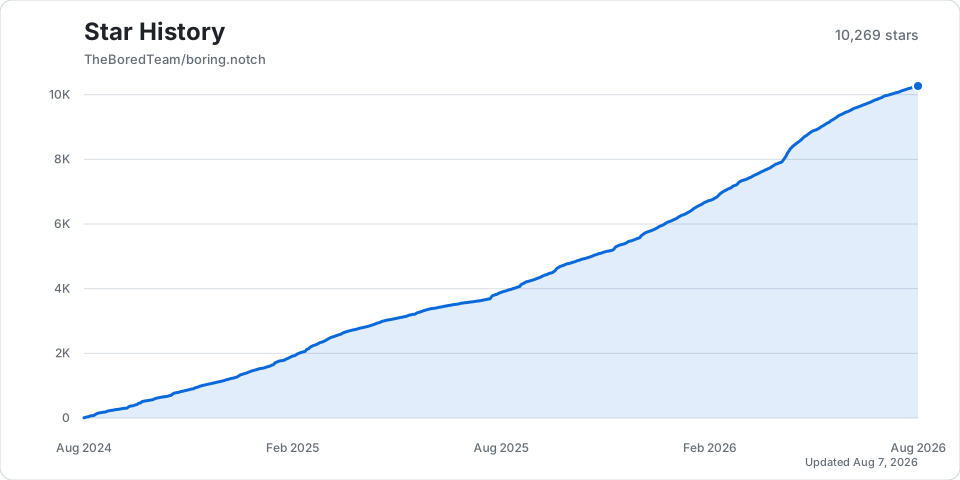
Star History
Support us on Ko-fi!
🎉 Acknowledgments
We would like to express our gratitude to the authors and maintainers of the open-source projects that made this possible.
Notable Projects
- MediaRemoteAdapter – An open-source project that allowed us to use the Now Playing source in macOS 15.4+
- NotchDrop – An open-source project that has been instrumental in developing the first version of the "Shelf" feature in Boring Notch.
For a full list of licenses and attributions, please see the Third-Party Licenses file.
Icon credits: @maxtron95
Website credits: @himanshhhhuv
- SwiftUI: For making us look like coding wizards.
- You: For being awesome and checking out boring.notch!
📈 近 7 天 Star 趋势
🏆 排名变化趋势
📋 历史上榜记录
| 日期 | 榜单 | 排名 | 周期新增 | 总 STAR |
|---|