QL-Win / QuickLook
← 返回首页
Bring macOS “Quick Look” feature to Windows
📄 仓库 README
在 GitHub 查看 ↗来自 GitHub 仓库自述文件 · 版权归原作者所有

QuickLook
 Instant File Previews, Just Press Space
**The most powerful Quick Look implementation for Windows**





 The Problem |
 Superpowers |
 Get Started |
 Extend |
 Community |
💡 The Problem
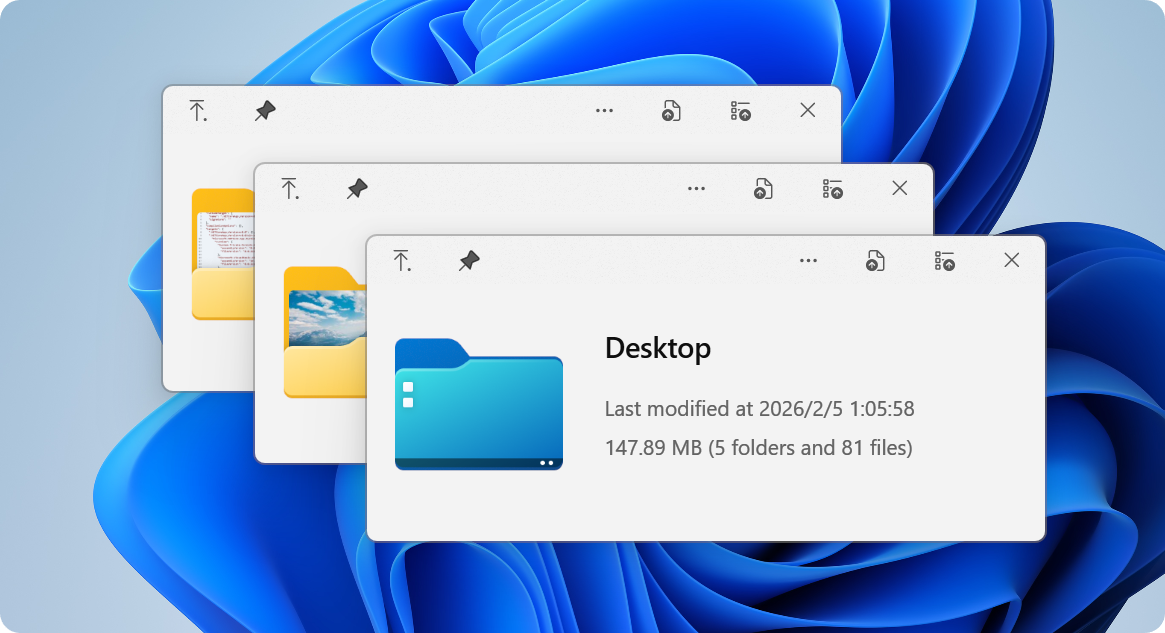
| ### Ever wished Windows had macOS's Quick Look? You know the drill: you want to peek at a file, so you double-click, wait for an app to launch, view the file, close the app... **exhausting**, right? macOS users? They just press Space. Instant preview. **Any file**. **Now Windows has it too.** 🎉 QuickLook brings that buttery-smooth, instant-preview experience to Windows. No more waiting. No more opening heavy applications just to peek at a document. |
|
🚀 Superpowers
### What Makes QuickLook Extraordinary
### ⚡️ **Lightning Speed**
 **Instant previews** with zero lag
Native performance that feels like magic
Hardware-accelerated rendering
**Instant previews** with zero lag
Native performance that feels like magic
Hardware-accelerated rendering
|
### 🎨 **Gorgeous Design**
 **Fluent Design System** integration
Beautiful on 4K displays
Touch-optimized interface
**Fluent Design System** integration
Beautiful on 4K displays
Touch-optimized interface
|
### 🌈 **100+ Formats**
 Images, videos, documents, code
**3D models**, archives, fonts
Extensible with plugins
Images, videos, documents, code
**3D models**, archives, fonts
Extensible with plugins
|
| #### 📸 **Visual Files** - 🖼️ Images (JPEG, PNG, GIF, WebP, RAW) - 🎬 Videos (MP4, AVI, MKV, MOV) - 🎨 Photoshop (PSD), Illustrator (AI) - 📐 3D Models (OBJ, STL, FBX) - 🎭 Animated GIFs & APNGs #### 📄 **Documents** - 📝 PDF, Word, Excel, PowerPoint - 📋 Text files with syntax highlighting - 📊 Markdown with live rendering - 📜 E-books (EPUB, MOBI) - 📑 Comics (CBZ, CBR) | #### 💻 **Developer Files** - 🐍 Python, JavaScript, C++, Rust - 🌐 HTML, CSS, JSON, XML - ⚙️ Config files (YAML, TOML, INI) - 📦 Archives (ZIP, RAR, 7Z, TAR) - 🔧 Binary files with hex view #### 🎵 **Media** - 🎵 Audio (MP3, FLAC, WAV, AAC) - 🎼 Sheet music - 🎨 Fonts (TTF, OTF, WOFF) - 🖌️ Vector graphics (SVG, EPS) - 📹 Subtitles (SRT, ASS) |
### 🎯 **Works Everywhere**
**File Explorer**
 Native integration
|
**Open/Save Dialogs**
 System-wide support
|
**3rd Party Managers**
 Total Commander, xplorer²
|
**Cloud Storage**
 OneDrive, Dropbox ready
|
📦 Get Started
### Choose Your Adventure
| Feature | Store | Installer | Scoop | Nightly | |---------|-------|-----------|-------|---------| | Auto-updates | ✅ | ⚠️ | ✅ | ⚠️ | | Open/Save dialogs | ❌ | ✅ | ✅ | ✅ | | Portable mode | ❌ | ✅ | ❌ | ✅ | | Stability | ✅✅✅ | ✅✅✅ | ✅✅✅ | ✅✅ | 📖 [Read the full comparison](https://github.com/QL-Win/QuickLook/wiki/Differences-Between-Distributions)
 ### **Microsoft Store**
**Recommended for most users**
✅ Automatic updates
✅ Sandboxed security
✅ One-click install
### **Microsoft Store**
**Recommended for most users**
✅ Automatic updates
✅ Sandboxed security
✅ One-click install
 ⚠️ Limited Open/Save dialog support
|
### **Installer**
**Full-featured experience**
✅ Complete functionality
✅ Open/Save dialog support
✅ Portable option available
 💎 Get the full power
|
 ### **Scoop**
**For command-line lovers**
✅ Easy updates
✅ Reproducible installs
✅ Version management
### **Scoop**
**For command-line lovers**
✅ Easy updates
✅ Reproducible installs
✅ Version management
|
 ### **Nightly**
**Live on the edge**
✅ Latest features
✅ Bug fixes first
⚠️ May be unstable
### **Nightly**
**Live on the edge**
✅ Latest features
✅ Bug fixes first
⚠️ May be unstable
 🌙 Experimental builds
|
🤔 Not sure which version to choose?
| Feature | Store | Installer | Scoop | Nightly | |---------|-------|-----------|-------|---------| | Auto-updates | ✅ | ⚠️ | ✅ | ⚠️ | | Open/Save dialogs | ❌ | ✅ | ✅ | ✅ | | Portable mode | ❌ | ✅ | ❌ | ✅ | | Stability | ✅✅✅ | ✅✅✅ | ✅✅✅ | ✅✅ | 📖 [Read the full comparison](https://github.com/QL-Win/QuickLook/wiki/Differences-Between-Distributions)
⚡ Quick Start in 10 Seconds
|
**💡 Pro Tips:** - QuickLook lives in your system tray - Works with **any file** in File Explorer - Use arrow keys to preview multiple files - Press `Esc` or `Space` again to close - Drag files directly from the preview! |
⌨️ Master the Shortcuts
### Your New Superpowers
> **💡 Pro Tip:** You can navigate files using arrow keys even when the preview window isn't focused!
| ### 🎮 **Basic Controls** | Key | Action | |-----|--------| | Space | Toggle preview | | Esc Space | Close window | | Enter | Open file | | ↑ ↓ | Next/Previous | | ### 🔍 **Navigation** | Key | Action | |-----|--------| | ← → | Navigate files | | Mouse Click | Select file | | Page Up Down | Scroll content | | Home End | Jump to start/end | | ### 🎨 **Advanced** | Key | Action | |-----|--------| | Wheel | Zoom (images) | | Ctrl+Wheel | Zoom (PDFs) | | L-Click Drag | Rotate 3D | | M-Click Drag | Pan 3D | |
> **💡 Pro Tip:** You can navigate files using arrow keys even when the preview window isn't focused!
🧩 Extend
### Supercharge QuickLook with Plugins
*Transform QuickLook into a universal file viewer*
### 📦 How to Install or Upgrade Plugins
### 📦 How to Remove Plugins


 ### **OfficeViewer**
Preview **Word, Excel & PowerPoint** files
**No Microsoft Office required!**
### **OfficeViewer**
Preview **Word, Excel & PowerPoint** files
**No Microsoft Office required!**

|
 ### **PdfViewer-Native**
Enhanced PDF viewing with **WebView2**
Modern, fast, feature-rich
### **PdfViewer-Native**
Enhanced PDF viewing with **WebView2**
Modern, fast, feature-rich

|
 ### **PostScriptViewer**
Preview `.ps` and `.eps` files
Perfect for designers
### **PostScriptViewer**
Preview `.ps` and `.eps` files
Perfect for designers

|
 ### **CADImport**
View CAD files natively
`.dwg`, `.dxf`, `.plt`, `.cgm`
### **CADImport**
View CAD files natively
`.dwg`, `.dxf`, `.plt`, `.cgm`

|
### 📦 How to Install or Upgrade Plugins
| **1️⃣ Download** Get the `.qlplugin` file | **2️⃣ Install** Ensure QuickLook is currently running, select the file and press `Spacebar`. | **3️⃣ Restart** Click on the `Install` button, then restart QuickLook. |
| **1️⃣ Quit** Quit QuickLook. | **2️⃣ Navigate** Navigate to the [Data location](https://github.com/QL-Win/QuickLook/wiki/Differences-Between-Distributions#user-data-location). | **3️⃣ Remove** You should find several folders. Remove the one you do not want to use. |
💖 Community
### Join Thousands of Happy Users
### 👨💻 For Developers Interested in contributing? Check out our development resources:


 ### **QQ Group**
Join our Chinese community
**371388501**
### **QQ Group**
Join our Chinese community
**371388501**

|
 ### **Translate**
Help QuickLook speak your language
Make it accessible
### **Translate**
Help QuickLook speak your language
Make it accessible

|
 ### **Star Us**
Show your support
It means a lot!
### **Star Us**
Show your support
It means a lot!

|
### 👨💻 For Developers Interested in contributing? Check out our development resources:
🙏 Credits
### Built with Love by Amazing People
 **Design Team**
[@OiCkilL](https://twitter.com/OiCkilL)
[@QubitsDev](https://twitter.com/qubitsdev)
[@Donno](https://github.com/Donnnno)
[@Shomnipotence](https://github.com/Shomnipotence)
*Fluent UI & Icons*
**Design Team**
[@OiCkilL](https://twitter.com/OiCkilL)
[@QubitsDev](https://twitter.com/qubitsdev)
[@Donno](https://github.com/Donnnno)
[@Shomnipotence](https://github.com/Shomnipotence)
*Fluent UI & Icons*
|
 **Contributors**
[Our Amazing Team](https://github.com/QL-Win/QuickLook/graphs/contributors)
*Code, translations & ideas*
**Contributors**
[Our Amazing Team](https://github.com/QL-Win/QuickLook/graphs/contributors)
*Code, translations & ideas*
|
 **Open Source**
[Libraries We Use](https://github.com/QL-Win/QuickLook/wiki/On-the-Shoulders-of-Giants)
*Standing on giants*
**Open Source**
[Libraries We Use](https://github.com/QL-Win/QuickLook/wiki/On-the-Shoulders-of-Giants)
*Standing on giants*
|
 **You!**
Every User Matters
*Thank you for using QuickLook*
**You!**
Every User Matters
*Thank you for using QuickLook*
|
📜 License

**QuickLook is free and open source under [GPL-3.0](https://opensource.org/licenses/GPL-3.0)** *Free software, free forever. No ads, no tracking, no premium tiers.*
**Need commercial licensing?** Contact us for sublicensing options.
## ⭐ Like QuickLook? Star the repo! **Your support keeps this project alive and improving**





Note: The official website content may be inaccurate or out of date. To help maintain the site, please submit a PR to QuickLook Website Repository
Made with ❤️ by the QuickLook community

📈 近 7 天 Star 趋势
每日新增 Star(柱)与累计 Star(线)· 数据来自 GitHub
🏆 排名变化趋势
在各榜单中的排名历史(数字越小越靠前)
📋 历史上榜记录
每次快照的详细数据
| 日期 | 榜单 | 排名 | 周期新增 | 总 STAR |
|---|