📄 仓库 README
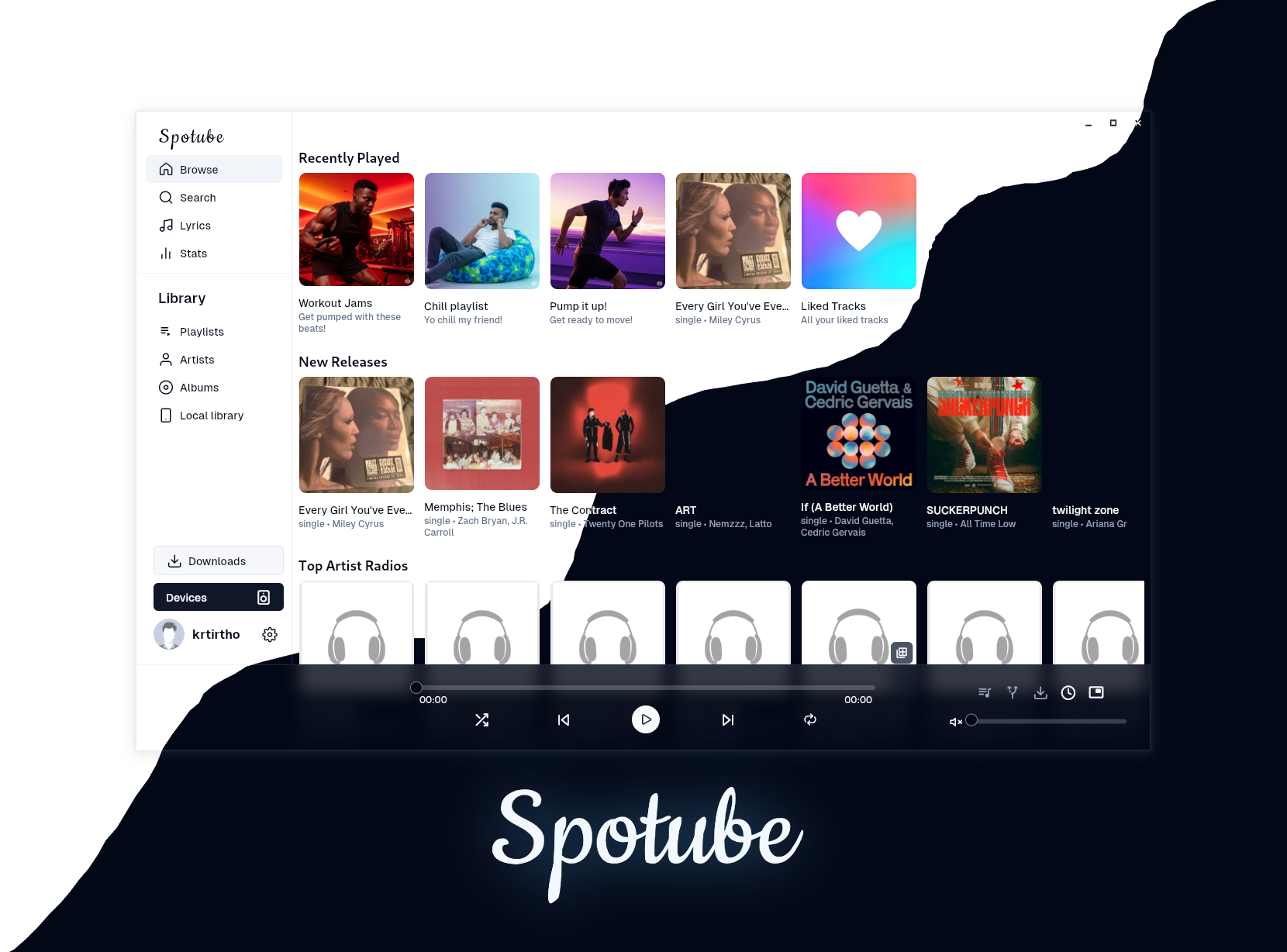
在 GitHub 查看 ↗ A cross-platform extensible open-source music streaming platform.
Bring your own music metadata/playlist/audio-source with plugins created by community or by yourself. A small step towards the decentralized music streaming era!



 [](https://news.ycombinator.com/item?id=39066136)
[](https://news.ycombinator.com/item?id=39066136)
 ---
---


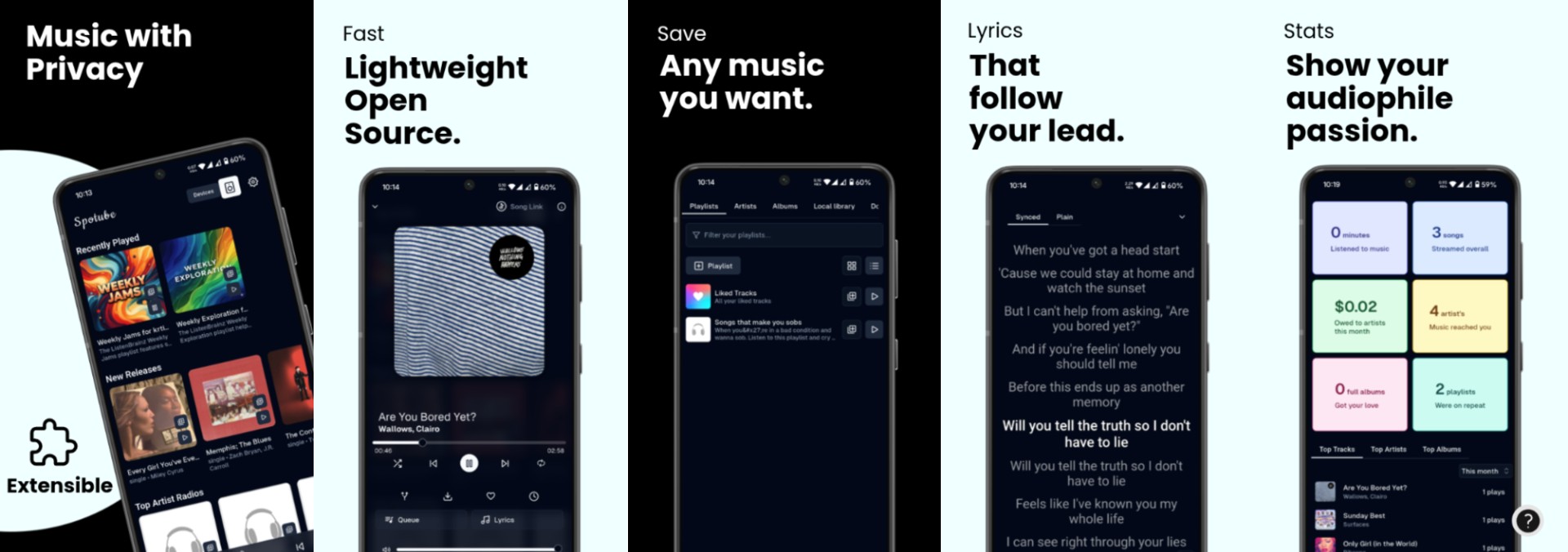
🌃 Features
- 🧩 Plugin powered, supports any platform or custom music service through plugins.
- 🗺️ Community driven plugins for popular platforms or create your own.
- ⬇️ Freely downloadable tracks with tagged metadata.
- 🖥️ 📱 Cross-platform support.
- 🪶 Small size & less data usage.
- 🕒 Time synced lyrics regardless of the plugin support.
- ✋ No telemetry, diagnostics or user data collection.
- 🚀 Native performance.
- 📖 Open source/libre software.
- 🔉 Playback control is done locally, not on the server.
⬇️ Download
Download Spotube from the Official Website: https://spotube.cc
🔄 Nightly Builds
Grab the latest nightly builds of Spotube from the Offical Website.
🕳️ Building from source

Spotube is a Kotlin Multiplatform + Compose Multiplatform app. The desktop app is built with the Nucleus Gradle plugin and released as a GraalVM native image: an ahead-of-time compiled binary that needs no JVM installed.
Prerequisites
- JDK 21 to run Gradle. The Gradle daemon JDK and the GraalVM toolchain are provisioned automatically.
- Rust (
rustup+cargo). ThecomposeAppRust library is built through Gobley. - Android SDK, only for Android builds.
- Unpublished dependency. One dependency isn't on Maven Central yet. Clone it and run
./gradlew publishToMavenLocalin it: - kdroidFilter/ComposeNativeWebview, at the commit pinned in
spotube-release-binary.yml(COMPOSE_WEBVIEW_COMMIT) - Linux runtime libraries (needed to run the app, including
:composeApp:run). The.deb/.rpminstall these as dependencies from your distro. For a source build, install them yourself, including VLC. Only the.AppImageis self-contained (it bundles VLC, GTK 3 and WebKitGTK, and uses just the host's glibc, graphics, X11 and sound libraries):
| Distro | Command |
|---|---|
| Debian/Ubuntu | sudo apt-get install libvlc5 vlc-plugin-base libwebkit2gtk-4.1-0 libgtk-3-0 libasound2 libgl1 libxtst6 libxi6 libxrender1 |
| Fedora | sudo dnf install vlc-libs webkit2gtk4.1 gtk3 alsa-lib mesa-libGL libXtst libXi libXrender. vlc-libs is only in RPM Fusion, so enable it first. |
| Arch / CachyOS / Manjaro | sudo pacman -S vlc webkit2gtk-4.1 gtk3 alsa-lib libglvnd libxtst libxi libxrender |
| openSUSE | sudo zypper install libvlc5 libwebkit2gtk-4_1-0 libgtk-3-0 libasound2 Mesa-libGL1 libXtst6 libXi6 libXrender1 (for wide codec support, switch to the Packman repo's VLC) |
Arch-based distros and openSUSE have no native package here. Use the .AppImage. The .rpm is built with Fedora package names, so it won't resolve on openSUSE.
On Ubuntu 24.04+/Debian 13 libgtk-3-0 and libasound2 are named libgtk-3-0t64 and libasound2t64; apt resolves this automatically.
Always use the Gradle wrapper (./gradlew, or gradlew.bat on Windows).
Development
./gradlew :composeApp:run                    # desktop (JVM), fastest edit/run loop
./gradlew :composeApp:assembleStableDebug    # Android debug APK (or assembleNightlyDebug)
Development builds stay fast. The release-only optimizations (the Rust release profile with LTO and symbol stripping, the native image, native-library pruning) are only applied when you build something to ship. See Production vs development builds.
Building the desktop app (GraalVM native image)
Native toolchain
Nucleus downloads and caches GraalVM CE under ~/.gradle/nucleus/graalvm on the first native build. Set GRAALVM_HOME to use your own GraalVM instead. Each OS also needs a native C toolchain:
| OS | Requirements |
|---|---|
| Linux | gcc, zlib headers, patchelf; plus rpm for .rpm packages, fuse for .AppImage, and, for the AppImage's bundled libraries, zstd (plus ar/tar and readelf, from binutils). Debian/Ubuntu: sudo apt-get install build-essential zlib1g-dev patchelf rpm fuse zstd. Fedora: sudo dnf install gcc zlib-devel patchelf rpm-build fuse zstd (also install the Linux runtime libraries to run what you build) |
| macOS | Xcode Command Line Tools (xcode-select --install) |
| Windows | Visual Studio Build Tools with the "Desktop development with C++" workload. Build from an "x64 Native Tools" prompt if native-image can't find MSVC. |
A native build is a whole-program compile. It takes about 10 minutes, uses every CPU core, and peaks at roughly 15 GB of RAM (it gets slower, not broken, with less). That only happens for the native tasks below, never for run.
Build and run
# App folder: binary + its native libs, in composeApp/build/compose/binaries/main/graalvm-app/
./gradlew :composeApp:createGraalvmNativeDistributable

# Run that folder's binary directly
./composeApp/build/compose/binaries/main/graalvm-app/org.spotube.spotube/spotube

# Or build and launch in one step
./gradlew :composeApp:runGraalvmNativeDistributable
Keep the spotube binary next to the .so/.dll/lib/ files it was built with; it loads them from its own folder.
Installers
Each OS can only build its own installers:
| OS | Command | Output |
|---|---|---|
| Linux | ./gradlew :composeApp:packageGraalvmDeb :composeApp:packageGraalvmRpm, then ./gradlew :composeApp:packageGraalvmAppImage -PappImage=true |
composeApp/build/compose/binaries/main/graalvm-{deb,rpm,appimage}/ |
| Windows | ./gradlew :composeApp:packageGraalvmExe (or packageGraalvmMsi) |
composeApp/build/compose/binaries/main/graalvm-exe/ |
| macOS | ./gradlew :composeApp:packageGraalvmDmg |
composeApp/build/compose/binaries/main/graalvm-dmg/ |
Add -Pnightly=true for the nightly channel (separate icons and name).
The .deb and .rpm use your distro's shared libraries and declare them as dependencies, so the package manager installs them (on Fedora, vlc-libs needs RPM Fusion enabled). The .AppImage is the self-contained one: it bundles VLC, GTK 3 and WebKitGTK (see What the AppImage bundles).
What the AppImage bundles
Build it with ./gradlew :composeApp:packageGraalvmAppImage -PappImage=true. Without -PappImage=true nothing is bundled and the app uses the system libraries, which is what the .deb/.rpm and :composeApp:run do.
The bundle follows the AppImage exclude list and what Tauri apps ship. It carries VLC (audio-only, from the vlcj-bundler plugin's bundleVlc option), GTK 3, WebKitGTK 4.1, GLib/GIO, pango/cairo and their dependencies, plus glib-networking for HTTPS in the webview. It leaves the host's glibc, libstdc++, libz, GL/EGL/DRM, X11/xcb, ALSA, fontconfig/freetype/harfbuzz and the Wayland libraries alone, so the host's graphics, display and sound stack is used. Everything is taken from the Ubuntu 24.04 archive, so the AppImage needs glibc 2.38 or newer.
How it works, in short:
- DownloadLinuxGtkBundleTask downloads the packages, keeps the libraries reachable from GTK/WebKit and relocates them with patchelf. Needs ar, tar, zstd, readelf and patchelf.
- WebKitGTK has its helper-process path compiled in, so the library is patched to look relative to the working directory, and at startup the app moves there (AppImageEnvironment). It also points GIO_EXTRA_MODULES at the bundled TLS module and sets WEBKIT_DISABLE_DMABUF_RENDERER=1, because the bundled WebKitGTK 2.44's dmabuf renderer never paints (or aborts) against a newer host Mesa/compositor. The display backend is left alone: forcing X11 doesn't help, since the webview doesn't paint on XWayland either.
- Startup order matters: main() calls GraalVmInitializer.initialize() first, since the VLC loader and the environment setup read compose.application.resources.dir.
Reflection metadata (when a feature breaks only in the native build)
A native image is a closed world: anything the app reaches through reflection, JNI or JNA (vlcj, the Zipline/QuickJS plugin engine, NewPipe, ktor, datastore, …) must be declared at build time. Nucleus generates most of this automatically. The rest is in composeApp/graalvm/reachability-metadata.json.
If something works in :composeApp:run but throws ClassNotFoundException, NoSuchMethodException, MissingReflectionRegistrationError or similar in the native binary, record what's missing:
./gradlew :composeApp:runWithNativeAgent
The app starts on the JVM with GraalVM's tracing agent attached. Use the broken feature (and anything near it), then close the window normally: the recorded entries are merged into composeApp/graalvm/ only on a clean exit, not with Ctrl+C. Commit the updated JSON and rebuild the native image.
./gradlew :composeApp:runGraalvmNative gives a faster debugging loop: a quick-build (-Ob) native image that reports exactly which registration is missing.
Keep the hand-written uk.co.caprica.vlcj.binding.lib.LibVlc entry. JNA's direct mapping looks up its native methods through reflection, and without the entry, playback fails to initialize.
Production vs development builds
Production mode is switched on automatically when you ask Gradle for a shippable artifact: any package*, create*, notarize* or nativeImageCompile task. You can force it either way with -Pproduction=true or -Pproduction=false.
Development (run, debug builds) |
Production (installers, native image) | |
|---|---|---|
| Rust library (desktop) | debug profile, fast incremental compile |
release profile with LTO, single codegen unit, stripped (31 MB → 1.8 MB) |
| Desktop app | JVM, hot-reloadable | GraalVM native image, -Os (size-optimized) |
| Native libraries | everything on the classpath | only the host OS/CPU's natives; other OSes' and CPUs' libraries are pruned from the uber JAR the image is compiled from |
| Skia (Skiko) | extracted from the JAR | loaded from lib/ next to the binary, not embedded a second time |
| JDK runtime libs (Linux) | n/a | native-image's ~10 KB libjvm.so/libjava.so shims instead of the JDK's (28 MB libjvm.so) |
Android picks the Rust profile from its build type (debug or release) on its own.
Releases
Releases are built by spotube-release-binary.yml, run manually (workflow_dispatch) as stable, beta or nightly. A beta is the stable build released like a stable release (draft, not a pre-release), tagged v<version>-beta.N (set betaNumber in composeApp/build.gradle.kts to N, and back to null for stable). Each desktop platform (Linux x86_64 and aarch64, Windows, macOS) builds its native installers on its own runner. Android builds a signed APK.
👥 The Spotube team
- Kingkor Roy Tirtho - The Founder, Maintainer and Lead Developer
- Owen Connor - The Cool Discord Moderator
- Piotr Rogowski - The MacOS Developer
- Rusty Apple - The Mysterious Unknown Guy
💼 License
Spotube is open source and licensed under the AGPL-3.0-or-later License.
© Copyright Spotube 2026
📈 近 7 天 Star 趋势
🏆 排名变化趋势
📋 历史上榜记录
| 日期 | 榜单 | 排名 | 周期新增 | 总 STAR |
|---|