HKUDS / LightRAG
← 返回首页
[EMNLP2025] LightRAG: Simple and Fast Retrieval-Augmented Generation
📄 仓库 README
在 GitHub 查看 ↗来自 GitHub 仓库自述文件 · 版权归原作者所有












🎉 News
- [2026.07]🎯[New Feature]: Add Smart Heading recognition feature for word documents.
- [2026.05]🎯[New Feature]: Merge RagAnything into LightRAG🎉. Multimodal content parsing and extraction via MinerU / Docling services.
- [2026.05]🎯[New Feature]: Introducing four selectable text chunking strategies:
Fix,Recursive,Vector, andParagraph. - [2026.05]🎯[New Feature]: Role-specific LLM configuration support, 4 distinct roles: EXTRACT, QUERY, KEYWORDS, and VLM, with independent LLM settings.
- [2026.03]🎯[New Feature]: Integrated OpenSearch as a unified storage backend, providing comprehensive support for all four LightRAG storage.
- [2026.03]🎯[New Feature]: Introduced a setup wizard. Support for local deployment of embedding, reranking, and storage backends via Docker.
- [2025.11]🎯[New Feature]: Integrated RAGAS for Evaluation and Langfuse for Tracing. Updated the API to return retrieved contexts alongside query results to support context precision metrics.
- [2025.10]🎯[Scalability Enhancement]: Eliminated processing bottlenecks to support Large-Scale Datasets Efficiently.
- [2025.09]🎯[New Feature] Enhances knowledge graph extraction accuracy for Open-Sourced LLMs such as Qwen3-30B-A3B.
- [2025.08]🎯[New Feature] Reranker is now supported, significantly boosting performance for mixed queries (set as default query mode).
- [2025.08]🎯[New Feature] Added Document Deletion with automatic KG regeneration to ensure optimal query performance.
- [2025.06]🎯[New Release] Our team has released RAG-Anything — an All-in-One Multimodal RAG system for seamless processing of text, images, tables, and equations.
- [2025.06]🎯[New Feature] LightRAG now supports comprehensive multimodal data handling through RAG-Anything integration, enabling seamless document parsing and RAG capabilities across diverse formats including PDFs, images, Office documents, tables, and formulas. Please refer to the new multimodal section for details.
- [2025.03]🎯[New Feature] LightRAG now supports citation functionality, enabling proper source attribution and enhanced document traceability.
- [2025.02]🎯[New Feature] You can now use MongoDB as an all-in-one storage solution for unified data management.
- [2025.02]🎯[New Release] Our team has released VideoRAG-a RAG system for understanding extremely long-context videos
- [2025.01]🎯[New Release] Our team has released MiniRAG making RAG simpler with small models.
- [2025.01]🎯You can now use PostgreSQL as an all-in-one storage solution for data management.
- [2024.11]🎯[New Resource] A comprehensive guide to LightRAG is now available on LearnOpenCV. — explore in-depth tutorials and best practices. Many thanks to the blog author for this excellent contribution!
- [2024.11]🎯[New Feature] Introducing the LightRAG WebUI — an interface that allows you to insert, query, and visualize LightRAG knowledge through an intuitive web-based dashboard.
- [2024.11]🎯[New Feature] You can now use Neo4J for Storage-enabling graph database support.
- [2024.10]🎯[New Feature] We've added a link to a LightRAG Introduction Video. — a walkthrough of LightRAG's capabilities. Thanks to the author for this excellent contribution!
- [2024.10]🎯[New Channel] We have created a Discord channel!💬 Welcome to join our community for sharing, discussions, and collaboration! 🎉🎉
Algorithm Flowchart
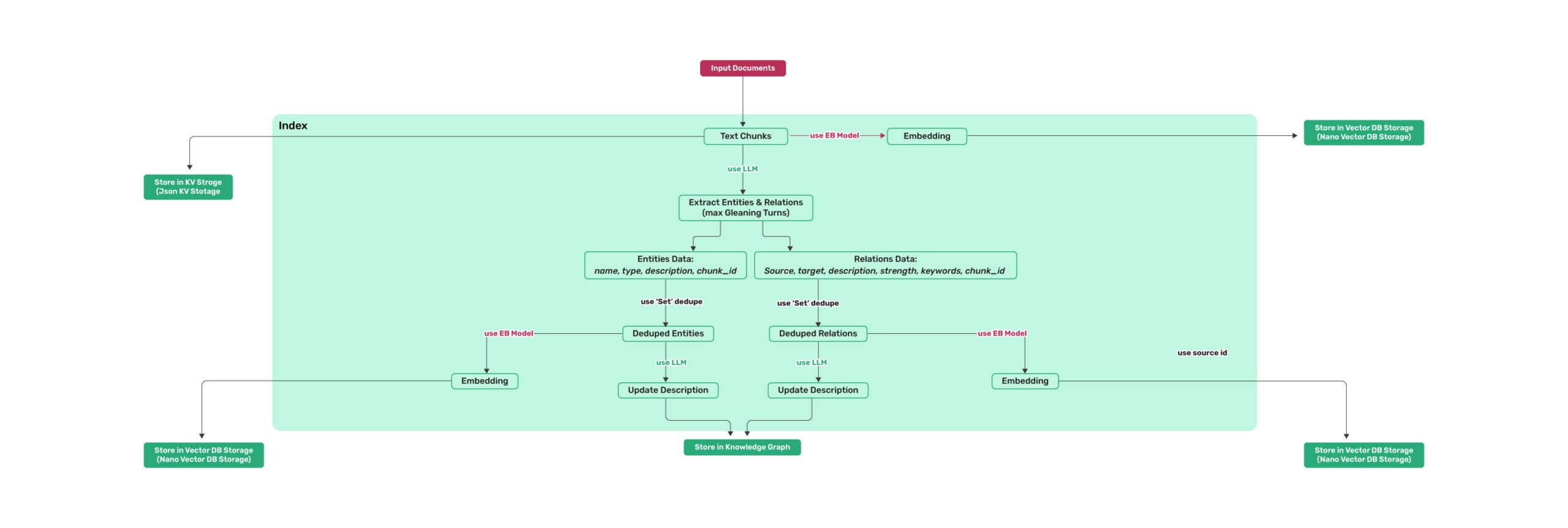 *Figure 1: LightRAG Indexing Flowchart - Img Caption : [Source](https://learnopencv.com/lightrag/)* 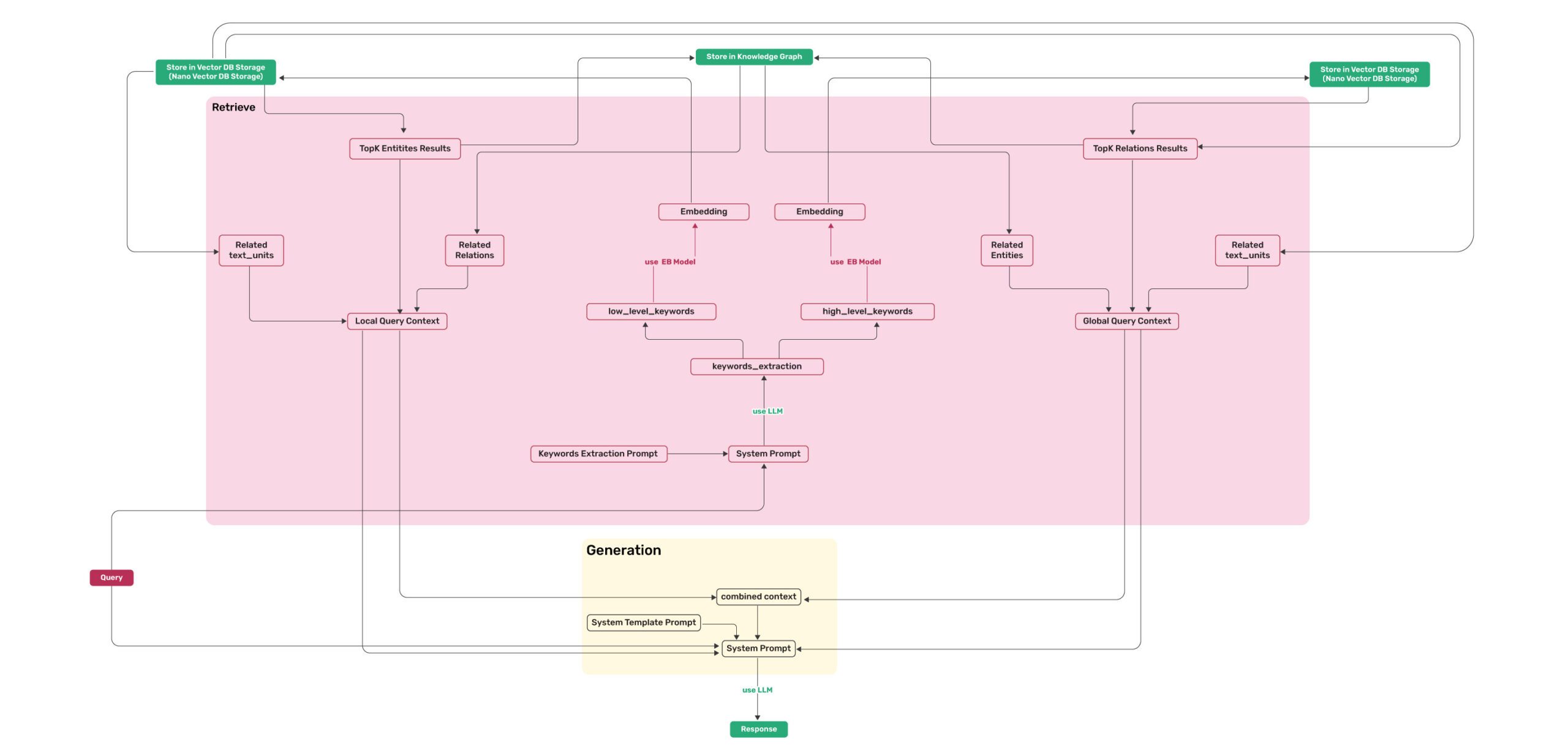 *Figure 2: LightRAG Retrieval and Querying Flowchart - Img Caption : [Source](https://learnopencv.com/lightrag/)*Installation
💡 Using uv for Package Management: This project uses uv for fast and reliable Python package management. Install uv first: curl -LsSf https://astral.sh/uv/install.sh | sh (Unix/macOS) or powershell -c "irm https://astral.sh/uv/install.ps1 | iex" (Windows)
Note: You can also use pip if you prefer, but uv is recommended for better performance and more reliable dependency management.
📦 Offline Deployment: For offline or air-gapped environments, see the Offline Deployment Guide for instructions on pre-installing all dependencies and cache files.
Install LightRAG Server
- Install from PyPI
### Install LightRAG Server as tool using uv (recommended)
uv tool install "lightrag-hku[api]"

### Or using pip
# python -m venv .venv
# source .venv/bin/activate  # Windows: .venv\Scripts\activate
# pip install "lightrag-hku[api]"

# Setup env file
# Obtain the env.example file by downloading it from the GitHub repository root
# or by copying it from a local source checkout.
cp env.example .env  # Update the .env with your LLM and embedding configurations
# Launch the server. It binds to all interfaces (0.0.0.0) by default.
# SECURITY: before exposing it on a network, configure authentication in .env
# (LIGHTRAG_API_KEY, or AUTH_ACCOUNTS together with TOKEN_SECRET), or bind to
# 127.0.0.1 for local-only access; without auth every endpoint is public.
# Note: the Ollama-compatible /api/* routes stay open by default for client
# compatibility; set WHITELIST_PATHS=/health to require auth on them too.
lightrag-server
- Installation from Source
```bash git clone https://github.com/HKUDS/LightRAG.git cd LightRAG
Bootstrap the development environment (recommended)
make dev sourc
📈 近 7 天 Star 趋势
每日新增 Star(柱)与累计 Star(线)· 数据来自 GitHub
🏆 排名变化趋势
在各榜单中的排名历史(数字越小越靠前)
📋 历史上榜记录
每次快照的详细数据
| 日期 | 榜单 | 排名 | 周期新增 | 总 STAR |
|---|