📄 仓库 README
在 GitHub 查看 ↗[](https://github.com/Greedeks/GTweak/blob/main/README.md) [](https://github.com/Greedeks/GTweak/blob/main/README-fr.md) [](https://github.com/Greedeks/GTweak/blob/main/README-he.md) [](https://github.com/Greedeks/GTweak/blob/main/README-hu.md) [](https://github.com/Greedeks/GTweak/blob/main/README-it.md) [](https://github.com/Greedeks/GTweak/blob/main/README-ko.md) [](https://github.com/Greedeks/GTweak/blob/main/README-pl.md) [](https://github.com/Greedeks/GTweak/blob/main/README-pt-br.md) [](https://github.com/Greedeks/GTweak/blob/main/README-ru.md) [](https://github.com/Greedeks/GTweak/blob/main/README-sl-si.md) [](https://github.com/Greedeks/GTweak/blob/main/README-th.md) [](https://github.com/Greedeks/GTweak/blob/main/README-tr.md) [](https://github.com/Greedeks/GTweak/blob/main/README-uk.md) [](https://github.com/Greedeks/GTweak/blob/main/README-zh-cn.md)
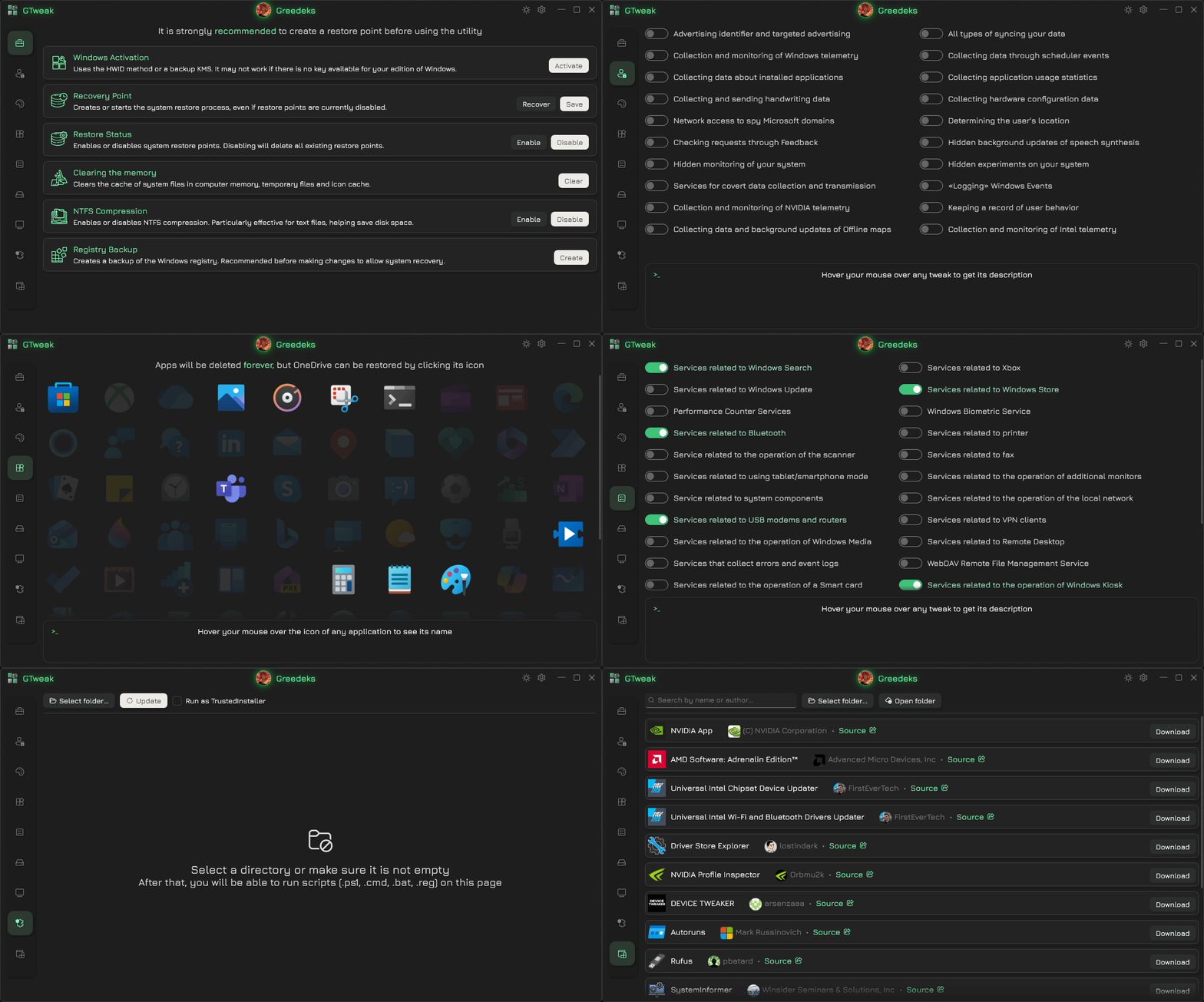


✦ Tweak Anything
Activation & Security - Activating Windows using HWID and KMS methods - Disabling Windows Defender, SmartScreen, Antimalware, VBS, and UAC
Updates & Services - Disabling and pausing Windows updates; removing temporary update files - Disabling unused and unnecessary system services
Privacy & Telemetry - Disabling keyloggers and telemetry for Windows, NVIDIA, and Intel - Disabling services, events, and Task Scheduler tasks related to user data collection - Blocking Microsoft shadow domains via hosts and firewall
Network & Diagnostics - Disabling unnecessary network protocols: Teredo, ISATAP, and IPv6 - Disabling built-in Windows diagnostic tools and disk defragmentation
Bloat & AI - Uninstalling OneDrive and Microsoft Edge with all associated data and WebView2 - Removing standard pre-installed UWP apps in Windows 10/11 - Removing and disabling AI assistants: Cortana, Copilot, and Recall
UI & Notifications - Customizing themes, window settings, taskbar layout, and icons - Disabling personalized ads, system banners, SCOOBE, notifications, and tips
Hardware & Performance - Configuring keyboard and mouse settings: key filtering, sticky keys, and pointer acceleration - Applying the ultimate performance power plan - Fixing Realtek High Definition Audio sound delay via power settings
Maintenance & Advanced
- Clearing RAM, temporary files, icon caches
- Compressing and decompressing files using NTFS to save space
- Viewing hardware configuration and monitoring system components
- Executing custom scripts (.ps1, .cmd, .bat, .reg) with TrustedInstaller privileges
✦ System Requirements
Windows support: since 10 (build 18362.116)
Installed platform: .NET Framework 4.8
Run as administrator: required
Antivirus: add to exclusions or disable
⚠️ The utility is designed exclusively for official Windows images downloaded from trusted sources. If you have installed a trimmed/modified version of Windows, you are solely responsible for its functionality.
✦ Dependencies
NuGet - TaskScheduler - Costura - Newtonsoft.Json - Ookii.Dialogs.Wpf - WPF-UI
System References - FirewallAPI - Windows.winmd
✦ Localization & Translation
Special Thanks to these amazing people for their translation contributions
How to Translate GTweak
**I. Submit a Pull Request** - Fork the repository [here](https://github.com/Greedeks/GTweak/fork). - Download the [English base file (Localize.xaml)](https://github.com/Greedeks/GTweak/blob/main/.Source/GTweak/Languages/en/Localize.xaml) **or** browse and copy from [existing translations](https://github.com/Greedeks/GTweak/tree/main/.Source/GTweak/Languages) in other languages. - Translate the file and save it in a folder named after your [language code](https://learn.microsoft.com/en-us/windows-hardware/manufacture/desktop/available-language-packs-for-windows?view=windows-11) (e.g., `ko` for Korean, `fr` for French).For regional variants: language-region (e.g., `pt-br` for Brazilian Portuguese, `zh-cn` for Simplified Chinese). - Place the folder in:
📂 .Source
└── 📁 GTweak
    └── 📁 Languages
        ├── 📁 en
        ├── 📁 ru
        └── 📁 [your-language-code]
**II. Request via Issue** - If you’re unfamiliar with Git, open a [Feature Request issue](https://github.com/Greedeks/GTweak/issues/new?template=%E2%9C%A8-feature-request-.yaml&title=[Feature]%20Add%20translation). - Specify your target [language code](https://learn.microsoft.com/en-us/windows-hardware/manufacture/desktop/available-language-packs-for-windows?view=windows-11). - Provide the name of your language written in your native language according to the [NOTE](https://github.com/Greedeks/GTweak/blob/main/.Source/GTweak/Languages/LanguageCatalog.xaml#L5-L11). - Attach your translated `Localize.xaml` file.
[!NOTE]
The current translation may be incomplete, as new features might have been added that haven't been translated yet. In such cases, those parts of the program will appear in English by default.
✦ Contact


📈 近 7 天 Star 趋势
🏆 排名变化趋势
📋 历史上榜记录
| 日期 | 榜单 | 排名 | 周期新增 | 总 STAR |
|---|