📄 仓库 README
在 GitHub 查看 ↗Bank of Anthos

Bank of Anthos is a sample HTTP-based web app that simulates a bank's payment processing network, allowing users to create artificial bank accounts and complete transactions.
Google uses this application to demonstrate how developers can modernize enterprise applications using Google Cloud products, including: Google Kubernetes Engine (GKE), Anthos Service Mesh (ASM), Anthos Config Management (ACM), Migrate to Containers, Spring Cloud GCP, Cloud Operations, Cloud SQL, Cloud Build, and Cloud Deploy. This application works on any Kubernetes cluster.
If you are using Bank of Anthos, please ★Star this repository to show your interest!
Note to Googlers: Please fill out the form at go/bank-of-anthos-form.
Screenshots
| Sign in | Home |
|---|---|
 |
 |
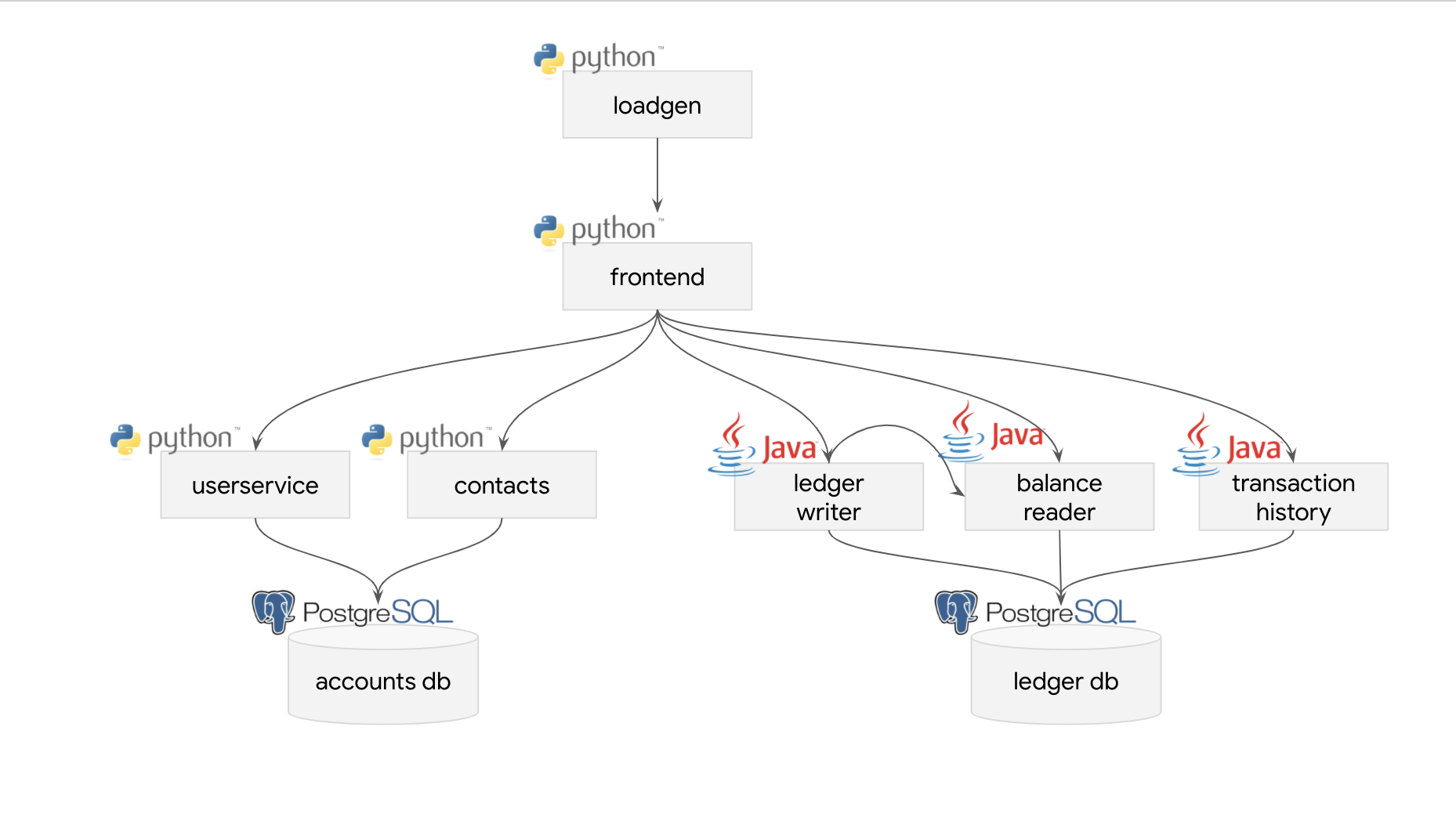
Service architecture
| Service | Language | Description |
|---|---|---|
| frontend | Python | Exposes an HTTP server to serve the website. Contains login page, signup page, and home page. |
| ledger-writer | Java | Accepts and validates incoming transactions before writing them to the ledger. |
| balance-reader | Java | Provides efficient readable cache of user balances, as read from ledger-db. |
| transaction-history | Java | Provides efficient readable cache of past transactions, as read from ledger-db. |
| ledger-db | PostgreSQL | Ledger of all transactions. Option to pre-populate with transactions for demo users. |
| user-service | Python | Manages user accounts and authentication. Signs JWTs used for authentication by other services. |
| contacts | Python | Stores list of other accounts associated with a user. Used for drop down in "Send Payment" and "Deposit" forms. |
| accounts-db | PostgreSQL | Database for user accounts and associated data. Option to pre-populate with demo users. |
| loadgenerator | Python/Locust | Continuously sends requests imitating users to the frontend. Periodically creates new accounts and simulates transactions between them. |
Interactive quickstart (GKE)
The following button opens up an interactive tutorial showing how to deploy Bank of Anthos in GKE:

Quickstart (GKE)
-
Ensure you have the following requirements: - Google Cloud project. - Shell environment with
gcloud,git, andkubectl. -
Clone the repository.
sh
   git clone https://github.com/GoogleCloudPlatform/bank-of-anthos
   cd bank-of-anthos/
- Set the Google Cloud project and region and ensure the Google Kubernetes Engine API is enabled.
sh
   export PROJECT_ID=<PROJECT_ID>
   export REGION=us-central1
   gcloud services enable container.googleapis.com \
     --project=${PROJECT_ID}
Substitute <PROJECT_ID> with the ID of your Google Cloud project.
- Create a GKE cluster and get the credentials for it.
sh
   gcloud container clusters create-auto bank-of-anthos \
     --project=${PROJECT_ID} --region=${REGION} \
     --labels dev-tutorial=bank-of-anthos
Creating the cluster may take a few minutes.
- Deploy Bank of Anthos to the cluster.
sh
   kubectl apply -f ./extras/jwt/jwt-secret.yaml
   kubectl apply -f ./kubernetes-manifests
- Wait for the pods to be ready.
sh
   kubectl get pods
After a few minutes, you should see the Pods in a Running state:
NAME                                  READY   STATUS    RESTARTS   AGE
   accounts-db-6f589464bc-6r7b7          1/1     Running   0          99s
   balancereader-797bf6d7c5-8xvp6        1/1     Running   0          99s
   contacts-769c4fb556-25pg2             1/1     Running   0          98s
   frontend-7c96b54f6b-zkdbz             1/1     Running   0          98s
   ledger-db-5b78474d4f-p6xcb            1/1     Running   0          98s
   ledgerwriter-84bf44b95d-65mqf         1/1     Running   0          97s
   loadgenerator-559667b6ff-4zsvb        1/1     Running   0          97s
   transactionhistory-5569754896-z94cn   1/1     Running   0          97s
   userservice-78dc876bff-pdhtl          1/1     Running   0          96s
- Access the web frontend in a browser using the frontend's external IP.
sh
   kubectl get service frontend | awk '{print $4}'
Visit http://EXTERNAL_IP in a web browser to access your instance of Bank of Anthos.
- Once you are done with it, delete the GKE cluster.
sh
   gcloud container clusters delete bank-of-anthos \
     --project=${PROJECT_ID} --region=${REGION}
Deleting the cluster may take a few minutes.
Additional deployment options
- Workload Identity: See these instructions.
- Cloud SQL: See these instructions to replace the in-cluster databases with hosted Google Cloud SQL.
- Multi Cluster with Cloud SQL: See these instructions to replicate the app across two regions using GKE, Multi Cluster Ingress, and Google Cloud SQL.
- Istio: See these instructions to configure an IngressGateway.
- Anthos Service Mesh: ASM requires Workload Identity to be enabled in your GKE cluster. See the workload identity instructions to configure and deploy the app. Then, apply
extras/istio/to your cluster to configure frontend ingress. - Java Monolith (VM): We provide a version of this app where the three Java microservices are coupled together into one monolithic service, which you can deploy inside a VM (eg. Google Compute Engine). See the ledgermonolith directory.
Documentation
- Development to learn how to run and develop this app locally.
- Environments to learn how to deploy on non-GKE clusters.
- Workload Identity to learn how to set-up Workload Identity.
- CI/CD pipeline to learn details about and how to set-up the CI/CD pipeline.
- Troubleshooting to learn how to resolve common problems.
Demos featuring Bank of Anthos
- Tutorial: Explore Anthos (Google Cloud docs)
- Tutorial: Migrating a monolith VM to GKE
- Tutorial: Running distributed services on GKE private clusters using ASM
- Tutorial: Run full-stack workloads at scale on GKE
- Architecture: Anthos on bare metal
- Architecture: Creating and deploying secured applications
- Keynote @ Google Cloud Next '20: Building trust for speedy innovation
- Workshop @ IstioCon '22: Manage and secure distributed services with ASM
📈 近 7 天 Star 趋势
🏆 排名变化趋势
📋 历史上榜记录
| 日期 | 榜单 | 排名 | 周期新增 | 总 STAR |
|---|