📄 仓库 README
在 GitHub 查看 ↗PoeRedux
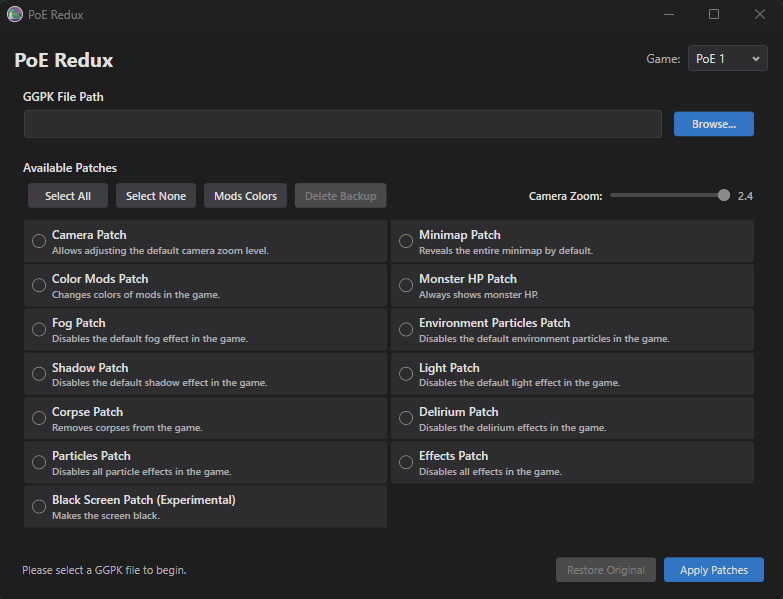
Features
PoE 1
- Camera Patch
-
Allows adjusting the default camera zoom level (1.2x to 2.4x)
-
Minimap Patch
-
Reveals the entire minimap by default
-
Monster HP Patch
-
Always shows monster HP bars
-
Color Mods Patch
-
Changes colors of mods in the game
-
Fog Patch
-
Disables the default fog effect in the game
-
Environment Particles Patch
-
Disables the default environment particles in the game
-
Shadow Patch
-
Disables the default shadow effect in the game
-
Light Patch
-
Disables the default light effect in the game
-
Corpse Patch
-
Removes corpses from the game
-
Delirium Patch
-
Disables the delirium effects in the game
-
Particles Patch
-
Disables all particle effects in the game
-
Effects Patch
-
Disables all effects in the game
-
Black Screen Patch (Experimental)
- Makes the screen black
PoE 2
- Camera Patch
-
Allows adjusting the default camera zoom level (1.2x to 2.4x)
-
Minimap Patch
-
Reveals the entire minimap by default
-
Color Mods Patch
-
Changes colors of mods in the game
-
Monster HP Patch
-
Always shows monster HP bars
-
Atlas Fog Patch
-
Removes fog from the Atlas
-
Fog Patch
-
Disables the default fog effect in the game
-
Rain Patch
-
Disables the default rain effect in the game
-
Clouds Patch
-
Disables the default clouds effect in the game
-
Environment Particles Patch
-
Disables the default environment particles in the game
-
Shadow Patch
-
Disables the default shadow effect in the game
-
Light Patch
-
Disables the default light effect in the game
-
Delirium Patch
-
Disables the delirium effects in the game
-
Particles Patch
-
Disables all particle effects in the game
-
Effects Patch
-
Disables all effects in the game
-
Black Screen Patch (Experimental)
- Makes the screen black
Installation
- Go to the Releases page
- Download the latest
PoeRedux-win-x64.exe - Run the executable
Note: The application is self-contained and includes all required dependencies.
Verifying Game Files
For Standalone Client Users
- Navigate to your Path of Exile install directory (e.g.,
C:\Program Files (x86)\Grinding Gear Games\Path of Exile\) - Right-click
PackCheck.exeand select Run as Administrator
For Steam Users
- Right-click Path of Exile in your Steam Library
- Select Properties > Local Files > Verify Game Cache
Note: File verification will restore original game files, removing any applied patches.
Backups
Before any patch overwrites a game file, PoeRedux saves the original bytes to a local backup file. The Restore Original button in the app uses this backup to revert all changes for the currently selected game.
Backups are stored per game under your Windows Local AppData folder:
%LOCALAPPDATA%\PoeRedux\Backups\
    poe1.bak    (Path of Exile 1)
    poe2.bak    (Path of Exile 2)
Note: If you verify game files via PackCheck or Steam, the backup is no longer needed — you can safely delete the .bak file manually.
System Requirements
- Operating System: Windows 10 version 2004 or later / Windows 11
- Runtime: .NET 10.0 Runtime (included in self-contained build)
Support
For issues, suggestions, or contributions, please visit the GitHub repository.
📈 近 7 天 Star 趋势
🏆 排名变化趋势
📋 历史上榜记录
| 日期 | 榜单 | 排名 | 周期新增 | 总 STAR |
|---|