📄 仓库 README
在 GitHub 查看 ↗NeuralNote 
NeuralNote is the audio plugin that brings state-of-the-art audio-to-MIDI transcription into your favorite Digital Audio Workstation. See the website.
[!NOTE] 🎉 NeuralNote v2 is out! Download it from the website or the releases page.
Testing so far covers only a few machines and GPUs. Whether something breaks or works great on your hardware, please tell us in GitHub issues (see Hardware).
What's new in v2
- A new, much more capable transcription model. v2 replaces Spotify's Basic Pitch with MuScriptor, from Kyutai and Mirelo (paper, blog post, checkpoints). It is a transformer with 103M to 1.4B parameters, compared with fewer than 17K for Basic Pitch.
- Multi-instrument transcription. Transcribe full mixes, not just one instrument at a time, with notes grouped by instrument.
- A built-in multi-instrument synth. Listen to every transcribed instrument, with per-instrument gain, mute and solo.
- A new, modern UI.
- Still fully local. Transcription runs on your machine, on the GPU or the CPU, and your audio never leaves it. NeuralNote only goes online to download models and to check for updates.
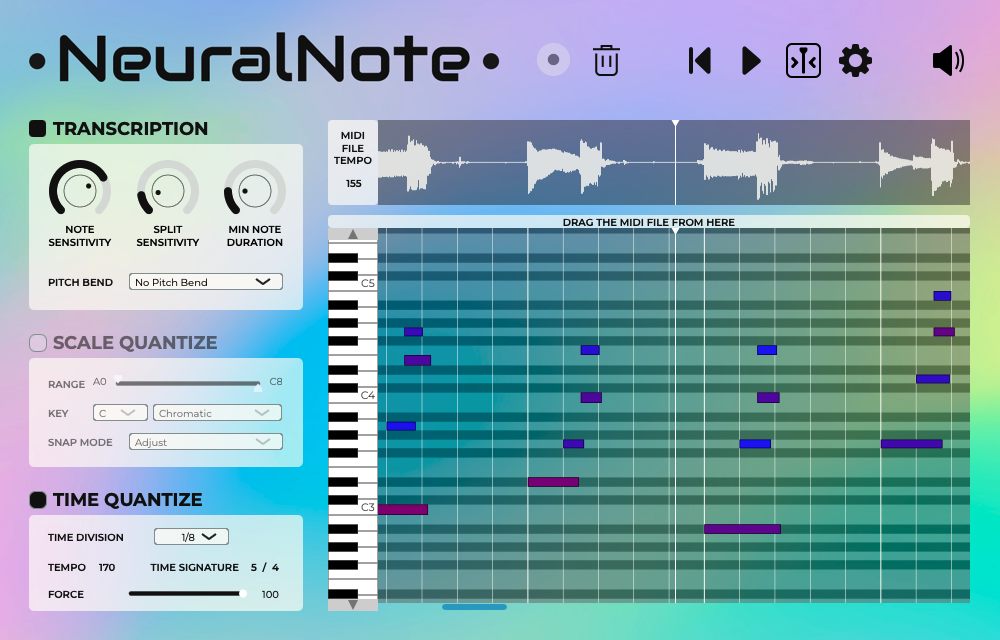
Install
Download the latest release for your platform from the website or releases page.
- macOS:
NeuralNote_Installer_Mac_arm64.pkgfor Apple Silicon,NeuralNote_Installer_Mac_x64.pkgfor Intel Macs. Both install the Standalone app, VST3 and AU, and are signed and notarized. - Windows (x64):
NeuralNote_Installer_Windows_x64.exeinstalls the Standalone app and VST3. It is not code signed, so Windows may warn you before running it for the first time. - Linux: prebuilt binaries are coming soon. In the meantime, you can build from source.
The transcription model is not included. Download it from within NeuralNote the first time you open it (see Models and performance).
Usage
NeuralNote is a simple AudioFX plugin (VST®3/AU/Standalone app) that you apply to the track you want to transcribe.
- Gather some audio:
- Click record. This works both when recording live and when playing the track in your DAW.
- Or drop an audio file on the plugin (.wav, .aiff, .flac, .mp3 and .ogg (vorbis) are supported).
- Select the instruments to transcribe in the left panel, or select
Automaticto let the model detect them. - Transcriptions tend to be better when the model is given the correct set of instruments.
- Click
Transcribe. The transcription runs in the background, and the MIDI fills into the piano roll as it is decoded. A progress bar is shown while it runs. - Pause it with the button next to the progress bar, and resume it later from where it stopped, even after closing and reopening the plugin or your DAW session. The bin button discards the transcription.
- Click play to listen to the result without waiting for the transcription to finish. Only the part decoded so far plays.
- Adjust the mix between the source audio and the synthesized transcription.
- Adjust the level of each instrument.
- When you're happy with the result, drag and drop the MIDI from the plugin onto a MIDI track, or save the MIDI file to your computer.
Models and performance
MuScriptor comes in three sizes, small, medium and large, which trade speed for quality. NeuralNote downloads
them as GGUF files from DamRsn/muscriptor-gguf on Hugging Face.
When no model is installed, all three sizes are available to download. The Model button in the top bar lets you
switch between installed models, download other sizes, and open the folder where they are stored.
| OS | Models folder |
|---|---|
| macOS | ~/Library/NeuralNote/models |
| Windows | %APPDATA%\NeuralNote\models |
| Linux | ~/.config/NeuralNote/models |
The downloads are about 210 MB for small, 620 MB for medium and 2.7 GB for large.
You can also put a model file in that folder by hand. Use a file from v1/ of the
HF repo, unchanged and with its original name (e.g.
muscriptor-medium-f16.gguf). NeuralNote only picks up files whose name and size match the ones it downloads.
You can remove a model by deleting it from this folder, and re-download it at any time.
Hardware. Transcription speed depends mostly on the model size and on your hardware. The GPU is used when available,
through Metal on macOS and Vulkan on Windows and Linux. A GPU is strongly recommended for the medium and large models.
Settings > Compute device picks the device: Auto (the default, which names the device it chose), a specific GPU, or
the CPU. The choice applies from the next transcription, and GPUs added or removed later are listed after restarting
NeuralNote (or your DAW). Only a few GPUs have been tested so far. If transcription fails, gives wrong results or is
unexpectedly slow on your machine, please open an issue, either here or
in muscriptor.cpp if the problem is in the engine itself. Please
include your OS, GPU and model size.
Approximate real-time factors measured on an Apple M1 Pro (above 1× means faster than real time):
| Size | GPU (Metal) | CPU |
|---|---|---|
small |
~3.5× | ~2× |
medium |
~1.5× | ~0.7× |
large |
~0.5× | not recommended |
See muscriptor.cpp's performance notes for details.
Build from source
Requirements:
git- CMake
- A C++23 compiler, such as Clang, MSVC or GCC. Only Clang has been tested so far, on macOS, Windows and Linux.
- Python 3 (used at configure time to fetch and build the synth's soundfont)
- Internet access on the first configure.
muscriptor.cppfetches ggml, and the soundfont's two sources (~55 MB) are downloaded.
macOS needs Xcode's Metal toolchain, which compiles the GPU shaders at build time:
xcodebuild -downloadComponent MetalToolchain. Configuring with -DMUSCRIPTOR_METAL_PRECOMPILED=OFF builds without it
instead, and the shaders then compile when NeuralNote's window first opens in each app or DAW, and again after a macOS
update, which takes about 20 seconds.
Windows GPU support needs the Vulkan SDK at build time. Without it,
NeuralNote builds and transcribes on the CPU only. With it, configure from a Visual Studio developer prompt, or set
CC, CXX and RC in the environment: ggml builds its shader generator as a separate project that doesn't see
CMake's compiler settings.
Linux has been tested on Ubuntu 24.04 with Clang 20. Install the compiler, JUCE's Linux dependencies, and the Vulkan headers and shader compiler:
sudo apt install clang-20 ninja-build pkg-config python3 \
    libasound2-dev libjack-jackd2-dev ladspa-sdk libcurl4-openssl-dev libfreetype-dev libfontconfig1-dev \
    libx11-dev libxcomposite-dev libxcursor-dev libxext-dev libxinerama-dev libxrandr-dev libxrender-dev \
    libwebkit2gtk-4.1-dev libglu1-mesa-dev mesa-common-dev \
    libvulkan-dev glslc spirv-headers
Select the compiler through the environment when configuring, e.g. CC=clang-20 CXX=clang++-20 cmake -B build -G Ninja
-DCMAKE_BUILD_TYPE=Release.
Ninja is optional but makes builds faster (-G Ninja).
Clone with submodules:
git clone --recurse-submodules https://github.com/DamRsn/NeuralNote
cd NeuralNote
If you already cloned without them, run git submodule update --init --recursive.
Configure and build:
cmake -B build -DCMAKE_BUILD_TYPE=Release
cmake --build build --config Release
The Standalone app and the plugins are written to build/NeuralNote_artefacts/Release/.
On macOS, a build contains only one architecture, the host's by default. To build for Intel Macs on Apple Silicon,
configure with -DCMAKE_OSX_ARCHITECTURES=x86_64. Such a build runs under Rosetta, and its plugins are not copied to
~/Library/Audio/Plug-Ins.
On Windows, the Standalone app supports ASIO devices. Distributing a build with ASIO requires signing Steinberg's
ASIO license agreement. To build without it, configure with
-DNEURALNOTE_ASIO=OFF.
Reuse NeuralNote's transcription engine
The transcription engine is a separate, self-contained repo:
muscriptor.cpp. It is a C++/ggml port of MuScriptor, included here as a
git submodule (ThirdParty/muscriptor.cpp) and linked as a static library. It takes 16 kHz mono float32 audio and
returns note events. See its docs/API.md for the
public API. The GGUF weights it loads are available on
Hugging Face (see License).
Roadmap
- Prebuilt binaries for Linux
- MIDI out, with per-instrument channel selection
- CLI
- Performance optimizations
Bug reports, feature requests and contributing
If you find a bug or have a suggestion, please file a GitHub issue. Contributions are most welcome. Feel free to open a PR!
License
NeuralNote's code is published under the Apache-2.0 license. See the license file.
The MuScriptor model weights are not open source. They were released by Kyutai and Mirelo under the CC BY-NC 4.0 license, and are redistributed as GGUF files on Hugging Face under that same license. They may only be used non-commercially. The Apache-2.0 license covers NeuralNote's code only, not the weights.
Third-party libraries and assets
Their full license notices are in Installers/license.txt.
- JUCE (JUCE Starter)
- VST3 SDK (MIT license, bundled with JUCE)
- ASIO SDK headers (Steinberg ASIO license, bundled with JUCE, Windows only)
- muscriptor.cpp (MIT license)
- ggml (MIT license, fetched by muscriptor.cpp)
- PFFFT (BSD-style license, bundled in muscriptor.cpp)
- MuScriptor model weights (CC BY-NC 4.0, see above)
- TinySoundFont (MIT license)
- MuseScore_General soundfont (MIT license)
- FluidR3Mono_GM soundfont (MIT license)
- minimp3 (CC0-1.0 license)
- Inter (SIL Open Font License 1.1)
- JetBrains Mono (SIL Open Font License 1.1)
VST is a registered trademark of Steinberg Media Technologies GmbH. ASIO is a registered trademark of Steinberg Media Technologies GmbH.
Credits
NeuralNote v2
Developed by Damien Ronssin, with AI assistance.
NeuralNote v1
Developed by Damien Ronssin and Tibor Vass. The plugin user interface was designed by Perrine Morel.
Many thanks to the v1 contributors!
- jatinchowdhury18: File browser.
- trirpi
- More scale options in
SCALE QUANTIZE. - Horizontal zoom for the audio waveform and the piano roll.
- polygon and SamuMazzi: Linux support.
📈 近 7 天 Star 趋势
🏆 排名变化趋势
📋 历史上榜记录
| 日期 | 榜单 | 排名 | 周期新增 | 总 STAR |
|---|