📄 仓库 README
在 GitHub 查看 ↗https://github.com/user-attachments/assets/535ef7ee-1631-4a69-b839-564c56cf90b4
A template, not a product. OpenBot is meant to be cloned and made your own. There is no hosted version to sign up for, and nothing here is published as a package to depend on: every workspace in this repository is private. You take the repository, replace the example tenant package under
examples/with your own coworkers, channels and skills, and run it. Everything below describes a starting point, not a finished thing somebody operates for you.Beta, and under active development. OpenBot is early. Expect rough edges and bugs, and expect things to move. Issues and pull requests are welcome.
Runs on your machine. Everything below is written for a laptop.
.env.examplecarriesOPENBOT_SINGLE_USER=true, which admits every request as one administrator, so a fresh clone reaches the product without registering an OAuth client first. Sign-in turns that off, and is required before anybody else can reach the deployment.We can build this for you, or with you, at your company. Our engineers will stand OpenBot up inside your infrastructure, customize it into something that looks like your own product, and hand it back to you to keep changing. Start the conversation.
In the meantime, run all of it on your laptop, Intelligence included: CopilotKit's free Developer plan covers running Intelligence locally in Docker on a Mac.
What it is
An agent platform that runs inside your own infrastructure. Docker Compose brings up every part of it, the data sits in your PostgreSQL, and the model is yours to choose: no model ships in the box, and an administrator supplies the credential, which is encrypted at rest and never logged.
A deployment starts with two coworkers, and they are configuration rather than code: General Assistant for everyday work and Knowledge for company questions. A Risk Analyst joins them once its endpoint is configured, and ten more wait in examples/fintech/catalog/, each doing one job — reading an expense claim against the policy as written, turning a meeting note into the follow-ups actually in it, drafting release notes from what shipped, triaging a ticket, answering a new starter from the handbook, writing a brief that names what it could not find, writing up an interview, handing an on-call shift over, assembling what is known before a renewal, and grouping customer feedback into themes it can cite. Copy one into examples/fintech/agents/ to add it, write your own there or in agents.yaml, or make one from /bots in the UI.
Anything a Bot does to a computer, a file, an MCP server or a component goes through one gateway that decides and records it. That is the difference between an agent that can use your tools and an agent you can let near them.
More at copilotkit.ai/openbot.
Built on AG-UI
A Bot is any endpoint speaking AG-UI, the open protocol for agent-to-user interaction, so OpenBot is not tied to a framework and neither are you. Agents built with LangGraph, Mastra, CrewAI, Pydantic AI, Google ADK or written by hand all arrive the same way, and the governance rides the protocol rather than the framework.
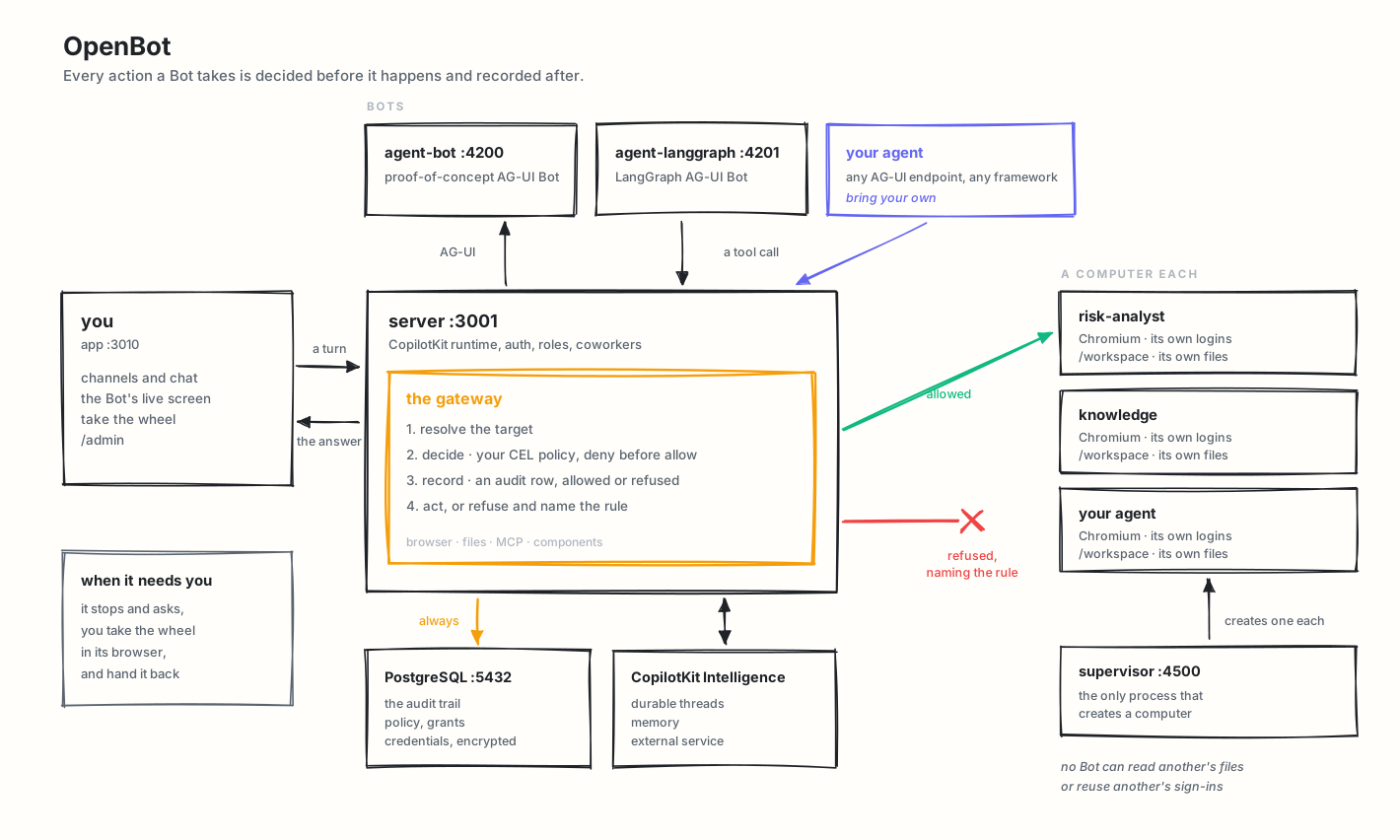
Requirements
- Docker, for PostgreSQL and the shipped Bots.
- Bun 1.4+, for the app, the API server and the tests (some tests fail on 1.3).
- A CopilotKit Intelligence project and license. A free plan is available, and Intelligence can be self-hosted.
- A model key. The proof-of-concept Bot uses OpenAI; the LangGraph Bot can use OpenAI, Anthropic, or Google.
Quick start
Setting up with an AI assistant? Paste
prompt.txtinto it first. It carries the same steps as below plus the things that are easy to get wrong: which of the blank keys in.env.exampleare actually yours to fill (the CopilotKit key and a model key), which the start script fills for you, and what each start-up refusal means. Every claim in it is checked against this repository.
- Create
.env:
sh
   cp .env.example .env
   bun install
- Connect a fresh managed Intelligence project:
sh
   npx --yes copilotkit@latest login
   npx --yes copilotkit@latest project select
   bun scripts/setup-learning.ts
The helper provisions the selected project's runtime key, creates or reuses its
openbot Learning container, then writes both settings to .env. It preserves
custom container assignments and never replaces an existing OpenBot key; with one
set, it only creates openbot in that key's project if it is missing.
For fresh self-hosted setup, set INTELLIGENCE_API_URL to that deployment's
HTTPS API origin (or http://localhost for a local one) and run the helper
without the two npx commands. It opens an isolated Chrome or Edge window for
your usual sign-in and project choice; install either browser first. For CLI-managed
local evaluation installs, it discovers the matching dashboard with the newest installed or
cached CopilotKit CLI and uses that dashboard for login and session requests. Discovery
runs offline with Bun, without downloading the CLI or requiring npx on your PATH.
If no CLI is available, manually hosted deployments use their API origin for sign-in. Complete the local auth
approval shown in the browser when prompted. The runtime API URL stays unchanged. It writes
the API URL, the key and the container, not INTELLIGENCE_GATEWAY_WS_URL, so
set that one to the same deployment yourself. Once openbot exists, the server assigns it
as the default by itself unless Admin → Automatic Learning
has a saved setting.
Managed Intelligence needs no separate licence token.
- Fill the remaining required values:
OPENAI_API_KEY
Keep the managed Intelligence URLs from .env.example unless you run Intelligence yourself. The example KEY_ENCRYPTION_KEY is public and fine locally; generate your own with:
sh
   openssl rand -base64 32
- Run:
sh
   bash scripts/start.sh
- Open http://localhost:3010.
scripts/start.sh starts Docker services, applies migrations, starts the API server on port 3001, starts the routine worker, starts the app on port 3010, and checks that the services answer their own health routes before printing next steps.
scripts/stop.sh takes the same things down, including each Bot's computer, which compose does not own; --keep-computers leaves the computers running. Nothing is deleted: the database, the Bots' files and their browser profiles are volumes.
Intelligence on your own machine
To try Intelligence on one Mac instead of the managed service, follow
Evaluate Intelligence locally. The free
Developer plan qualifies. The local licence lasts 30 days and
npx copilotkit@latest local renew renews it as often as you need, while your account is in good
standing. It is a preview for macOS with Docker Desktop,
not a production installation. Run its
npx copilotkit@latest local connect from the OpenBot root, where .env is.
That command writes INTELLIGENCE_API_URL, INTELLIGENCE_GATEWAY_WS_URL and
CPK_INTELLIGENCE_API_KEY to .env. OpenBot reads those settings directly; no key
copying or renaming is needed. INTELLIGENCE_API_KEY remains supported for older
configurations. When both are set, the non-empty CLI key takes precedence so
reconnecting uses the new project's key.
To give the Bots a Learning container on that stack, see Automatic Learning.
Deploy it
One image carries the app, the API, the browser the Bots drive, and optionally PostgreSQL. Same
.env, no Kubernetes.
```sh
The published image. Nothing to clone and nothing to build.
docker run -p 3001:3001 --env-file .env \ -e EMBEDDED_POSTGRES=on -v openbot-data:/
📈 近 7 天 Star 趋势
🏆 排名变化趋势
📋 历史上榜记录
| 日期 | 榜单 | 排名 | 周期新增 | 总 STAR |
|---|